c++中文路径中文文件读写
用c++读写中文路径下中文内容,不依赖地方库,只设置utf-8即可
·
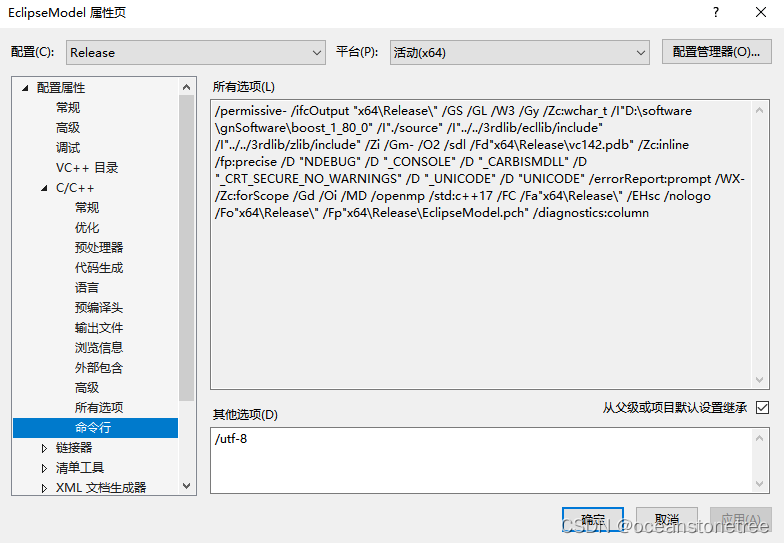
踩了坑,两个地方需要注意,否则就会乱码或无法找到文件
(1)采用utf-8格式,对cpp文件进行编码,用utf-8的方式对内容尽心高度写,方法是std::setlocale(LC_ALL, ".UTF-8");
(2)visual studio的编译命令行添加 /utf-8 以增加对utf-8内容的支持。
// testChineseFilePath.cpp : 此文件包含 "main" 函数。程序执行将在此处开始并结束。
//

#include <iostream>
#include <string>
#include <filesystem>
#include <fstream>

using namespace std;


int main()
{
    std::cout << "Hello World!\n";
    string filePath = "E:/迅雷下载/测试中文读写.txt";
    std::setlocale(LC_ALL, ".UTF-8");
    if (!filesystem::exists(filePath)) {
        cout << filePath << " is not exist" << endl;
        return -1;
    }

    //设置当前路径
    filesystem::current_path(filesystem::path(filePath).parent_path());

    //读取文件
    ifstream fin(filePath);
    while (!fin.eof())
    {
        string line;
        getline(fin, line);
        if (line.size() > 0) {
            cout << line << endl;
        }
    }
    fin.close();

    //写出文件
    cout << filePath << endl;
    ofstream fout("输出文件.txt");
    fout << "write text to a file with chinese file name 中文" << endl;
    fout.close();

    return 0;

}
运行效果
Hello World!
测试中文的读写算法
E:/迅雷下载/测试中文读写.txt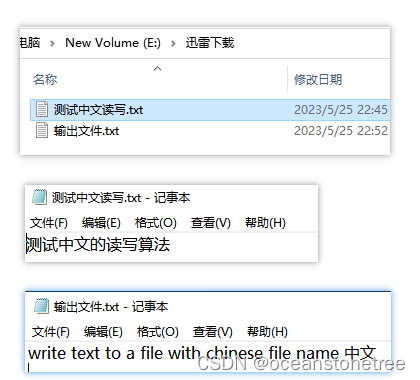

腾讯云面向开发者汇聚海量精品云计算使用和开发经验,营造开放的云计算技术生态圈。
更多推荐
 0
0 0
0- 0


 已为社区贡献6条内容

所有评论(0)