ios混合开发npm run ios报错error Failed to build iOS project. We ran "xcodebuild" command but it exited wit
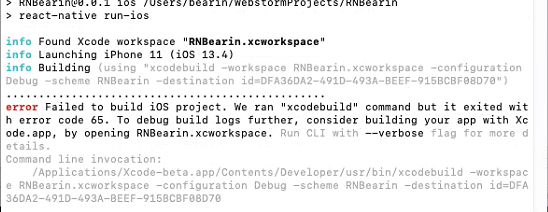
没有更改profile文件之前,npm run ios 是没有报错的。更改profile文件引入react后,使用pod install后,报错如下:
error Failed to build iOS project. We ran "xcodebuild" command but it exited with error code 65. To debug build logs further, consider building your app with Xcode.app
解决方法
1.删除项目依赖包以及 yarn 缓存
rm -rf node_modules && yarn cache clean
2.重新装包
yarn install
3.清除 React-Native 缓存
rm -rf ~/.rncache
4.新建文件夹 .rncache
mkdir ~/.rncache
5.直接运行下载脚本
node_modules/react-native/scripts/ios-install-third-party.sh
6.若直接下载完成,直接运行 react-native run-ios 即可成功
7.若下载失败,多次重复运行4中的代码,我运行超过20次才成功,或者进行如下步骤
8.四个下载链接是关键,使用工具下载这四个文件。下载链接与 React-Native 版本紧密关联,请仔细查看文件版本。
(1)https://github.com/google/glog/archive/v0.3.5.tar.gz
(2)https://github.com/google/double-conversion/archive/v1.1.6.tar.gz
(4)https://github.com/facebook/folly/archive/v2018.10.22.00.tar.gz
网页打开链接即可下载
9.下载完成后,进入目录
open ~/.rncache
10.将下载的四个文件移入到目录下
11.再次运行安装脚本,因为使用本地下载文件,所有运行起来很快
node_modules/react-native/scripts/ios-install-third-party.sh
12.如果不成功,继续运行node_modules/react-native/scripts/ios-install-third-party.sh,直到成功为止
13.运行项目就可以跑起来了,首次启动会有点慢,耐心等会就行
react-native run-ios

腾讯云面向开发者汇聚海量精品云计算使用和开发经验,营造开放的云计算技术生态圈。
更多推荐
 0
0 0
0- 0


 已为社区贡献7条内容

所有评论(0)