部署Openstack-R企业私有云平台
项目:部署Openstack-R企业私有云平台
一、云计算概述:
什么是云计算:
相信大家听到最多的阿里云、腾讯云、百度云等等这些词,那到底什么是云计算?云计
算又能干什么呢?
云计算(cloud computing)是一种基于因特网的超级计算模式,在远程的数据中心里,
成千上万台电脑和服务器连接成一片电脑云。因此,云计算甚至可以让你体验每秒 10 万亿
次的运算能力,拥有这么强大的计算能力可以模拟核爆炸、预测气候变化和市场发展趋势。
用户通过电脑、笔记本、手机等方式接入数据中心,按自己的需求进行运算。
狭义的云计算是指 IT 基础设施的交付和使用模式,指通过网络以按需、易扩展的方式
获得所需的资源(硬件、平台、软件)。提供资源的网络被称为“云”。
“云”中的资源在使用者看来是可以无限扩展的,并且可以随时获取,按需使用,随时扩展,按使用付费。这种特性经常被称为像水电一样使用 IT 基础设施。广义的云计算是指服务的交付和使用模式,指通过网络以按需、易扩展的方式获得所需的服务。这种服务可以是 IT 和软件、互联网相关的,也可以是任意其他的服务。
云计算是一种模型,能够提供无论在何时何地都可以便捷获取所需资源的模型,这些资源可以是网络资源、存储资源、服务器资源、甚至是服务或者应用软件资源等,这些资源能够让用户根据需要快速创建应用,并且在不需要时进行资源释放。
概述:
狭义的云计算是指IT基础设施的交付和使用模式;
广义的云计算是指服务的交付和使用模式;
云资源:
网络资源 、存储资源 、服务器资源、……
服务模型:
IaaS(基础架构即服务):
提供底层IT基础设施服务,包括处理能力、存储空间、网络资源等;
一般面向对象是IT管理人员;
PaaS(平台即服务):
把安装好开发环境的系统平台作为一种服务通过互联网提供给用户;
一般面向对象是开发人员;
SaaS(软件即服务):
直接通过互联网为用户提供软件和应用程序的服务;
一般面向的对象是普通用户;
二、公有云、私有云、混合云概述:
略
三、Openstack私有云技术概述:
OpenStack 起源:OpenStack 是 Rackspace(一家美国的云计算厂商)和 NASA(美国国家航空航天局)在 2010 年共同发起了 OpenStack 项目。那时候 Rackspace 是美国第二大云计算厂商,但规模只能占到亚马逊的 5%。只依靠内部的力量来超越或者追赶亚马逊不大可能,这家公司索性就把自己的项目开源了,也就是后来的 openstack 的存储源码(swift)。
概述:一款云计算开源项目,以Apache许可证授权的自由软件和开放源代码项目,旨在为公共及私有云的建设与管理提供软件的开源项目、覆盖了网络、虚拟化、操作系统、服务器等各个方面。
OpenStack 是一个开源的云计算管理平台项目,由几个主要的组件组合起来完成具体工作。OpenStack 支持几乎所有类型的云环境,项目目标是提供实施简单、可大规模扩展、丰富、标准统一的云计算管理平台。OpenStack 通过各种互补的服务提供了基础设施即服务(IaaS)的解决方案,每个服务提供 API 以进行集成。
它是一个正在开发中的云计算平台项目,根据成熟及重要程度的不同,被分解成核心项目、孵化项目,以及支持项目和相关项目。每个项目都有自己的委员会和项目技术主管,而且每个项目都不是一成不变的,孵化项目可以根据发展的成熟度和重要性,转变为核心项目。截止目前最新开发版为Rocky版本,每大概半年左右更新一次版本。
未来发展:
如果仅仅是因为开源,那么 OpenStack 对于企业似乎就没那么大的价值了。相反,OpenStack 提供了一个非常好的有关如何来打造类似于主要公有云比如亚马逊(AWS)和Google Cloud Platform(GCP)的弹性私有云的样板。就像 Hadoop 将 Google 的 MapReduce(加上它的参考架构)推向大众一样,OpenStack 将 AWS/GCP 样式的基础架构即服务(IaaS)推向了每个用户。它就是能实现企业内部 DevOps 的终极平台。
OpenStack 能在企业内部提供类似的平台。私有云可以基于公有云模型来构造,使得开发者同时拥有集中式 IT 控制和支配。本质上,它是两者融合的较佳平台,这也是 OpenStack驱动的私有云的真正价值。
由 OpenStack 来实现企业内部的 DevOps,进而实现敏捷,而敏捷恰恰是驱动云计算的原动力。 OpenStack 作为一个可扩展的打造下一代弹性云的基础架构,尽管它还不是很完美。
但作为一个开源项目,它的吸引力确实不容小视。基于平台开放,会有越来越多的力量促使
它更完善和强大,采用 OpenStack 意味着企业云平台会更加自主可控,并实现技术沉淀和自动化运维水平的提升;
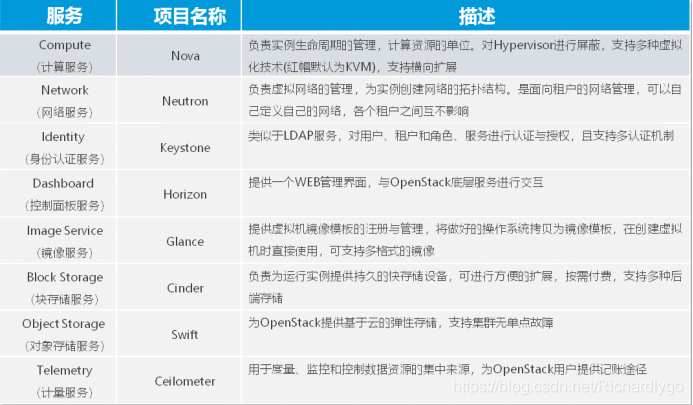
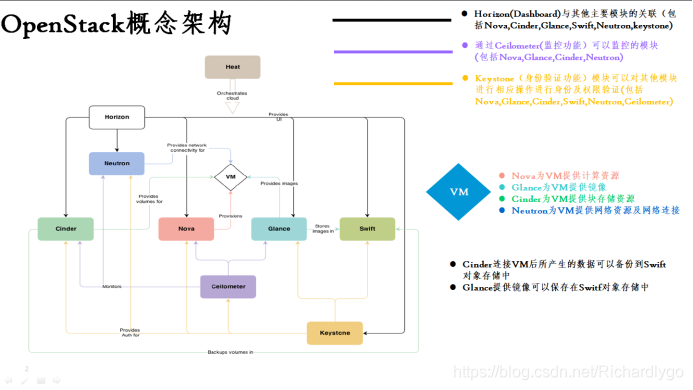
四、Openstack内部组件:
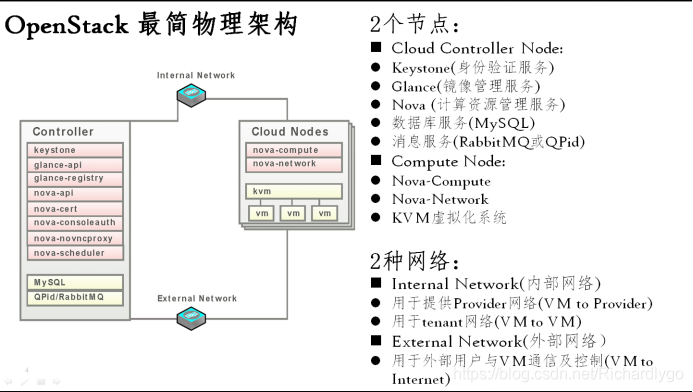
五、Openstack物理架构:
三、项目环境:
|
系统类型 |
IP地址 |
主机名 |
所需软件 |
|
Centos 7.4 1708 64bit |
192.168.100.101 |
ctrl.linuxfan.cn |
四、项目实施步骤:
- ctrl控制节点环境准备(配置硬件、DNS域名解析、磁盘扩容):
- 配置NTP时间同步服务:
- 配置安装openstack_R版本的yum源;
- 安装配置mariadb数据库程序:
- 安装配置rebbitmq-server消息队列、memcached缓存服务:
- 安装配置keystone身份验证组件一(数据库授权、程序安装、初始化程序):
- 安装配置keystone身份验证组件二(创建keystone组件项目):
- 安装配置Glance镜像组件一(创建glance组件项目、数据库授权):
- 安装配置Glance镜像组件二(安装glance程序、配置启动服务)
- 准备基于Kvm的云主机实例所需要的镜像文件:
- 上传镜像文件到openstack的项目中:
- 安装配置nova计算组件一(创建nova组件项目、注册身份信息、数据库授权):
- 安装配置nova计算组件二(安装nova程序、修改配置、启动基础服务):
- 安装配置nova计算组件三(安装配置nova-compute程序):
- 安装配置neutron网络组件一(创建neutron组件项目、数据库授权):
- 安装配置neutron网络组件二(安装neutron程序、配置启动服务):
- 创建配置neutron网络接口:
- 创建云主机实例类型:
- 基于Centos6镜像创建云主机实例(验证各个组件列表、创建安全组、添加安全组策略、创建云主机实例):
- 安装配置horizon组件(准备dashboard组件):
- 使用浏览器访问测试Dashboard页面:
- 基于浏览器管理openstack实例:
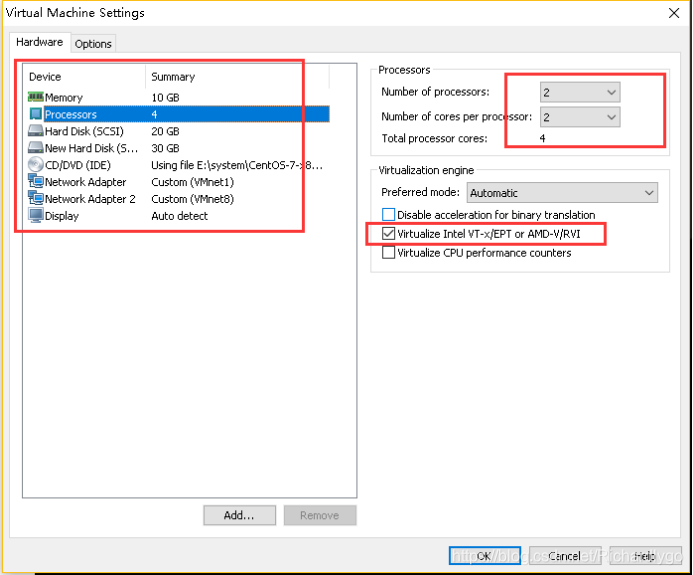
- ctrl控制节点环境准备(配置硬件、DNS域名解析、磁盘扩容):

[root@ctrl ~]# fdisk /dev/sdb
n--p--1--回车--回车--p--t--8e--w
[root@ctrl ~]# partx -a /dev/sdb
partx: /dev/sdb: error adding partition 1
[root@ctrl ~]# vgscan
Reading volume groups from cache.
Found volume group "centos_lwh" using metadata type lvm2
[root@ctrl ~]# vgextend centos_lwh /dev/sdb1
Physical volume "/dev/sdb1" successfully created.
Volume group "centos_lwh" successfully extended
[root@ctrl ~]# lvextend /dev/centos_lwh/root /dev/sdb1
Size of logical volume centos_lwh/root changed from 18.46 GiB (4727 extents) to 48.46 GiB (12406 extents).
Logical volume centos_lwh/root successfully resized.
[root@ctrl ~]# xfs_growfs /dev/centos_lwh/root
meta-data=/dev/mapper/centos_lwh-root isize=256 agcount=4, agsize=1210112 blks
= sectsz=512 attr=2, projid32bit=1
= crc=0 finobt=0 spinodes=0
data = bsize=4096 blocks=4840448, imaxpct=25
= sunit=0 swidth=0 blks
naming =version 2 bsize=4096 ascii-ci=0 ftype=0
log =internal bsize=4096 blocks=2560, version=2
= sectsz=512 sunit=0 blks, lazy-count=1
realtime =none extsz=4096 blocks=0, rtextents=0
data blocks changed from 4840448 to 12703744
[root@ctrl ~]# df -hT |grep root
/dev/mapper/centos_lwh-root xfs 49G 1.9G 47G 4% /
- 配置NTP时间同步服务:
[root@ctrl ~]# wget -O /etc/yum.repos.d/CentOS-Base.repo http://mirrors.aliyun.com/repo/Centos-7.repo
[root@ctrl ~]# yum -y install ntp
[root@ctrl ~]# vi /etc/ntp.conf
15 restrict 192.168.100.0 mask 255.255.255.0 nomodify notrap
22 #server 0.centos.pool.ntp.org iburst
23 #server 1.centos.pool.ntp.org iburst
24 #server 2.centos.pool.ntp.org iburst
25 #server 3.centos.pool.ntp.org iburst
26 server ntp1.jst.mfeed.ad.jp iburst
27 server ntp2.jst.mfeed.ad.jp iburst
28 server ntp3.jst.mfeed.ad.jp iburst
:wq
[root@ctrl ~]# systemctl start ntpd
[root@ctrl ~]# systemctl enable ntpd
Created symlink from /etc/systemd/system/multi-user.target.wants/ntpd.service to /usr/lib/systemd/system/ntpd.service.

- 配置安装openstack_R版本的yum源;
[root@ctrl ~]# cat <<END >>/etc/yum.repos.d/openstack.repo
[local3]
name=local3
baseurl=ftp://192.168.100.100/openstack
enable=1
gpgcheck=0
END
[root@ctrl ~]# yum -y install centos-release-openstack-rocky
[root@ctrl ~]# sed -i -e "s/enabled=1/enabled=0/g" /etc/yum.repos.d/CentOS-OpenStack-rocky.repo
- 安装配置mariadb数据库程序:
[root@ctrl ~]# yum -y install mariadb-server
注:如若使用openstack源命令为:yum --enablerepo=centos-openstack-rocky -y install
[root@ctrl ~]# vi /etc/my.cnf
10 [mysqld]
13 character-set-server=utf8
:wq
[root@ctrl ~]# systemctl start mariadb
[root@ctrl ~]# systemctl enable mariadb
Created symlink from /etc/systemd/system/multi-user.target.wants/mariadb.service to /usr/lib/systemd/system/mariadb.service.
[root@ctrl ~]# mysql_secure_installation
Enter current password for root (enter for none):
Set root password? [Y/n] y
New password: 123123
Re-enter new password: 123123
Password updated successfully!
Reloading privilege tables..
... Success!
Remove anonymous users? [Y/n] y
... Success!
Disallow root login remotely? [Y/n] y
... Success!
Remove test database and access to it? [Y/n] y
Reload privilege tables now? [Y/n] y
... Success!
[root@ctrl ~]# mysql -uroot -p123123
MariaDB [(none)]> exit
- 安装配置rabbitmq-server消息队列、memcached缓存服务:
[root@ctrl ~]# yum -y install rabbitmq-server memcached
[root@ctrl ~]# systemctl start rabbitmq-server memcached
[root@ctrl ~]# systemctl enable rabbitmq-server memcached
Created symlink from /etc/systemd/system/multi-user.target.wants/rabbitmq-server.service to /usr/lib/systemd/system/rabbitmq-server.service.
Created symlink from /etc/systemd/system/multi-user.target.wants/memcached.service to /usr/lib/systemd/system/memcached.service.
[root@ctrl ~]# rabbitmqctl add_user openstack password ##创建rabbitmq用户密码
Creating user "openstack" ...
...done.
[root@ctrl ~]# rabbitmqctl set_permissions openstack ".*" ".*" ".*" ##授权
Setting permissions for user "openstack" in vhost "/" ...
...done.
- 安装配置keystone身份验证组件一(数据库授权、程序安装、初始化程序):
[root@ctrl ~]# mysql -uroot -p123123
MariaDB [(none)]> create database keystone;
Query OK, 1 row affected (0.00 sec)
MariaDB [(none)]> grant all privileges on keystone.* to keystone@'localhost' identified by 'password';
Query OK, 0 rows affected (0.00 sec)
MariaDB [(none)]> grant all privileges on keystone.* to keystone@'%' identified by 'password';
Query OK, 0 rows affected (0.00 sec)
MariaDB [(none)]> flush privileges;
Query OK, 0 rows affected (0.00 sec)
MariaDB [(none)]> exit
[root@ctrl ~]# yum -y install openstack-keystone openstack-utils python-openstackclient httpd mod_wsgi
[root@ctrl ~]# vi /etc/keystone/keystone.conf
610 memcache_servers = 192.168.100.101:11211
742 connection = mysql+pymysql://keystone:password@192.168.100.101/keystone
2828 provider = fernet
:wq
[root@ctrl ~]# su -s /bin/bash keystone -c "keystone-manage db_sync" ##keystone用户身份提权
[root@ctrl ~]# keystone-manage fernet_setup --keystone-user keystone --keystone-group keystone ##初始化keystone
[root@ctrl ~]# keystone-manage credential_setup --keystone-user keystone --keystone-group keystone
[root@ctrl ~]# export controller=192.168.100.101 ##为下方命令设置变量,设置最终web页面的访问密码,在红色位置
[root@ctrl ~]# keystone-manage bootstrap --bootstrap-password adminpassword \
--bootstrap-admin-url http://$controller:5000/v3/ \
--bootstrap-internal-url http://$controller:5000/v3/ \
--bootstrap-public-url http://$controller:5000/v3/ \
--bootstrap-region-id RegionOne
[root@ctrl ~]# ln -s /usr/share/keystone/wsgi-keystone.conf /etc/httpd/conf.d/
[root@ctrl ~]# systemctl start httpd
[root@ctrl ~]# systemctl enable httpd
Created symlink from /etc/systemd/system/multi-user.target.wants/httpd.service to /usr/lib/systemd/system/httpd.service.
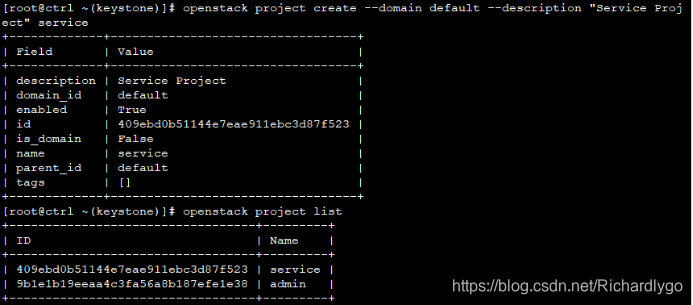
- 安装配置keystone身份验证组件二(创建keystone组件项目):
[root@ctrl ~]# vi ~/keystonerc ##新建文件
export OS_PROJECT_DOMAIN_NAME=default
export OS_USER_DOMAIN_NAME=default
export OS_PROJECT_NAME=admin
export OS_USERNAME=admin
export OS_PASSWORD=adminpassword
export OS_AUTH_URL=http://192.168.100.101:5000/v3
export OS_IDENTITY_API_VERSION=3
export OS_IMAGE_API_VERSION=2
export PS1='[\u@\h \W(keystone)]\$ '
:wq
[root@ctrl ~]# chmod 600 ~/keystonerc
[root@ctrl ~]# source ~/keystonerc
[root@ctrl ~(keystone)]# echo "source ~/keystonerc " >> ~/.bash_profile
- 安装配置Glance镜像组件一(创建glance组件项目、数据库授权):
[root@ctrl ~(keystone)]# openstack user create --domain default --project service --password servicepassword glance
+---------------------+----------------------------------+
| Field | Value |
+---------------------+----------------------------------+
| default_project_id | 409ebd0b51144e7eae911ebc3d87f523 |
| domain_id | default |
| enabled | True |
| id | 750b65209bce475cbfefa3a6786d9867 |
| name | glance |
| options | {} |
| password_expires_at | None |
+---------------------+----------------------------------+
[root@ctrl ~(keystone)]# openstack role add --project service --user glance admin
[root@ctrl ~(keystone)]# openstack service create --name glance --description "OpenStack Image service" image
+-------------+----------------------------------+
| Field | Value |
+-------------+----------------------------------+
| description | OpenStack Image service |
| enabled | True |
| id | 26c9264c8239465295848193041bfb28 |
| name | glance |
| type | image |
+-------------+----------------------------------+
[root@ctrl ~(keystone)]# export controller=192.168.100.101
[root@ctrl ~(keystone)]# openstack endpoint create --region RegionOne image public http://$controller:9292
+--------------+----------------------------------+
| Field | Value |
+--------------+----------------------------------+
| enabled | True |
| id | 3f7381e4c0c84af59e7cd4972195df0e |
| interface | public |
| region | RegionOne |
| region_id | RegionOne |
| service_id | 26c9264c8239465295848193041bfb28 |
| service_name | glance |
| service_type | image |
| url | http://192.168.100.101:9292 |
+--------------+----------------------------------+
[root@ctrl ~(keystone)]# openstack endpoint create --region RegionOne image internal http://$controller:9292
+--------------+----------------------------------+
| Field | Value |
+--------------+----------------------------------+
| enabled | True |
| id | ec6f4cd1588f4090a5816b9f086dc857 |
| interface | internal |
| region | RegionOne |
| region_id | RegionOne |
| service_id | 26c9264c8239465295848193041bfb28 |
| service_name | glance |
| service_type | image |
| url | http://192.168.100.101:9292 |
+--------------+----------------------------------+
[root@ctrl ~(keystone)]# openstack endpoint create --region RegionOne image admin http://$controller:9292
+--------------+----------------------------------+
| Field | Value |
+--------------+----------------------------------+
| enabled | True |
| id | 8fc3381029144913a74ef5f453415d67 |
| interface | admin |
| region | RegionOne |
| region_id | RegionOne |
| service_id | 26c9264c8239465295848193041bfb28 |
| service_name | glance |
| service_type | image |
| url | http://192.168.100.101:9292 |
+--------------+----------------------------------+
[root@ctrl ~(keystone)]# mysql -uroot -p123123
MariaDB [(none)]> create database glance;
Query OK, 1 row affected (0.00 sec)
MariaDB [(none)]> grant all privileges on glance.* to glance@'localhost' identified by 'password';
Query OK, 0 rows affected (0.00 sec)
MariaDB [(none)]> grant all privileges on glance.* to glance@'%' identified by 'password';
Query OK, 0 rows affected (0.00 sec)
MariaDB [(none)]> flush privileges;
Query OK, 0 rows affected (0.00 sec)
MariaDB [(none)]> exit
- 安装配置Glance镜像组件二(安装glance程序、配置启动服务):
[root@ctrl ~(keystone)]# yum -y install openstack-glance
[root@ctrl ~(keystone)]# mv /etc/glance/glance-api.conf /etc/glance/glance-api.conf.org
[root@ctrl ~(keystone)]# vi /etc/glance/glance-api.conf
[DEFAULT]
bind_host = 0.0.0.0
[glance_store]
stores = file,http
default_store = file
filesystem_store_datadir = /var/lib/glance/images/
[database]
# MariaDB connection info
connection = mysql+pymysql://glance:password@192.168.100.101/glance
# keystone auth info
[keystone_authtoken]
www_authenticate_uri = http://192.168.100.101:5000
auth_url = http://192.168.100.101:5000
memcached_servers = 192.168.100.101:11211
auth_type = password
project_domain_name = default
user_domain_name = default
project_name = service
username = glance
password = servicepassword
[paste_deploy]
flavor = keystone
:wq
[root@ctrl ~(keystone)]# mv /etc/glance/glance-registry.conf /etc/glance/glance-registry.conf.org
[root@ctrl ~(keystone)]# vi /etc/glance/glance-registry.conf
[DEFAULT]
bind_host = 0.0.0.0
[database]
# MariaDB connection info
connection = mysql+pymysql://glance:password@192.168.100.101/glance
# keystone auth info
[keystone_authtoken]
www_authenticate_uri = http://192.168.100.101:5000
auth_url = http://192.168.100.101:5000
memcached_servers = 192.168.100.101:11211
auth_type = password
project_domain_name = default
user_domain_name = default
project_name = service
username = glance
password = servicepassword
[paste_deploy]
flavor = keystone
:wq
[root@ctrl ~(keystone)]# chmod 640 /etc/glance/glance-api.conf /etc/glance/glance-registry.conf
[root@ctrl ~(keystone)]# chown root:glance /etc/glance/glance-api.conf /etc/glance/glance-registry.conf
[root@ctrl ~(keystone)]# su -s /bin/bash glance -c "glance-manage db_sync"
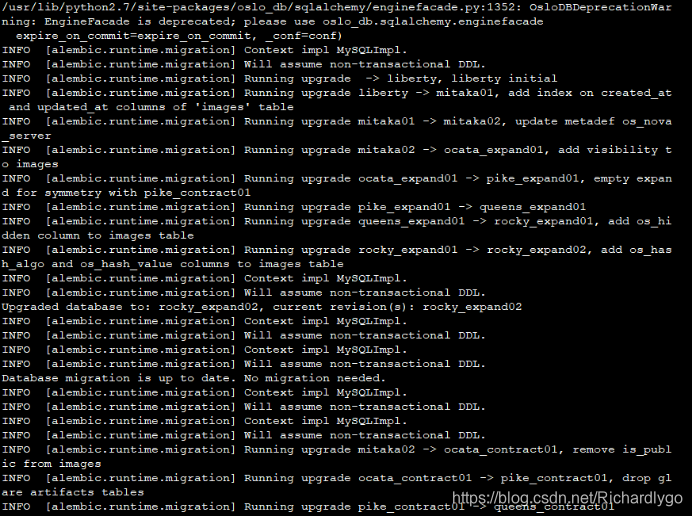

[root@ctrl ~(keystone)]# systemctl start openstack-glance-api openstack-glance-registry
[root@ctrl ~(keystone)]# systemctl enable openstack-glance-api openstack-glance-registry
Created symlink from /etc/systemd/system/multi-user.target.wants/openstack-glance-api.service to /usr/lib/systemd/system/openstack-glance-api.service.
Created symlink from /etc/systemd/system/multi-user.target.wants/openstack-glance-registry.service to /usr/lib/systemd/system/openstack-glance-registry.service.
- 准备基于Kvm的云主机实例所需要的镜像文件:
[root@ctrl ~(keystone)]# yum -y install qemu-kvm libvirt virt-install bridge-utils
[root@ctrl ~(keystone)]# lsmod | grep kvm
kvm_intel 170200 0
kvm 566604 1 kvm_intel
irqbypass 13503 1 kvm
[root@ctrl ~(keystone)]# systemctl start libvirtd
[root@ctrl ~(keystone)]# systemctl enable libvirtd
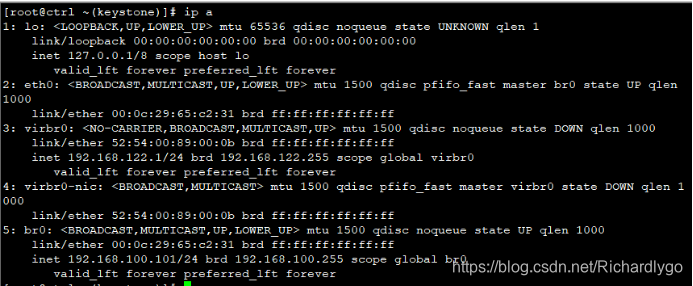
[root@ctrl ~(keystone)]# cp /etc/sysconfig/network-scripts/ifcfg-eth0 /etc/sysconfig/network-scripts/ifcfg-br0
[root@ctrl ~(keystone)]# cat <<END >/etc/sysconfig/network-scripts/ifcfg-br0
TYPE=Bridge
BOOTPROTO=static
DEFROUTE=yes
PEERDNS=yes
PEERROUTES=yes
IPV4_FAILURE_FATAL=yes
NAME=br0
DEVICE=br0
ONBOOT=yes
NM_CONTROLLED=no
IPADDR=192.168.100.101
PREFIX=24
GATEWAY=192.168.100.100
DNS1=192.168.100.100
END
[root@ctrl ~(keystone)]# cat <<END >/etc/sysconfig/network-scripts/ifcfg-eth0
TYPE=Ethernet
BOOTPROTO=none
DEFROUTE=yes
PEERDNS=yes
PEERROUTES=yes
IPV4_FAILURE_FATAL=yes
NAME=eth0
DEVICE=eth0
ONBOOT=yes
NM_CONTROLLED=no
BRIDGE=br0
END
[root@ctrl ~(keystone)]# systemctl restart network
[root@ctrl ~(keystone)]# ls /tmp/CentOS-6.5-x86_64-bin-DVD1.iso
/tmp/CentOS-6.5-x86_64-bin-DVD1.iso
[root@ctrl ~(keystone)]# mkdir /var/kvm/images -p
[root@ctrl ~(keystone)]# chmod 777 /var/kvm/images/
[root@ctrl ~(keystone)]# qemu-img create -f qcow2 /var/kvm/images/centos6.img 10G
Formatting '/var/kvm/images/centos6.img', fmt=qcow2 size=10737418240 cluster_size=65536 lazy_refcounts=off refcount_bits=16
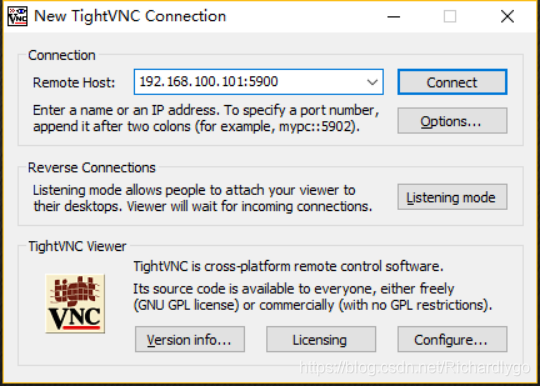
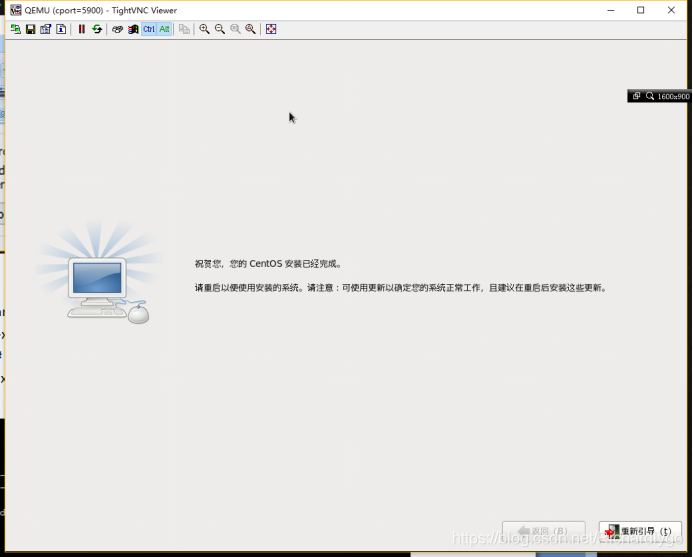
[root@ctrl ~(keystone)]# virt-install --virt-type kvm --name Centos6 --ram 1024 --cdrom=/tmp/CentOS-6.5-x86_64-bin-DVD1.iso --disk path=/var/kvm/images/centos6.img --network network=default --graphics vnc,listen=192.168.100.101 -vncport=5900 --noautoconsole
开始安装......
域安装仍在进行。您可以重新连接
到控制台以便完成安装进程。
[root@ctrl ~(keystone)]# netstat -utpln |grep 5900
tcp 0 0 192.168.100.101:5900 0.0.0.0:* LISTEN 2193/qemu-kvm
[root@ctrl ~(keystone)]# virsh list --all
Id 名称 状态
----------------------------------------------------
- cport=5900 关闭
[root@ctrl ~(keystone)]# virsh start cport=5900
域 cport=5900 已开始
注解:启动虚拟机后发现如下情况:
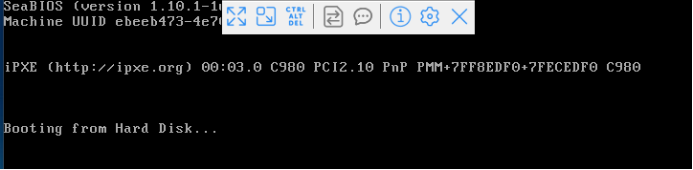
解决方法:
[root@ctrl ~(keystone)]# vi /etc/libvirt/qemu/cport\=5900.xml
<disk type='file' device='disk'>
<driver name='qemu' type='qcow2'/>
<source file='/var/kvm/images/centos6.img' />
<target dev='hdb' bus='ide'/>
<!-- <address .../> -->
</disk>
[root@ctrl ~(keystone)]# virsh define /etc/libvirt/qemu/cport\=5900.xml
定义域 cport=5900(从 /etc/libvirt/qemu/cport=5900.xml)
[root@ctrl ~(keystone)]# virsh destroy cport=5900
域 cport=5900 被删除
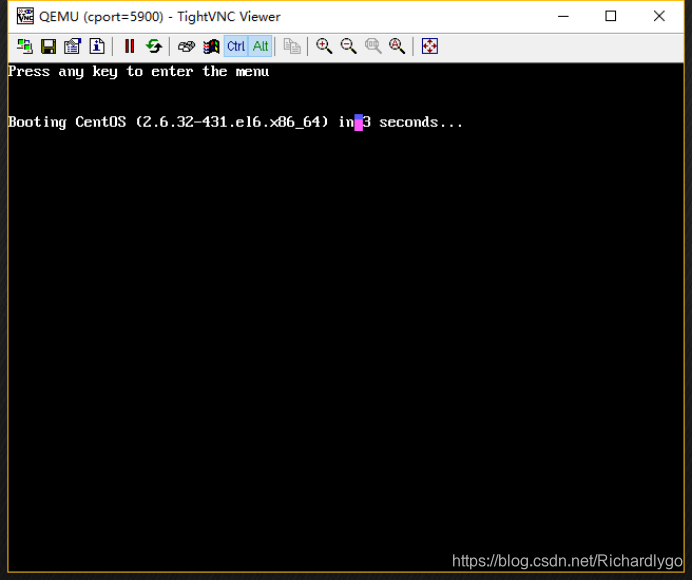
[root@ctrl ~(keystone)]# virsh start cport=5900
域 cport=5900 已开始
- 上传镜像文件到openstack的项目中:
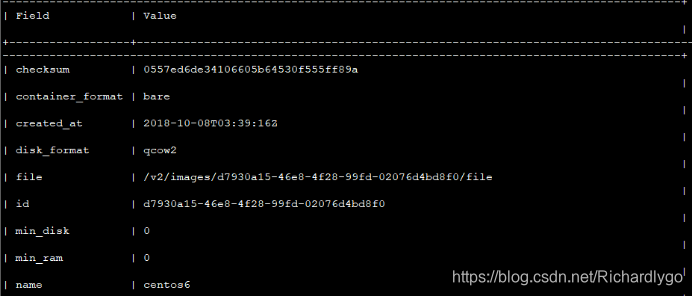
[root@ctrl ~(keystone)]# openstack image create "centos6" --file /var/kvm/images/centos6.img --disk-format qcow2 --container-format bare --public
[root@ctrl ~(keystone)]# ls /var/kvm/images/cirros-0.3.0-x86_64-disk.img
/var/kvm/images/cirros-0.3.0-x86_64-disk.img
[root@ctrl ~(keystone)]# openstack image create "cirros" --file /var/kvm/images/cirros-0.3.0-x86_64-disk.img --disk-format qcow2 --container-format bare --public
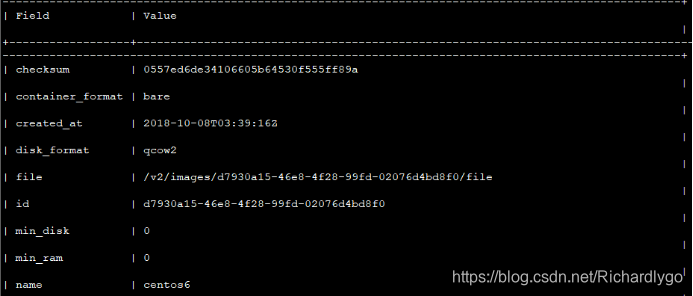

[root@ctrl ~(keystone)]# wget http://cloud-images.ubuntu.com/releases/18.04/release/ubuntu-18.04-server-cloudimg-amd64.img -P /var/kvm/images
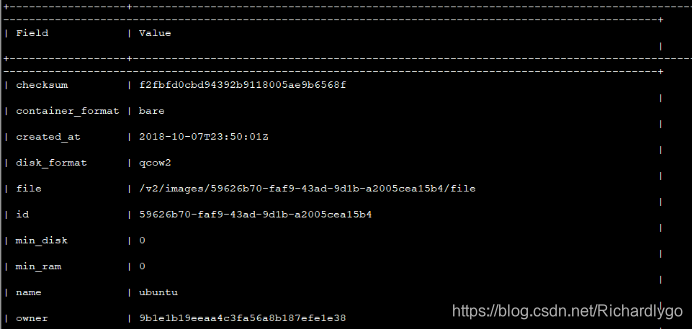
[root@ctrl ~(keystone)]# openstack image create "ubuntu" --file /var/kvm/images/ubuntu-18.04-server-cloudimg-amd64.img --disk-format qcow2 --container-format bare --public
- 安装配置nova计算组件一(创建nova组件项目、注册身份信息、数据库授权):
[root@ctrl ~(keystone)]# openstack user create --domain default --project service --password servicepassword nova
+---------------------+----------------------------------+
| Field | Value |
+---------------------+----------------------------------+
| default_project_id | 409ebd0b51144e7eae911ebc3d87f523 |
| domain_id | default |
| enabled | True |
| id | b656c431d6274086b154c71ac4d73a13 |
| name | nova |
| options | {} |
| password_expires_at | None |
+---------------------+----------------------------------+
[root@ctrl ~(keystone)]# openstack role add --project service --user nova admin
[root@ctrl ~(keystone)]# openstack user create --domain default --project service --password servicepassword placement
+---------------------+----------------------------------+
| Field | Value |
+---------------------+----------------------------------+
| default_project_id | 409ebd0b51144e7eae911ebc3d87f523 |
| domain_id | default |
| enabled | True |
| id | 90b0dd62d01d4b8e8f942ece5f6a9090 |
| name | placement |
| options | {} |
| password_expires_at | None |
+---------------------+----------------------------------+
[root@ctrl ~(keystone)]# openstack role add --project service --user placement admin
[root@ctrl ~(keystone)]# openstack service create --name nova --description "OpenStack Compute service" compute
+-------------+----------------------------------+
| Field | Value |
+-------------+----------------------------------+
| description | OpenStack Compute service |
| enabled | True |
| id | ca713c020ecd42dab904dea5d86358ec |
| name | nova |
| type | compute |
+-------------+----------------------------------+
[root@ctrl ~(keystone)]# openstack service create --name placement --description "OpenStack Compute Placement service" placement
+-------------+-------------------------------------+
| Field | Value |
+-------------+-------------------------------------+
| description | OpenStack Compute Placement service |
| enabled | True |
| id | 4e156636cfaf4c75b78770d24600bf5b |
| name | placement |
| type | placement |
+-------------+-------------------------------------+
[root@ctrl ~(keystone)]# export controller=192.168.100.101
[root@ctrl ~(keystone)]# openstack endpoint create --region RegionOne compute public http://$controller:8774/v2.1/%\(tenant_id\)s
+--------------+------------------------------------------------+
| Field | Value |
+--------------+------------------------------------------------+
| enabled | True |
| id | 12aa3dc475374021be93a8d1b6c81182 |
| interface | public |
| region | RegionOne |
| region_id | RegionOne |
| service_id | ca713c020ecd42dab904dea5d86358ec |
| service_name | nova |
| service_type | compute |
| url | http://192.168.100.101:8774/v2.1/%(tenant_id)s |
+--------------+------------------------------------------------+
[root@ctrl ~(keystone)]# openstack endpoint create --region RegionOne compute internal http://$controller:8774/v2.1/%\(tenant_id\)s
+--------------+------------------------------------------------+
| Field | Value |
+--------------+------------------------------------------------+
| enabled | True |
| id | 4388a0e4bb5f4aef9fc1b1779c0a9bb9 |
| interface | internal |
| region | RegionOne |
| region_id | RegionOne |
| service_id | ca713c020ecd42dab904dea5d86358ec |
| service_name | nova |
| service_type | compute |
| url | http://192.168.100.101:8774/v2.1/%(tenant_id)s |
+--------------+------------------------------------------------+
[root@ctrl ~(keystone)]# openstack endpoint create --region RegionOne compute admin http://$controller:8774/v2.1/%\(tenant_id\)s
+--------------+------------------------------------------------+
| Field | Value |
+--------------+------------------------------------------------+
| enabled | True |
| id | 8f20d5b2f13e41d394c5983ad78f4306 |
| interface | admin |
| region | RegionOne |
| region_id | RegionOne |
| service_id | ca713c020ecd42dab904dea5d86358ec |
| service_name | nova |
| service_type | compute |
| url | http://192.168.100.101:8774/v2.1/%(tenant_id)s |
+--------------+------------------------------------------------+
[root@ctrl ~(keystone)]# openstack endpoint create --region RegionOne placement public http://$controller:8778
+--------------+----------------------------------+
| Field | Value |
+--------------+----------------------------------+
| enabled | True |
| id | 7890112bf3a540f88764e1acf3b0b171 |
| interface | public |
| region | RegionOne |
| region_id | RegionOne |
| service_id | 4e156636cfaf4c75b78770d24600bf5b |
| service_name | placement |
| service_type | placement |
| url | http://192.168.100.101:8778 |
+--------------+----------------------------------+
[root@ctrl ~(keystone)]# openstack endpoint create --region RegionOne placement internal http://$controller:8778
+--------------+----------------------------------+
| Field | Value |
+--------------+----------------------------------+
| enabled | True |
| id | 322d3588d3b544e0963188153f8c9652 |
| interface | internal |
| region | RegionOne |
| region_id | RegionOne |
| service_id | 4e156636cfaf4c75b78770d24600bf5b |
| service_name | placement |
| service_type | placement |
| url | http://192.168.100.101:8778 |
+--------------+----------------------------------+
[root@ctrl ~(keystone)]# openstack endpoint create --region RegionOne placement admin http://$controller:8778
+--------------+----------------------------------+
| Field | Value |
+--------------+----------------------------------+
| enabled | True |
| id | 3ae51d7d68bf41ddbba970ab675aced2 |
| interface | admin |
| region | RegionOne |
| region_id | RegionOne |
| service_id | 4e156636cfaf4c75b78770d24600bf5b |
| service_name | placement |
| service_type | placement |
| url | http://192.168.100.101:8778 |
+--------------+----------------------------------+
[root@ctrl ~(keystone)]# mysql -uroot -p123123
MariaDB [(none)]> create database nova;
Query OK, 1 row affected (0.00 sec)
MariaDB [(none)]> grant all privileges on nova.* to nova@'localhost' identified by 'password';
Query OK, 0 rows affected (0.00 sec)
MariaDB [(none)]> grant all privileges on nova.* to nova@'%' identified by 'password';
Query OK, 0 rows affected (0.00 sec)
MariaDB [(none)]> create database nova_api;
Query OK, 1 row affected (0.00 sec)
MariaDB [(none)]> grant all privileges on nova_api.* to nova@'localhost' identified by 'password';
Query OK, 0 rows affected (0.00 sec)
MariaDB [(none)]> grant all privileges on nova_api.* to nova@'%' identified by 'password';
Query OK, 0 rows affected (0.00 sec)
MariaDB [(none)]> create database nova_placement;
Query OK, 1 row affected (0.00 sec)
MariaDB [(none)]> grant all privileges on nova_placement.* to nova@'localhost' identified by 'password';
Query OK, 0 rows affected (0.00 sec)
MariaDB [(none)]> grant all privileges on nova_placement.* to nova@'%' identified by 'password';
Query OK, 0 rows affected (0.00 sec)
MariaDB [(none)]> create database nova_cell0;
Query OK, 1 row affected (0.00 sec)
MariaDB [(none)]> grant all privileges on nova_cell0.* to nova@'localhost' identified by 'password';
Query OK, 0 rows affected (0.00 sec)
MariaDB [(none)]> grant all privileges on nova_cell0.* to nova@'%' identified by 'password';
Query OK, 0 rows affected (0.00 sec)
MariaDB [(none)]> flush privileges;
Query OK, 0 rows affected (0.00 sec)
MariaDB [(none)]> exit
- 安装配置nova计算组件二(安装nova程序、修改配置、启动基础服务):
[root@ctrl ~(keystone)]# yum -y install openstack-nova
[root@ctrl ~(keystone)]# mv /etc/nova/nova.conf /etc/nova/nova.conf.org
[root@ctrl ~(keystone)]# vi /etc/nova/nova.conf
[DEFAULT]
my_ip = 192.168.100.101
state_path = /var/lib/nova
enabled_apis = osapi_compute,metadata
log_dir = /var/log/nova
# RabbitMQ connection info
transport_url = rabbit://openstack:password@192.168.100.101
[api]
auth_strategy = keystone
# Glance connection info
[glance]
api_servers = http://192.168.100.101:9292
[oslo_concurrency]
lock_path = $state_path/tmp
# MariaDB connection info
[api_database]
connection = mysql+pymysql://nova:password@192.168.100.101/nova_api
[database]
connection = mysql+pymysql://nova:password@192.168.100.101/nova
# Keystone auth info
[keystone_authtoken]
www_authenticate_uri = http://192.168.100.101:5000
auth_url = http://192.168.100.101:5000
memcached_servers = 192.168.100.101:11211
auth_type = password
project_domain_name = default
user_domain_name = default
project_name = service
username = nova
password = servicepassword
[placement]
auth_url = http://192.168.100.101:5000
os_region_name = RegionOne
auth_type = password
project_domain_name = default
user_domain_name = default
project_name = service
username = placement
password = servicepassword
[placement_database]
connection = mysql+pymysql://nova:password@192.168.100.101/nova_placement
[wsgi]
api_paste_config = /etc/nova/api-paste.ini
:wq
[root@ctrl ~(keystone)]# chmod 640 /etc/nova/nova.conf
[root@ctrl ~(keystone)]# chgrp nova /etc/nova/nova.conf
[root@ctrl ~(keystone)]# vi /etc/httpd/conf.d/00-nova-placement-api.conf
16 <Directory /usr/bin>
17 Require all granted
18 </Directory>
19 </VirtualHost>
:wq
[root@ctrl ~(keystone)]# su -s /bin/bash nova -c "nova-manage api_db sync"
[root@ctrl ~(keystone)]# su -s /bin/bash nova -c "nova-manage cell_v2 map_cell0"
[root@ctrl ~(keystone)]# su -s /bin/bash nova -c "nova-manage db sync"
/usr/lib/python2.7/site-packages/pymysql/cursors.py:170: Warning: (1831, u'Duplicate index `block_device_mapping_instance_uuid_virtual_name_device_name_idx`. This is deprecated and will be disallowed in a future release.')
result = self._query(query)
/usr/lib/python2.7/site-packages/pymysql/cursors.py:170: Warning: (1831, u'Duplicate index `uniq_instances0uuid`. This is deprecated and will be disallowed in a future release.')
result = self._query(query)
[root@ctrl ~(keystone)]# su -s /bin/bash nova -c "nova-manage cell_v2 create_cell --name cell1"
[root@ctrl ~(keystone)]# systemctl restart httpd
[root@ctrl ~(keystone)]# chown nova. /var/log/nova/nova-placement-api.log
[root@ctrl ~(keystone)]# for service in api consoleauth conductor scheduler novncproxy; do
systemctl start openstack-nova-$service
systemctl enable openstack-nova-$service
done
Created symlink from /etc/systemd/system/multi-user.target.wants/openstack-nova-api.service to /usr/lib/systemd/system/openstack-nova-api.service.
Created symlink from /etc/systemd/system/multi-user.target.wants/openstack-nova-consoleauth.service to /usr/lib/systemd/system/openstack-nova-consoleauth.service.
Created symlink from /etc/systemd/system/multi-user.target.wants/openstack-nova-conductor.service to /usr/lib/systemd/system/openstack-nova-conductor.service.
Created symlink from /etc/systemd/system/multi-user.target.wants/openstack-nova-scheduler.service to /usr/lib/systemd/system/openstack-nova-scheduler.service.
Created symlink from /etc/systemd/system/multi-user.target.wants/openstack-nova-novncproxy.service to /usr/lib/systemd/system/openstack-nova-novncproxy.service.

- 安装配置nova计算组件三(安装配置nova-compute程序):
[root@ctrl ~(keystone)]# vi /etc/nova/nova.conf ##末尾追加
[vnc]
enabled = True
server_listen = 0.0.0.0
server_proxyclient_address = 192.168.100.101
novncproxy_base_url = http://192.168.100.101:6080/vnc_auto.html
:wq
[root@ctrl ~(keystone)]# systemctl start openstack-nova-compute
[root@ctrl ~(keystone)]# systemctl enable openstack-nova-compute
Created symlink from /etc/systemd/system/multi-user.target.wants/openstack-nova-compute.service to /usr/lib/systemd/system/openstack-nova-compute.service.
[root@ctrl ~(keystone)]# su -s /bin/bash nova -c "nova-manage cell_v2 discover_hosts"
[root@ctrl ~(keystone)]# openstack compute service list

- 安装配置neutron网络组件一(创建neutron组件项目、数据库授权):
[root@ctrl ~(keystone)]# openstack user create --domain default --project service --password servicepassword neutron
+---------------------+----------------------------------+
| Field | Value |
+---------------------+----------------------------------+
| default_project_id | 409ebd0b51144e7eae911ebc3d87f523 |
| domain_id | default |
| enabled | True |
| id | 91ddfad33f424aeb944d1e317bea49ac |
| name | neutron |
| options | {} |
| password_expires_at | None |
+---------------------+----------------------------------+
[root@ctrl ~(keystone)]# openstack role add --project service --user neutron admin
[root@ctrl ~(keystone)]# openstack service create --name neutron --description "OpenStack Networking service" network
+-------------+----------------------------------+
| Field | Value |
+-------------+----------------------------------+
| description | OpenStack Networking service |
| enabled | True |
| id | 2cb2aa8cf45b415cb421340c807c204e |
| name | neutron |
| type | network |
+-------------+----------------------------------+
[root@ctrl ~(keystone)]# export controller=192.168.100.101
[root@ctrl ~(keystone)]# openstack endpoint create --region RegionOne network public http://$controller:9696
+--------------+----------------------------------+
| Field | Value |
+--------------+----------------------------------+
| enabled | True |
| id | 3ac7d86b514f478fa18e69116dff4165 |
| interface | public |
| region | RegionOne |
| region_id | RegionOne |
| service_id | 2cb2aa8cf45b415cb421340c807c204e |
| service_name | neutron |
| service_type | network |
| url | http://192.168.100.101:9696 |
+--------------+----------------------------------+
[root@ctrl ~(keystone)]# openstack endpoint create --region RegionOne network internal http://$controller:9696
+--------------+----------------------------------+
| Field | Value |
+--------------+----------------------------------+
| enabled | True |
| id | 1ad237ba2d4b45f48844262c22b55265 |
| interface | internal |
| region | RegionOne |
| region_id | RegionOne |
| service_id | 2cb2aa8cf45b415cb421340c807c204e |
| service_name | neutron |
| service_type | network |
| url | http://192.168.100.101:9696 |
+--------------+----------------------------------+
[root@ctrl ~(keystone)]# openstack endpoint create --region RegionOne network admin http://$controller:9696
+--------------+----------------------------------+
| Field | Value |
+--------------+----------------------------------+
| enabled | True |
| id | b2f9bf0ae0ac49ee8343925ea60f6f24 |
| interface | admin |
| region | RegionOne |
| region_id | RegionOne |
| service_id | 2cb2aa8cf45b415cb421340c807c204e |
| service_name | neutron |
| service_type | network |
| url | http://192.168.100.101:9696 |
+--------------+----------------------------------+
[root@ctrl ~(keystone)]# mysql -uroot -p123123
MariaDB [(none)]> create database neutron_ml2;
Query OK, 1 row affected (0.00 sec)
MariaDB [(none)]> grant all privileges on neutron_ml2.* to neutron@'localhost' identified by 'password';
Query OK, 0 rows affected (0.00 sec)
MariaDB [(none)]> grant all privileges on neutron_ml2.* to neutron@'%' identified by 'password';
Query OK, 0 rows affected (0.00 sec)
MariaDB [(none)]> flush privileges;
Query OK, 0 rows affected (0.00 sec)
MariaDB [(none)]> exit
- 安装配置neutron网络组件二(安装neutron程序、配置启动服务):
[root@ctrl ~(keystone)]# yum -y install openstack-neutron openstack-neutron-ml2 openstack-neutron-openvswitch
[root@ctrl ~(keystone)]# mv /etc/neutron/neutron.conf /etc/neutron/neutron.conf.org
[root@ctrl ~(keystone)]# vi /etc/neutron/neutron.conf
[DEFAULT]
core_plugin = ml2
service_plugins = router
auth_strategy = keystone
state_path = /var/lib/neutron
dhcp_agent_notification = True
allow_overlapping_ips = True
notify_nova_on_port_status_changes = True
notify_nova_on_port_data_changes = True
# RabbitMQ connection info
transport_url = rabbit://openstack:password@192.168.100.101
# Keystone auth info
[keystone_authtoken]
www_authenticate_uri = http://192.168.100.101:5000
auth_url = http://192.168.100.101:5000
memcached_servers = 192.168.100.101:11211
auth_type = password
project_domain_name = default
user_domain_name = default
project_name = service
username = neutron
password = servicepassword
# MariaDB connection info
[database]
connection = mysql+pymysql://neutron:password@192.168.100.101/neutron_ml2
# Nova connection info
[nova]
auth_url = http://192.168.100.101:5000
auth_type = password
project_domain_name = default
user_domain_name = default
region_name = RegionOne
project_name = service
username = nova
password = servicepassword
[oslo_concurrency]
lock_path = $state_path/tmp
:wq
[root@ctrl ~(keystone)]# chmod 640 /etc/neutron/neutron.conf
[root@ctrl ~(keystone)]# chgrp neutron /etc/neutron/neutron.conf
[root@ctrl ~(keystone)]# vi /etc/neutron/l3_agent.ini
17 interface_driver = neutron.agent.linux.interface.OVSInterfaceDriver
:wq
[root@ctrl ~(keystone)]# vi /etc/neutron/dhcp_agent.ini
17 interface_driver = neutron.agent.linux.interface.OVSInterfaceDriver
28 dhcp_driver = neutron.agent.linux.dhcp.Dnsmasq
37 enable_isolated_metadata = true
:wq
[root@ctrl ~(keystone)]# vi /etc/neutron/metadata_agent.ini
22 nova_metadata_host = 192.168.100.101
34 metadata_proxy_shared_secret = metadata_secret
260 memcache_servers = 192.168.100.101:11211
:wq
[root@ctrl ~(keystone)]# vi /etc/neutron/plugins/ml2/ml2_conf.ini
128 [ml2]
129 type_drivers = flat,vlan,gre,vxlan
130 tenant_network_types =
131 mechanism_drivers = openvswitch,l2population
132 extension_drivers = port_security
262 enable_security_group = true
263 firewall_driver = neutron.agent.linux.iptables_firewall.OVSHybridIptablesFirewallDriver
268 enable_ipset = True
:wq
[root@ctrl ~(keystone)]# vi /etc/nova/nova.conf
8 [api]
9 use_neutron = True
10 linuxnet_interface_driver = nova.network.linux_net.LinuxOVSInterfaceDriver
11 firewall_driver = nova.virt.firewall.NoopFirewallDriver
12 vif_plugging_is_fatal = True
13 vif_plugging_timeout = 300
64 [neutron]
65 auth_url = http://192.168.100.101:5000
66 auth_type = password
67 project_domain_name = default
68 user_domain_name = default
69 region_name = RegionOne
70 project_name = service
71 username = neutron
72 password = servicepassword
73 service_metadata_proxy = True
74 metadata_proxy_shared_secret = metadata_secret
:wq
[root@ctrl ~(keystone)]# systemctl start openvswitch
[root@ctrl ~(keystone)]# systemctl enable openvswitch
Created symlink from /etc/systemd/system/multi-user.target.wants/openvswitch.service to /usr/lib/systemd/system/openvswitch.service.
[root@ctrl ~(keystone)]# ovs-vsctl add-br br-int
[root@ctrl ~(keystone)]# ln -s /etc/neutron/plugins/ml2/ml2_conf.ini /etc/neutron/plugin.ini
[root@ctrl ~(keystone)]# su -s /bin/bash neutron -c "neutron-db-manage --config-file /etc/neutron/neutron.conf --config-file /etc/neutron/plugin.ini upgrade head"
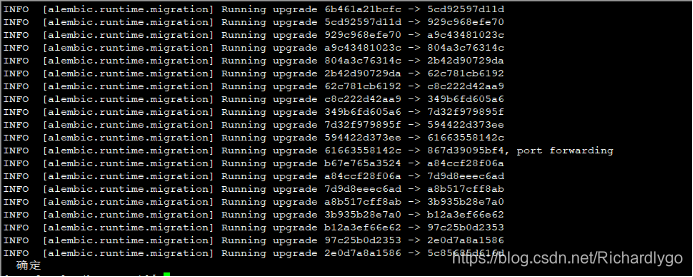
[root@ctrl ~(keystone)]# for service in server dhcp-agent l3-agent metadata-agent openvswitch-agent; do
systemctl start neutron-$service
systemctl enable neutron-$service
done
Created symlink from /etc/systemd/system/multi-user.target.wants/neutron-server.service to /usr/lib/systemd/system/neutron-server.service.
Created symlink from /etc/systemd/system/multi-user.target.wants/neutron-dhcp-agent.service to /usr/lib/systemd/system/neutron-dhcp-agent.service.
Created symlink from /etc/systemd/system/multi-user.target.wants/neutron-l3-agent.service to /usr/lib/systemd/system/neutron-l3-agent.service.
Created symlink from /etc/systemd/system/multi-user.target.wants/neutron-metadata-agent.service to /usr/lib/systemd/system/neutron-metadata-agent.service.
Created symlink from /etc/systemd/system/multi-user.target.wants/neutron-openvswitch-agent.service to /usr/lib/systemd/system/neutron-openvswitch-agent.service.
[root@ctrl ~(keystone)]# systemctl restart openstack-nova-api openstack-nova-compute
[root@ctrl ~(keystone)]# openstack network agent list
+--------------------------------------+--------------------+------------------+-------------------+-------+-------+---------------------------+
| ID | Agent Type | Host | Availability Zone | Alive | State | Binary |
+--------------------------------------+--------------------+------------------+-------------------+-------+-------+---------------------------+
| 0afa493b-f0cb-451b-90cc-0043a5d7d28e | Metadata agent | ctrl.linuxfan.cn | None | :-) | UP | neutron-metadata-agent |
| 8c14f816-84fb-40d3-866e-7bceb1f0f9b8 | Open vSwitch agent | ctrl.linuxfan.cn | None | :-) | UP | neutron-openvswitch-agent |
| c99caac6-68b2-4ae7-9b66-0a51f887ca18 | DHCP agent | ctrl.linuxfan.cn | nova | :-) | UP | neutron-dhcp-agent |
| dd4f5c05-a194-4a9c-a71b-f8e49957a5de | L3 agent | ctrl.linuxfan.cn | nova | :-) | UP | neutron-l3-agent |
+--------------------------------------+--------------------+------------------+-------------------+-------+-------+---------------------------+
- 创建配置neutron网络接口:
[root@ctrl ~(keystone)]# ovs-vsctl add-br br-eth1
[root@ctrl ~(keystone)]# ovs-vsctl add-port br-eth1 eth1
[root@ctrl ~(keystone)]# vi /etc/neutron/plugins/ml2/ml2_conf.ini
180 [ml2_type_flat]
181 flat_networks = physnet1
:wq
[root@ctrl ~(keystone)]# vi /etc/neutron/plugins/ml2/openvswitch_agent.ini
193 [ovs]
194 bridge_mappings = physnet1:br-eth1
:wq
[root@ctrl ~(keystone)]# systemctl restart neutron-openvswitch-agent
[root@ctrl ~(keystone)]# projectID=$(openstack project list | grep service | awk '{print $2}')
[root@ctrl ~(keystone)]# openstack network create --project $projectID --share --provider-network-type flat --provider-physical-network physnet1 sharednet1
+---------------------------+--------------------------------------+
| Field | Value |
+---------------------------+--------------------------------------+
| admin_state_up | UP |
| availability_zone_hints | |
| availability_zones | |
| created_at | 2018-10-07T23:09:32Z |
| description | |
| dns_domain | None |
| id | 80c1241e-e3d8-4b76-821e-8de96f9bafda |
| ipv4_address_scope | None |
| ipv6_address_scope | None |
| is_default | False |
| is_vlan_transparent | None |
| mtu | 1500 |
| name | sharednet1 |
| port_security_enabled | True |
| project_id | 409ebd0b51144e7eae911ebc3d87f523 |
| provider:network_type | flat |
| provider:physical_network | physnet1 |
| provider:segmentation_id | None |
| qos_policy_id | None |
| revision_number | 0 |
| router:external | Internal |
| segments | None |
| shared | True |
| status | ACTIVE |
| subnets | |
| tags | |
| updated_at | 2018-10-07T23:09:32Z |
+---------------------------+--------------------------------------+
[root@ctrl ~(keystone)]# openstack subnet create subnet1 --network sharednet1 --project $projectID --subnet-range 192.168.100.0/24 --allocation-pool start=192.168.100.250,end=192.168.100.254 --gateway 192.168.100.100 --dns-nameserver 192.168.100.100
+-------------------+--------------------------------------+
| Field | Value |
+-------------------+--------------------------------------+
| allocation_pools | 192.168.100.250-192.168.100.254 |
| cidr | 192.168.100.0/24 |
| created_at | 2018-10-07T23:11:31Z |
| description | |
| dns_nameservers | 192.168.100.100 |
| enable_dhcp | True |
| gateway_ip | 192.168.100.100 |
| host_routes | |
| id | c1d379ee-df75-4d00-89e6-2d7a22a78f1a |
| ip_version | 4 |
| ipv6_address_mode | None |
| ipv6_ra_mode | None |
| name | subnet1 |
| network_id | 80c1241e-e3d8-4b76-821e-8de96f9bafda |
| project_id | 409ebd0b51144e7eae911ebc3d87f523 |
| revision_number | 0 |
| segment_id | None |
| service_types | |
| subnetpool_id | None |
| tags | |
| updated_at | 2018-10-07T23:11:31Z |
+-------------------+--------------------------------------+
[root@ctrl ~(keystone)]# openstack network list
+--------------------------------------+------------+--------------------------------------+
| ID | Name | Subnets |
+--------------------------------------+------------+--------------------------------------+
| 80c1241e-e3d8-4b76-821e-8de96f9bafda | sharednet1 | c1d379ee-df75-4d00-89e6-2d7a22a78f1a |
+--------------------------------------+------------+--------------------------------------+
[root@ctrl ~(keystone)]# openstack subnet list
+--------------------------------------+---------+--------------------------------------+------------------+
| ID | Name | Network | Subnet |
+--------------------------------------+---------+--------------------------------------+------------------+
| c1d379ee-df75-4d00-89e6-2d7a22a78f1a | subnet1 | 80c1241e-e3d8-4b76-821e-8de96f9bafda | 192.168.100.0/24 |
+--------------------------------------+---------+--------------------------------------+------------------
- 创建云主机实例类型:
[root@ctrl ~(keystone)]# openstack project create --domain default --description "Hiroshima Project" hiroshima
+-------------+----------------------------------+
| Field | Value |
+-------------+----------------------------------+
| description | Hiroshima Project |
| domain_id | default |
| enabled | True |
| id | 6fc357714c414a72aa6e91163f42133c |
| is_domain | False |
| name | hiroshima |
| parent_id | default |
| tags | [] |
+-------------+----------------------------------+
[root@ctrl ~(keystone)]# openstack user create --domain default --project hiroshima --password userpassword serverworld
+---------------------+----------------------------------+
| Field | Value |
+---------------------+----------------------------------+
| default_project_id | 6fc357714c414a72aa6e91163f42133c |
| domain_id | default |
| enabled | True |
| id | b2fe3924a58f418e9ec21c5b400fce42 |
| name | serverworld |
| options | {} |
| password_expires_at | None |
+---------------------+----------------------------------+
[root@ctrl ~(keystone)]# openstack role create CloudUser
+-----------+----------------------------------+
| Field | Value |
+-----------+----------------------------------+
| domain_id | None |
| id | 84c41679f0de471a87ff4a7e4f75d91c |
| name | CloudUser |
+-----------+----------------------------------+
[root@ctrl ~(keystone)]# openstack role add --project hiroshima --user serverworld CloudUser
[root@ctrl ~(keystone)]# openstack flavor create --id 0 --vcpus 1 --ram 2048 --disk 10 m1.small
+----------------------------+----------+
| Field | Value |
+----------------------------+----------+
| OS-FLV-DISABLED:disabled | False |
| OS-FLV-EXT-DATA:ephemeral | 0 |
| disk | 10 |
| id | 0 |
| name | m1.small |
| os-flavor-access:is_public | True |
| properties | |
| ram | 2048 |
| rxtx_factor | 1.0 |
| swap | |
| vcpus | 1 |
+----------------------------+----------+
- 基于Centos6镜像创建云主机实例(验证各个组件列表、创建安全组、添加安全组策略、创建云主机实例):
[root@ctrl ~(keystone)]# openstack flavor list
+----+----------+------+------+-----------+-------+-----------+
| ID | Name | RAM | Disk | Ephemeral | VCPUs | Is Public |
+----+----------+------+------+-----------+-------+-----------+
| 0 | m1.small | 2048 | 10 | 0 | 1 | True |
+----+----------+------+------+-----------+-------+-----------+
[root@ctrl ~(keystone)]# openstack image list
+--------------------------------------+---------+--------+
| ID | Name | Status |
+--------------------------------------+---------+--------+
| d7930a15-46e8-4f28-99fd-02076d4bd8f0 | centos6 | active |
| c9251306-32ec-4d3e-b996-650288ee22c5 | cirros | active |
+--------------------------------------+---------+--------+
[root@ctrl ~(keystone)]# openstack network list
+--------------------------------------+------------+--------------------------------------+
| ID | Name | Subnets |
+--------------------------------------+------------+--------------------------------------+
| 80c1241e-e3d8-4b76-821e-8de96f9bafda | sharednet1 | c1d379ee-df75-4d00-89e6-2d7a22a78f1a |
+--------------------------------------+------------+--------------------------------------+
[root@ctrl ~(keystone)]# openstack security group create secgroup01
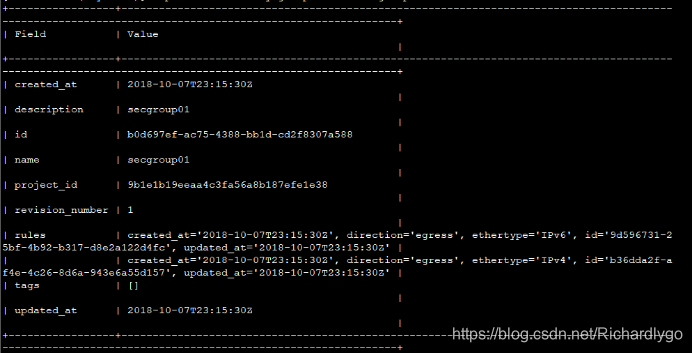
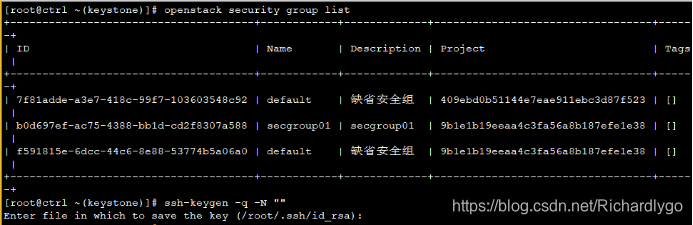
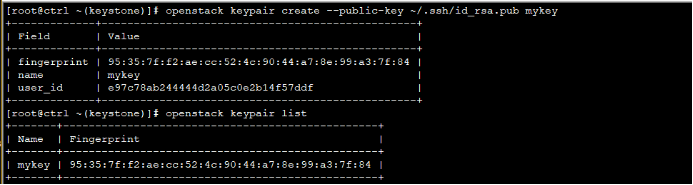
[root@ctrl ~(keystone)]# netID=$(openstack network list | grep sharednet1 | awk '{ print $2 }')
[root@ctrl ~(keystone)]# openstack server create --flavor m1.small --image cirros --security-group secgroup01 --nic net-id=$netID --key-name mykey cirros
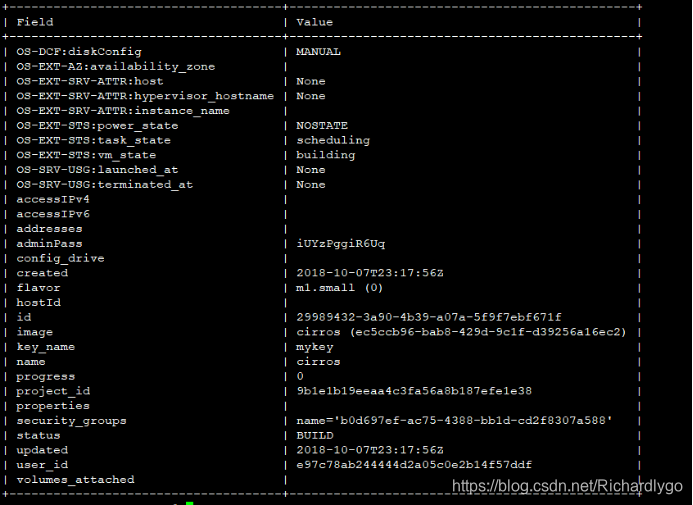

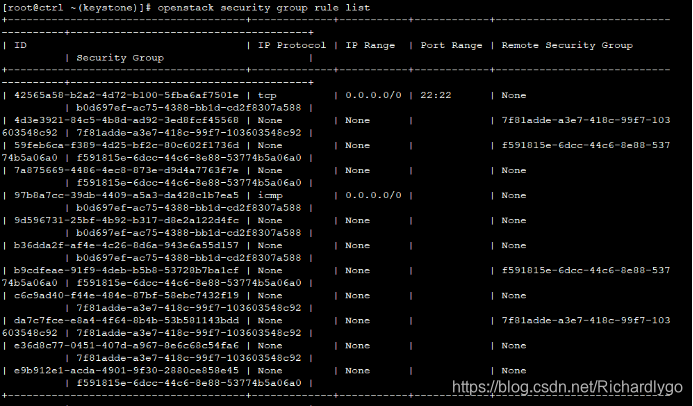
[root@ctrl ~(keystone)]# openstack security group rule create --protocol icmp --ingress secgroup01
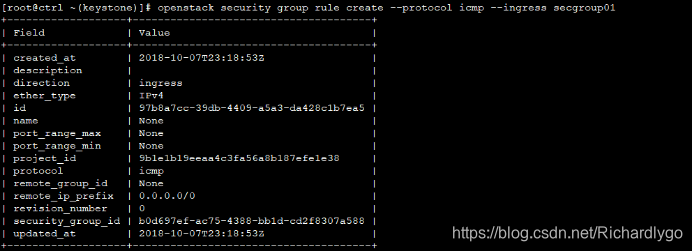
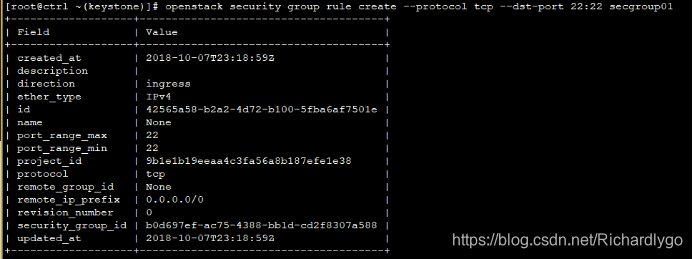
[root@ctrl ~(keystone)]# openstack security group rule create --protocol tcp --dst-port 22:22 secgroup01
- 安装配置horizon组件(准备dashboard组件):
[root@ctrl ~(keystone)]# yum -y install openstack-dashboard
[root@ctrl ~(keystone)]# vi /etc/openstack-dashboard/local_settings
38 ALLOWED_HOSTS = ['ctrl.linuxfan.cn', 'localhost']
64 OPENSTACK_API_VERSIONS = {
65 # "data-processing": 1.1,
66 "identity": 3,
67 "volume": 2,
68 "compute": 2,
69 }
75 OPENSTACK_KEYSTONE_MULTIDOMAIN_SUPPORT = True
97 OPENSTACK_KEYSTONE_DEFAULT_DOMAIN = 'Default'
160 CACHES = {
161 'default': {
162 'BACKEND': 'django.core.cache.backends.locmem.LocMemCache',
163 'LOCATION': '192.168.100.101:11211',
164 },
165 }
184 OPENSTACK_HOST = "192.168.100.101"
:wq
[root@ctrl ~(keystone)]# vi /etc/httpd/conf.d/openstack-dashboard.conf
4 WSGIApplicationGroup %{GLOBAL}
:wq
[root@ctrl ~(keystone)]# systemctl restart httpd
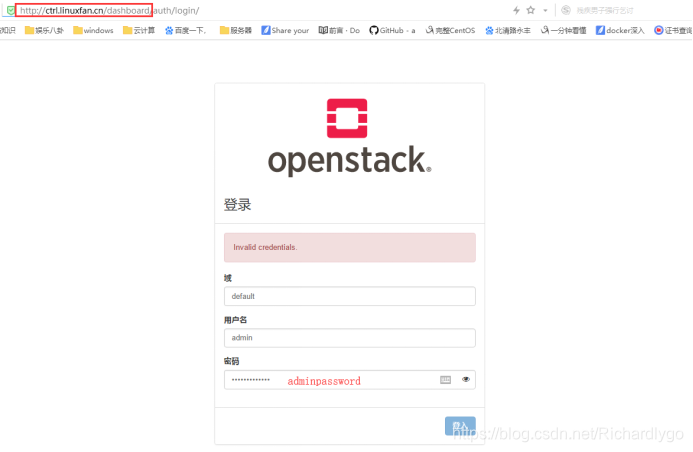
- 使用浏览器访问测试Dashboard页面:
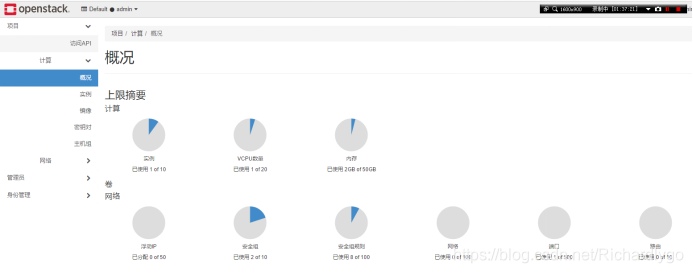
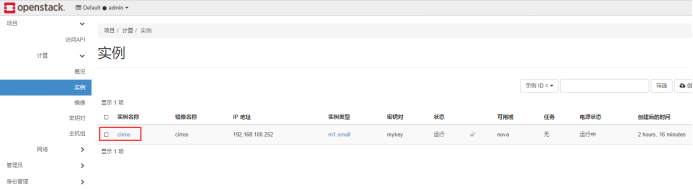
- 基于浏览器管理openstack实例:
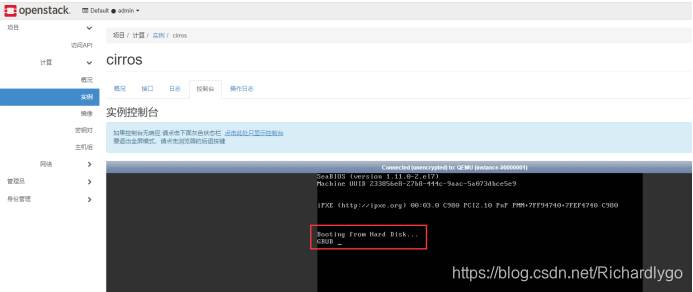
注解:访问控制台发现cirros实例无法访问,此问题由于镜像文件格式问题所导致,解决方案如下:
[root@ctrl images(keystone)]# openstack image list ##查看镜像ID
+--------------------------------------+---------+--------+
| ID | Name | Status |
+--------------------------------------+---------+--------+
| d7930a15-46e8-4f28-99fd-02076d4bd8f0 | centos6 | active |
| c9251306-32ec-4d3e-b996-650288ee22c5 | cirros | active |
+--------------------------------------+---------+--------+
[root@ctrl images(keystone)]# openstack image set --property hw_disk_bus=ide --property hw_vif_model=e1000 c9251306-32ec-4d3e-b996-650288ee22c5 ##将上述镜像格式设置为ide格式
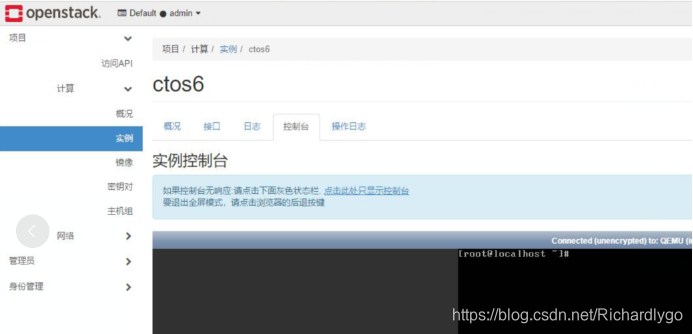
注解:如若创建云主机实例出现错误,显示找不到有效的主机,500,此问题由于nova节点资源不足导致,可以通过扩大单点nova节点资源或者添加新的nova节点即可:
删除原有主机实例,基于更改后的镜像文件进行创建实例,测试云主机启动状态:

腾讯云面向开发者汇聚海量精品云计算使用和开发经验,营造开放的云计算技术生态圈。
更多推荐
 0
0 0
0- 0


 已为社区贡献7条内容

所有评论(0)