yolov8实现行人跌倒检测web
用flask编写网页,实现图片上传进行检测和调用电脑摄像头进行实时检测,但调用摄像头检测存在问题,会出现进程冲突的情况,导致视频采集不是很流畅。
(一)项目结构
yolo_flask/ # 项目根目录
├── static/ # Flask 静态资源
│ ├── css/ # 样式文件
│ │ └── style.css # 网页样式表
│ ├── images/ # 图片资源
│ │ ├── background.JPG
│ │ └── background_2.JPG
│ ├── results/ # 检测结果存储(处理后图片)
│ └── uploads/ # 用户上传文件存储
│
├── templates/ # Flask 网页模板
│ ├── base.html # 基础模板(主要是导航,其他页面继承此模板)
│ ├── camera.html # (废案)
│ ├── detect.html # 摄像头检测页面
│ ├── index.html # 主页
│ └── upload.html # 图片上传页面
│
├── app.py # Flask 主应用入口
├── app_demo.py # (废案)
├── best.pt # YOLO 预训练模型权重文件
├── demo.py # (废案)
├── local_detect.py # 本地检测脚本(非 Web 功能)
补充:
images文件夹下存放的是网站的背景,可以随意替换成你喜欢的照片。
best.pt是我自己训练得来的权重,不过数据集比较粗糙而且数量有点少,效果不是很好,看看后期有时间能不能再优化优化。
这一次模型用的是添加Seattentions的yolov8模型。
local_detect.py运行后是直接用opencv调用摄像头直接检测。
(二)开发环境
3050笔记本
pycharm社区版
python=3.8
Windows11操作系统
(三)实物展示
直接运行app.py

点击链接后进入主页
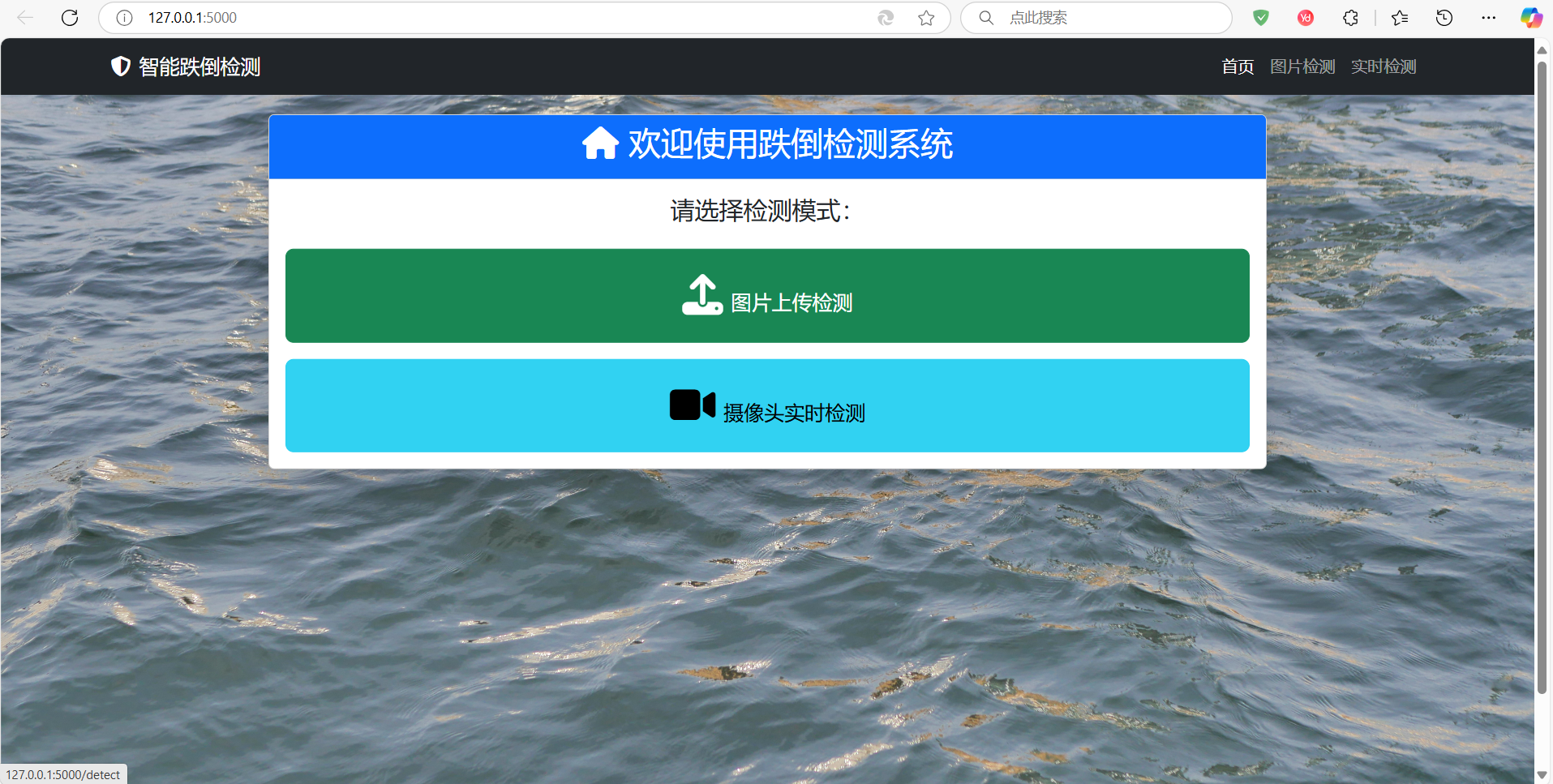
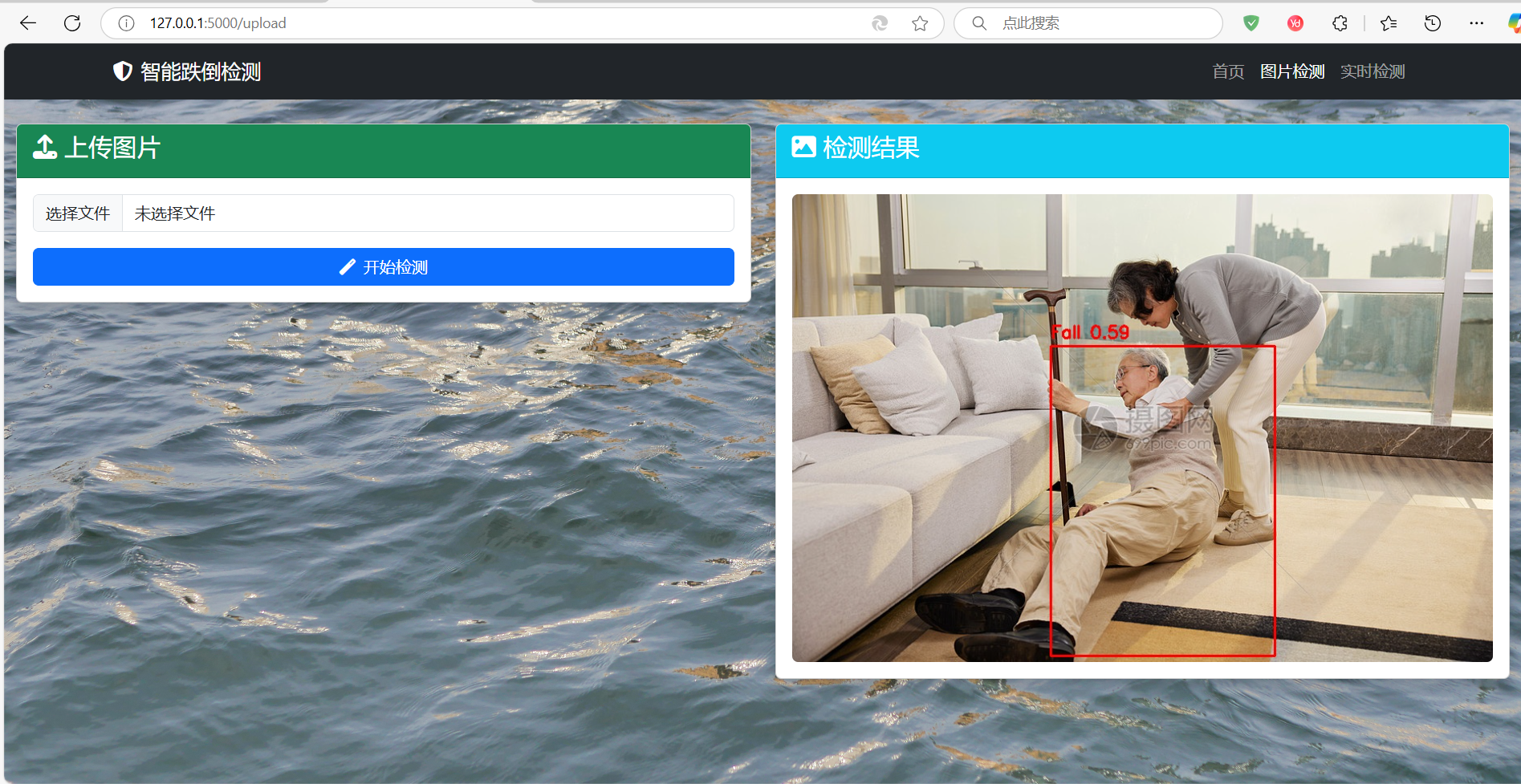
进入图片上传检测页面
从网上选了一张图片进行检测:
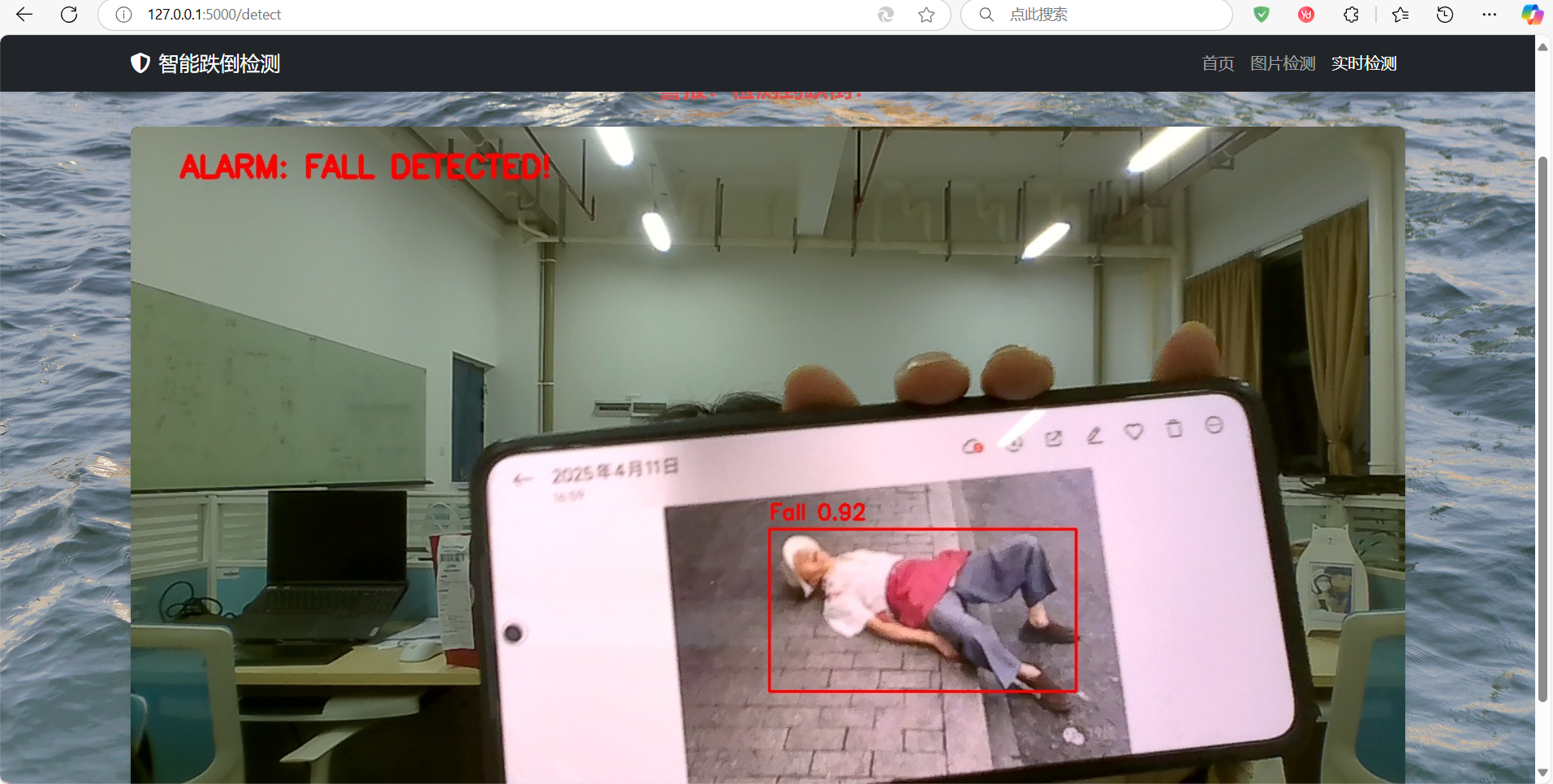
实时检测页面
打开相册能够较精确的检测,但稍微有些卡顿,后期还有待优化。
(四)源码展示(部分)
python:
app.py(主程序)
from flask import Flask, render_template, request, redirect, url_for, jsonify,Response
from ultralytics import YOLO
import cv2
import os
import uuid
import base64
import numpy as np
import  time
import threading

app = Flask(__name__)


app.config.update({
    'UPLOAD_FOLDER': 'static/uploads',
    'RESULT_FOLDER': 'static/results',
    'ALLOWED_EXTENSIONS': {'png', 'jpg', 'jpeg'},
    'MAX_CONTENT_LENGTH': 5 * 1024 * 1024  # 限制上传文件为5MB
})

# 加载模型
model = YOLO('best.pt')


def allowed_file(filename):
    return '.' in filename and \
        filename.rsplit('.', 1)[1].lower() in app.config['ALLOWED_EXTENSIONS']


# ================== 页面路由 ==================
@app.route('/')
def index():
    return render_template('index.html', active_page='index')


@app.route('/upload', methods=['GET', 'POST'])
def upload_file():
    if request.method == 'POST':
        # 验证文件有效性
        if 'file' not in request.files:
            return redirect(url_for('upload_file'))

        file = request.files['file']
        if not valid_upload_file(file):
            return redirect(url_for('upload_file'))

        # 处理文件上传
        result_filename = process_uploaded_file(file)
        return render_template('upload.html',
                               active_page='upload',
                               result=result_filename)

    return render_template('upload.html', active_page='upload')


@app.route('/detect')
def detect_page():
    return render_template('detect.html', active_page='detect')

@app.route('/video_feed')
def video_feed():
    return Response(gen_frames(),
                    mimetype='multipart/x-mixed-replace; boundary=frame')

@app.route('/alarm_status')
def get_alarm_status():
    global alarm_status
    return jsonify({'alarm': alarm_status})

@app.teardown_appcontext
def teardown(exception=None):
    release_camera()

# ================== detect页面工具函数 ==================
cap = None
lock = threading.Lock()
ALARM_CONF = 0.7  # 报警置信度阈值
alarm_status = False  # 报警状态

def init_camera():
    global cap
    with lock:
        if cap is None or not cap.isOpened():
            cap = cv2.VideoCapture(0)
            if not cap.isOpened():
                print("无法打开摄像头")
                return False
            cap.set(cv2.CAP_PROP_FRAME_WIDTH, 1280)
            cap.set(cv2.CAP_PROP_FRAME_HEIGHT, 720)
        return True

def release_camera():
    global cap
    with lock:
        if cap is not None:
            cap.release()
            cap = None

def gen_frames():
    global cap, alarm_status
    while True:
        try:
            if not init_camera():
                time.sleep(1)
                continue

            with lock:
                success, frame = cap.read()
                if not success:
                    print("摄像头读取失败,尝试重新初始化...")
                    release_camera()
                    continue

                # 进行检测
                results = model(frame, conf=0.5)

                # 绘制检测结果
                alarm_triggered = False
                for result in results:
                    for box in result.boxes:
                        x1, y1, x2, y2 = map(int, box.xyxy[0].tolist())
                        conf = box.conf[0].item()
                        cls_id = int(box.cls[0])

                        # 绘制检测框
                        color = (0, 0, 255)
                        cv2.rectangle(frame, (x1, y1), (x2, y2), color, 2)
                        label = f"Fall {conf:.2f}"
                        cv2.putText(frame, label, (x1, y1 - 10),
                                    cv2.FONT_HERSHEY_SIMPLEX, 0.7, color, 2)

                        if conf >= ALARM_CONF: #置信度超过报警阈值ALARM_CONF,设置alarm_triggered为True
                            alarm_triggered = True

                # 更新报警状态
                alarm_status = alarm_triggered

                # 添加报警提示
                if alarm_triggered:
                    cv2.putText(frame, "ALARM: FALL DETECTED!", (50, 50),
                                cv2.FONT_HERSHEY_SIMPLEX, 1, (0, 0, 255), 3)

                # 转换图像为JPEG格式
                ret, buffer = cv2.imencode('.jpg', frame)
                frame_bytes = buffer.tobytes()
                yield (b'--frame\r\n'
                       b'Content-Type: image/jpeg\r\n\r\n' + frame_bytes + b'\r\n')

        except Exception as e:
            print(f"发生错误: {e}")
            release_camera()
            time.sleep(1)


# ================== upload工具函数 ==================

#upload文件检查
def valid_upload_file(file):
    return file and file.filename != '' and allowed_file(file.filename)

#upload页面上传图片检测结果保存
def process_uploaded_file(file):
    # 生成唯一文件名
    ext = file.filename.rsplit('.', 1)[1].lower()
    filename = f"{uuid.uuid4().hex}.{ext}"
    upload_path = os.path.join(app.config['UPLOAD_FOLDER'], filename)
    file.save(upload_path)

    # 读取,然后调用模型执行检测并保存结果
    img = cv2.imread(upload_path)
    results = model(img)
    draw_detections(img, results)

    # 保存检测结果
    result_filename = f"result_{filename}"
    result_path = os.path.join(app.config['RESULT_FOLDER'], result_filename)
    cv2.imwrite(result_path, img)

    return result_filename


def draw_detections(img, results):
    for result in results:
        for box in result.boxes:
            x1, y1, x2, y2 = map(int, box.xyxy[0].cpu().numpy())
            conf = box.conf[0].item()
            cv2.rectangle(img, (x1, y1), (x2, y2), (0, 0, 255), 2)
            cv2.putText(img, f"Fall {conf:.2f}", (x1, y1 - 10),
                        cv2.FONT_HERSHEY_SIMPLEX, 0.7, (0, 0, 255), 2)


if __name__ == '__main__':
    # 创建图片检测的目录
    os.makedirs(app.config['UPLOAD_FOLDER'], exist_ok=True)
    os.makedirs(app.config['RESULT_FOLDER'], exist_ok=True)

    #RUN
    app.run(host='0.0.0.0', port=5000, debug=True)
html:
base.html源码(主要是写了个导航栏)
<!DOCTYPE html>
<html lang="zh-CN">
<head>
    <meta charset="UTF-8">
    <meta name="viewport" content="width=device-width, initial-scale=1.0">
    <title>{% block title %}{% endblock %}</title>
    <link href="https://cdn.bootcdn.net/ajax/libs/twitter-bootstrap/5.3.0/css/bootstrap.min.css" rel="stylesheet">
    <link href="https://cdn.bootcdn.net/ajax/libs/font-awesome/6.4.0/css/all.min.css" rel="stylesheet">
    <link rel="stylesheet" href="{{ url_for('static', filename='css/style.css') }}">
</head>
<body>
    <!-- 固定导航栏 -->
    <nav class="navbar navbar-expand-lg navbar-dark bg-dark fixed-top">
        <div class="container">
            <a class="navbar-brand" href="{{ url_for('index') }}">
                <i class="fas fa-shield-alt me-2"></i>智能跌倒检测
            </a>
            <button class="navbar-toggler" type="button" data-bs-toggle="collapse" data-bs-target="#navbarNav">
                <span class="navbar-toggler-icon"></span>
            </button>
            <div class="collapse navbar-collapse" id="navbarNav">
                <ul class="navbar-nav ms-auto">
                    <li class="nav-item">
                        <a class="nav-link {{ 'active' if active_page == 'index' }}"
                           href="{{ url_for('index') }}">首页</a>
                    </li>
                    <li class="nav-item">
                        <a class="nav-link {{ 'active' if active_page == 'upload' }}"
                           href="{{ url_for('upload_file') }}">图片检测</a>
                    </li>
                    <li class="nav-item">
                        <a class="nav-link {{ 'active' if active_page == 'detect' }}"
                           href="{{ url_for('detect_page') }}">实时检测</a>
                    </li>
                </ul>
            </div>
        </div>
    </nav>

    <!-- 内容区(留出导航栏高度) -->
    <div class="container-fluid" style="margin-top: 80px;">
        {% block content %}{% endblock %}
    </div>

    <!-- Bootstrap JS -->
    <script src="https://cdn.bootcdn.net/ajax/libs/twitter-bootstrap/5.3.0/js/bootstrap.bundle.min.js"></script>
    {% block scripts %}{% endblock %}
</body>
</html>
upload.html(图片上传页面)
{% extends "base.html" %}

{% block title %}图片检测{% endblock %}

{% block content %}
<div class="row">
    <div class="col-md-6">
        <div class="card shadow">
            <div class="card-header bg-success text-white">
                <h4><i class="fas fa-upload"></i> 上传图片</h4>
            </div>
            <div class="card-body">
                <form method="post" enctype="multipart/form-data" action="/upload">
                    <div class="mb-3">
                        <input class="form-control" type="file" name="file" accept="image/*" required>
                    </div>
                    <button type="submit" class="btn btn-primary w-100">
                        <i class="fas fa-magic me-2"></i>开始检测
                    </button>
                </form>
            </div>
        </div>
    </div>

    <div class="col-md-6">
        {% if result %}
        <div class="card shadow">
            <div class="card-header bg-info text-white">
                <h4><i class="fas fa-image"></i> 检测结果</h4>
            </div>
            <div class="card-body">
                <img src="{{ url_for('static', filename='results/' + result) }}"
                     class="img-fluid rounded" alt="检测结果">
            </div>
        </div>
        {% endif %}
    </div>
</div>
{% endblock %}
index.html(网站主页)
{% extends "base.html" %}

{% block title %}首页{% endblock %}

{% block content %}
<div class="row justify-content-center">
    <div class="col-md-8 text-center">
        <div class="card shadow-lg">
            <div class="card-header bg-primary text-white">
                <h2><i class="fas fa-home"></i> 欢迎使用跌倒检测系统</h2>
            </div>
            <div class="card-body">
                <h4 class="mb-4">请选择检测模式:</h4>
                <div class="d-grid gap-3">
                    <a href="/upload" class="btn btn-lg btn-success">
                        <i class="fas fa-upload fa-2x me-2"></i>图片上传检测
                    </a>
                    <a href="/detect" class="btn btn-lg btn-info">
                        <i class="fas fa-video fa-2x me-2"></i>摄像头实时检测
                    </a>
                </div>
            </div>
        </div>
    </div>
</div>
{% endblock %}
detect.html(实时检测)
{% extends "base.html" %}
{% block content %}
<head>
    <title>实时跌倒检测</title>
    <style>
        body {
            margin: 0;
            padding: 20px;
            background-color: #f0f0f0;
        }
        .container {
            max-width: 1280px;
            margin: 0 auto;
        }
        h1 {
            text-align: center;
            color: #333;
        }
        #video-feed {
            width: 100%;
            background-color: #000;
            border-radius: 8px;
            box-shadow: 0 4px 8px rgba(0,0,0,0.1);
        }
        .status-bar {
            text-align: center;
            margin: 20px 0;
            font-size: 24px;
            color: #d9534f;
            font-weight: bold;
        }
    </style>
</head>

<body>
    <div class="container">
        <h1>实时跌倒检测系统</h1>
        <div class="status-bar" id="status">监控中...</div>
        <img id="video-feed" src="{{ url_for('video_feed') }}">
    </div>

    <script>
        // 检测报警状态的简单实现
        const statusElement = document.getElementById('status');

        // 每3秒检查一次报警状态
        setInterval(() => {
            fetch('/alarm_status')
                .then(response => response.json())
                .then(data => {
                    if(data.alarm) {
                        statusElement.textContent = "警报:检测到跌倒!";
                        statusElement.style.color = "#d9534f";
                    } else {
                        statusElement.textContent = "状态正常";
                        statusElement.style.color = "#5cb85c";
                    }
                })
                .catch(error => {
                    console.error('获取报警状态失败:', error);
                });
        }, 3000);
    </script>
</body>

{% endblock %}
CSS:
style.css
/* 背景样式 */
body {
    background: url('../images/background_2.jpg') no-repeat center center fixed;
    background-size: cover;
    min-height: 100vh;
}

/* 导航栏间距调整 */
.navbar {
    margin-bottom: 30px;
}

/* 卡片阴影效果 */
.card {
    box-shadow: 0 0.5rem 1rem rgba(0, 0, 0, 0.15);
    transition: transform 0.3s;
}

.card:hover {
    transform: translateY(-5px);
}

/* 按钮间距 */
.btn-lg {
    padding: 1.5rem 2rem;
    font-size: 1.25rem;
}
(五)画饼
目前这个项目还是很粗糙的,断断续续的做,想到什么写什么。未来期望是解决摄像头的卡顿问题,同时修改当前的页面更加美观整洁,尽量风格统一且看起来清新一些。想要一整个项目打包文件的可以私信我,看到我会马上回。

腾讯云面向开发者汇聚海量精品云计算使用和开发经验,营造开放的云计算技术生态圈。
更多推荐
 14
14 0
0- 0


 已为社区贡献3条内容

所有评论(0)