一分钟搞定SQL Server数据库巡检报告,省时又省力!
·
DBA的日常痛点
DBA经常要定期检查数据库运行情况:磁盘空间使用情况、会话状态、性能指标、备份情况…,手动检查+写报告,半天时间就没了?
今天分享一个 SQL Server巡检脚本,一键自动生成HTML巡检报告,运维效率直接起飞!
脚本核心功能
(1) 检查项覆盖
✅ 数据库版本 ✅ 会话信息 ✅ CPU/内存压力
✅ 磁盘空间 ✅ 备份状态 ✅ 日志文件
✅ 账号安全 ✅ 作业执行 ✅ 操作系统日志
…等等!
(2) 可视化HTML报告
自动生成HTML样式的报告
(3) 自定义配置
$config = @{
    ReportDir      = "C:\check\"  # 修改为报告保存目录
    SqlServer      = "127.0.0.1"
    SqlDatabase    = "master"
    SqlScriptPath  = "C:\check\sqlquery\"  # 修改为sql脚本目录
    EventLogLimit  = 500
}
根据实际环境,自定义相关参数设置。
(4) 脚本主要内容
脚本是用powershell编写的,内容如下:
<#
.SYNOPSIS
生成 SQL Server 巡检报告的脚本
.DESCRIPTION
该脚本通过执行多个 SQL 查询收集服务器信息,并生成格式化的 HTML 报告
#>

# 配置参数
$config = @{
    ReportDir      = "C:\check\"  # 修改为报告保存目录
    SqlServer      = "127.0.0.1"
    SqlDatabase    = "master"
    SqlScriptPath  = "C:\check\sqlquery\"  # 修改为sql脚本目录
    EventLogLimit  = 500
}

# 动态生成文件名
$ipAddress = (Get-NetIPAddress -AddressFamily IPv4 | Where-Object {
    $_.InterfaceAlias -notlike '*Loopback*' -and $_.PrefixOrigin -ne 'WellKnown'
} | Select-Object -First 1).IPAddress

$hostName = hostname
$dateString = Get-Date -Format "yyyyMMdd"
$config['ReportPath'] = Join-Path $config.ReportDir ("{0}-{1}-{2}.html" -f $ipAddress, $hostName.ToLower(), $dateString)

# 确保目录存在
if (-not (Test-Path $config.ReportDir)) {
    New-Item -ItemType Directory -Path $config.ReportDir -Force | Out-Null
}


# HTML 样式表
$htmlHeader = @"
<style>
    body { font-family: Segoe UI, Arial; margin: 25px; }
    h1 { color: #2c3e50; border-bottom: 2px solid #3498db; }
    h3 { color: #7f8c8d; }
    h4 { color: #2c3e50; margin-top: 30px; }
    table { border-collapse: collapse; width: 100%; margin: 20px 0; }
    th { background-color: #3498db; color: white; padding: 12px; text-align: left; }
    td { padding: 10px; border: 1px solid #ddd; }
    tr:nth-child(even) { background-color: #f8f9fa; }
</style>
"@

# 初始化报告内容
$reportSections = @()

# 公共函数:执行 SQL 查询并返回格式化表格
function Get-SqlResult {
    param(
        [string]$scriptName,
        [string[]]$properties,
        [string]$sectionTitle
    )

    $result = try {
        $queryPath = Join-Path $config.SqlScriptPath $scriptName
        Invoke-Sqlcmd -ServerInstance $config.SqlServer -Database $config.SqlDatabase -InputFile $queryPath -ErrorAction Stop
    }
    catch {
        return "<p style='color: red'>错误: $_</p>"
    }

    if (-not $result) { return "<p>没有找到相关数据</p>" }

    $htmlTable = $result | Select-Object $properties | ConvertTo-Html -Fragment
    return @"
<h4>$sectionTitle</h4>
$htmlTable
"@
}

# 创建报告头部
$reportHeader = @"
<!DOCTYPE html>
<html>
<head>
    <title>SQL Server数据库巡检报告</title>
    $htmlHeader
</head>
<body>
    <h1>SQL Server数据库巡检报告</h1>
    <h3>生成时间: $(Get-Date -Format 'yyyy-MM-dd HH:mm:ss')</h3>
"@

# 处理检查项
$checkItems = @(
    @{ Script = 'cpu.sql';              Props = @('wait_type','wait_time_s','pct','running_pct');        Title = '检查CPU是否有压力' },
    @{ Script = 'Memory.sql';           Props = @('Physical Memory (MB)','Available Memory (MB)','System Memory State'); Title = '检查服务器物理内存使用情况' },
    @{ Script = 'buffer_hit_ratio.sql'; Props = @('object_name','counter_name','cntr_value');       Title = '检查buffer cache hit ratio值' },
    @{ Script = 'page_life.sql';        Props = @('Server Name','object_name','Page Life Expectancy'); Title = '检查page life expectancy' },
    @{ Script = 'lazy_write.sql';       Props = @('counter_name','cntr_value');                       Title = '检查lazy write/sec' },
    @{ Script = 'disk.sql';             Props = @('Driveletter','Total_Space_GB','Free_Space_GB');     Title = '磁盘空间使用情况' },
    @{ Script = 'DB_information.sql';   Props = @('Database Name','file_id','name','Physical_name','Growth in MB','Max_size in MB','Total Size in MB'); Title = '检查数据库文件基本信息' },
    @{ Script = 'recovery_model.sql';   Props = @('Database Name','Recovery Model','Log Reuse Wait Description','Log Size (MB)','Log Used (MB)','Log Used %'); Title = '检查日志文件属性和恢复模式' },
    @{ Script = 'port.sql';             Props = @('IP_Address','port','state_desc');                  Title = '检查1433端口监听状态' },
    @{ Script = 'userinfo.sql';         Props = @('LoginName','PasswordLastSetTime','DaysUntilExpiration','PasswordExpirationDate','PasswordExpireChecked'); Title = '检查密码快过期的SQL账号' },
    @{ Script = 'job.sql';              Props = @('Job ID', 'Job Name','Exe Time','Exe Status','Elapsed Time','Next run Time'); Title = '检查job执行情况' },
    @{ Script = 'backup.sql';           Props = @('Database Name', 'Compressed Backup Size (MB)','Backup Elapsed Time (sec)','Backup Finish Date'); Title = '检查备份状态' },
    @{ Script = 'sqllog.sql';           Props = @('LogDate', 'ProcessInfo','Text');                   Title = 'SQL Server日志' }
)

foreach ($item in $checkItems) {
    $reportSections += Get-SqlResult -scriptName $item.Script -properties $item.Props -sectionTitle $item.Title
}


# 处理操作系统日志
$osLog = try {
    $events = Get-WinEvent -LogName 'System' -MaxEvents $config.EventLogLimit -ErrorAction Stop |
              Select-Object EventID,
                            @{Name='TimeCreated'; Expression={$_.TimeCreated.ToString("yyyy-MM-dd HH:mm")}},
                            @{Name='Level'; Expression={
                                switch($_.Level) {
                                    0 { "未分类" }
                                    1 { "关键" }
                                    2 { "错误" }
                                    3 { "警告" }
                                    4 { "信息" }
                                    5 { "详细" }
                                    default { $_.Level }
                                }
                            }},
                            Message

    $events | ConvertTo-Html -Fragment -Property EventID, TimeCreated, Level, Message
}
catch {
    "<p style='color: red'>错误: $_</p>"
}

$reportSections += @"
<h4>操作系统系统日志(最近$($config.EventLogLimit)条)</h4>
$osLog
"@

# 生成完整报告
$fullReport = $reportHeader + ($reportSections -join "`n") + "</body></html>"

# 保存报告
if (Test-Path $config.ReportPath) {
    Remove-Item $config.ReportPath -Force
}

$fullReport | Out-File $config.ReportPath -Encoding UTF8

Write-Host "报告已生成: $($config.ReportPath)" -ForegroundColor Green
使用方法
1️⃣ 下载脚本
👉 复制代码保存为check.ps1
👉 创建C:\check\sqlquery\目录,存放SQL查询文件(公众号后台回复消息"sqlserver巡检脚本",即可获取)
修改配置
按需调整数据库地址、报告保存路径等参数
执行命令
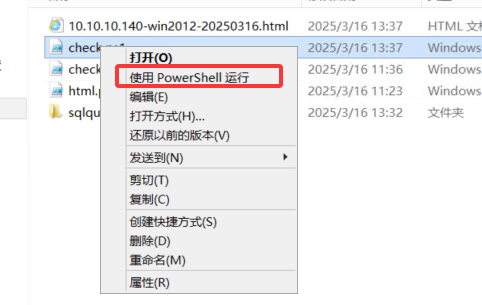
右击"check.ps1",选择使用PowerShell运行
输出结果:
用浏览器打开目录下生成的html文件即可查看报告:
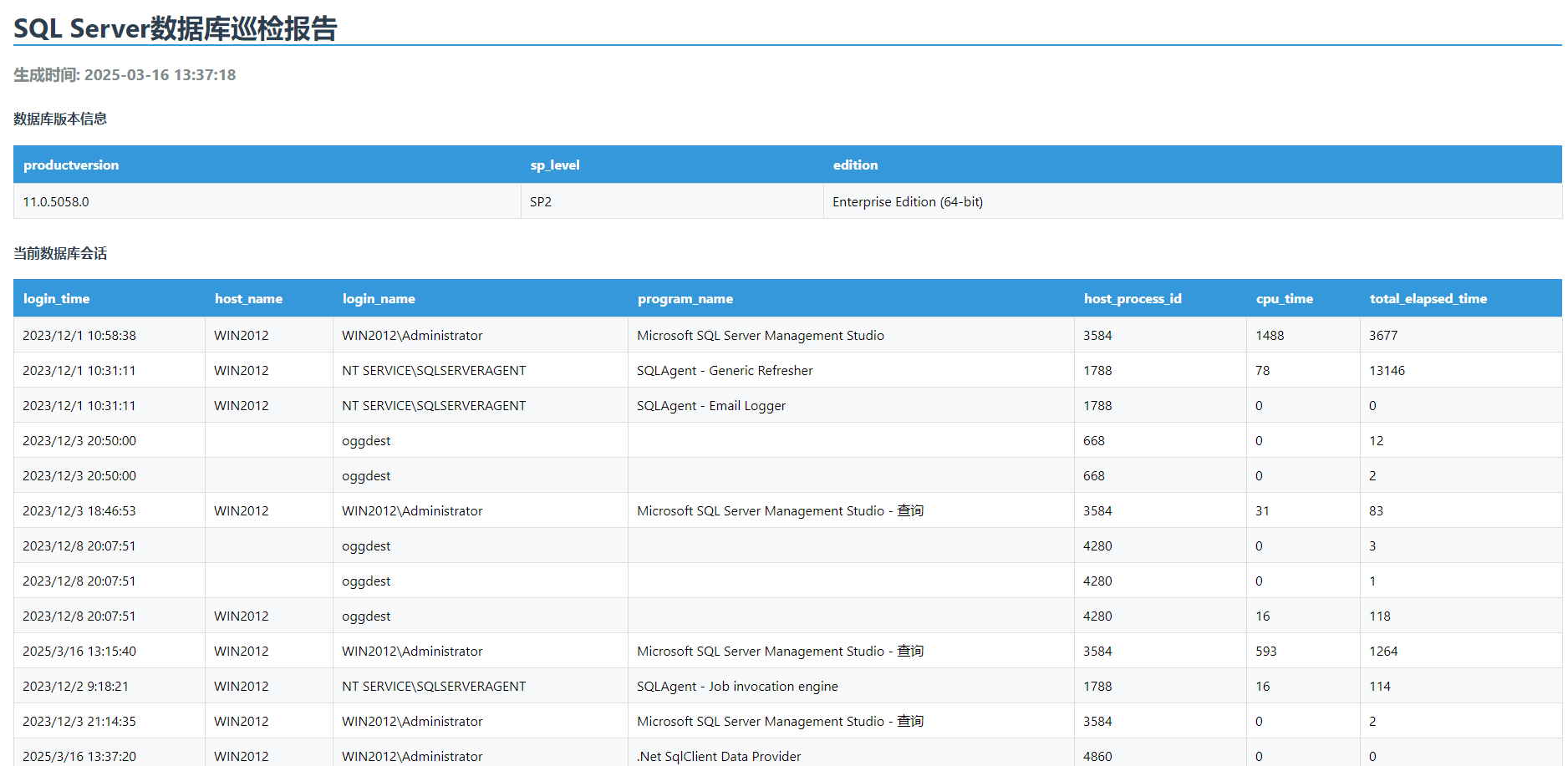
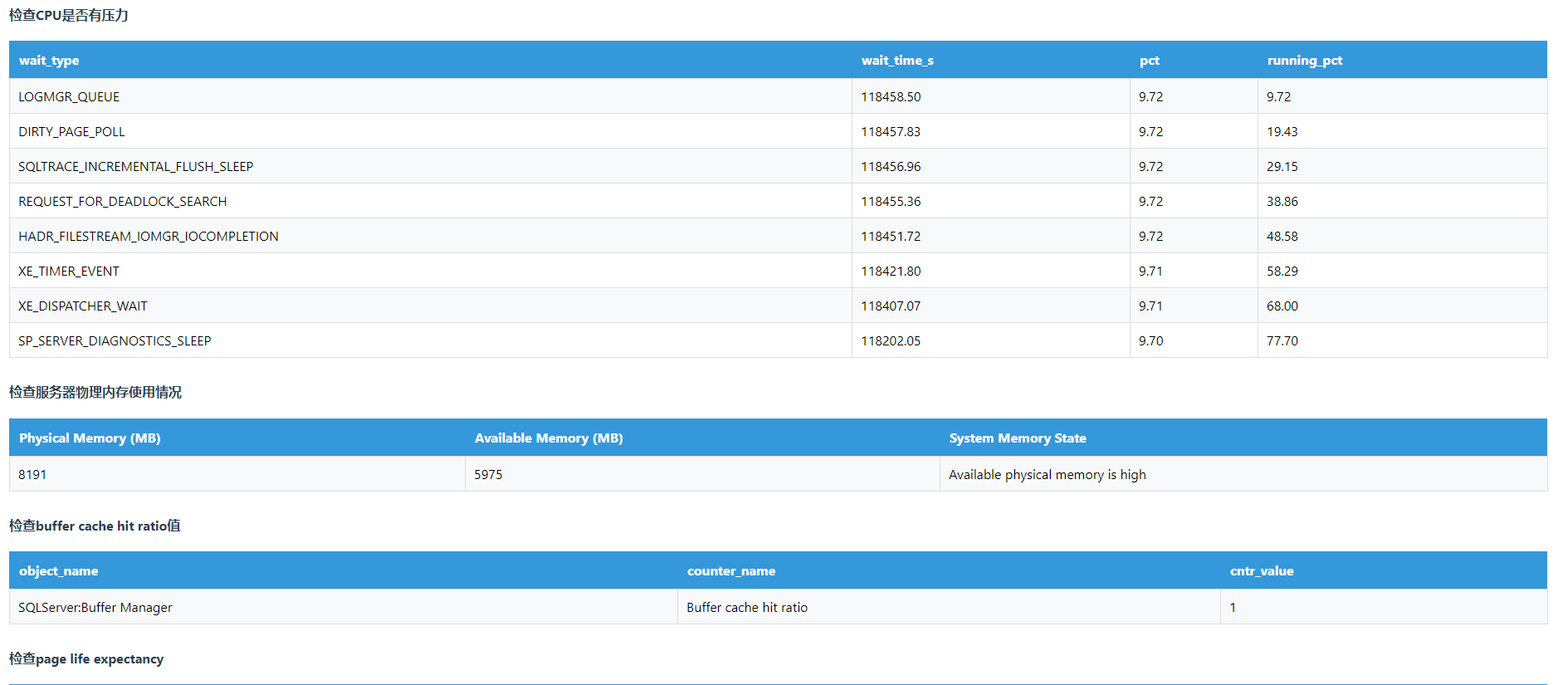
更多检查项,自己查看html报告吧。
增加检查项
- 增加检查项:在sqlquery目录添加新的sql文件
- 修改check.ps1脚本:添加相应的检查项
注意事项
- 首次运行可能需解除PowerShell执行限制
- 生产环境建议先测试再使用
脚本可以帮我们大大节省了巡检时间!现在公众号后台回复消息“sqlserver巡检脚本”获取完整代码包(含常用SQL查询语句)
快转发给需要的小伙伴,一起告别繁琐的手动巡检吧!具体详情请参考 一分钟搞定SQL Server数据库巡检报告,省时又省力!

腾讯云面向开发者汇聚海量精品云计算使用和开发经验,营造开放的云计算技术生态圈。
更多推荐
 6
6 0
0- 0


 已为社区贡献4条内容

所有评论(0)