智能家居传感器:BME680--树莓派3B+ 搭配BME680的数据读取温湿度和气压。树莓派IIC BME680算法库 (未完成版本)
在之前的一篇博客里面写了关于Stm32F407 读取BME680传感器的程序,发现很多小伙伴都想玩BME680这个传感器,所以准备再开一个坑,做一下BME680和树莓派搭配的例子,希望给大家一点点参考。关于上一篇博客 传送门在这里 https://blog.csdn.net/weixin_41534481/article/details/104302626代码位置 https://gitee.co
在之前的一篇博客里面写了关于Stm32F407 读取BME680传感器的程序,发现很多小伙伴都想玩BME680这个传感器,所以准备再开一个坑,做一下BME680和树莓派搭配的例子,希望给大家一点点参考。
关于上一篇博客 传送门在这里 https://blog.csdn.net/weixin_41534481/article/details/104302626
代码位置 https://gitee.com/jeasonb/bme680_pi
https://gitee.com/jeasonb/iot680pi
https://gitee.com/jeasonb/bme680
我的代码做了几个版本的,有点乱,大家见谅 资源肯定都在其中,大家找找,我有空继续完善一下
这一篇博客主要是分享关于树莓派的IIC 驱动以及我现在的开发环境的。
目前的开发方法使用的是window下的vscode 开发程序,使用filezilla 传输文件到树莓派。编译器选择的是树莓派自带的gcc 编译器。使用cmake 生成makefile 文件。
初步的设想就是可以读取出来温湿度/气压/IAQ。 进阶的想法就是可以实现将这些数据上传到domoticz的服务器。
第一步就是驱动BME680模块,这里我选择的是使用树莓派的硬件IIC 来驱动BME680,BME680 也支持SPi,而且官方的驱动也支持SPI的接口,但是我还是选择了更熟悉的IIC。
我的BME680驱动一个分成了三层,最底层是基于以下的库文件来使用树莓派的IIC
代码我会放到gitee,这里只引出作者,表达感谢
/* bcm2835.c
// C and C++ support for Broadcom BCM 2835 as used in Raspberry Pi
// http://elinux.org/RPi_Low-level_peripherals
// http://www.raspberrypi.org/wp-content/uploads/2012/02/BCM2835-ARM-Peripherals.pdf
//
// Author: Mike McCauley
// Copyright (C) 2011-2013 Mike McCauley
// $Id: bcm2835.c,v 1.27 2019/07/22 23:04:24 mikem Exp mikem $
*/
通过使用这个头文件我们就可以操作树莓派的硬件IIC ,该作者的方法应该是寄存器的方法,使用的是ioremap 映射硬件的寄存器,然后直接操作寄存器进行硬件的操作,该文件具有很全面的硬件操作相关的函数,我只是使用了其中的IIC 相关。
相关的函数名称如下
int bcm2835_i2c_begin(void);
void bcm2835_i2c_end(void);
void bcm2835_i2c_setSlaveAddress(uint8_t addr);
void bcm2835_i2c_setClockDivider(uint16_t divider);
void bcm2835_i2c_set_baudrate(uint32_t baudrate);
uint8_t bcm2835_i2c_write(char * buf, uint32_t len);
uint8_t bcm2835_i2c_read(char* buf, uint32_t len);
uint8_t bcm2835_i2c_read_register_rs(char* regaddr, char* buf, uint32_t len);
uint8_t bcm2835_i2c_write_read_rs(char* cmds, uint32_t cmds_len, char* buf, uint32_t buf_len);
这是最底层的函数操作,然后我为了适应BME680的官方驱动的入口函数又对底层函数进行了一层包装
最顶层的BME 官方驱动的函数入口如下所示
/** Type definitions */
/*!
 * Generic communication function pointer
 * @param[in] dev_id: Place holder to store the id of the device structure
 *                    Can be used to store the index of the Chip select or
 *                    I2C address of the device.
 * @param[in] reg_addr:	Used to select the register the where data needs to
 *                      be read from or written to.
 * @param[in/out] reg_data: Data array to read/write
 * @param[in] len: Length of the data array
 */
typedef int8_t (*bme680_com_fptr_t)(uint8_t dev_id, uint8_t reg_addr, uint8_t *data, uint16_t len);

/*!
 * Delay function pointer
 * @param[in] period: Time period in milliseconds
 */
typedef void (*bme680_delay_fptr_t)(uint32_t period);
上述的两个函数指针的类型分别定义了BME680 需要的寄存器的读写和延时函数。
我的对应的实现函数名称如下 (完整代码请去gitee找,挺长的不好放)
int8_t my_i2c_read(uint8_t dev_id, uint8_t reg_addr, uint8_t *data, uint16_t len)
int8_t my_i2c_write(uint8_t dev_id, uint8_t reg_addr, uint8_t *data, uint16_t len)
void   my_delay(uint32_t period)
将自己编写的函数的函数指针传递给BME680官方驱动之后就可以进行一些读取操作了。
BME 680 的初始话部分的代码如下
void init_bme680(void)
{
    int rslt;
    uint8_t set_required_settings;
    gas_sensor.read  =  my_i2c_read;
    gas_sensor.write =  my_i2c_write;
    gas_sensor.delay_ms = my_delay;

    gas_sensor.intf              = BME680_I2C_INTF; //interface : IIC
    gas_sensor.power_mode        = BME680_FORCED_MODE; //模式选择
    gas_sensor.chip_id           = BME680_CHIP_ID;    //芯片id
    gas_sensor.dev_id            = BME680_I2C_ADDR_SECONDARY;

    gas_sensor.calib             = calib_struct;
    gas_sensor.tph_sett          = tph_sett_struct;
    gas_sensor.gas_sett          = gas_sett_struct;

    gas_sensor.tph_sett.os_hum   = BME680_OS_1X;
    gas_sensor.tph_sett.os_temp  = BME680_OS_1X;
    gas_sensor.tph_sett.os_pres  = BME680_OS_1X;
    gas_sensor.tph_sett.filter   = BME680_FILTER_SIZE_1;

   gas_sensor.power_mode = BME680_FORCED_MODE;
  /* Set the required sensor settings needed */
    set_required_settings = (BME680_OST_SEL | BME680_OSP_SEL | BME680_OSH_SEL | BME680_FILTER_SEL| BME680_GAS_SENSOR_SEL);
    rslt =  bme680_init(&gas_sensor);
    if(rslt == BME680_OK)
    {
        printf(" init done \r\n");
    }else {
        printf(" init failed rslt = %d\r\n",rslt);
    }

    /* Set the desired sensor configuration */
	 rslt =  bme680_set_sensor_settings(set_required_settings,&gas_sensor);
   if(rslt)printf("result of bme680_set_sensor_settings() is %d",rslt);

	/* Set the power mode */
	rslt =  bme680_set_sensor_mode(&gas_sensor);
    if(rslt)printf("result of bme680_set_sensor_mode() is %d",rslt);
    //bsec_init();
}
其实到了上面的这些的步骤我们只是完成了第一部分,驱动BME680 传感器,而且这里的驱动我们还取巧了,使用的别人的代码。而且其中的初始化逻辑我还参考了我的上一篇博客的做法。
接下来要进行的是读取传感器的数据,尤其是IAQ的数据,根据官方的说法,IAQ的数据是需要配合相应的算法去进行计算才能得出结果的,为此我特意去BSEC的官网下载了BME680的算法库。完整的算法库也会放到gitee上,大家自行获取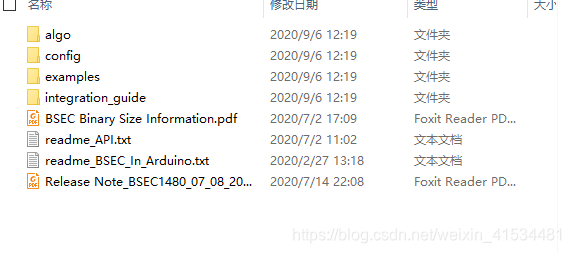 在算法库中又针对不同硬件平台的lite和normal算法,我们选择的是针对树莓派的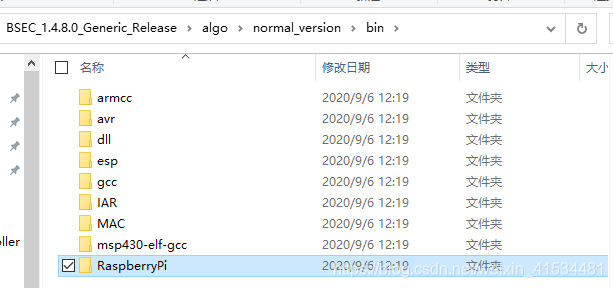
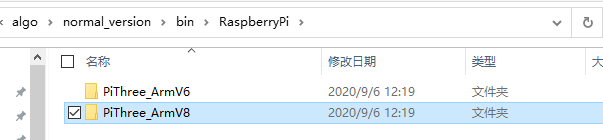
这是本次使用的算法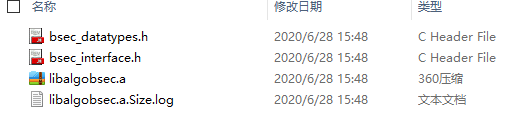
我们需要做的就是将算法库链接到我们的程序上,
这里我使用的是cmaked的方法自动生成相应的makefile文件,其中关于链接算法库的做法如下
cmake_minimum_required(VERSION 3.1 FATAL_ERROR)

# Set project information
project(controller VERSION 0.0.0 LANGUAGES C)
include(cmakes/BuildDefaults.cmake)
include_directories(./IIC/)
include_directories(./drive/)
include_directories(./algo/)
include_directories(.)

#target_include_directories(app PUBLIC  "./algo/"       )
link_directories("./algo/")
add_executable(app
                ./main.c
                ./IIC/bcm2835.c
                ./IIC/my_i2c.c
                ./drive/bme680.c
                ./drive/my_bme680.c
                #./IIC/i2c.c

                 )

target_link_libraries(app
                    libalgobsec.a
                    -pthread        )
可以看到在编译完可执行文件之后我们将算法库链接到了可执行文件上,另外的pthread库是为了之后开其他的线程处理数据的,目前用不到,我也加上了。
有机会继续分享吧,该下班了 希望有大佬一起完善BME680的代码,也希望大家指出不足,有问题请直接评论区留言,我会尽快回复的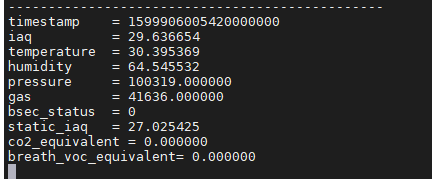

腾讯云面向开发者汇聚海量精品云计算使用和开发经验,营造开放的云计算技术生态圈。
更多推荐
 1
1 0
0- 0


 已为社区贡献6条内容

所有评论(0)