昇腾系列--音频压测:基于Atlas800T A2环境使用vllm-ascend部署Qwen2.5-Omni-7B,并用aisbench压测Qwen2.5-Omni-7B音频转文字的性能
本文详细介绍了Qwen2.5-Omni-7B大模型的环境部署与性能测试过程。在Atlas800TA2硬件平台上,完成vllm-ascend框架的环境安装,并成功加载Qwen2.5-Omni-7B模型服务,使用aisbench工具对模型的音频转文字性能进行压测。
一、Qwen2.5-Omni-7B环境部署
环境信息:
| vllm | 0.11.0 |
| vllm-ascend |
0.11.0rc0 |
| cann |
8.2.RC1 |
| HDK |
25.2.0 |
| 硬件信息 | Atlas800T A2 |
HDK 安装
下载安装包
驱动Ascend-hdk-910b-npu-driver_25.2.0_linux-aarch64.run
固件:Ascend-hdk-910b-npu-firmware_7.7.0.6.236.run
#安装命令
groupadd HwHiAiUser
useradd -g HwHiAiUser -d /home/HwHiAiUser -m HwHiAiUser
./Ascend-hdk-910b-npu-driver_25.2.0_linux-aarch64.run --full
./Ascend-hdk-910b-npu-firmware_7.7.0.6.236.run --full
cann安装
下载安装包
toolkit:Ascend-cann-toolkit_8.2.RC1_linux-aarch64.run
kernels:Ascend-cann-kernels-910b_8.2.RC1_linux-aarch64.run
nnal:Ascend-cann-nnal_8.2.RC1_linux-aarch64.run
#安装命令
./Ascend-cann-toolkit_8.2.RC1_linux-aarch64.run --full
./Ascend-cann-kernels-910b_8.2.RC1_linux-aarch64.run --install
./Ascend-cann-nnal_8.2.RC1_linux-aarch64.run --install
vllm-ascend安装
pip install vllm==0.11.0
pip install torch==2.7.1
pip install torchaudio==2.7.1
pip install vllm-ascend==0.11.0rc0
Qwen2.5-Omni-7B下载
pip install modelscope
modelscope download --model Qwen/Qwen2.5-Omni-7B --local_dir ./
vllm服务加载
source /usr/local/Ascend/ascend-toolkit/set_env.sh
source /usr/local/Ascend/nnal/atb/set_env.sh
export VLLM_USE_MODELSCOPE=True
export PYTORCH_NPU_ALLOC_CONF=max_split_size_mb:256
export ASCEND_RT_VISIBLE_DEVICES=0
export VLLM_TORCH_PROFILER_DIR="./vllm_profile"
vllm serve /root/autodl-tmp/Qwen2.5-Omni-7B --host 0.0.0.0 --port 9988 \
--max-model-len 4096 \
--max-num-batched-tokens 4096 \
--max-num-seqs 5 \
--gpu-memory-utilization 0.4 \
--dtype bfloat16 \
--tensor-parallel-size 1 \
--trust-remote-code \
--served-model-name Qwen2.5-Omni-7B \
--block-size 128 \
--allowed-local-media-path /root/Omni-7B/benchmark/ais_bench/datasets/ \
--enable-prefix-caching
服务启动成功如下图:

测试命令
curl -s 127.0.0.1:9988/v1/chat/completions \
-H "Content-Type: application/json" \
-d '{
"model": "Qwen2.5-Omni-7B",
"stream": false,
"messages": [
{"role": "user", "content": [
{"type": "audio_url", "audio_url": {"url":"file:////root/output000.wav"}},
{"type": "text", "text": "识别音频中的内容"}
]}
]
}'
测试结果

二、压测Qwen2.5-Omni-7B音频转文字性能
aisbench安装
git clone https://github.com/AISBench/benchmark.git
cd benchmark/
pip3 install -e ./ --use-pep517pip3 install -r requirements/api.txt
pip3 install -r requirements/extra.txt
压测数据集
选择其中10个文件
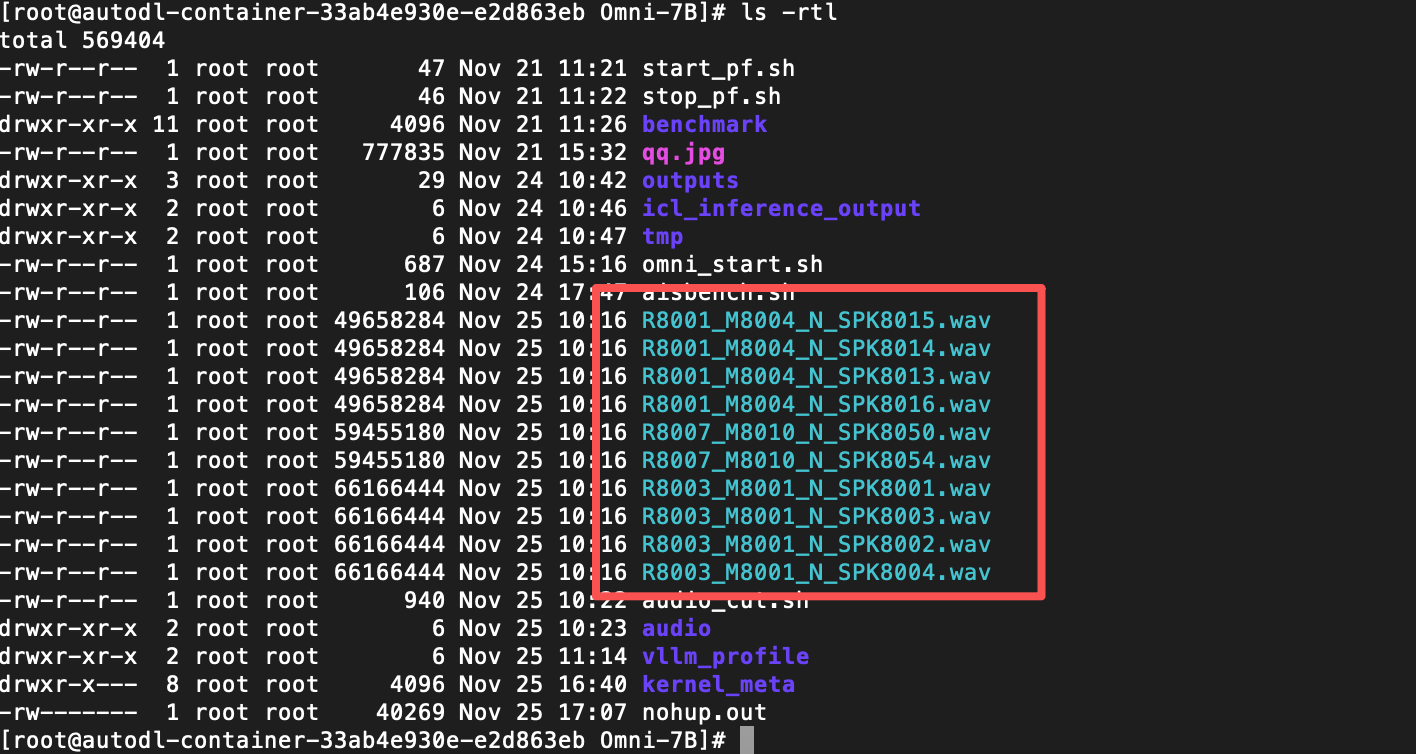
使用命令切分成30s音频段
ffmpeg -i R8001_M8004_N_SPK8015.wav -f segment -segment_time 30 -c copy audio/SPK8015%03d.wav
ffmpeg -i R8001_M8004_N_SPK8014.wav -f segment -segment_time 30 -c copy audio/SPK8014%03d.wav
ffmpeg -i R8001_M8004_N_SPK8013.wav -f segment -segment_time 30 -c copy audio/SPK8013%03d.wav
ffmpeg -i R8001_M8004_N_SPK8016.wav -f segment -segment_time 30 -c copy audio/SPK8016%03d.wav
ffmpeg -i R8003_M8001_N_SPK8002.wav -f segment -segment_time 30 -c copy audio/SPK8002%03d.wav
ffmpeg -i R8003_M8001_N_SPK8003.wav -f segment -segment_time 30 -c copy audio/SPK8003%03d.wav
ffmpeg -i R8007_M8010_N_SPK8054.wav -f segment -segment_time 30 -c copy audio/SPK8054%03d.wav
ffmpeg -i R8007_M8010_N_SPK8050.wav -f segment -segment_time 30 -c copy audio/SPK8050%03d.wav
ffmpeg -i R8003_M8001_N_SPK8001.wav -f segment -segment_time 30 -c copy audio/SPK8001%03d.wav
ffmpeg -i R8003_M8001_N_SPK8004.wav -f segment -segment_time 30 -c copy audio/SPK8004%03d.wav
将数据集复制到ais_bench安装路径
cp audio/* benchmark/ais_bench/datasets/mm_custom/
自定义数据集创建mm_custom.jsonl文件,路径benchmark/ais_bench/datasets/mm_custom/,内容格式如下:
{"type":"video","path":["benchmark/ais_bench/datasets/mm_custom/SPK8004-001.wav"],"question":"describe this video","answer":"xxx"}
{"type":"video","path":["benchmark/ais_bench/datasets/mm_custom/SPK8004-002.wav"],"question":"describe this video","answer":"xxx"}
{"type":"video","path":["benchmark/ais_bench/datasets/mm_custom/SPK8004-003.wav"],"question":"describe this video","answer":"xxx"}
{"type":"video","path":["benchmark/ais_bench/datasets/mm_custom/SPK8004-004.wav"],"question":"describe this video","answer":"xxx"}
aisbench测试
修改连接vllm的配置文件benchmark/ais_bench/benchmark/configs/models/vllm_api/vllm_api_stream_chat.py

压测命令
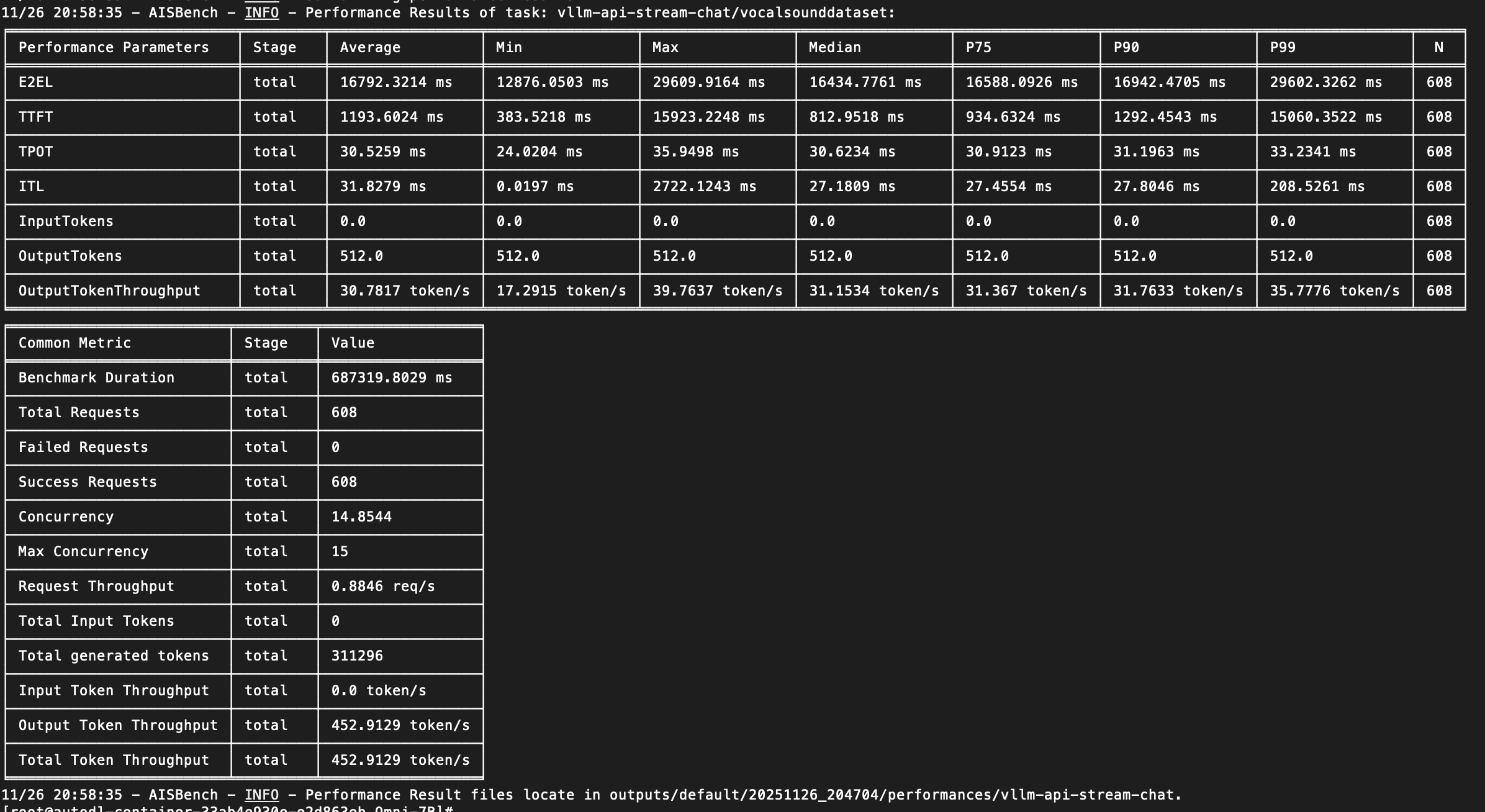
ais_bench --models vllm_api_stream_chat --datasets mm_custom_gen --mode perf --num-prompts 150
压测结果

腾讯云面向开发者汇聚海量精品云计算使用和开发经验,营造开放的云计算技术生态圈。
更多推荐
 22
22 0
0- 0


 已为社区贡献4条内容

所有评论(0)