【开源鸿蒙Flutter跨平台开发学习笔记 】DAY04:实现Dio网络请求封装
·
小鱼虽然比部分人慢一步,但是还没放弃哦,今天的目标是:完成网络请求封装。虽然昨天已经找到flutte-axios文档,但是任性的本小鱼今天打算先实现的是Dio网络请求封装。
网络请求封装是一个重要的架构设计,以下是我总结的完整封装思路【花了好几个小时完成的,请耐心看完~ 】:
一、核心设计原则
1、单一职责
class HttpClient {}        // 网络层 - 只负责HTTP通信
class ApiService {}   // 数据层 - 数据处理和缓存
2、开闭原则
// 对扩展开放,对修改关闭
abstract class BaseHttpClient {
  Future<Response> get(String url);
  Future<Response> post(String url, dynamic data);
}

class AxiosClient implements HttpClient {
  // 实现具体逻辑,可以随时替换为其他HTTP客户端
}
二、分层架构设计
1、四层架构设计:
┌─────────────────┐
│    Presentation │ UI层 - 页面和状态管理
├─────────────────┤
│   Business      │ 业务层 - 业务逻辑和用例
├─────────────────┤
│    Data         │ 数据层 - 仓库模式
├─────────────────┤
│  Infrastructure │ 基础设施 - 网络请求、本地存储
└─────────────────┘
三、核心组件封装
1、基础网络客户端
import 'package:dio/dio.dart';
import 'models/api_response.dart';
abstract class BaseHttpClient {
  // 基础配置方法
  void setBaseUrl(String baseUrl);
  void setHeaders(Map<String, String> headers);
  void setTimeout(Duration connectTimeout, Duration receiveTimeout, Duration sendTimeout);

  // 拦截器管理
  void addInterceptor(Interceptor interceptor);
  void removeInterceptor(Interceptor interceptor);
  void clearInterceptors();

  // 核心请求方法
  Future<ApiResponse<T>> get<T>(
      String path, {
        Map<String, dynamic>? queryParameters,
        Options? options,
        String? requestId,
      });

  Future<ApiResponse<T>> post<T>(
      String path, {
        dynamic data,
        Map<String, dynamic>? queryParameters,
        Options? options,
        String? requestId,
      });

  Future<ApiResponse<T>> put<T>(
      String path, {
        dynamic data,
        Map<String, dynamic>? queryParameters,
        Options? options,
        String? requestId,
      });

  Future<ApiResponse<T>> delete<T>(
      String path, {
        dynamic data,
        Map<String, dynamic>? queryParameters,
        Options? options,
        String? requestId,
      });

  Future<ApiResponse<T>> patch<T>(
      String path, {
        dynamic data,
        Map<String, dynamic>? queryParameters,
        Options? options,
        String? requestId,
      });

  // 请求取消
  void cancelRequest(String requestId);
  void cancelAllRequests();

  // 文件上传
  Future<ApiResponse<T>> upload<T>(
      String path, {
        required String filePath,
        required String fileKey,
        Map<String, dynamic>? data,
        ProgressCallback? onSendProgress,
        Options? options,
        String? requestId,
      });

  // 文件下载
  Future<ApiResponse<T>> download<T>(
      String path, {
        required String savePath,
        ProgressCallback? onReceiveProgress,
        Map<String, dynamic>? queryParameters,
        Options? options,
        String? requestId,
      });

  // 认证相关
  void setAuthToken(String token);
  void clearAuthToken();

  // 工具方法
  bool isNetworkError(DioException error);
  bool isServerError(int statusCode);

  // 资源释放
  void dispose();
}
2、统一响应模型
class ApiResponse<T> {
  final T? data;
  final int statusCode;
  final String message;
  final bool success;
  final Map<String, dynamic>? headers;

  ApiResponse({
    this.data,
    required this.statusCode,
    required this.message,
    required this.success,
    this.headers,
  });

  factory ApiResponse.success(T data, {int statusCode = 200, Map<String, dynamic>? headers}) {
    return ApiResponse(
      data: data,
      statusCode: statusCode,
      message: 'Success',
      success: true,
      headers: headers,
    );
  }

  factory ApiResponse.error(String message, {int statusCode = 500, Map<String, dynamic>? headers}) {
    return ApiResponse(
      data: null,
      statusCode: statusCode,
      message: message,
      success: false,
      headers: headers,
    );
  }

  Map<String, dynamic> toJson() {
    return {
      'data': data,
      'statusCode': statusCode,
      'message': message,
      'success': success,
      'headers': headers,
    };
  }
}
3、错误体系处理
abstract class AppException implements Exception {
  final String message;
  final int code;

  AppException({required this.message, required this.code});

  @override
  String toString() => 'AppException: $message (code: $code)';
}

class NetworkException extends AppException {
  NetworkException(String message) : super(message: message, code: 1001);
}

class ServerException extends AppException {
  ServerException(String message, int code) : super(message: message, code: code);
}

class AuthenticationException extends AppException {
  AuthenticationException(String message) : super(message: message, code: 401);
}

class ValidationException extends AppException {
  ValidationException(String message) : super(message: message, code: 422);
}

class TimeoutException extends AppException {
  TimeoutException(String message) : super(message: message, code: 408);
}

class UnknownException extends AppException {
  UnknownException(String message) : super(message: message, code: 500);
}
四、拦截器设计
1、认证拦截器
import 'package:dio/dio.dart';

class AuthInterceptor extends Interceptor {
  final Future<String?> Function() getToken;
  final Future<String?> Function() refreshToken;

  AuthInterceptor({
    required this.getToken,
    required this.refreshToken,
  });

  @override
  void onRequest(RequestOptions options, RequestInterceptorHandler handler) async {
    // 自动添加 token
    final token = await getToken();
    if (token != null && token.isNotEmpty) {
      options.headers['Authorization'] = 'Bearer $token';
    }
    handler.next(options);
  }

  @override
  void onError(DioException err, ErrorInterceptorHandler handler) async {
    // Token 过期处理 (401)
    if (err.response?.statusCode == 401) {
      final newToken = await refreshToken();
      if (newToken != null && newToken.isNotEmpty) {
        // 更新请求头并重试
        err.requestOptions.headers['Authorization'] = 'Bearer $newToken';
        try {
          final response = await Dio().fetch(err.requestOptions);
          return handler.resolve(response);
        } catch (retryError) {
          return handler.next(err);
        }
      }
    }
    handler.next(err);
  }
}
2、日志拦截器
import 'package:dio/dio.dart';

class LoggingInterceptor extends Interceptor {
  @override
  void onRequest(RequestOptions options, RequestInterceptorHandler handler) {
    final time = DateTime.now().toIso8601String();
    print('🕒 $time');
    print('🚀 [REQUEST] ${options.method} ${options.uri}');
    print('📦 Headers: ${options.headers}');
    if (options.data != null) {
      print('📤 Body: ${options.data}');
    }
    if (options.queryParameters.isNotEmpty) {
      print('🔍 Query: ${options.queryParameters}');
    }
    handler.next(options);
  }

  @override
  void onResponse(Response response, ResponseInterceptorHandler handler) {
    print('✅ [RESPONSE] ${response.statusCode} ${response.requestOptions.uri}');
    print('📥 Data: ${response.data}');
    handler.next(response);
  }

  @override
  void onError(DioException err, ErrorInterceptorHandler handler) {
    print('❌ [ERROR] ${err.type} - ${err.message}');
    print('📋 Response: ${err.response?.data}');
    handler.next(err);
  }
}
3、重试拦截器
import 'package:dio/dio.dart';

import '../config/api_config.dart';

class RetryInterceptor extends Interceptor {
  @override
  void onError(DioException err, ErrorInterceptorHandler handler) async {
    final options = err.requestOptions;
    final retryCount = (options.extra['retryCount'] as int?) ?? 0;

    if (_shouldRetry(err) && retryCount < ApiConfig.maxRetries) {
      await Future.delayed(ApiConfig.retryInterval);
      options.extra['retryCount'] = retryCount + 1;

      try {
        final response = await Dio().fetch(options);
        handler.resolve(response);
      } catch (e) {
        handler.next(err);
      }
    } else {
      handler.next(err);
    }
  }

  bool _shouldRetry(DioException error) {
    return error.type == DioExceptionType.connectionTimeout ||
        error.type == DioExceptionType.receiveTimeout ||
        error.type == DioExceptionType.sendTimeout ||
        error.response?.statusCode == 502 ||
        error.response?.statusCode == 503 ||
        error.response?.statusCode == 504;
  }
}
五、配置管理
1、环境配置,根据实际配置哦
enum Environment { development, staging, production }

class ApiConfig {
  static Environment _environment = Environment.development;

  static void setEnvironment(Environment env) {
    _environment = env;
  }

  static String get baseUrl {
    switch (_environment) {
      case Environment.development:
        return 'https://jsonplaceholder.typicode.com';
      case Environment.staging:
        return 'https://staging.api.example.com';
      case Environment.production:
        return 'https://api.example.com';
      default:
        return 'https://jsonplaceholder.typicode.com';
    }
  }

  static Map<String, String> get defaultHeaders {
    return {
      'Content-Type': 'application/json',
      'Accept': 'application/json',
      'User-Agent': 'Flutter-App/1.0.0',
    };
  }

  static Duration get connectTimeout => const Duration(seconds: 10);
  static Duration get receiveTimeout => const Duration(seconds: 10);
  static Duration get sendTimeout => const Duration(seconds: 10);

  // 重试配置
  static int get maxRetries => 3;
  static Duration get retryInterval => const Duration(seconds: 1);
}
六、数据层
accessToken 要替换成自己的~
import '../core/http/base_http_client.dart';
import '../models/GitCodeUser.dart';

class ApiService {
  final BaseHttpClient _httpClient;
  final accessToken = '----';

  ApiService(this._httpClient);

  void initialize() {
      _httpClient.setBaseUrl('https://api.gitcode.com/api/v5');

      _httpClient.setHeaders({
        'Content-Type': 'application/json',
      });

  }

  // 获取用户信息
  Future<GitCodeUser> getUserInfo(String username) async {
    try {
      final response = await _httpClient.get(
        '/users/$username',
        queryParameters: {
          'access_token': accessToken,
        },
      );

      return GitCodeUser.fromJson(response.data);
    } catch (e) {
      print('获取用户信息失败: $e');
      rethrow;
    }
  }

  // 获取用户仓库列表
  Future<List<dynamic>> getUserRepos(String username) async {
    try {
      final response = await _httpClient.get(
        '/users/$username/repos',
        queryParameters: {
          'access_token': accessToken,
          'sort': 'updated',
          'per_page': 10,
        },
      );

      return response.data as List;
    } catch (e) {
      print('获取用户仓库失败: $e');
      rethrow;
    }
  }

  // 搜索用户
  Future<List<dynamic>> searchUsers(String query) async {
    try {
      final response = await _httpClient.get(
        '/search/users',
        queryParameters: {
          'access_token': 'SE7Gx6zoWYa4vmysQD6H1hgV',
          'q': query,
          'per_page': 20,
        },
      );

      return response.data['items'] as List;
    } catch (e) {
      print('搜索用户失败: $e');
      rethrow;
    }
  }
}
用户实例
class GitCodeUser {
  final int id;
  final String login;
  final String name;
  final String? avatarUrl;
  final String? bio;
  final int publicRepos;
  final int followers;
  final int following;

  GitCodeUser({
    required this.id,
    required this.login,
    required this.name,
    this.avatarUrl,
    this.bio,
    required this.publicRepos,
    required this.followers,
    required this.following,
  });

  factory GitCodeUser.fromJson(Map<String, dynamic> json) {
    int parseInt(dynamic v) {
      if (v is int) return v;
      if (v is String) return int.tryParse(v) ?? 0;
      return 0;
    }

    return GitCodeUser(
      id: parseInt(json['id']),
      login: json['login'] ?? '',
      name: json['name'] ?? '',
      avatarUrl: json['avatar_url'],
      bio: json['bio'],
      publicRepos: parseInt(json['public_repos']),
      followers: parseInt(json['followers']),
      following: parseInt(json['following']),
    );
  }
}
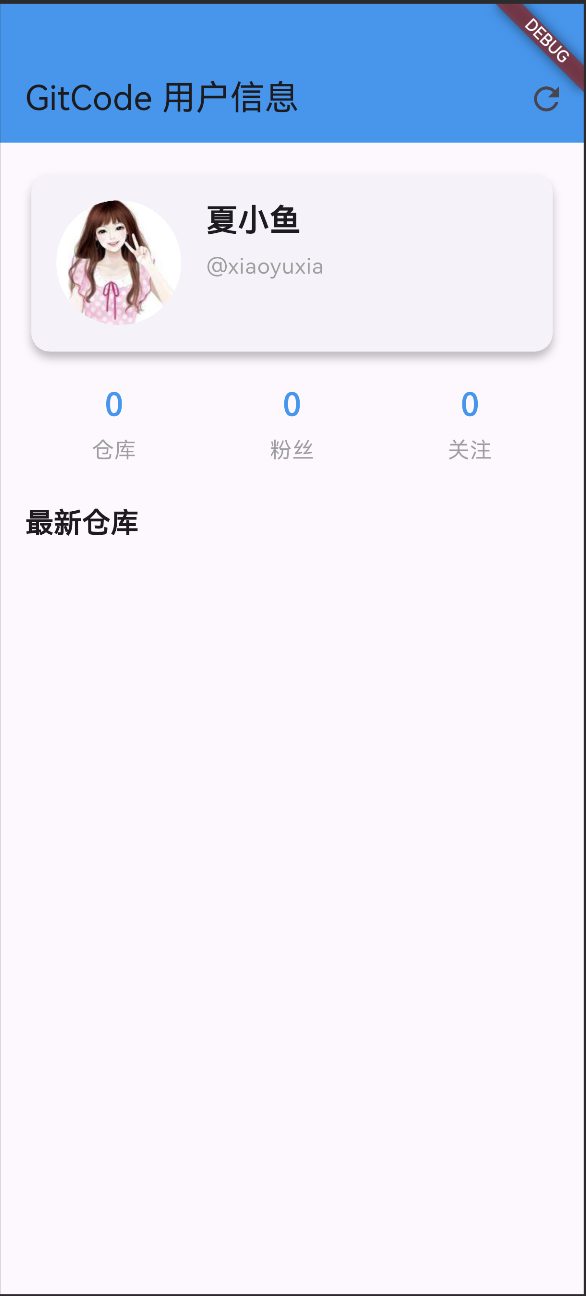
七、页面
import 'package:flutter/material.dart';
import 'package:pocket/core/http/dio_http_client.dart';
import 'package:pocket/services/user_service.dart';

import '../models/GitCodeUser.dart';


class UserProfilePage extends StatefulWidget {
  final String username;

  const UserProfilePage({super.key, required this.username});

  @override
  _UserProfilePageState createState() => _UserProfilePageState();
}

class _UserProfilePageState extends State<UserProfilePage> {
  final ApiService _userService = ApiService(new HttpClient());
  GitCodeUser? _user;
  List<dynamic> _repos = [];
  bool _isLoading = true;
  String _error = '';

  @override
  void initState() {
    super.initState();
    _userService.initialize();
    _loadUserData();
  }

  Future<void> _loadUserData() async {
    setState(() {
      _isLoading = true;
      _error = '';
    });

    try {
      final results = await Future.wait([
        _userService.getUserInfo(widget.username),
        _userService.getUserRepos(widget.username),
      ]);

      final user = results[0] as GitCodeUser;
      final repos = results[1] as List<dynamic>;

      setState(() {
        _user = user;
        _repos = repos;
      });
    } catch (e) {
      setState(() {
        _error = e.toString();
      });
    } finally {
      setState(() {
        _isLoading = false;
      });
    }
  }

  @override
  Widget build(BuildContext context) {
    return Scaffold(
      appBar: AppBar(
        title: Text('GitCode 用户信息'),
        backgroundColor: Colors.blue,
        actions: [
          IconButton(
            icon: Icon(Icons.refresh),
            onPressed: _loadUserData,
          ),
        ],
      ),
      body: _isLoading
          ? Center(child: CircularProgressIndicator())
          : _error.isNotEmpty
          ? Center(
        child: Column(
          mainAxisAlignment: MainAxisAlignment.center,
          children: [
            Icon(Icons.error_outline, size: 64, color: Colors.red),
            SizedBox(height: 16),
            Text(
              '加载失败',
              style: TextStyle(fontSize: 18, color: Colors.red),
            ),
            SizedBox(height: 8),
            Text(_error),
            SizedBox(height: 20),
            ElevatedButton(
              onPressed: _loadUserData,
              child: Text('重试'),
            ),
          ],
        ),
      )
          : _user == null
          ? Center(child: Text('用户不存在'))
          : SingleChildScrollView(
        padding: EdgeInsets.all(16),
        child: Column(
          crossAxisAlignment: CrossAxisAlignment.start,
          children: [
            // 用户基本信息卡片
            Card(
              elevation: 4,
              child: Padding(
                padding: EdgeInsets.all(16),
                child: Row(
                  children: [
                    CircleAvatar(
                      radius: 40,
                      backgroundColor: Colors.grey[300],
                      backgroundImage: _user!.avatarUrl != null
                          ? NetworkImage(_user!.avatarUrl!)
                          : null,
                      child: _user!.avatarUrl == null
                          ? Icon(Icons.person, size: 40)
                          : null,
                    ),
                    SizedBox(width: 16),
                    Expanded(
                      child: Column(
                        crossAxisAlignment: CrossAxisAlignment.start,
                        children: [
                          Text(
                            _user!.name,
                            style: TextStyle(
                              fontSize: 20,
                              fontWeight: FontWeight.bold,
                            ),
                          ),
                          SizedBox(height: 4),
                          Text(
                            '@${_user!.login}',
                            style: TextStyle(
                              color: Colors.grey,
                            ),
                          ),
                          SizedBox(height: 8),
                          if (_user!.bio != null)
                            Text(
                              _user!.bio!,
                              style: TextStyle(
                                fontStyle: FontStyle.italic,
                              ),
                            ),
                        ],
                      ),
                    ),
                  ],
                ),
              ),
            ),

            SizedBox(height: 16),

            // 统计信息
            Row(
              mainAxisAlignment: MainAxisAlignment.spaceAround,
              children: [
                _buildStatItem('仓库', _user!.publicRepos),
                _buildStatItem('粉丝', _user!.followers),
                _buildStatItem('关注', _user!.following),
              ],
            ),

            SizedBox(height: 24),

            // 仓库列表
            Text(
              '最新仓库',
              style: TextStyle(
                fontSize: 18,
                fontWeight: FontWeight.bold,
              ),
            ),
            SizedBox(height: 12),
            ..._repos.map((repo) => _buildRepoItem(repo)),
          ],
        ),
      ),
    );
  }

  Widget _buildStatItem(String label, int count) {
    return Column(
      children: [
        Text(
          count.toString(),
          style: TextStyle(
            fontSize: 20,
            fontWeight: FontWeight.bold,
            color: Colors.blue,
          ),
        ),
        SizedBox(height: 4),
        Text(
          label,
          style: TextStyle(
            color: Colors.grey,
          ),
        ),
      ],
    );
  }

  Widget _buildRepoItem(Map<String, dynamic> repo) {
    return Card(
      margin: EdgeInsets.only(bottom: 8),
      child: ListTile(
        leading: Icon(Icons.folder, color: Colors.blue),
        title: Text(
          repo['name'] ?? '未知仓库',
          style: TextStyle(fontWeight: FontWeight.bold),
        ),
        subtitle: repo['description'] != null
            ? Text(repo['description'])
            : null,
        trailing: Row(
          mainAxisSize: MainAxisSize.min,
          children: [
            Icon(Icons.star, size: 16, color: Colors.amber),
            SizedBox(width: 4),
            Text('${repo['stargazers_count'] ?? 0}'),
          ],
        ),
      ),
    );
  }
}
八、修改程序入口运行
username换成自己的~
// main.dart
import 'package:flutter/material.dart';
import 'package:pocket/pages/UserProfilePage.dart';

void main() {
  runApp(MyApp());
}

class MyApp extends StatelessWidget {
  @override
  Widget build(BuildContext context) {
    return MaterialApp(
      title: 'GitCode API Demo',
      theme: ThemeData(
        primarySwatch: Colors.blue,
        visualDensity: VisualDensity.adaptivePlatformDensity,
      ),
      home: UserProfilePage(username: '------'),
    );
  }
}
今天上班在摸鱼写博客 😁,完美结束 🎉

腾讯云面向开发者汇聚海量精品云计算使用和开发经验,营造开放的云计算技术生态圈。
更多推荐
 8
8 0
0- 0


 已为社区贡献6条内容

所有评论(0)