全面解析抖音环境检测特征参数 x-tt-session-dtrait 加密风控对抗
一、接口参数分析
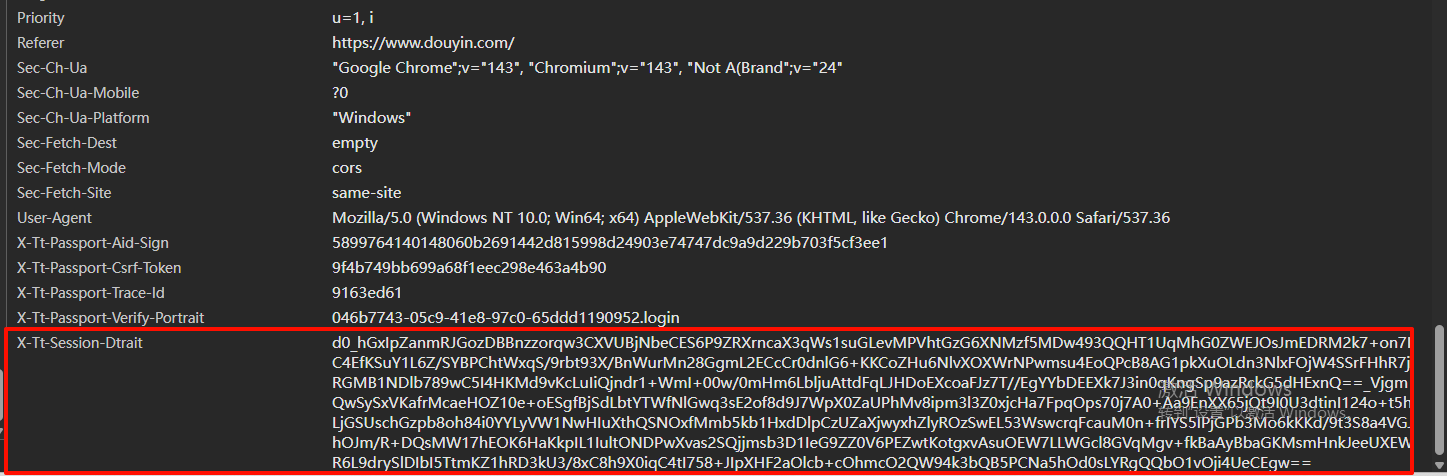
抖音的x-tt-session-dtrait是抖音 Web 端接口的风控类请求头参数,主要用于抖音服务端对请求的合法性、环境安全性进行校验,是反爬虫和风控体系的重要组成部分。
1.参数的核心作用:该参数是抖音风控系统用于验证请求来源的真实性、防止恶意请求(如批量发布、爬虫刷接口)的关键参数,若校验不通过,会出现 “掉号” 等限制情况。
2.参数的格式与加密逻辑:
-
最终格式为
d0_xx_xx:d0是固定前缀,第一个xx为RSA 加密结果,第二个xx为AES-CBC 加密结果。 -
加密原文包含多维度环境信息:
{“dtrait”:“IAAAAA…”,“timestamp”:1753688900,“sdkVersion”:“1.0.31-beta.4”,“path”:“/web/api/media/aweme/create_v2/”}
其中
dtrait字段是浏览器环境特征的编码结果,timestamp为请求时间戳,sdkVersion是前端 SDK 版本,path为请求接口路径。
3.dtrait 字段的生成逻辑:
- 基于浏览器环境数据生成数组, 通过
fromCharCode转换后再进行 Base64 编码得到。 - 数组的生成依赖于对环境特征数据通过
MurmurHash3(mmh3) 哈希算法计算得到。
4.需要验证的接口有以下(其实不止这些)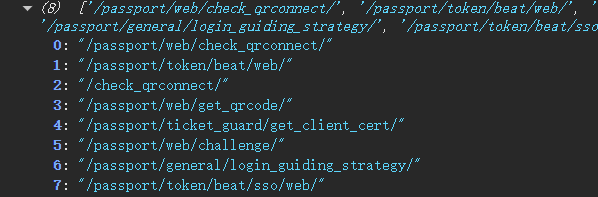

5.加密分析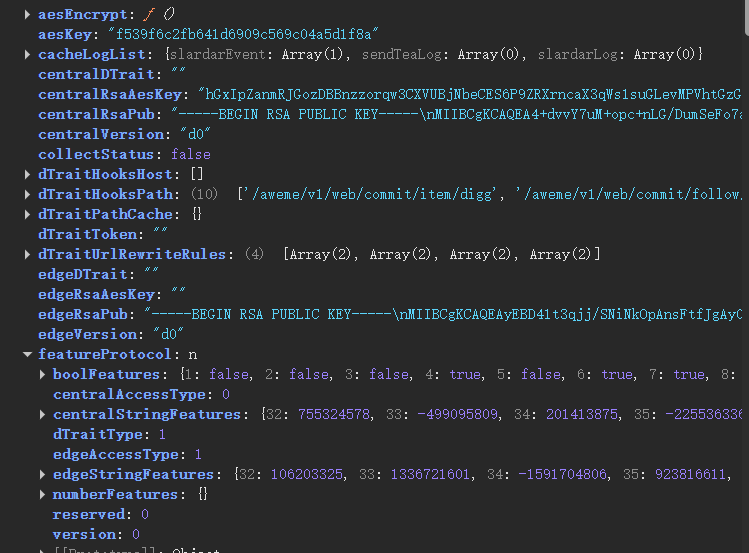
-
RSA加密
- RSA公钥:
centralRsaPub - 加密内容:
aesKey - 加密结果:
centralRsaAesKey
- RSA公钥:
-
AES加密
- key:
aesKey - 随机iv
- 加密内容:
‘{“dtrait”:“IAAAAADQIC0FVqIh4kBm/yIMAVTzI/KOlrAkqZONXCUtc6pZJoXtgvcnMxVHqSj4xKtTKeJh0LIqsjfqUCv+nGbOLEbrp0It3oooWy5hrZ6JLzYf+ukwf9YtXDEAAAAAMl/j+xEzdw/MRTSiHrKONRJqRnA2hZHFNjcbzZ0NODo+sfA5ucywezqnDTbrO0LJZ588on/QuT3KVO52PnPg/t4/6hH+lkDs4kRa”,“timestamp”:1765764515,“sdkVersion”:“1.0.31”,“path”:“/passport/web/get_qrcode/”}’
- key:
其中 aesKey 是随机生成
最后 d0_ + centralRsaAesKey + _ + AES加密结果 得到 x-tt-session-dtrait
二、dtrait加密分析
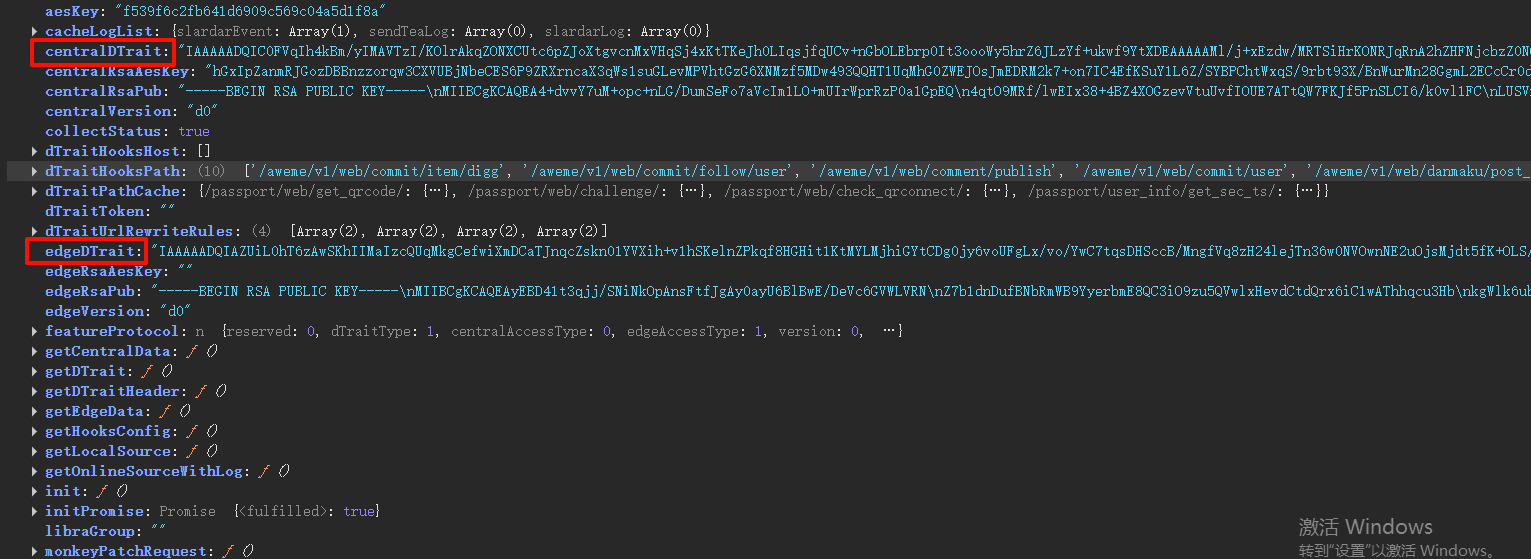
有两个特征,一个是中心特征centralDTrait
还有一个是浏览器特征edgeDTrait(我用的是edge浏览器)
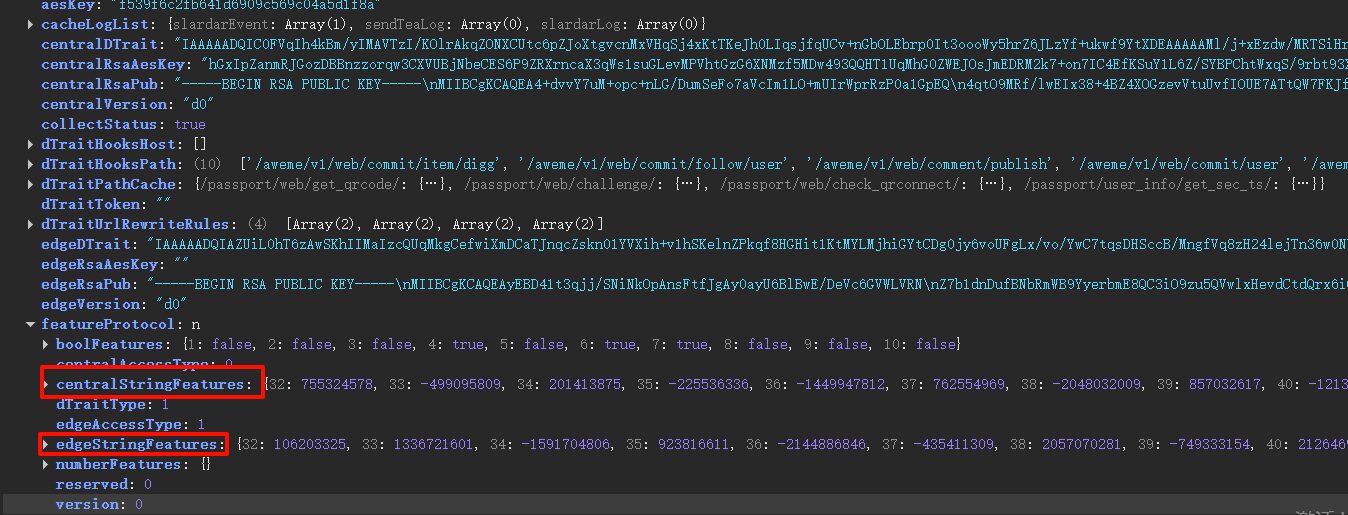
中心特征centralDTrait是由 centralStringFeatures 加密而来
浏览器特征edgeDTrait是由 edgeStringFeatures 加密而来
def getDTrait(data: Dict[Any, int]) -> str:
    sorted_items = sorted(data.items(), key=lambda x: x[0])
    buffer = bytearray([32, 0, 0, 0, 0, 208])  # prepend
    for key_str, value in sorted_items:
        key_int = int(key_str)
        buffer.append(key_int)
        buffer.extend(value.to_bytes(4, byteorder='big', signed=False))
    return base64.b64encode(buffer).decode('ascii')
-
中心特征
centralStringFeatures{ "32": 755324578, "33": -499095809, "34": 201413875, "35": -225536336, "36": -1449947812, "37": 762554969, "38": -2048032009, "39": 857032617, "40": -121328813, "41": -496906062, "42": -1304958384, "43": -23304498, "44": 1189848898, "45": -561371045, "46": 1638768265, "47": 908065513, "48": 2144742748, "49": 0, "50": 1608776465, "51": 1997524037, "52": -1575046514, "53": 308954736, "54": -2054044362, "55": 466459917, "56": 977187312, "57": -1177767813, "58": -1492306197, "59": 1120495519, "60": -1568681799, "61": -900403594, "62": 1944125150, "63": -367919466, "64": -320715686 } -
浏览器特征
edgeStringFeatures{ "32": 106203325, "33": 1336721601, "34": -1591704806, "35": 923816611, "36": -2144886846, "37": -435411309, "38": 2057070281, "39": -749333154, "40": 2126469202, "41": -379099911, "42": 2143405598, "43": 1965740824, "44": -924743578, "45": 137901199, "46": -1348386464, "47": 535798774, "48": 196831920, "49": -764297089, "50": 2015319727, "51": 527312250, "52": -404771788, "53": 1404083409, "54": -1192694734, "55": 1843786430, "56": -1262500929, "57": -507389166, "58": -180831113, "59": 409138613, "60": 1793188973, "61": 388962776, "62": -144870940, "63": 660759971, "64": 1620944669 } -
中心特征
centralStringFeatures对象里面有33个哈希特征值,分别对33个环境特征值进行murmur3哈希算法 -
而 浏览器特征
edgeStringFeatures又是分别对中心特征centralStringFeatures对象进行遍历哈希
三、特征值分析
前面分析,我们只需要分析中心特征 centralStringFeatures 对象里面有33个哈希特征值
str_32
CSSStyleDeclaration接口代表一个 CSS 声明块,它是 CSS 属性键值对的集合- 将字符串
"CSSStyleDeclaration"哈希得到str_32
str_33
- DOM 元素的矩形位置信息(DOMRect 对象),用于描述元素在页面中的几何位置和尺寸,常见于浏览器的 DOM API(比如
getBoundingClientRect()方法的返回值) - bottom: -39.8446652734375,
height: 135.27838134765625,
left: -147.341796875,
right: -12.06841552734375,
top: -175.123046875,
width: 135.27338134765625,
x: -147.341796875,
y: -175.123046875
| 属性 | 含义 |
|---|---|
x / left |
元素左边缘相对于视口左上角的水平坐标(这里 x=-147.341796875 表示元素左边缘在视口左侧外 147 像素) |
y / top |
元素上边缘相对于视口左上角的垂直坐标(y=-175.123046875 表示元素上边缘在视口上方外 175 像素) |
width |
元素的宽度(这里是 135.27838134765625 像素) |
height |
元素的高度(这里是 135.27838134765625 像素,说明这是个正方形元素) |
right |
元素右边缘相对于视口左上角的水平坐标(right = left + width) |
bottom |
元素下边缘相对于视口左上角的垂直坐标(bottom = top + height) |
- 对
"135.27838134765625,135.27838134765625,-147.341796875,-175.123046875"哈希
str_34
- canvas画布
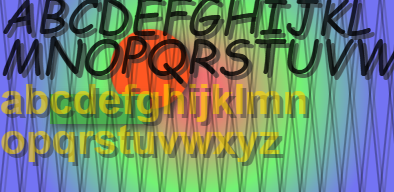
data:image/png;base64,iVBORw0KGgoAAAANSUhEUgAAAZAAAADICAYAAADGFbfiAAAQAElEQVR4AcT9B4Alx3EfjP+qe2Ze3Lx7OUcc0iESgUgkSBCMYhQpUhQpioRsJcu2ZMuS7e9kypYtWYEKliWKooKVTIk5UwQIECAJEDkDl/Ptbd63L81Md/9/NW/f4gAGBer7f4Op6VT16+rq6uqeeXukAf7H… - 将canvas画布绘制出来的图片base64格式数据哈希得到 str_34
str_35
- cssText,length,parentRule,cssFloat,getPropertyPriority,getPropertyValue,item,removeProperty,setProperty,constructor,forEach,accent-color,align-content,align-items,align-self,alignment-baseline,anchor-name,anchor-scope,animation-composition,animation-delay,animation-direction,animation-duration,animation-fill-mode…
- 将 CSS 样式属性集合哈希得到 str_35
str_36
-
[{“ActiveBorder”:“rgb(0, 0, 0)”},{“ActiveCaption”:“rgb(0, 0, 0)”},{“ActiveText”:“rgb(0, 102, 204)”},{“AppWorkspace”:“rgb(255, 255, 255)”},{“Background”:“rgb(255, 255, 255)”},{“ButtonBorder”:“rgb(0, 0, 0)”},{“ButtonFace”:“rgb(240, 240, 240)”},{“ButtonHighlight”:“rgb(240, 240, 240)”},{“ButtonShadow”:“rgb(240, 240, 240)”},{“ButtonText”:“rgb(0, 0, 0)”},{“Canvas”:“rgb(255, 255, 255)”},{“CanvasText”:“rgb(0, 0, 0)”},{“CaptionText”:“rgb(0, 0, 0)”},{“Field”:“rgb(255, 255, 255)”},{“FieldText”:“rgb(0, 0, 0)”},{“GrayText”:“rgb(109, 109, 109)”},{“Highlight”:“rgb(0, 120, 215)”},{“HighlightText”:“rgb(255, 255, 255)”},{“InactiveBorder”:“rgb(0, 0, 0)”},{“InactiveCaption”:“rgb(255, 255, 255)”},{“InactiveCaptionText”:“rgb(128, 128, 128)”},{“InfoBackground”:“rgb(255, 255, 255)”},{“InfoText”:“rgb(0, 0, 0)”},{“LinkText”:“rgb(0, 102, 204)”},{“Mark”:“rgb(255, 255, 0)”},{“MarkText”:“rgb(0, 0, 0)”},{“Menu”:“rgb(255, 255, 255)”},{“MenuText”:“rgb(0, 0, 0)”},{“Scrollbar”:“rgb(255, 255, 255)”},{“ThreeDDarkShadow”:“rgb(0, 0, 0)”},{“ThreeDFace”:“rgb(240, 240, 240)”},{“ThreeDHighlight”:“rgb(0, 0, 0)”},{“ThreeDLightShadow”:“rgb(0, 0, 0)”},{“ThreeDShadow”:“rgb(0, 0, 0)”},{“VisitedText”:“rgb(0, 102, 204)”},{“Window”:“rgb(255, 255, 255)”},{“WindowFrame”:“rgb(0, 0, 0)”},{“WindowText”:“rgb(0, 0, 0)”}]
-
将 Windows 系统 “颜色”哈希得到 str_36
str_37
- [{“caption”:“16px Arial”},{“icon”:“16px Arial”},{“menu”:“12px “Microsoft YaHei UI””},{“message-box”:“16px Arial”},{“small-caption”:“12px “Microsoft YaHei UI””},{“status-bar”:“12px “Microsoft YaHei UI””}]*
- 将 Windows 系统 “字体”哈希得到 str_37
str_38
-
😀,👨👩👧👦,©,™,◼ - 将上面表情符号哈希得到 str_38
str_39
- Web Audio API 音频处理中产生的「高精度相对时间值」
对"164537.64795303345"哈希
str_40
- Web Audio API音频采样点的振幅值
- 对
"502.5999283068122"哈希
str_44
- 浏览器对不同音视频格式的 支持能力信息

- 对
"audio/aac,audio/mpeg,audio/mpegurl,audio/ogg; codecs="vorbis",audio/wav; codecs="1",audio/x-m4a,video/mp4; codecs="avc1.42E01E",video/webm; codecs="vp8",video/webm; codecs="vp9",video/x-matroska"哈希
str_45
- 浏览器
navigator.connection网络状态信息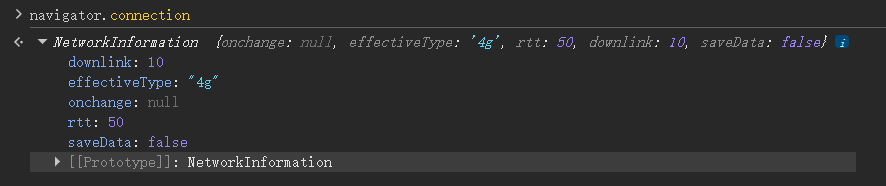
downlink:当前网络的下行速度(这里是 10 Mbps)effectiveType: “4g”:表示当前网络类型属于4g- 将
"10,4g"哈希得到 str_45
str_46
- 地区语言
将"zh-CN,zh-CN"哈希得到 str_46
str_49
- 对空字符串
""哈希
str_50
- 对浏览器
navigator.userAgent哈希
str_51
- Web Audio API音频采样点的振幅值
- 对
"17189.090454101562"哈希
str_53
- 系统 / 浏览器语言偏好、以及谷歌语音合成(TTS)/ 语音识别(ASR)引擎标识的混合语言配置列表
“zh-CN,Microsoft Huihui - Chinese (Simplified, PRC),Google Deutsch,Google US English,Google UK English Female,Google UK English Male,Google español,Google español de Estados Unidos,Google français,Google हिन्दी,Google Bahasa Indonesia,Google italiano,Google 日本語,Google 한국의,Google Nederlands,Google polski,Google português do Brasil,Google русский,Google 普通话(中国大陆),Google 粤語(香港),Google 國語(臺灣)”
str_54
- 对浏览器的语言偏好标识列表
"zh-CN,de-DE,en-US,en-GB,es-ES,es-US,fr-FR,hi-IN,id-ID,it-IT,ja-JP,ko-KR,nl-NL,pl-PL,pt-BR,ru-RU,zh-HK,zh-TW,Microsoft Huihui - Chinese (Simplified, PRC),Microsoft Kangkang - Chinese (Simplified, PRC),Microsoft Yaoyao - Chinese (Simplified, PRC)"哈希 - 特殊项说明
最后三个以Microsoft开头的标签:Microsoft Huihui - Chinese (Simplified, PRC)Microsoft Kangkang - Chinese (Simplified, PRC)Microsoft Yaoyao - Chinese (Simplified, PRC)
这些是微软拼音输入法的语言配置项,对应不同的输入法语音 / 识别引擎,本质也是用于标识中文(简体,中国)环境下的输入法偏好。
str_55
-
动态创建和配置 SVG 元素
height: 67.88999938964844
width: 123.44999694824219
x: 10.5
y: 20.25 -
内部矩形:
x="10.5"(矩形左上角 X 坐标)、y="20.25"(Y 坐标)、width="123.44999694824219"、height="67.88999938964844"(矩形尺寸) -
对
"10.5,20.25,123.44999694824219,67.88999938964844"哈希
str_56
- 对音频采样点的数量
"4736"哈希
str_58
- 地区语言和时区
对"zh-CN+Asia/Shanghai"哈希
str_59
- Windows 默认权限
对"default"哈希
str_60
- 对
"0,8,12,0"哈希 - CPU 核心数:
navigator.hardwareConcurrency: 12 - 设备内存(GB):
navigator.deviceMemory: 8 - 设备最大支持的同时触摸点数:
navigator.maxTouchPoints: 0- 如果是触摸屏设备(比如手机、平板、触控笔记本),该值通常是 1、5 等(代表支持单指 / 多指触控);
像普通的台式机、非触控笔记本,这个值就会是 0,说明设备没有触摸输入能力。
- 如果是触摸屏设备(比如手机、平板、触控笔记本),该值通常是 1、5 等(代表支持单指 / 多指触控);
str_61
- 屏幕信息:
screen = { availHeight: 1032, availLeft: 0, availTop: 0, availWidth: 1920 } - 对
"1032,0,0,1920"哈希
str_62
- 屏幕信息:
screen = { height: 1080, width: 1920 } - 对
"1080,1920"哈希
str_64
-
WebGL显卡信息
-
ANGLE (NVIDIA, NVIDIA GeForce RTX 3060 (0x00002544) Direct3D11 vs_5_0 ps_5_0, D3D11)哈希得到 -1384899703 -
Google Inc. (NVIDIA)哈希得到 -1695834697 -
再将
"-1384899703,-1695834697"哈希得到 str_64

腾讯云面向开发者汇聚海量精品云计算使用和开发经验,营造开放的云计算技术生态圈。
更多推荐
 24
24 0
0- 0


 已为社区贡献2条内容

所有评论(0)