[已解决] pycharm debug时一直显示collecting data或者Frames are not available
·
问题描述
如题,在pycharm中debug时一直显示collecting data或者Frames are not available。
参考文献
参见博客:解决PyCharm调试查看变量时一直显示collecting data并报错Timeout waiting for response且看不到任何内容
解决方法
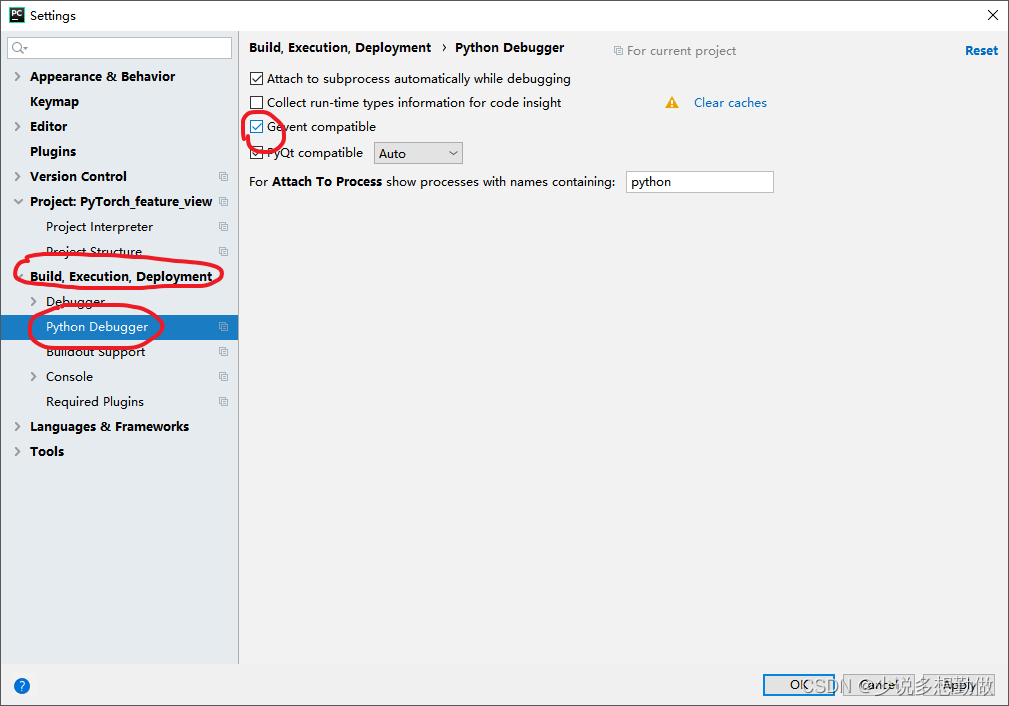
在PyCharm,打开Setting界面,在如下设置项中勾选“Gevent compatible”即可,如下图所示:

腾讯云面向开发者汇聚海量精品云计算使用和开发经验,营造开放的云计算技术生态圈。
更多推荐
 1
1 0
0- 0


 已为社区贡献8条内容

所有评论(0)