解决python环境引入包时报错: Error #15 found libiomp5md.dll already initialized
解决python环境引入包时报错: Error #15 found libiomp5md.dll already initialized
在使用深度学习高性能计算库的环境中,偶尔会由于库的安装依赖问题,出现omp库的错误。本文要解决的是libiomp5md.dll重复问题,具体症状如下:
症状
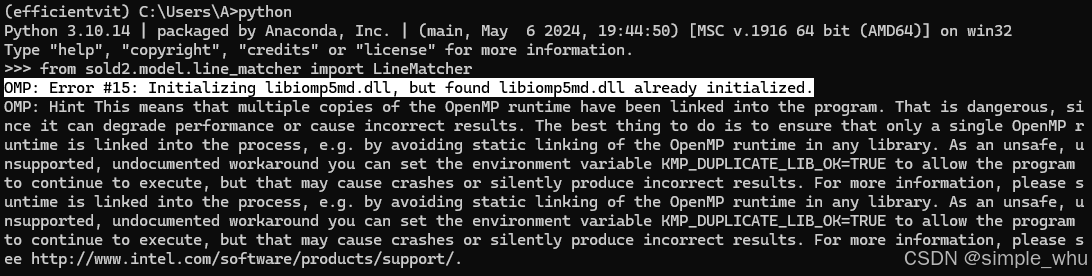
报错信息:
OMP: Error #15: Initializing libiomp5md.dll, but found libiomp5md.dll already initialized.
OMP: Hint This means that multiple copies of the OpenMP runtime have been linked into the program. That is dangerous, si
nce it can degrade performance or cause incorrect results. The best thing to do is to ensure that only a single OpenMP r
untime is linked into the process, e.g. by avoiding static linking of the OpenMP runtime in any library. As an unsafe, u
nsupported, undocumented workaround you can set the environment variable KMP_DUPLICATE_LIB_OK=TRUE to allow the program
to continue to execute, but that may cause crashes or silently produce incorrect results. For more information, please s
untime is linked into the process, e.g. by avoiding static linking of the OpenMP runtime in any library. As an unsafe, u
nsupported, undocumented workaround you can set the environment variable KMP_DUPLICATE_LIB_OK=TRUE to allow the program
to continue to execute, but that may cause crashes or silently produce incorrect results. For more information, please s
ee http://www.intel.com/software/products/support/.
解决方法
删除当前python环境中的libiomp5md.dll,重新启动命令行/终端即可。
可以在cmd中激活python环境,然后使用命令:
where libiomp5md.dll
或者在powershell中使用命令:
where.exe libiomop5md.dll
以查看系统中libiomp5md.dll的位置。将列出的路径中位于虚拟环境的bin下的libiomp5md.dll删除:
例如我的在"D:\Anaconda3\envs\efficientvit\Library\bin"目录下。
扩展阅读

腾讯云面向开发者汇聚海量精品云计算使用和开发经验,营造开放的云计算技术生态圈。
更多推荐
 29
29 0
0- 0


 已为社区贡献6条内容

所有评论(0)