【解决】No toolchains found in the NDK toolchains folder for ABI with prefix: arm-linux-androideabi
No toolchains found in the NDK toolchains folder for ABI with prefix: arm-linux-androideabi
编译android应用工程时,出现【解决】No toolchains found in the NDK toolchains folder for ABI with prefix: arm-linux-androideabi编译异常,该怎样处理呢
原因:
在程序编译过程中出现了“No toolchains found in the NDK toolchains folder for ABI with prefix: arm-linux-androideabi” error 导致安卓程序编译失败,引起这个的主要原因如下:
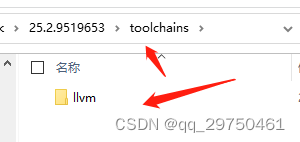
即 当前您在工程中引入的NDK版本过高的原因,貌似目前Android Studio中默认使用的是 25.2.9519653,内部确认没有 arm-linux-androideabi 架构的支持,具体可打开 ndk安装文件夹查看 toolschains 文件夹(在您的SDK文件及下 有个 ndk 文件夹,打开即可看到对应的ndk版本包):如我的路径:
…\SDK\ndk\25.2.9519653\toolchains(图片借用下,)
解决方案:如下,去sdk updatemanager 界面
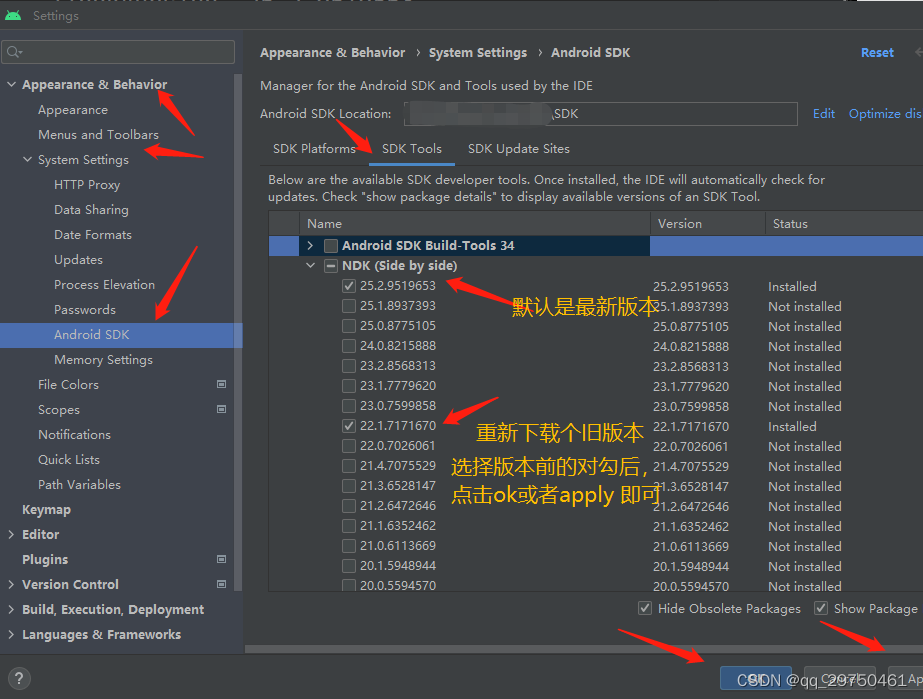
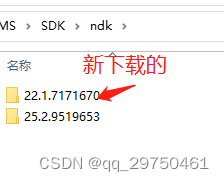
下载完旧版本 如下
打开旧版本的toolchain如下
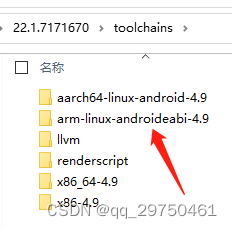
将以上llvm之外的所有文件夹复制到你当前编译时版本(25.1.XXX)的文件里面
重新编译就可以了。
ps:记得在module 模块的build.gradle文件中添加
apply plugin: 'com.android.application'
apply plugin: 'kotlin-android'

android {
    compileSdkVersion 33
    buildToolsVersion "30.0.0"
  +  ndkVersion "25.1.8937393"
//    ndkVersion "23.1.7779620"
    defaultConfig {
        applicationId "com.cmccpoc"
        minSdkVersion 21
        multiDexEnabled true
腾讯云面向开发者汇聚海量精品云计算使用和开发经验,营造开放的云计算技术生态圈。
更多推荐
 1
1 0
0- 0


 已为社区贡献1条内容

所有评论(0)