python爬虫实战——小红书
if os.path.exists(path) and os.path.isdir(path):
    if os.listdir(path):
        return True
return False
下载资源
def download_resource(url, save_path):
response = requests.get(url, stream=True)
if response.status_code == 200:
with open(save_path, ‘wb’) as file:
for chunk in response.iter_content(1024):
file.write(chunk)
读入文件,判断作品数量然后进行任务分配:
读入文件
content = ‘’
with open(‘./xhs_works.txt’, mode=‘r’, encoding=‘utf-8’) as f:
content = json.load(f)
转换成 [[href, is_pictures],[href, is_pictures],…] 类型
每一维中分别是作品页的URL、作品类型
url_list = [list(pair) for pair in content.items()]
有多少个作品
length = len(url_list)
if length > 3:
ul = [url_list[0: int(length / 3) + 1], url_list[int(length / 3) + 1: int(length / 3) * 2 + 1],url_list[int(length / 3) * 2 + 1: length]]
# 开启三个线程并分配任务
for child_ul in ul:
thread = threading.Thread(target=thread_task, args=(child_ul,))
thread.start()
else:
thread_task(url_list)
若使用多线程,每一个线程处理自己被分配到的作品列表:
每一个线程遍历自己分配到的作品列表,进行逐项处理
def thread_task(ul):
for item in ul:
href = item[0]
is_pictures = (True if item[1] == 0 else False)
res = work_task(href, is_pictures)
if res == 0: # 被阻止正常访问
break
处理每一项作品:
处理每一项作品
def work_task(href, is_pictures):
# href 中最后的一个路径参数就是博主的id
work_id = href.split(‘/’)[-1]
# 判断是否已经下载过该作品
has_downloaded = check_download_or_not(work_id, is_pictures)

# 没有下载,则去下载
if not has_downloaded:
    if not is_pictures:
        res = deal_video(work_id)
    else:
        res = deal_pictures(work_id)
    if res == 0:
        return 0            # 无法正常访问
else:
    print('当前作品已被下载')
    return 2
return 1
## 4、处理图文类型作品
对于图文类型,每一张图片都作为 div 元素的背景图片进行展示,图片对应的 URL 在 div 元素的 style 中。 可以先获取到 style 的内容,然后根据圆括号进行分隔,最后得到图片的地址。
这里拿到的图片是没有水印的。
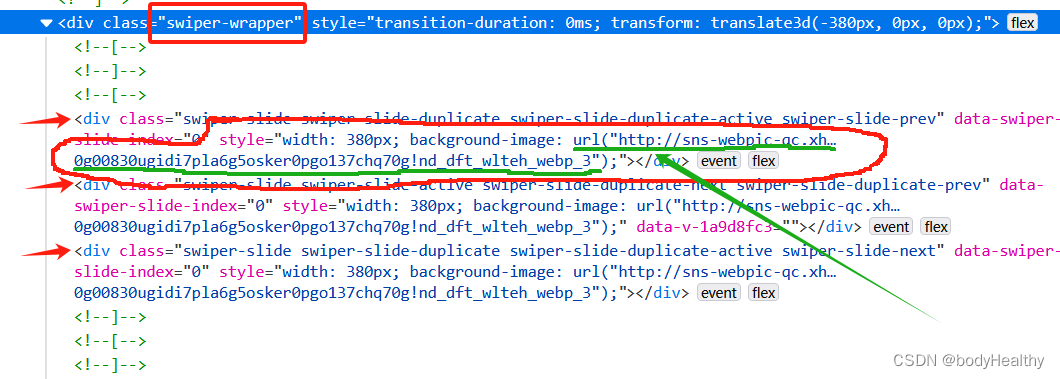
处理图片类型作品的一系列操作
def download_pictures_prepare(res_links, path, date):
# 下载作品到目录
index = 0
for src in res_links:
download_resource(src, f’{path}/{date}-{index}.webp’)
index += 1
处理图片类型的作品
def deal_pictures(work_id):
# 直接 requests 请求回来,style 是空的,使用 webdriver 获取当前界面的源代码
temp_driver = webdriver.Chrome()
temp_driver.set_page_load_timeout(5)
temp_driver.get(f’https://www.xiaohongshu.com/explore/{work_id}')
sleep(1)
try:
# 如果页面中有 class=‘feedback-btn’ 这个元素,则表示不能正常访问
temp_driver.find_element(By.CLASS_NAME, ‘feedback-btn’)
except NoSuchElementException: # 没有该元素,则说明能正常访问到作品页面
WebDriverWait(temp_driver, 5).until(EC.presence_of_element_located((By.CLASS_NAME, ‘swiper-wrapper’)))
    # 获取页面的源代码
    source_code = temp_driver.page_source
    temp_driver.quit()

    html = BeautifulSoup(source_code, 'lxml')
    swiper_sliders = html.find_all(class_='swiper-slide')
    # 当前作品的发表日期
    date = html.find(class_='bottom-container').span.string.split(' ')[0].strip()

    # 图片路径
    res_links = []
    for item in swiper_sliders:
        # 在 style 中提取出图片的 url
        url = item['style'].split('url(')[1].split(')')[0].replace('"', '').replace('"', '')
        if url not in res_links:
            res_links.append(url)

    #为图片集创建目录
    path = f'{ABS_BASE_URL}/{work_id}-pictures'
    try:
        os.makedirs(path)
    except FileExistsError:
        # 目录已经存在,则直接下载到该目录下
        download_pictures_prepare(res_links, path, date)
    except Exception as err:
        print(f'deal_pictures 捕获到其他错误:{err}')
    else:
        download_pictures_prepare(res_links, path, date)
    finally:
        return 1
except Exception as err:
    print(f'下载图片类型作品 捕获到错误:{err}')
    return 1
else:
    print(f'访问作品页面被阻断,下次再试')
    return 0
## 5、处理视频类型作品
获取到的视频有水印。
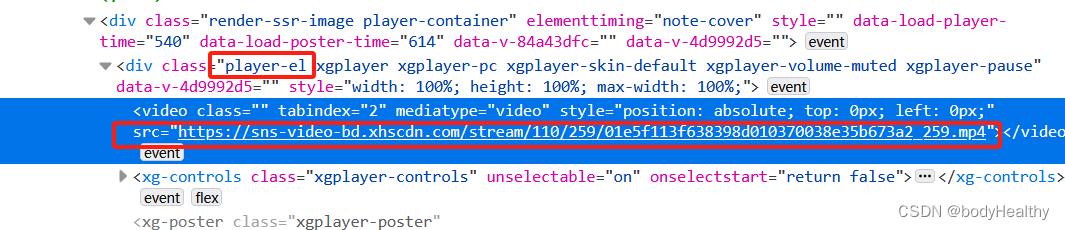
处理视频类型的作品
def deal_video(work_id):
temp_driver = webdriver.Chrome()
temp_driver.set_page_load_timeout(5)
temp_driver.get(f’https://www.xiaohongshu.com/explore/{work_id}')
sleep(1)
try:
temp_driver.find_element(By.CLASS_NAME, ‘feedback-btn’)
except NoSuchElementException:
WebDriverWait(temp_driver, 5).until(EC.presence_of_element_located((By.CLASS_NAME, ‘player-container’)))
source_code = temp_driver.page_source
temp_driver.quit()
    html = BeautifulSoup(source_code, 'lxml')
    video_src = html.find(class_='player-el').video['src']
    # 作品发布日期
    date = html.find(class_='bottom-container').span.string.split(' ')[0].strip()

    # 为视频作品创建目录,以 作品的id号 + video 命名目录
    path = f'{ABS_BASE_URL}/{work_id}-video'
    try:
        os.makedirs(path)
    except FileExistsError:
        download_resource(video_src, f'{path}/{date}.mp4')
    except Exception as err:
        print(f'deal_video 捕获到其他错误:{err}')
    else:
        download_resource(video_src, f'{path}/{date}.mp4')
    finally:
        return 1
except Exception as err:
    print(f'下载视频类型作品 捕获到错误:{err}')
    return 1
else:
    print(f'访问视频作品界面被阻断,下次再试')
    return 0
## 6、异常访问而被中断的现象
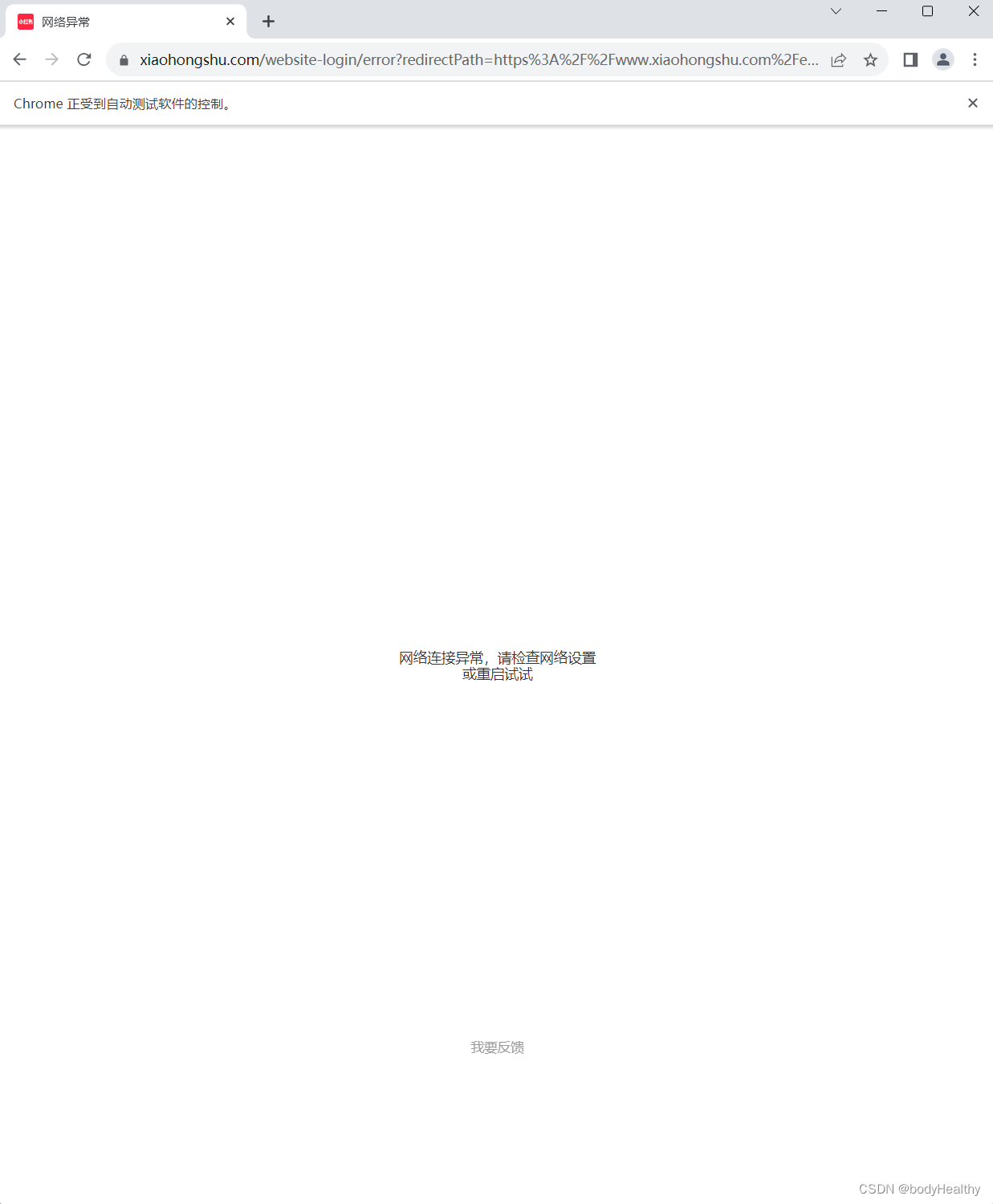
频繁的访问和下载资源会被重定向到如下的页面,可以通过获取到该页面的特殊标签来判断是否被重定向连接,如果是,则及时中断访问,稍后再继续。
使用 webdriver 访问页面,页面打开后,在 try 中查找是否有 class='feedback-btn' 元素(即下方的 我要反馈 的按钮)。如果有该元素,则在 else 中进行提示并返回错误码退出任务。如果找不到元素,则会触发 NoSuchElementException 的错误,在 except 中继续任务即可。
try:
    temp_driver.find_element(By.CLASS_NAME, 'feedback-btn')
except NoSuchElementException:
    # 正常访问到作品页面
    pass
except Exception as err:
    # 其他的异常
    return 1
else:
    # 不能访问到作品页面
    return 0
## 7、完整参考代码
import json
import threading
import requests,os
from selenium.webdriver.common.by import By
from selenium.common.exceptions import NoSuchElementException
from selenium.webdriver.support import expected_conditions as EC
from selenium.webdriver.support.wait import WebDriverWait
from datetime import datetime
from selenium import webdriver
from time import sleep
from bs4 import BeautifulSoup
获取当前时间
def get_current_time():
now = datetime.now()
format_time = now.strftime(“_%Y-%m-%d__%H-%M-%S-%f__”)
return format_time
下载的作品保存的路径,以作者主页的 id 号命名
ABS_BASE_URL = f’G:\639476c10000000026006023’
检查作品是否已经下载过
def check_download_or_not(work_id, is_pictures):
end_str = ‘pictures’ if is_pictures else ‘video’
# work_id 是每一个作品的目录,检查目录是否存在并且是否有内容,则能判断对应的作品是否被下载过
path = f’{ABS_BASE_URL}/{work_id}-{end_str}’
if os.path.exists(path) and os.path.isdir(path):
if os.listdir(path):
return True
return False
下载资源
def download_resource(url, save_path):
response = requests.get(url, stream=True)
if response.status_code == 200:
with open(save_path, ‘wb’) as file:
for chunk in response.iter_content(1024):
file.write(chunk)
处理图片类型作品的一系列操作
def download_pictures_prepare(res_links, path, date):
# 下载作品到目录
index = 0
for src in res_links:
download_resource(src, f’{path}/{date}-{index}.webp’)
index += 1
处理图片类型的作品
def deal_pictures(work_id):
# 直接 requests 请求回来,style 是空的,使用 webdriver 获取当前界面的源代码
temp_driver = webdriver.Chrome()
temp_driver.set_page_load_timeout(5)
temp_driver.get(f’https://www.xiaohongshu.com/explore/{work_id}')
sleep(1)
try:
temp_driver.find_element(By.CLASS_NAME, ‘feedback-btn’)
except NoSuchElementException:
WebDriverWait(temp_driver, 5).until(EC.presence_of_element_located((By.CLASS_NAME, ‘swiper-wrapper’)))
source_code = temp_driver.page_source
temp_driver.quit()
    html = BeautifulSoup(source_code, 'lxml')
    swiper_sliders = html.find_all(class_='swiper-slide')
    # 当前作品的发表日期
    date = html.find(class_='bottom-container').span.string.split(' ')[0].strip()

    # 图片路径
    res_links = []
    for item in swiper_sliders:
        url = item['style'].split('url(')[1].split(')')[0].replace('"', '').replace('"', '')
        if url not in res_links:
            res_links.append(url)

    #为图片集创建目录
    path = f'{ABS_BASE_URL}/{work_id}-pictures'
    try:
        os.makedirs(path)
    except FileExistsError:
        # 目录已经存在,则直接下载到该目录下
        download_pictures_prepare(res_links, path, date)
    except Exception as err:
        print(f'deal_pictures 捕获到其他错误:{err}')
    else:
        download_pictures_prepare(res_links, path, date)
    finally:
        return 1
except Exception as err:
    print(f'下载图片类型作品 捕获到错误:{err}')
    return 1
else:
    print(f'访问作品页面被阻断,下次再试')
    return 0
处理视频类型的作品
def deal_video(work_id):
temp_driver = webdriver.Chrome()
temp_driver.set_page_load_timeout(5)
一、Python所有方向的学习路线
Python所有方向的技术点做的整理,形成各个领域的知识点汇总,它的用处就在于,你可以按照下面的知识点去找对应的学习资源,保证自己学得较为全面。


二、Python必备开发工具
工具都帮大家整理好了,安装就可直接上手!
三、最新Python学习笔记
当我学到一定基础,有自己的理解能力的时候,会去阅读一些前辈整理的书籍或者手写的笔记资料,这些笔记详细记载了他们对一些技术点的理解,这些理解是比较独到,可以学到不一样的思路。

四、Python视频合集
观看全面零基础学习视频,看视频学习是最快捷也是最有效果的方式,跟着视频中老师的思路,从基础到深入,还是很容易入门的。

五、实战案例
纸上得来终觉浅,要学会跟着视频一起敲,要动手实操,才能将自己的所学运用到实际当中去,这时候可以搞点实战案例来学习。
六、面试宝典


简历模板
网上学习资料一大堆,但如果学到的知识不成体系,遇到问题时只是浅尝辄止,不再深入研究,那么很难做到真正的技术提升。
一个人可以走的很快,但一群人才能走的更远!不论你是正从事IT行业的老鸟或是对IT行业感兴趣的新人,都欢迎加入我们的的圈子(技术交流、学习资源、职场吐槽、大厂内推、面试辅导),让我们一起学习成长!

腾讯云面向开发者汇聚海量精品云计算使用和开发经验,营造开放的云计算技术生态圈。
更多推荐
 3
3 0
0- 0


 已为社区贡献3条内容

所有评论(0)