如何在visual studio下编译zxing cpp,以及zxing c++的使用
刚开始请允许我发一下牢骚,刚开始学c++,然后,在使用zxing c++解析二维码的时候,需要找资料。但是,我所找的资料都有问题,下载zxing cpp之后,编译的时候各种问题,当时头都大了。而且,网上关于zxing c++二维码解析的资料甚少,都是Java的。所以,当时我就想着,如果弄好了这个,我一定要详细记录一下。
zxing cpp在visual studio 2013下的编译:
一、下载zxing cpp,下载zxing cpp可以从这里下载http://download.csdn.net/detail/sinat_29957455/9770892,不需要资源分也是本人上传的,我已经请测过,没有任何问题,如有问题请留言。我这里面也包含了一个lib在Debug目录下,这里面还在zxing的基础上封装了许多的方法,方法的目录如下,这些方法是基于opencv的基础上进行封装的,如果需要使用的话,请自行配置好opencv的环境,我是基于opencv 2.4.11的环境,至于opencv环境如何配置,网上的资料很多,不过刚开始配,坑很多,这就只能自己慢慢填了,我也是这样填过来的。
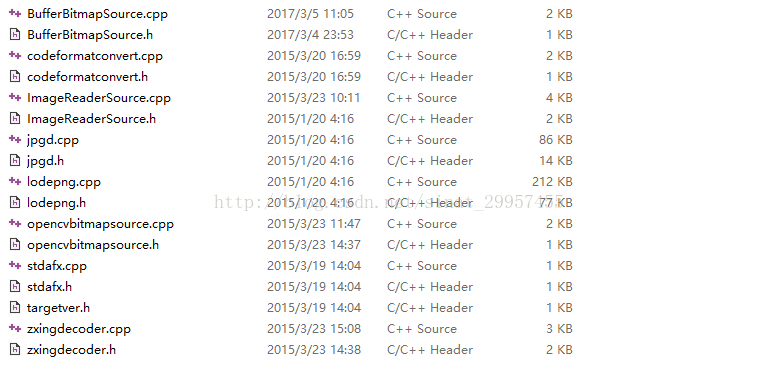
二、下载好zxing cpp的源码之后,需要注意一个地方,因为zixng里面有很多二维码的解析方式,所以里面会有很多的相同名字的cpp文件,这个在你编译生成lib的时候,不会报错,但是会有很多的warning。因为,你编译的时候,会产生很多的obj文件,这些都是编译cpp产生的。如果,你没有指定目录的话,后面产生的貌似不会覆盖前面的obj(visual studio里面会报,因为.obj被多次指定, 被忽略),所以这个在你后面使用lib的时候,链接会报很多的错误。指定cpp生成obj的目录如下:
1、选中cpp文件后鼠标右击,选择属性之后,打开下面的窗口,然后点击C/C++ -> 输出文件 -> 对象文件名,aztec便是文件夹的名字,到时候编译的时候,会在debug下面产生一个aztec文件夹。产生的obj会存放到该目录下。

2、需要指定目录的cpp如下(选择下面的cpp文件然后,设置成上图所示即可)
aztec目录下:Decoder.cpp、Detector.cpp
datamatrix目录下的:BitMatrixParser.cpp、DataBlock.cpp、DecodedBitStreamParser.cpp、Decoder.cpp、Detector.cpp、Version.cpp
pdf417目录下的:BitMatrixParser.cpp、DecodedBitStreamParser.cpp、Decoder.cpp、Detector.cpp
qrcode目录下的:BitMatrixParser.cpp、DataBlock.cpp、DecodedBitStreamParser.cpp、Decoder.cpp、Detector.cpp、Version.cpp
3、如果,找不到头文件的话,包含一下目录,即可,设置方式如下,选中,配置属性->VC++目录->包含目录,如果还是有问题的话。请确保选中的是正确的目录,比如头文件在zxing/zxing/detector.cpp,如果包含的时候是#include <zxing/detector.cpp>那么你就要选到第一个zxing即可,不然也会报错,当然你可以多选几个这个是没有问题的。

4、点击生成解决方案即可。
二、zxing lib的使用,我也上传了一个资源,地址如下http://download.csdn.net/detail/sinat_29957455/9770929
1、使用的时候需要配置好opencv(如果是使用我的lib),然后包含头文件,在我的include目录下有,设置一下lib的目录,如果不会的话,自行百度一下。
2、下面是一个使用的例子
#include <iostream>
#include <fstream>
#include <string>
#include "ImageReaderSource.h"
#include <zxing/common/Counted.h>
#include <zxing/Binarizer.h>
#include <zxing/MultiFormatReader.h>
#include <zxing/Result.h>
#include <zxing/ReaderException.h>
#include <zxing/common/GlobalHistogramBinarizer.h>
#include <zxing/common/HybridBinarizer.h>
#include <exception>
#include <zxing/Exception.h>
#include <zxing/common/IllegalArgumentException.h>
#include <zxing/BinaryBitmap.h>
#include <zxing/DecodeHints.h>

#include <zxing/qrcode/QRCodeReader.h>
#include <zxing/multi/qrcode/QRCodeMultiReader.h>
#include <zxing/multi/ByQuadrantReader.h>
#include <zxing/multi/MultipleBarcodeReader.h>
#include <zxing/multi/GenericMultipleBarcodeReader.h>


#include <Windows.h>

#include "zxingdecoder.h"
#include "opencvbitmapsource.h"
#include <opencv2\opencv.hpp>

using namespace std;
using namespace zxing;
using namespace zxing::multi;
using namespace zxing::qrcode;

namespace {

	bool more = false;
	bool test_mode = false;
	bool try_harder = false;
	bool search_multi = false;
	bool use_hybrid = false;
	bool use_global = false;
	bool verbose = false;

}

char* G2U(const char* gb2312)
{
	int len = MultiByteToWideChar(CP_ACP, 0, gb2312, -1, NULL, 0);
	wchar_t* wstr = new wchar_t[len+1];
	memset(wstr, 0, len+1);
	MultiByteToWideChar(CP_ACP, 0, gb2312, -1, wstr, len);
	len = WideCharToMultiByte(CP_UTF8, 0, wstr, -1, NULL, 0, NULL, NULL);
	char* str = new char[len+1];
	memset(str, 0, len+1);
	WideCharToMultiByte(CP_UTF8, 0, wstr, -1, str, len, NULL, NULL);
	if(wstr) delete[] wstr;
	return str;
}

char* U2G(const char* utf8)
{
	int len = MultiByteToWideChar(CP_UTF8, 0, utf8, -1, NULL, 0);
	wchar_t* wstr = new wchar_t[len+1];
	memset(wstr, 0, len+1);
	MultiByteToWideChar(CP_UTF8, 0, utf8, -1, wstr, len);
	len = WideCharToMultiByte(CP_ACP, 0, wstr, -1, NULL, 0, NULL, NULL);
	char* str = new char[len+1];
	memset(str, 0, len+1);
	WideCharToMultiByte(CP_ACP, 0, wstr, -1, str, len, NULL, NULL);
	if(wstr) delete[] wstr;
	return str;
}

vector<Ref<Result> > decode(Ref<BinaryBitmap> image, DecodeHints hints) {
	Ref<Reader> reader(new MultiFormatReader);
	return vector<Ref<Result> >(1, reader->decode(image, hints));
}

vector<Ref<Result> > decode_multi(Ref<BinaryBitmap> image, DecodeHints hints) {
	MultiFormatReader delegate;
	GenericMultipleBarcodeReader reader(delegate);
	return reader.decodeMultiple(image, hints);
}

int read_image(Ref<LuminanceSource> source, bool hybrid, string expected) {
	vector<Ref<Result> > results;
	string cell_result;
	int res = -1;
	try {
		Ref<Binarizer> binarizer;
		if (hybrid) {
			binarizer = new HybridBinarizer(source);
		} else {
			binarizer = new GlobalHistogramBinarizer(source);
		}
		DecodeHints hints(DecodeHints::DEFAULT_HINT);
		hints.setTryHarder(try_harder);
		Ref<BinaryBitmap> binary(new BinaryBitmap(binarizer));
		if (search_multi) {
			results = decode_multi(binary, hints);
		} else {
			results = decode(binary, hints);
		}
		res = 0;
	} catch (const ReaderException& e) {
		cell_result = "zxing::ReaderException: " + string(e.what());
		res = -2;
	} catch (const zxing::IllegalArgumentException& e) {
		cell_result = "zxing::IllegalArgumentException: " + string(e.what());
		res = -3;
	} catch (const zxing::Exception& e) {
		cell_result = "zxing::Exception: " + string(e.what());
		res = -4;
	} catch (const std::exception& e) {
		cell_result = "std::exception: " + string(e.what());
		res = -5;
	}

	if (test_mode && results.size() == 1) {
		std::string result = results[0]->getText()->getText();
		if (expected.empty()) {
			const char * data = result.data();
			char * utf_8 = U2G(data);
			result.clear();
			result.append(utf_8);
			cout << "  Expected text or binary data for image missing." << endl
				<< "  Detected: " << result << endl;
			res = -6;
		} else {
			if (expected.compare(result) != 0) {
				cout << "  Expected: " << expected << endl
					<< "  Detected: " << result << endl;
				cell_result = "data did not match";
				res = -6;
			}
		}
	}

	if (res != 0 && (verbose || (use_global ^ use_hybrid))) {
		cout << (hybrid ? "Hybrid" : "Global")
			<< " binarizer failed: " << cell_result << endl;
	} else if (!test_mode) {
		if (verbose) {
			cout << (hybrid ? "Hybrid" : "Global")
				<< " binarizer succeeded: " << endl;
		}
		for (size_t i = 0; i < results.size(); i++) {
			if (more) {
				cout << "  Format: "
					<< BarcodeFormat::barcodeFormatNames[results[i]->getBarcodeFormat()]
				<< endl;
				for (int j = 0; j < results[i]->getResultPoints()->size(); j++) {
					cout << "  Point[" << j <<  "]: "
						<< results[i]->getResultPoints()[j]->getX() << " "
						<< results[i]->getResultPoints()[j]->getY() << endl;
				}
			}
			if (verbose) {
				cout << "    ";
			}
			cout << results[i]->getText()->getText() << endl;
		}
	}

	return res;
}

string read_expected(string imagefilename) {
	string textfilename = imagefilename;
	string::size_type dotpos = textfilename.rfind(".");

	textfilename.replace(dotpos + 1, textfilename.length() - dotpos - 1, "txt");
	ifstream textfile(textfilename.c_str(), ios::binary);
	textfilename.replace(dotpos + 1, textfilename.length() - dotpos - 1, "bin");
	ifstream binfile(textfilename.c_str(), ios::binary);
	ifstream *file = 0;
	if (textfile.is_open()) {
		file = &textfile;
	} else if (binfile.is_open()) {
		file = &binfile;
	} else {
		return std::string();
	}
	file->seekg(0, ios_base::end);
	size_t size = size_t(file->tellg());
	file->seekg(0, ios_base::beg);

	if (size == 0) {
		return std::string();
	}

	char* data = new char[size + 1];
	file->read(data, size);
	data[size] = '\0';
	string expected(data);
	delete[] data;

	return expected;
}

void decode_image(Reader *reader, cv::Mat &image)
{
    try
    {
        Ref<OpenCVBitmapSource> source(new OpenCVBitmapSource(image));
        Ref<Binarizer> binarizer(new GlobalHistogramBinarizer(source));
        Ref<BinaryBitmap> bitmap(new BinaryBitmap(binarizer));
        Ref<Result> result(reader->decode(bitmap, DecodeHints(DecodeHints::TRYHARDER_HINT)));//+DecodeHints::DEFAULT_HINT)));
		cout << CodeFormatConvert::convertUTF8ToGB2312(result->getText()->getText().data()) << endl;
            //Export the read barcode here
    }
    catch (zxing::Exception& e)
    {
            //Export your failure to read the code here
        cerr << "Error: " << e.what() << endl;
    }
}

int main(int argc, char** argv) {
	std::string filename = "../Debug/testimage5.jpg";
	cv::Mat image = cv::imread(filename);
	ZxingDecoder zxingDecoder;
	cv::VideoCapture capture(0);
	capture >> image;
	while(!image.empty())
	{
		std::string str = zxingDecoder.decode(image);
		if(str.size() != 0)
		{
			std::cout<<CodeFormatConvert::convertUTF8ToGB2312(str.data())<<std::endl;
		}
		cv::imshow("image", image);
		cv::waitKey(10);
		capture >> image;
	}
	return 0;
}
最后,如果配置好,opencv后,也添加好了,如果还是报什么highgui.dll找不到之类的话,请将opencv->build->x86(与操作系统 无关)->v12(这个需要根据你的visual studio的版本选择)->bin下面相应的dll文件添加到,c盘->windows->syswow64(操作系统为64 位)/system32(操作系统为32位)下面即可。
opencv配置文件我已经上传到了CSDN下载路径http://download.csdn.net/download/sinat_29957455/10262106,需要注意文件中opencv的版本为2.4.11,以及opencv在你电脑的存放路径(修改为你的电脑opencv的路径)。
--------------------2018/9/12更新-----------------------
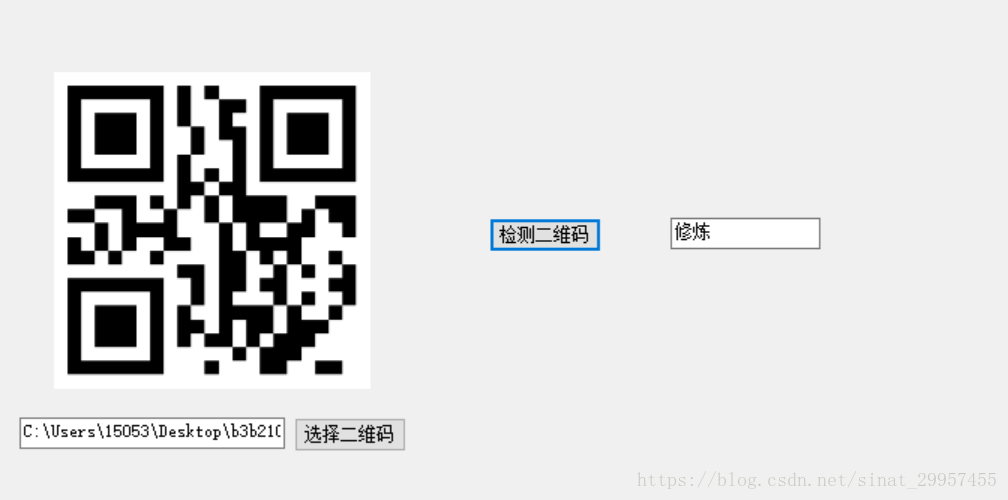
我使用zxing整合了一个C#工程,上传到了百度云盘,下载之后运行handleImage.exe,会有一个界面,选择需要识别的二维码就可以识别了,zxing被封装在了opencvdll.dll中,需要依赖OpenCV。
下载地址:链接:https://pan.baidu.com/s/1lddzj74i80vdYMK7UARlVg 密码:betu

腾讯云面向开发者汇聚海量精品云计算使用和开发经验,营造开放的云计算技术生态圈。
更多推荐
 5
5 0
0- 0


 已为社区贡献9条内容

所有评论(0)