sonarqube 部署(基于docker-compose)
·
sonarqube 部署(基于docker-compose)
-
使用docker-compose部署
-
version: "3.8" services: sonarqube: image: sonarqube:latest container_name: sonarqube restart: unless-stopped environment: SONAR_JDBC_URL: jdbc:postgresql://ip:5432/sonar SONAR_JDBC_USERNAME: postgres SONAR_JDBC_PASSWORD: sonar JAVA_OPTS: -Xms1G -Xmx4G -XX:MaxDirectMemorySize=2G ulimits: nofile: soft: 65536 hard: 65536 memlock : -1 deploy: resources: limits: memory: 4g # 至少分配 4GB 内存 ports: - 9000:9000 volumes: # - /opt/sonarqube/data:/opt/sonarqube/data - /opt/sonarqube/extensions:/opt/sonarqube/extensions - /opt/sonarqube/logs:/opt/sonarqube/logs - /opt/sonarqube/conf:/opt/sonarqube/conf networks: - sonarqube-net networks: sonarqube-net: driver: bridge -
这里要注意资源配置,如果资源不够,sonarqube是起不来的
-
并且确定挂载的目录有足够的权限
- ls -ld . 查看当前目录权限
- chmod 777 -R . 给当前目录设置最高权限
-
-
配置sonarqube配置文件
-
#--------------------------------------------------------------------------------------------------
# IMPORTANT:
# This file will *not* be reloaded when using the api/system/restart endpoint.
# In order for any change made to this file to be taken into account, you must perform a full
# restart of the main SonarQube service.
#--------------------------------------------------------------------------------------------------

# Property values can:
# - be overridden by environment variables. The name of the corresponding environment variable is the
#   upper-cased name of the property where all the dot ('.') and dash ('-') characters are replaced by
#   underscores ('_'). For example, to override 'sonar.web.systemPasscode' use 'SONAR_WEB_SYSTEMPASSCODE'.
# - be encrypted. See https://docs.sonarsource.com/sonarqube/latest/instance-administration/security/#settings-encryption

#--------------------------------------------------------------------------------------------------
# DATABASE
#
# IMPORTANT:
# - The embedded H2 database is used by default. It is recommended for tests but not for
#   production use. Supported databases are Oracle, PostgreSQL and Microsoft SQLServer.
# - Changes to database connection URL (sonar.jdbc.url) can affect SonarSource licensed products.

# User credentials.
# Permissions to create tables, indices and triggers must be granted to JDBC user.
# The schema must be created first.
sonar.jdbc.username=postgres
sonar.jdbc.password=sonar

#----- Embedded Database (default)
# H2 embedded database server listening port, defaults to 9092
#sonar.embeddedDatabase.port=9092


#----- Oracle 19c/21c
# The Oracle JDBC driver must be copied into the directory extensions/jdbc-driver/oracle/.
# Only the thin client is supported, and we recommend using the latest Oracle JDBC driver. See
# https://jira.sonarsource.com/browse/SONAR-9758 for more details.
# If you need to set the schema, please refer to http://jira.sonarsource.com/browse/SONAR-5000
#sonar.jdbc.url=jdbc:oracle:thin:@localhost:1521/XE


#----- PostgreSQL 11 or greater
# By default the schema named "public" is used. It can be overridden with the parameter "currentSchema".
#sonar.jdbc.url=jdbc:postgresql://localhost/sonarqube?currentSchema=my_schema
sonar.jdbc.url=jdbc:postgresql://ip:5432/sonar

#----- Microsoft SQLServer 2014/2016/2017/2019/2022 and SQL Azure
# A database named sonar must exist and its collation must be case-sensitive (CS) and accent-sensitive (AS)
# Use the following connection string if you want to use integrated security with Microsoft Sql Server
# Do not set sonar.jdbc.username or sonar.jdbc.password property if you are using Integrated Security
# For Integrated Security to work, you have to install the Microsoft SQL JDBC Auth package
# Please refer to the online documentation https://docs.sonarsource.com/sonarqube
# for the exact procedure for this version of SonarQube.
#sonar.jdbc.url=jdbc:sqlserver://localhost;databaseName=sonar;integratedSecurity=true

# Use the following connection string if you want to use SQL Auth while connecting to MS Sql Server.
# Set the sonar.jdbc.username and sonar.jdbc.password appropriately.
#sonar.jdbc.url=jdbc:sqlserver://localhost;databaseName=sonar


#----- Connection pool settings
# The maximum number of active connections that can be allocated
# at the same time, or negative for no limit.
# The recommended value is 1.2 * max sizes of HTTP pools. For example if HTTP ports are
# enabled with default sizes (50, see property sonar.web.http.maxThreads)
# then sonar.jdbc.maxActive should be 1.2 * 50 = 60.
#sonar.jdbc.maxActive=60

# The minimum number of connections that can remain idle in the pool,
# without extra ones being created, or zero to create none.
#sonar.jdbc.minIdle=10

# The maximum number of milliseconds that the pool will wait (when there
# are no available connections) for a connection to be returned before
# throwing an exception, or <= 0 to wait indefinitely.
#sonar.jdbc.maxWait=8000


#--------------------------------------------------------------------------------------------------
# WEB SERVER
# Web server is executed in a dedicated Java process. By default heap size is 512MB.
# Use the following property to customize JVM options.
#    Recommendations:
#
#    The HotSpot Server VM is recommended. The property -server should be added if server mode
#    is not enabled by default on your environment:
#    http://docs.oracle.com/javase/8/docs/technotes/guides/vm/server-class.html
#
#    Startup can be long if entropy source is short of entropy. Adding
#    -Djava.security.egd=file:/dev/./urandom is an option to resolve the problem.
#    See https://wiki.apache.org/tomcat/HowTo/FasterStartUp#Entropy_Source
#
#sonar.web.javaOpts=-Xmx512m -Xms128m -XX:+HeapDumpOnOutOfMemoryError
sonar.web.javaOpts=-Xmx1G -Xms512m -XX:+HeapDumpOnOutOfMemoryError

# Same as previous property, but allows to not repeat all other settings like -Xmx
#sonar.web.javaAdditionalOpts=

# Binding IP address. For servers with more than one IP address, this property specifies which
# address will be used for listening on the specified ports.
# By default, ports will be used on all IP addresses associated with the server.
#sonar.web.host=0.0.0.0

# Web context. When set, it must start with forward slash (for example /sonarqube).
# Changing this value and restarting the server can have unexpected consequences for logged in users,
# as they may end up with multiple conflicting browser cookies. If your users experience odd
# behaviors after you changed this value and restarted the server, ask them to clear their browser's
# cookies and log in again.
# The default value is root context (empty value).
#sonar.web.context=
# TCP port for incoming HTTP connections. Default value is 9000.
#sonar.web.port=9000


# The maximum number of connections that the server will accept and process at any given time.
# When this number has been reached, the server will not accept any more connections until
# the number of connections falls below this value. The operating system may still accept connections
# based on the sonar.web.connections.acceptCount property. The default value is 50.
#sonar.web.http.maxThreads=50

# The minimum number of threads always kept running. The default value is 5.
#sonar.web.http.minThreads=5

# The maximum queue length for incoming connection requests when all possible request processing
# threads are in use. Any requests received when the queue is full will be refused.
# The default value is 25.
#sonar.web.http.acceptCount=25

# The number of milliseconds this Connector will wait for another HTTP request before closing the
# connection. The default value is to use the value that has been set for the connectionTimeout
# attribute. Use a value of -1 to indicate no (i.e. infinite) timeout.
# The default value is 60000 (ms).
#sonar.web.http.keepAliveTimeout=60000

# By default users are logged out and sessions closed when server is restarted.
# If you prefer keeping user sessions open, a secret should be defined. Value is
# HS256 key encoded with base64. It must be unique for each installation of SonarQube.
# Example of command-line:
# echo -n "type_what_you_want" | openssl dgst -sha256 -hmac "key" -binary | base64
#sonar.auth.jwtBase64Hs256Secret=

# The inactivity timeout duration of user sessions, in minutes. After the configured
# period of time, the user is logged out.
# The default value is set to 3 days (4320 minutes).
# It must be set between 6 minutes and 3 months (129600 minutes).
# Value must be strictly positive.
#sonar.web.sessionTimeoutInMinutes=4320

# A passcode can be defined to access some web services from monitoring
# tools without having to use the credentials of a system administrator.
# Check the Web API documentation to know which web services are supporting this authentication mode.
# The passcode should be provided in HTTP requests with the header "X-Sonar-Passcode".
# By default feature is disabled.
#sonar.web.systemPasscode=


#--------------------------------------------------------------------------------------------------
# SSO AUTHENTICATION

# Enable authentication using HTTP headers
#sonar.web.sso.enable=false

# Name of the header to get the user login.
# Only alphanumeric, '.' and '@' characters are allowed
#sonar.web.sso.loginHeader=X-Forwarded-Login

# Name of the header to get the user name
#sonar.web.sso.nameHeader=X-Forwarded-Name

# Name of the header to get the user email (optional)
#sonar.web.sso.emailHeader=X-Forwarded-Email

# Name of the header to get the list of user groups, separated by comma (optional).
# If the sonar.sso.groupsHeader is set, the user will belong to those groups if groups exist in SonarQube.
# If none of the provided groups exists in SonarQube, the user will only belong to the default group.
# Note that the default group will always be set.
#sonar.web.sso.groupsHeader=X-Forwarded-Groups

# Interval used to know when to refresh name, email and groups.
# During this interval, if for instance the name of the user is changed in the header, it will only be updated after X minutes.
#sonar.web.sso.refreshIntervalInMinutes=5

#--------------------------------------------------------------------------------------------------
# LDAP CONFIGURATION

# Enable the LDAP feature
# sonar.security.realm=LDAP

# Set to true when connecting to a LDAP server using a case-insensitive setup.
# sonar.authenticator.downcase=true

# URL of the LDAP server. Note that if you are using ldaps, then you should install the server certificate into the Java truststore.
# ldap.url=ldap://localhost:10389

# Bind DN is the username of an LDAP user to connect (or bind) with. Leave this blank for anonymous access to the LDAP directory (optional)
# ldap.bindDn=cn=sonar,ou=users,o=mycompany

# Bind Password is the password of the user to connect with. Leave this blank for anonymous access to the LDAP directory (optional)
# ldap.bindPassword=secret

# Possible values: simple | CRAM-MD5 | DIGEST-MD5 | GSSAPI See http://java.sun.com/products/jndi/tutorial/ldap/security/auth.html (default: simple)
# ldap.authentication=simple

# See :
#   * http://java.sun.com/products/jndi/tutorial/ldap/security/digest.html
#   * http://java.sun.com/products/jndi/tutorial/ldap/security/crammd5.html
# (optional)
# ldap.realm=example.org

# Context factory class (optional)
# ldap.contextFactoryClass=com.sun.jndi.ldap.LdapCtxFactory

# Enable usage of StartTLS (default : false)
# ldap.StartTLS=true

# Follow or not referrals. See http://docs.oracle.com/javase/jndi/tutorial/ldap/referral/jndi.html (default: true)
# ldap.followReferrals=false

# USER MAPPING

# Distinguished Name (DN) of the root node in LDAP from which to search for users (mandatory)
# ldap.user.baseDn=cn=users,dc=example,dc=org

# LDAP user request. (default: (&(objectClass=inetOrgPerson)(uid={login})) )
# ldap.user.request=(&(objectClass=user)(sAMAccountName={login}))

# Attribute in LDAP defining the user’s real name. (default: cn)
# ldap.user.realNameAttribute=name

# Attribute in LDAP defining the user’s email. (default: mail)
# ldap.user.emailAttribute=email

# GROUP MAPPING

# Distinguished Name (DN) of the root node in LDAP from which to search for groups. (optional, default: empty)
# ldap.group.baseDn=cn=groups,dc=example,dc=org

# LDAP group request (default: (&(objectClass=groupOfUniqueNames)(uniqueMember={dn})) )
# ldap.group.request=(&(objectClass=group)(member={dn}))

# Property used to specifiy the attribute to be used for returning the list of user groups in the compatibility mode. (default: cn)
# ldap.group.idAttribute=sAMAccountName

#--------------------------------------------------------------------------------------------------
# COMPUTE ENGINE
# The Compute Engine is responsible for processing background tasks.
# Compute Engine is executed in a dedicated Java process. Default heap size is 512MB.
# Use the following property to customize JVM options.
#    Recommendations:
#
#    The HotSpot Server VM is recommended. The property -server should be added if server mode
#    is not enabled by default on your environment:
#    http://docs.oracle.com/javase/8/docs/technotes/guides/vm/server-class.html
#
#sonar.ce.javaOpts=-Xmx512m -Xms128m -XX:+HeapDumpOnOutOfMemoryError
sonar.ce.javaOpts=-Xmx512m -Xms256m -XX:+HeapDumpOnOutOfMemoryError

# Same as previous property, but allows to not repeat all other settings like -Xmx
#sonar.ce.javaAdditionalOpts=


#--------------------------------------------------------------------------------------------------
# ELASTICSEARCH
# Elasticsearch is used to facilitate fast and accurate information retrieval.
# It is executed in a dedicated Java process. Default maximum heap size is 512MB.
# It is recommended to also set MaxDirectMemorySize (-XX:MaxDirectMemorySize) and set it to half the maximum heap size.
#
# --------------------------------------------------
# Word of caution for Linux users on 64bits systems
# --------------------------------------------------
# Please ensure Virtual Memory on your system is correctly configured for Elasticsearch to run properly
# (see https://www.elastic.co/guide/en/elasticsearch/reference/5.5/vm-max-map-count.html for details).
#
# When SonarQube runs standalone, a warning such as the following may appear in logs/es.log:
#      "max virtual memory areas vm.max_map_count [65530] is too low, increase to at least [262144]"
# When SonarQube runs as a cluster, however, Elasticsearch will refuse to start.
#

# JVM options of Elasticsearch process
#sonar.search.javaOpts=-Xmx512m -Xms512m -XX:MaxDirectMemorySize=256m -XX:+HeapDumpOnOutOfMemoryError
sonar.search.javaOpts=-Xmx512m -Xms512m -XX:MaxDirectMemorySize=256m -XX:+HeapDumpOnOutOfMemoryError

# Same as previous property, but allows to not repeat all other settings like -Xmx
#sonar.search.javaAdditionalOpts=

# Elasticsearch port for incoming HTTP connections. Default is 9001. Use 0 to get a free port.
# As a security precaution, should be blocked by a firewall and not exposed to the Internet.
sonar.search.port=9001

# Elasticsearch TCP transport port that is bound to loopback address. When nothing is set, a random port will be chosen.
# As a security precaution, your OS configuration should not expose this port for external access.
#sonar.es.port=

# Elasticsearch host. The search server will bind this address and the search client will connect to it.
# Default is loopback address.
# As a security precaution, should NOT be set to a publicly available address.
sonar.search.host=localhost
sonar.search.clusterName=elasticsearch


#--------------------------------------------------------------------------------------------------
# UPDATE CENTER

# Update Center requires an internet connection to request https://downloads.sonarsource.com/?prefix=sonarqube/update
# It is enabled by default.
#sonar.updatecenter.activate=true

# HTTP proxy (default none)
#http.proxyHost=
#http.proxyPort=
# HTTPS proxy (defaults are values of http.proxyHost and http.proxyPort)
#https.proxyHost=
#https.proxyPort=

# NT domain name if NTLM proxy is used
#http.auth.ntlm.domain=

# SOCKS proxy (default none)
#socksProxyHost=
#socksProxyPort=

# Proxy authentication (used for HTTP, HTTPS and SOCKS proxies)
#http.proxyUser=
#http.proxyPassword=

# Proxy exceptions: list of hosts that can be accessed without going through the proxy
#                   separated by the '|' character, wildcard character '*' can be used for pattern matching
#                   used for HTTP and HTTPS (default none)
#                   (note: localhost and its literal notations (127.0.0.1, ...) are always excluded)
#http.nonProxyHosts=


#--------------------------------------------------------------------------------------------------
# LOGGING

# SonarQube produces logs in files located in the same directory (see property sonar.path.logs below),
# one per process:
#   Main process (aka. App) logs in sonar.log
#   Web Server (aka. Web) logs in web.log
#   Compute Engine (aka. CE) logs in ce.log
#   Elasticsearch (aka. ES) logs in es.log
# and two other log files:
#   Access logs
#   Deprecation logs

# Regarding logs for processes:
# Depending on the startup, all 4 files follow the same rolling policy (see sonar.log.rollingPolicy and sonar.log.maxFiles) but it applies
# individually (eg. if sonar.log.maxFiles=4, there can be at most 4 of each files, ie. 16 files in total).
#
# All 4 files have logs in the same format:
#           1           2    3           4                       5                                                   6
# |-----------------| |---| |-|--------------------||------------------------------| |------------------------------------------------------------------------------------------------------------------------------|
# 2016.11.16 16:47:00 INFO  ce[AVht0dNXFcyiYejytc3m][o.s.s.c.t.CeWorkerCallableImpl] Executed task | project=org.sonarqube:example-java-maven | type=REPORT | id=AVht0dNXFcyiYejytc3m | submitter=admin | time=1699ms
#
# 1: timestamp. Format is YYYY.MM.DD HH:MM:SS
#    YYYY: year on 4 digits
#    MM: month on 2 digits
#    DD: day on 2 digits
#    HH: hour of day on 2 digits in 24 hours format
#    MM: minutes on 2 digits
#    SS: seconds on 2 digits
# 2: log level.
#    Possible values (in order of descending criticality): ERROR, WARN, INFO, DEBUG and TRACE
# 3: process identifier. Possible values: app (main), web (Web Server), ce (Compute Engine) and es (Elasticsearch)
# 4: SQ thread identifier. Can be empty.
#    In the Web Server, if present, it will be the HTTP request ID.
#    In the Compute Engine, if present, it will be the task ID.
# 5: logger name. Usually a class canonical name.
#    Package names are truncated to keep the whole field to 20 characters max
# 6: log payload. Content of this field does not follow any specific format, can vary in length and include line returns.
#    Some logs, however, will follow the convention to provide data in payload in the format " | key=value"
#    Especially, log of profiled pieces of code will end with " | time=XXXXms".

# Global level of logs (applies to all 4 processes).
# Supported values are INFO (default), DEBUG and TRACE
#sonar.log.level=INFO

# Level of logs of each process can be controlled individually with their respective properties.
# When specified, they overwrite the level defined at global level.
# Supported values are INFO, DEBUG and TRACE
#sonar.log.level.app=INFO
#sonar.log.level.web=INFO
#sonar.log.level.ce=INFO
#sonar.log.level.es=INFO

# Path to log files. Can be absolute or relative to installation directory.
# Default is <installation home>/logs
#sonar.path.logs=logs

# Rolling policy of log files
#    - based on time if value starts with "time:", for example by day ("time:yyyy-MM-dd")
#      or by month ("time:yyyy-MM")
#    - based on size if value starts with "size:", for example "size:10MB"
#    - disabled if value is "none".  That needs logs to be managed by an external system like logrotate.
#sonar.log.rollingPolicy=time:yyyy-MM-dd

# Maximum number of files to keep if a rolling policy is enabled.
#    - maximum value is 20 on size rolling policy
#    - unlimited on time rolling policy. Set to zero to disable old file purging.
#sonar.log.maxFiles=7

# Regarding the Access logs:
# Access log is the list of all the HTTP requests received by server. If enabled, it is stored
# in the file {sonar.path.logs}/access.log. This file follows the same rolling policy as other log file
# (see sonar.log.rollingPolicy and sonar.log.maxFiles).
#sonar.web.accessLogs.enable=true

# Format of access log. It is ignored if sonar.web.accessLogs.enable=false. Possible values are:
#    - "common" is the Common Log Format, shortcut to: %h %l %u %user %date "%r" %s %b
#    - "combined" is another format widely recognized, shortcut to: %h %l %u [%t] "%r" %s %b "%i{Referer}" "%i{User-Agent}"
#    - else a custom pattern. See http://logback.qos.ch/manual/layouts.html#AccessPatternLayout.
# The login of authenticated user is not implemented with "%u" but with "%reqAttribute{LOGIN}" (since version 6.1).
# The value displayed for anonymous users is "-".
# The SonarQube's HTTP request ID can be added to the pattern with "%reqAttribute{ID}" (since version 6.2).
# If SonarQube is behind a reverse proxy, then the following value allows to display the correct remote IP address:
#sonar.web.accessLogs.pattern=%i{X-Forwarded-For} %l %u [%t] "%r" %s %b "%i{Referer}" "%i{User-Agent}" "%reqAttribute{ID}"
# Default value (which was "combined" before version 6.2) is equivalent to "combined + SQ HTTP request ID":
#sonar.web.accessLogs.pattern=%h %l %u [%t] "%r" %s %b "%i{Referer}" "%i{User-Agent}" "%reqAttribute{ID}" %D

# Regarding the Deprecation logs:
# Deprecation log is the list of all calls to deprecated Web API.
# It is stored in the file {sonar.path.logs}/deprecation.log. This file follows the same rolling policy as other log file
# (see sonar.log.rollingPolicy and sonar.log.maxFiles).

# Format of deprecation log.
# See https://docs.sonarsource.com/sonarqube/latest/instance-administration/server-logs-and-system-info/
# The login of authenticated user is disabled by default.
# sonar.deprecationLogs.loginEnabled=false


#--------------------------------------------------------------------------------------------------
# OTHERS

# Delay in seconds between processing of notification queue. Default is 60 seconds.
#sonar.notifications.delay=60

# Paths to persistent data files (embedded database and search index) and temporary files.
# Can be absolute or relative to installation directory.
# Defaults are respectively <installation home>/data and <installation home>/temp
#sonar.path.data=data
#sonar.path.temp=temp

# Telemetry - Share anonymous SonarQube statistics
# By sharing anonymous SonarQube statistics, you help us understand how SonarQube is used so we can improve the product to work even better for you.
# We don't collect source code or IP addresses. And we don't share the data with anyone else.
#sonar.telemetry.enable=true

sonar.scm.enabled=true
sonar.authenticator.createUsers=true
-
依赖数据库
-
目前sonarqube已经不支持mysql了,官网有支持的数据库介绍,我这里选择的是 postgresSql。
-
你可以选择在docker-compose文件里面,将 postgresSql一同安装,然后用依赖的方式配置数据库,或者可以单独安装postgresSql,像我上面的方式配置数据库地址。
-
要注意的是配置完数据库后,直接启动可能会报连接不了数据库的错误(如果日志没有报错,正确显示连接你配置的数据库,请忽略)。需要配置下postgres的配置文件,设置远程连接的配置
汉化
- 在挂载目录下将下载好的插件放入
-

-
插件地址
- https://github.com/xuhuisheng/sonar-l10n-zh/releases/tag/sonar-l10n-zh-plugin-25.1
-
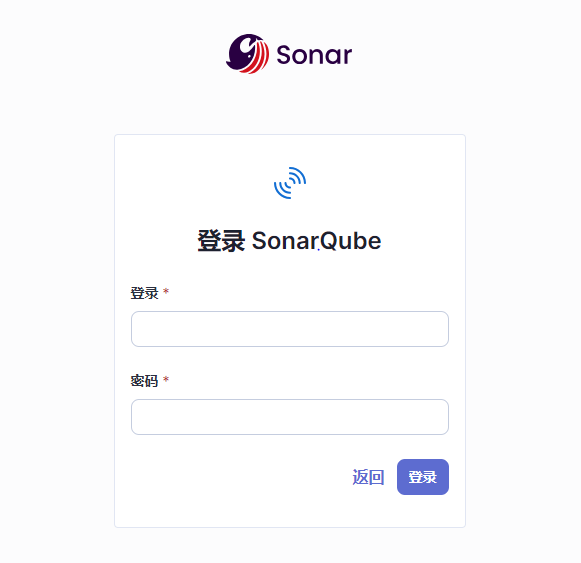
完成部署
- 按上述操作,应该能完成部署
-
-
管理员默认账号密码 admin admin
-
第一次登录需要更改密码
-
- 如果sonarqube容器启动不了,或者启动了但是不显示端口号,那么都是没有成功部署。具体要查看docker容器的日志
docker logs -f containerid/name- 常见的错误
- 资源不够
- 挂载卷宗权限不足
- 数据库无法连接
- 常见的错误
后续
- 如有不足请指出

腾讯云面向开发者汇聚海量精品云计算使用和开发经验,营造开放的云计算技术生态圈。
更多推荐
 3
3 0
0- 0


 已为社区贡献2条内容

所有评论(0)