Mavlink自定义消息生成与c++使用
·
下载mavlink代码:
git clone https://github.com/mavlink/mavlink.git --recursive
创建python虚拟环境并安装依赖:
python -m pip install -r pymavlink/requirements.txt
运行工具:
python .\mavgenerate.py
编写一个xml文件: anti.xml
<?xml version="1.0"?>
<mavlink>
    <messages>
        <message id="300" name="SEARCH_RESULT">
            <description>检测结果1</description>
            <field type="uint32_t" name="time_boot_ms">系统启动时间(毫秒)</field>
            <field type="uint8_t" name="target_count">目标数量</field>
            <field type="uint8_t[10]" name="target_id">目标ID数组</field>
            <field type="uint8_t[10]" name="camera_id">相机ID数组</field>
            <field type="int16_t[10]" name="pos_x">图像X坐标数组</field>
            <field type="int16_t[10]" name="pos_y">图像Y坐标数组</field>
        </message>
        <message id="301" name="TRACK_TARGET">
            <description>检测结果2</description>
            <field type="uint32_t" name="time_boot_ms">系统启动时间(毫秒)</field>
            <field type="int16_t" name="pos_x">图像中X坐标</field>
            <field type="int16_t" name="pos_y">图像中Y坐标</field>
            <field type="float" name="confidence">置信度(0-1.0)</field>
        </message>
    </messages>
设置xml路径和Out路径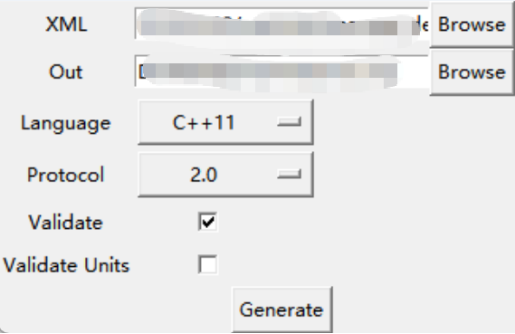
选择c++和2.0
将生成的mavlink头文件拷贝到c++工程,添加包含目录: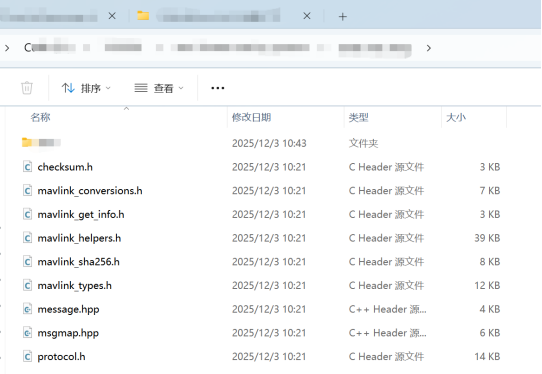
include_directories(“${CMAKE_CURRENT_SOURCE_DIR}/…/…/…/anti_mav_msg/”)
在代码中包含头文件:
#include "anti/mavlink.h"
代码中使用:
// 结构体转MSG
mavlink_search_result_t search_result;
mavlink_message_t msg;
{
    search_result.target_count = 5;
    search_result.time_boot_ms = 123456;
    for (int i = 0; i < 10; i++)
    {
        search_result.target_id[i] = i;
        search_result.camera_id[i] = i + 10;
        search_result.pos_x[i] = i * 100;
        search_result.pos_y[i] = i * 200;
    }
    mavlink_msg_search_result_encode(0, 0, &msg, &search_result);
}

//MSG转buffer
uint8_t buffer[1024];
uint16_t len = 0;
{
    len = mavlink_msg_to_send_buffer(buffer, &msg);
}

//通过串口或者UDP发送

//buffer 转 MSG 并 转为结构体 模拟解码操作
mavlink_search_result_t search_result_decode;
mavlink_message_t msg_decode;
mavlink_status_t status;
{
    mavlink_status_t used_status;
    for (int i = 0; i < len; i++)
    {
        //mavlink_frame_char_buffer(&msg_decode, &used_status, buffer[i], &msg_decode,
        //                          &status);  // 需要上层提供解码buffer
        if (mavlink_frame_char(0, buffer[i], &msg_decode, &status) == 1)
        {
            if (msg_decode.msgid == MAVLINK_MSG_ID_SEARCH_RESULT)
            {
                // msg_decode
                mavlink_msg_search_result_decode(&msg_decode, &search_result_decode);
            }
            else
            {
                META_LOG_ERROR("msgid unknow");
                continue;
            }
        }
    }
}

腾讯云面向开发者汇聚海量精品云计算使用和开发经验,营造开放的云计算技术生态圈。
更多推荐
 7
7 0
0- 0


 已为社区贡献5条内容

所有评论(0)