Windows安装DGL GPU版完全指南 - 图神经网络环境配置
摘要:本文介绍了在Windows系统上安装DGL(Deep Graph Library)的方法及常见问题。DGL作为图神经网络库,需严格匹配PyTorch和CUDA版本。安装方式包括一键安装(使用抠头助手自动匹配版本)和手动安装(根据CUDA版本选择对应DGL包)。文章还提供了安装验证方法、图卷积网络示例代码,并解答了CUDA版本不匹配、显存占用等常见问题。最后介绍了DGL的常用操作如图构建、特征
pip install dgl
# error: Could not find a version that satisfies the requirement
DGL(Deep Graph Library)是图神经网络库,Windows上安装需要匹配PyTorch和CUDA版本。
版本要求
DGL需要与PyTorch的CUDA版本严格匹配:
| PyTorch | CUDA | DGL | Python |
|---|---|---|---|
| 2.1.x | 11.8 | 2.1.0+cu118 | 3.8-3.11 |
| 2.1.x | 12.1 | 2.1.0+cu121 | 3.8-3.11 |
| 2.0.x | 11.8 | 2.0.0+cu118 | 3.7-3.11 |
安装中可能遇到的问题
在安装DGL之前,了解可能遇到的问题:
问题1:pip install找不到GPU版本
pip install dgl
# 安装成功,但只有CPU版本
import dgl
dgl.cuda.is_available()  # False
官方pip默认安装CPU版本,GPU版本需要指定下载源。
问题2:CUDA版本不匹配
pip install dgl -f https://data.dgl.ai/wheels/cu121/repo.html
import dgl
# RuntimeError: CUDA version mismatch
PyTorch是cu118,但装了cu121的DGL,必须完全一致。
问题3:不知道该装哪个版本
DGL版本号对应PyTorch版本,cu118对应CUDA 11.8,容易搞混。
如果你想避免这些问题,可以用抠头助手自动检测环境并选择正确版本。
方式一:一键安装
使用抠头助手自动匹配PyTorch和CUDA版本。
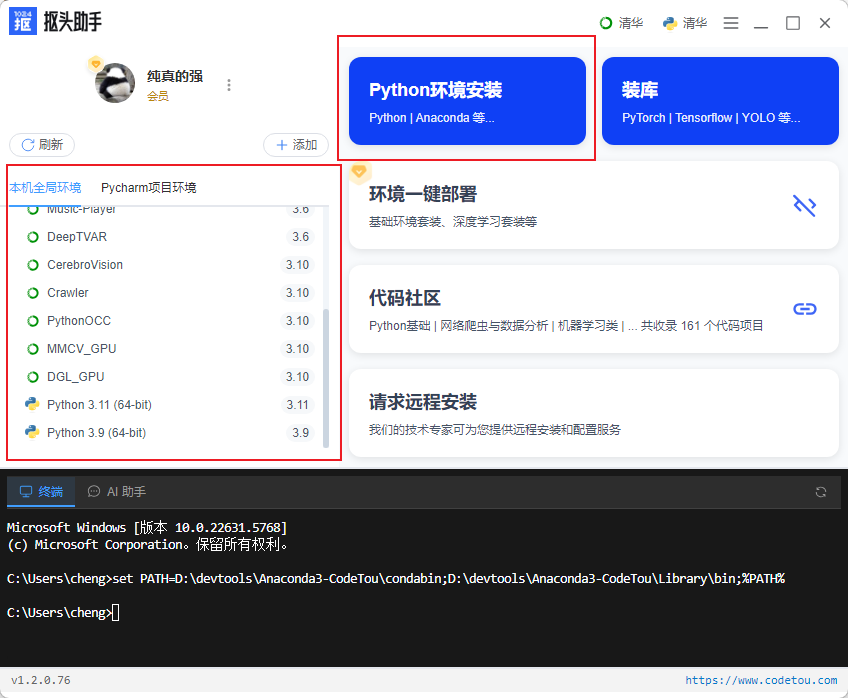
1. 选择Python环境
打开软件,在左侧选择你的Python环境:
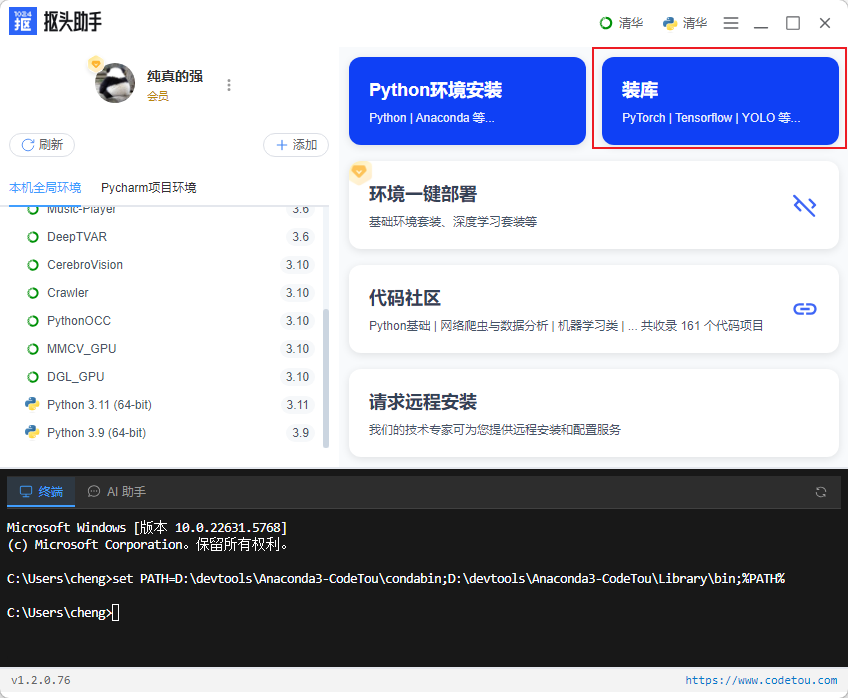
2. 找到DGL
切换到「GPU库」,找到DGL_GPU:
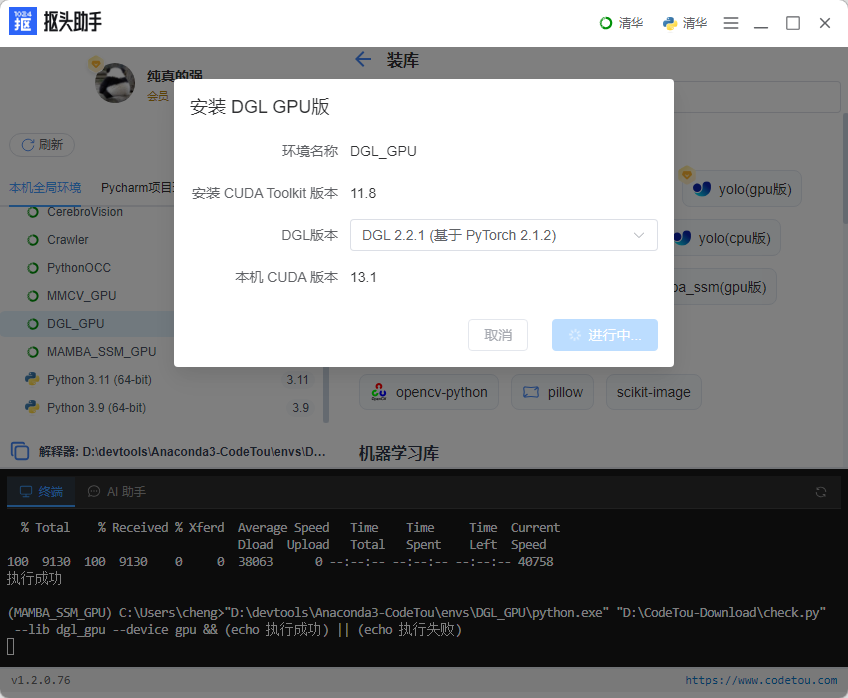
3. 确认配置并安装
软件会自动检测PyTorch和CUDA版本,选择匹配的DGL:
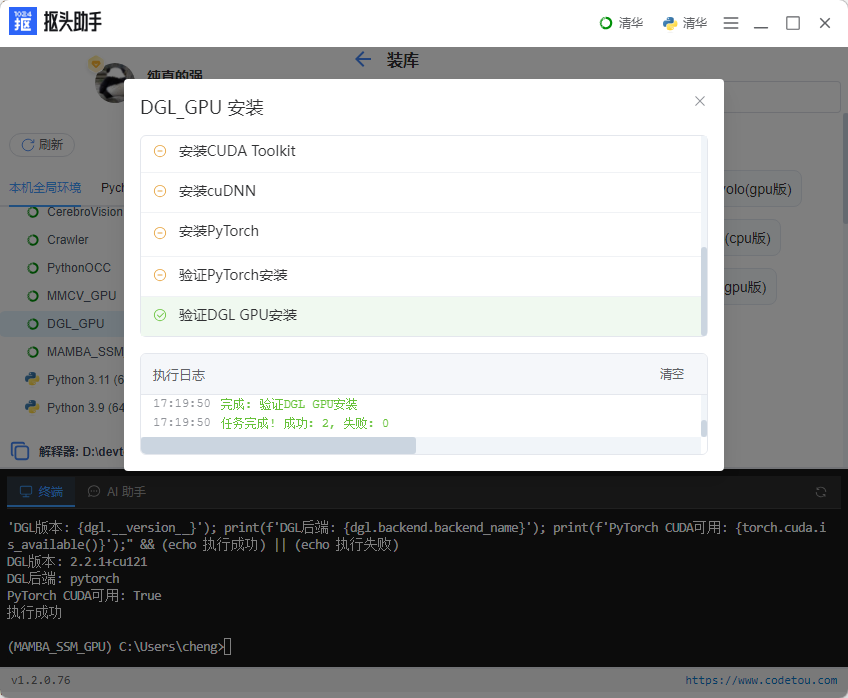
4. 等待完成
自动安装DGL及依赖:
方式二:手动安装
1. 确认当前环境
import torch
print(f"PyTorch: {torch.__version__}")
print(f"CUDA: {torch.version.cuda}")
2. 安装对应版本的DGL
根据CUDA版本选择:
CUDA 11.8:
pip install dgl -f https://data.dgl.ai/wheels/cu118/repo.html
CUDA 12.1:
pip install dgl -f https://data.dgl.ai/wheels/cu121/repo.html
3. 验证安装
import dgl
print(f"DGL版本: {dgl.__version__}")
print(f"CUDA可用: {dgl.cuda.is_available()}")
验证安装
运行基础测试:
import dgl
import torch

# 创建图
g = dgl.graph(([0, 1, 2], [1, 2, 3]))

# 转移到GPU
g = g.to('cuda')

print(f"节点数: {g.num_nodes()}")
print(f"边数: {g.num_edges()}")
print(f"设备: {g.device}")
输出:
节点数: 4
边数: 3
设备: cuda:0
图卷积网络示例
import torch
import torch.nn as nn
import dgl
import dgl.nn as dglnn

class GCN(nn.Module):
    def __init__(self, in_dim, hidden_dim, out_dim):
        super().__init__()
        self.conv1 = dglnn.GraphConv(in_dim, hidden_dim)
        self.conv2 = dglnn.GraphConv(hidden_dim, out_dim)

    def forward(self, g, features):
        h = torch.relu(self.conv1(g, features))
        h = self.conv2(g, h)
        return h

# 创建图和特征
g = dgl.graph(([0, 1, 2, 3], [1, 2, 3, 4])).to('cuda')
features = torch.randn(5, 10).cuda()

# 创建模型
model = GCN(10, 20, 5).cuda()

# 前向传播
output = model(g, features)
print(f"输出shape: {output.shape}")
常见问题
Q:import dgl报CUDA error?
PyTorch和DGL的CUDA版本不匹配。运行print(torch.version.cuda)确认版本,重装对应的DGL。
Q:RTX 40系列能用吗?
可以,支持CUDA 11.8。
Q:为什么pip install dgl失败?
官方默认提供CPU版本,GPU版本需要指定下载源。
Q:DGL占用显存多吗?
取决于图大小。可以用采样降低显存占用:
sampler = dgl.dataloading.NeighborSampler([10, 10])
dataloader = dgl.dataloading.DataLoader(
    g, torch.arange(g.num_nodes()), sampler, batch_size=1024
)
DGL常用操作
图构建
# 从边列表创建
g = dgl.graph(([0, 1, 2], [1, 2, 3]))

# 添加自环
g = dgl.add_self_loop(g)

# 双向图
g = dgl.to_bidirected(g)
节点和边特征
# 节点特征
g.ndata['feat'] = torch.randn(g.num_nodes(), 128)

# 边权重
g.edata['weight'] = torch.ones(g.num_edges())
消息传递
import dgl.function as fn

# 聚合邻居特征
g.update_all(fn.copy_u('feat', 'm'), fn.mean('m', 'h'))
相关教程
如果你还需要安装其他GPU库:
更多Python库安装教程,访问:https://www.codetou.com
遇到问题?打开软件右上角菜单 →「技术客服」,扫码添加微信获取帮助。

腾讯云面向开发者汇聚海量精品云计算使用和开发经验,营造开放的云计算技术生态圈。
更多推荐
 18
18 0
0- 0


 已为社区贡献7条内容

所有评论(0)