vscode设置clang-format
·
1. 设置
- 安装 c/++插件
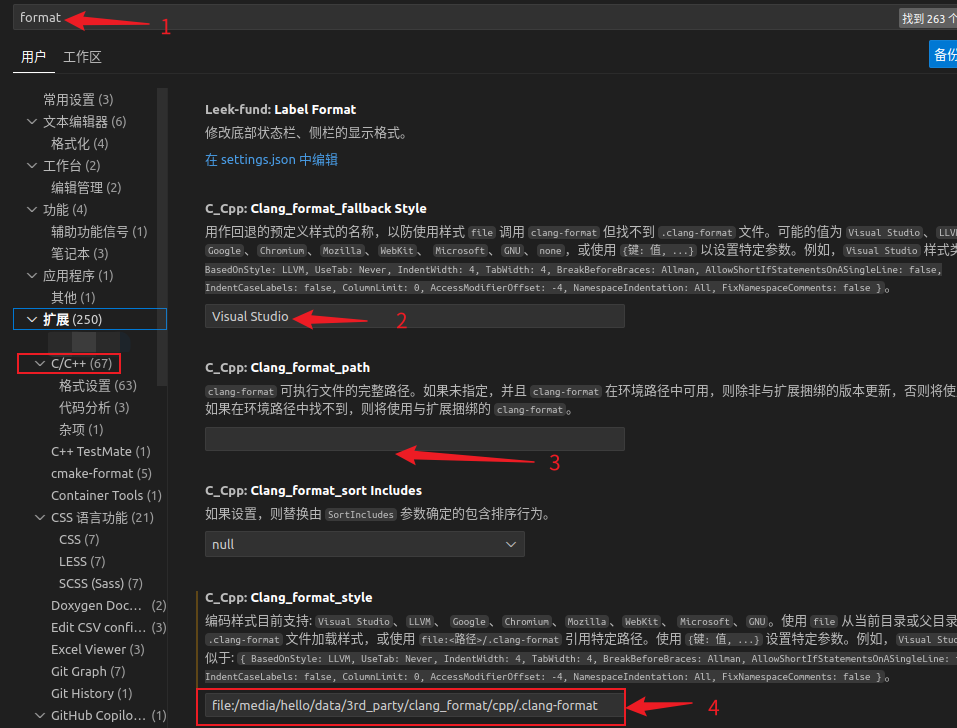
- 首选项–>设置–>format
如下:
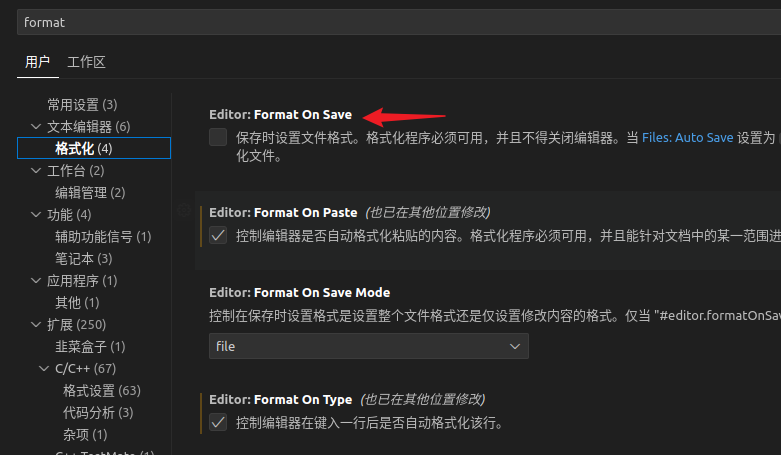
- 可开启保存就格式化
2. 说明
-
- 输入format可以搜索和格式相关的设置
-
- 当.clang-format文件没有找到时的默认代码风格
-
- clang-format可执行程序的完整路径, 如果是/usr/bin/clang-format 可以不加
-
重要: 这就是clang-format的格式配置文件, 所有的格式都在这里面定义.
3. .clang-format设置
# 语言: None, Cpp, Java, JavaScript, ObjC, Proto, TableGen, TextProto
Language: Cpp
# BasedOnStyle:	LLVM

# 访问说明符(public、private等)的偏移
AccessModifierOffset: -4

# 开括号(开圆括号、开尖括号、开方括号)后的对齐: Align, DontAlign, AlwaysBreak(总是在开括号后换行)
AlignAfterOpenBracket: Align

# 连续赋值时,对齐所有等号
AlignConsecutiveAssignments: false

# 连续声明时,对齐所有声明的变量名
AlignConsecutiveDeclarations: false

# 右对齐逃脱换行(使用反斜杠换行)的反斜杠
AlignEscapedNewlines: Right

# 水平对齐二元和三元表达式的操作数
AlignOperands: true

# 对齐连续的尾随的注释
AlignTrailingComments: true

# 不允许函数声明的所有参数在放在下一行
AllowAllParametersOfDeclarationOnNextLine: false

# 不允许短的块放在同一行
AllowShortBlocksOnASingleLine: true

# 允许短的case标签放在同一行
AllowShortCaseLabelsOnASingleLine: true

# 允许短的函数放在同一行: None, InlineOnly(定义在类中), Empty(空函数), Inline(定义在类中,空函数), All
AllowShortFunctionsOnASingleLine: None

# 允许短的if语句保持在同一行
AllowShortIfStatementsOnASingleLine: true

# 允许短的循环保持在同一行
AllowShortLoopsOnASingleLine: true

# 总是在返回类型后换行: None, All, TopLevel(顶级函数,不包括在类中的函数),
# AllDefinitions(所有的定义,不包括声明), TopLevelDefinitions(所有的顶级函数的定义)
AlwaysBreakAfterReturnType: None

# 总是在多行string字面量前换行
AlwaysBreakBeforeMultilineStrings: false

# 总是在template声明后换行
AlwaysBreakTemplateDeclarations: true

# false表示函数实参要么都在同一行,要么都各自一行
BinPackArguments: true

# false表示所有形参要么都在同一行,要么都各自一行
BinPackParameters: true

# 大括号换行,只有当BreakBeforeBraces设置为Custom时才有效
BraceWrapping:
  # class定义后面
  AfterClass: true
  # 控制语句后面
  AfterControlStatement: true
  # enum定义后面
  AfterEnum: true
  # 函数定义后面
  AfterFunction: true
  # 命名空间定义后面
  AfterNamespace: false
  # struct定义后面
  AfterStruct: true
  # union定义后面
  AfterUnion: true
  # extern之后
  AfterExternBlock: true
  # catch之前
  BeforeCatch: true
  # else之前
  BeforeElse: true
  # 缩进大括号
  IndentBraces: false
  # 分离空函数
  SplitEmptyFunction: false
  # 分离空语句
  SplitEmptyRecord: false
  # 分离空命名空间
  SplitEmptyNamespace: false

# 在二元运算符前换行: None(在操作符后换行), NonAssignment(在非赋值的操作符前换行), All(在操作符前换行)
BreakBeforeBinaryOperators: NonAssignment

# 在大括号前换行: Attach(始终将大括号附加到周围的上下文), Linux(除函数、命名空间和类定义,与Attach类似),
#   Mozilla(除枚举、函数、记录定义,与Attach类似), Stroustrup(除函数定义、catch、else,与Attach类似),
#   Allman(总是在大括号前换行), GNU(总是在大括号前换行,并对于控制语句的大括号增加额外的缩进), WebKit(在函数前换行), Custom
#   注:这里认为语句块也属于函数
BreakBeforeBraces: Custom

# 在三元运算符前换行
BreakBeforeTernaryOperators: false

# 在构造函数的初始化列表的冒号后换行
BreakConstructorInitializers: AfterColon

#BreakInheritanceList: AfterColon

BreakStringLiterals: false

# 每行字符的限制,0表示没有限制
ColumnLimit: 0

CompactNamespaces: true

# 构造函数的初始化列表要么都在同一行,要么都各自一行
ConstructorInitializerAllOnOneLineOrOnePerLine: false

# 构造函数的初始化列表的缩进宽度
ConstructorInitializerIndentWidth: 4

# 延续的行的缩进宽度
ContinuationIndentWidth: 4

# 去除C++11的列表初始化的大括号{后和}前的空格
Cpp11BracedListStyle: true

# 继承最常用的指针和引用的对齐方式
DerivePointerAlignment: false

# 固定命名空间注释
FixNamespaceComments: true

# 缩进case标签
IndentCaseLabels: false

IndentPPDirectives: None

# 缩进宽度
IndentWidth: 4

# 函数返回类型换行时,缩进函数声明或函数定义的函数名
IndentWrappedFunctionNames: false

# 保留在块开始处的空行
KeepEmptyLinesAtTheStartOfBlocks: false

# 连续空行的最大数量
MaxEmptyLinesToKeep: 1

# 命名空间的缩进: None, Inner(缩进嵌套的命名空间中的内容), All
NamespaceIndentation: None

# 指针和引用的对齐: Left, Right, Middle
PointerAlignment: Right

# 允许重新排版注释
ReflowComments: true

# 允许排序#include
SortIncludes: false

# 允许排序 using 声明
SortUsingDeclarations: false

# 在C风格类型转换后添加空格
SpaceAfterCStyleCast: false

# 在Template 关键字后面添加空格
SpaceAfterTemplateKeyword: true

# 在赋值运算符之前添加空格
SpaceBeforeAssignmentOperators: true

# SpaceBeforeCpp11BracedList: true

# SpaceBeforeCtorInitializerColon: true

# SpaceBeforeInheritanceColon: true

# 开圆括号之前添加一个空格: Never, ControlStatements, Always
SpaceBeforeParens: ControlStatements

# SpaceBeforeRangeBasedForLoopColon: true

# 在空的圆括号中添加空格
SpaceInEmptyParentheses: false

# 在尾随的评论前添加的空格数(只适用于//)
SpacesBeforeTrailingComments: 1

# 在尖括号的<后和>前添加空格
SpacesInAngles: false

# 在C风格类型转换的括号中添加空格
SpacesInCStyleCastParentheses: false

# 在容器(ObjC和JavaScript的数组和字典等)字面量中添加空格
SpacesInContainerLiterals: true

# 在圆括号的(后和)前添加空格
SpacesInParentheses: false

# 在方括号的[后和]前添加空格,lamda表达式和未指明大小的数组的声明不受影响
SpacesInSquareBrackets: false

# 标准: Cpp03, Cpp11, Auto
Standard: Cpp11

# tab宽度
TabWidth: 4

# 使用tab字符: Never, ForIndentation, ForContinuationAndIndentation, Always
UseTab: Never
4. 使用
-
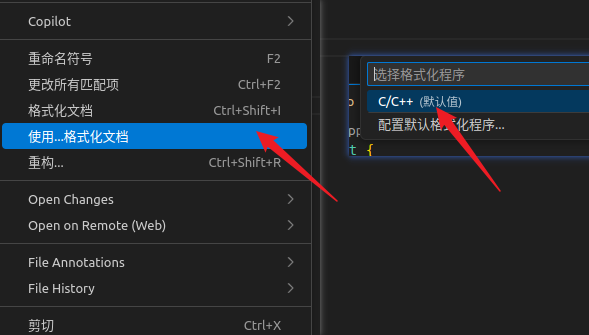
鼠标右键–>使用…格式化文档—>C/C++
-
快捷键: ctrl+shift+I
5. 效果
#include <iostream>
#include <vector>
#include <memory>
#include <map>
#include <string>

// 前置声明
class Vehicle;
struct Point;

// 枚举类型
enum class Color
{
    RED,
    GREEN,
    BLUE,
    YELLOW
};

enum Status
{
    STATUS_OK = 0,
    STATUS_ERROR = -1,
    STATUS_PENDING = 1
};

// 命名空间
namespace graphics {
namespace render {

// 结构体
struct Point
{
    double x, y, z;
    Point() :
        x(0.0), y(0.0), z(0.0)
    {}
    Point(double _x, double _y, double _z) :
        x(_x), y(_y), z(_z)
    {}
};

// 类定义
class Shape
{
private:
    std::string name_;
    Color color_;
    static int count_;

protected:
    Point center_;

public:
    // 构造函数
    Shape(const std::string &name, Color color) :
        name_(name), color_(color)
    {
        count_++;
    }

    // 虚析构函数
    virtual ~Shape()
    {
        count_--;
    }

    virtual double getArea() const = 0;
    virtual void draw() const = 0;

    // 普通成员函数
    void setCenter(const Point &p)
    {
        center_ = p;
    }
    Point getCenter() const
    {
        return center_;
    }

    // 静态函数
    static int getCount()
    {
        return count_;
    }

    // 友元函数声明
    friend std::ostream &operator<<(std::ostream &os, const Shape &shape);
};

int Shape::count_ = 0;

// 派生类
class Circle : public Shape
{
private:
    double radius_;

public:
    Circle(const std::string &name, double r) :
        Shape(name, Color::RED), radius_(r)
    {}

    // 重写虚函数
    double getArea() const override
    {
        return 3.14159 * radius_ * radius_;
    }

    void draw() const override
    {
        std::cout << "Drawing circle with radius: " << radius_ << std::endl;
    }

    // 操作符重载
    Circle &operator+=(double delta)
    {
        radius_ += delta;
        return *this;
    }
};

// 模板类
template <typename T>
class Container
{
private:
    std::vector<T> data_;

public:
    void add(const T &item)
    {
        data_.push_back(item);
    }

    T &operator[](size_t index)
    {
        return data_[index];
    }
    const T &operator[](size_t index) const
    {
        return data_[index];
    }

    size_t size() const
    {
        return data_.size();
    }

    // 迭代器支持
    typename std::vector<T>::iterator begin()
    {
        return data_.begin();
    }
    typename std::vector<T>::iterator end()
    {
        return data_.end();
    }
};

}
} // namespace graphics::render

// 函数模板
template <typename T>
T max(const T &a, const T &b)
{
    return (a > b) ? a : b;
}

// 函数重载
void processData(int value)
{
    std::cout << "Processing int: " << value << std::endl;
}

void processData(double value)
{
    std::cout << "Processing double: " << value << std::endl;
}

void processData(const std::string &value)
{
    std::cout << "Processing string: " << value << std::endl;
}

// 复杂函数
std::shared_ptr<graphics::render::Circle> createCircle(const std::string &name, double radius)
{
    auto circle = std::make_shared<graphics::render::Circle>(name, radius);

    circle->setCenter(graphics::render::Point(10.0, 20.0, 0.0));
    return circle;
}

// 主函数
int main()
{
    // 变量声明和初始化
    int x = 10, y = 20;
    double pi = 3.14159;
    std::string message = "Hello, World!";

    // 指针操作
    int *ptr = &x;
    int **pptr = &ptr;

    // 数组
    int numbers[] = {1, 2, 3, 4, 5};
    std::vector<int> vec{10, 20, 30, 40, 50};

    // 条件语句
    if (x > y)
    {
        std::cout << "x is greater" << std::endl;
    }
    else if (x < y)
    {
        std::cout << "y is greater" << std::endl;
    }
    else
    {
        std::cout << "Equal" << std::endl;
    }

    // 三元操作符
    int max_val = (x > y) ? x : y;

    // 循环
    for (int i = 0; i < 5; i++)
    {
        std::cout << "Loop iteration: " << i << std::endl;
    }

    // 范围循环
    for (const auto &num : vec)
    {
        std::cout << "Vector element: " << num << std::endl;
    }

    // while 循环
    int counter = 0;
    while (counter < 3)
    {
        std::cout << "Counter: " << counter++ << std::endl;
    }

    // switch 语句
    Color color = Color::RED;
    switch (color)
    {
    case Color::RED:
        std::cout << "Red color" << std::endl;
        break;
    case Color::GREEN:
        std::cout << "Green color" << std::endl;
        break;
    default:
        std::cout << "Other color" << std::endl;
        break;
    }

    // 容器和映射
    std::map<std::string, int> scores;
    scores["Alice"] = 95;
    scores["Bob"] = 87;
    scores["Charlie"] = 92;

    // Lambda 表达式
    auto lambda = [&](int a, int b) -> int {
        return a + b + x;
    };

    int result = lambda(5, 10);

    // 智能指针
    auto circle = createCircle("MyCircle", 5.0);
    std::unique_ptr<int> unique_ptr = std::make_unique<int>(42);

    // 模板使用
    graphics::render::Container<std::string> stringContainer;
    stringContainer.add("First");
    stringContainer.add("Second");
    stringContainer.add("Third");

    // 函数调用
    processData(42);
    processData(3.14);
    processData("Hello");

    // 异常处理
    try
    {
        if (vec.empty())
        {
            throw std::runtime_error("Vector is empty");
        }
        std::cout << "First element: " << vec.at(0) << std::endl;
    }
    catch (const std::exception &e)
    {
        std::cerr << "Exception: " << e.what() << std::endl;
    }

    // 复杂表达式
    double complex_calc = (pi * 2.0 + max_val) / (x + y) - static_cast<double>(result);

    // 指针算术
    int *arr_ptr = numbers;
    for (int i = 0; i < 5; ++i)
    {
        std::cout << "Array[" << i << "] = " << *(arr_ptr + i) << std::endl;
    }

    // 成员访问
    graphics::render::Point point(1.0, 2.0, 3.0);
    std::cout << "Point coordinates: (" << point.x << ", " << point.y << ", " << point.z << ")" << std::endl;

    return 0;
}

// 全局函数实现
std::ostream &graphics::render::operator<<(std::ostream &os, const Shape &shape)
{
    os << "Shape: " << shape.name_;
    return os;
}
参考
- https://rocm.docs.amd.com/projects/llvm-project/en/latest/LLVM/clang/html/ClangFormatStyleOptions.html
- https://zhuanlan.zhihu.com/p/356143396

腾讯云面向开发者汇聚海量精品云计算使用和开发经验,营造开放的云计算技术生态圈。
更多推荐
 3
3 0
0- 0


 已为社区贡献7条内容

所有评论(0)