注释容易混淆?修改vscode注释颜色,自定义你的专属颜色
【代码】注释容易混淆?修改vscode注释颜色,自定义你的专属颜色。
·
-
按
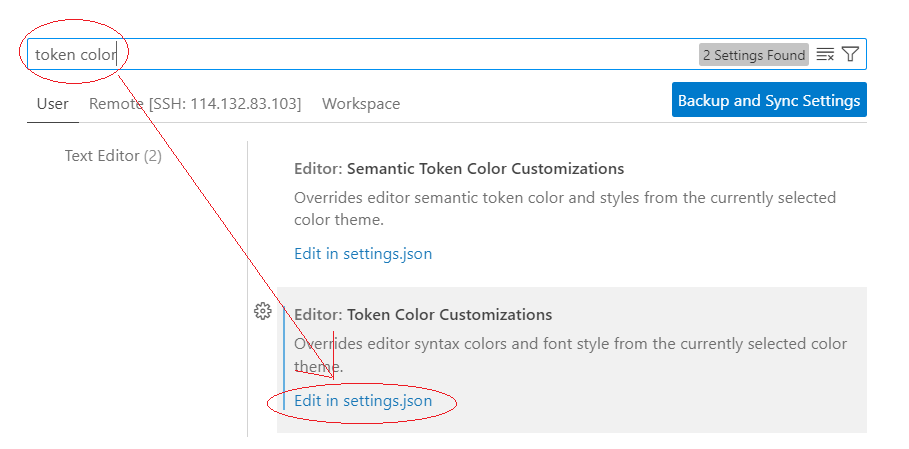
Ctrl+,打开设置,搜索 "token color" → 点击 "Edit in settings.json"
-
添加以下配置(以绿色注释为例):
"editor.tokenColorCustomizations": {
    "textMateRules": [
        {
            "scope": "comment.line",       // 单行注释(如 //)
            "settings": {
                "foreground": "#00FF00",   //在这儿改你想要的颜色
                "fontStyle": "italic"
            }
        },
        {
            "scope": "comment.block",     // 多行注释(如 /* */)
            "settings": {
                "foreground": "#00AA00",   //在这儿改你想要的颜色
                "fontStyle": "italic"
            }
        }
    ]
}
常用颜色代码:
-
浅灰色:
#999999 -
绿色:
#00FF00或#4EC9B0 -
蓝色:
#569CD6 -
紫色:
#C586C0

腾讯云面向开发者汇聚海量精品云计算使用和开发经验,营造开放的云计算技术生态圈。
更多推荐
 1
1 0
0- 0


 已为社区贡献7条内容

所有评论(0)