vscode launch.json task.json 配置笔记
·
launch.json
1、选中这里
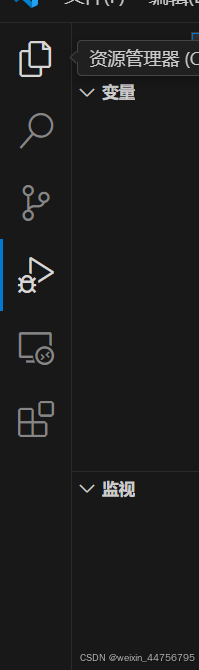
2、右下角添加配置

3、选择这个选项

4、launch.json示例代码及部分条目注释
{
  // 使用 IntelliSense 了解相关属性。
  // 悬停以查看现有属性的描述。
  // 欲了解更多信息,请访问: https://go.microsoft.com/fwlink/?linkid=830387
  "version": "0.2.0",
  "configurations": [
    {
      "name": "hello_server (gdb)启动",   //name可以随便设置
      "type": "cppdbg",    //类型按语言是固定的
      "request": "launch",    //launch是新开一个程序,attach是用于已经在运行的程序进行调试
      "program": "${fileDirname}/hello_server",  //和cwd的fileDirname要一致,表示最终生成的可执行文件的路径
      "args": [],
      "stopAtEntry": false,
      "cwd": "${fileDirname}/bin",    //一个bin目录作为程序假定的工作目录。可能是要利用那里的资源。相当于链接过去了
      "environment": [],
      "externalConsole": false,
      "MIMode": "gdb",
      "setupCommands": [
        {
          "description": "为 gdb 启用整齐打印",
          "text": "-enable-pretty-printing",
          "ignoreFailures": true
        },
        {
          "description": "将反汇编风格设置为 Intel",
          "text": "-gdb-set disassembly-flavor intel",
          "ignoreFailures": true
        }
      ],
      "preLaunchTask": "C: gcc 生成活动文件"  //表示在launch.json最开始一个任务是调用lable为 "C: gcc 生成活动文件" 的tasks.json文件来生成可执行文件以供launch.json调试
    }
  ]
}
5、tasks.json
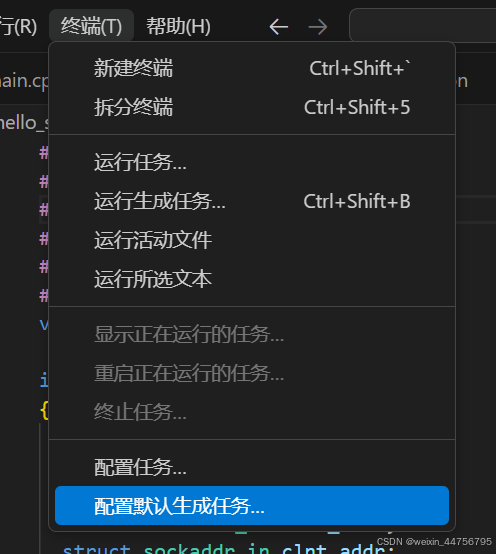 生成tasks.json
6、
{
  "version": "2.0.0",
  "tasks": [
    {
      "type": "cppbuild",
      "label": "C: gcc 生成活动文件", //这里要跟launch.json里的preLaunchTask内容一致,这是tasks.json的代号
      "command": "/usr/bin/gcc", //这里指定编译器,一般是gcc或者g++
      "args": [
        "-fdiagnostics-color=always",
        "-g",
        "hello_server.c", //-g表示编译出带调试信息的可执行文件,缺了这个生成的文件就不能调试了,hello_server.c是待编译的文件
        "-o",
        "${fileDirname}/hello_server"
      ], //-o 后面是生成的可执行文件名及其生成路径
      "options": {
        "cwd": "${fileDirname}"
      },
      "problemMatcher": ["$gcc"],
      "group": {
        "kind": "build",
        "isDefault": true
      },
      "detail": "编译器: /usr/bin/gcc"
    }
  ]
}

腾讯云面向开发者汇聚海量精品云计算使用和开发经验,营造开放的云计算技术生态圈。
更多推荐
 5
5 0
0- 0


 已为社区贡献1条内容

所有评论(0)