【javaFX基础】点击按钮出现弹窗,关闭窗口出现提示
Day1学习:javaFX项目,点击按钮出现弹窗,关闭窗口出现提示
·
一、知识及技巧(idea版)
1、快速调出javafx.application.Application的init()和stop()方法
方法1:右键点击类 → Generate → Override Methods
方法2:使用快捷键 Ctrl+O,选择init()和stop()方法
init()方法在应用程序启动时、UI创建之前调用
stop()方法在应用程序退出时调用
2、快速输入System.out.println
方法1:输入sout 然后按Tab键或Enter键
方法2:输入soutm (打印方法名)、soutp(打印参数)、soutv(打印变量值)
// 输入 sout → Tab
System.out.println();

// 输入 soutm → Tab
System.out.println("MyClass.main");

// 输入 soutp → Tab
System.out.println("args = " + Arrays.toString(args));

// 输入 soutv → Tab
System.out.println("i = " + i);
二、问题解决
1、路径来源没找到问题:注意看代码中写的路径是否正确

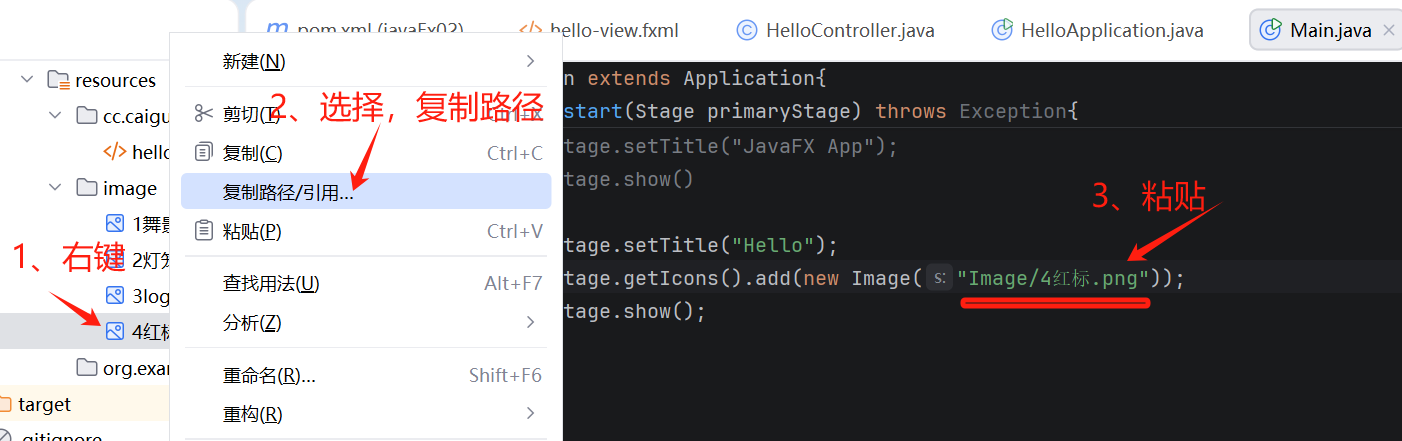
2、在JavaFX中,一旦调用了 stage.show() 或 stage.setVisible(true),就不能再修改窗口的模态属性,所以注意把show放在属性修改的代码下面,如下:
stage.initModality(Modality.APPLICATION_MODAL);
stage.show(); //不能先写在上
三、代码入门
创建javaFX项目,实现点击按钮出现弹窗。
运行程序实现弹出包含按钮(名为Hello)、按钮2(名为LC)的主窗口(名为World),主窗口大小不能拉伸,点击按钮1后弹出新窗口可再点击按钮,点击按钮2后弹出新窗口就不能操作任何按钮;关闭主窗口时会弹出提示。
package cc.caiguang.hello;
import javafx.application.Platform;
import javafx.scene.Scene;
import javafx.scene.control.Alert;
import javafx.scene.control.Button;
import javafx.scene.control.ButtonType;
import javafx.scene.image.Image;
import javafx.scene.layout.AnchorPane;
import javafx.scene.layout.BorderPane;
import javafx.scene.layout.Pane;
import javafx.stage.Modality;
import javafx.stage.Stage;
import javafx.application.Application;
import javafx.stage.StageStyle;
import org.w3c.dom.ls.LSOutput;
import java.util.Optional;

public class Main extends Application{
    public static void main(String[] args){
        Application.launch(args);
    }
    @Override
    public void start(Stage primaryStage) throws Exception{
        /*System.out.println("start()...");
        primaryStage.setTitle("JavaFX App");
        primaryStage.show();*/
        /*Button button = new Button( "按钮");
        BorderPane pane =new BorderPane(button);
        Scene scene = new Scene(pane, 300, 300);
        primaryStage.setScene(scene);
        primaryStage.setTitle("JavaFX App");
        primaryStage.show()
         */
        Button button = new Button(  "Hello");
        Button button2 = new Button(  "LC");
        button.setLayoutX(200);
        button.setLayoutY(300);
        button2.setLayoutX(200);
        button2.setLayoutY(350);
        AnchorPane pane =new AnchorPane();
        pane.getChildren().addAll(button,button2);
        button.setOnAction(e ->{
            Stage stage= new Stage();
            stage.setHeight(200);
            stage.setWidth(300);
            //stage.initModality(Modality.APPLICATION_MODAL);//点击按钮弹出窗口后,若未关闭窗口则无法重新点击按钮
            stage.show();
            //getHostServices().showDocument( "www.deepseek.com");打开网页
        });
        button2.setOnAction(e ->{
            Stage stage= new Stage();
            stage.setHeight(200);
            stage.setWidth(300);
            //stage.initModality(Modality.APPLICATION_MODAL);//点击按钮弹出窗口后,若未关闭窗口则无法重新点击按钮
            stage.initOwner(primaryStage);
            stage.initModality(Modality.APPLICATION_MODAL);//WINDOW_MODAL可移动按钮1弹出的窗口,APPLICATION_MODAL不能
            stage.show();
            //getHostServices().showDocument( "www.deepseek.com");
        });

        Platform.setImplicitExit(false);//取消操作系统默认退出
        primaryStage.setOnCloseRequest(event-> {
                    event.consume();
                    Alert alert = new Alert(Alert.AlertType.CONFIRMATION);
                    alert.setTitle("退出程序");
                    alert.setHeaderText(null);
                    alert.setContentText("您是否要退出程序?");
                    Optional<ButtonType> result = alert.showAndWait();
                    if (result.get() == ButtonType.OK) {
                        Platform.exit();//调用退出程序
                        //primaryStaqe.close();//仅仅关闭窗口,程序还在运营
                    }
                });
        Scene scene =new Scene(pane,500,500);
        primaryStage.setScene(scene);
        primaryStage.setTitle("World");
        primaryStage.getIcons().add(new Image("Image/4红标.png"));
        primaryStage.setResizable(false);//固定窗口大小
        //primaryStage.initStyle(StageStyle.UNDECORATED);
        primaryStage.show();

    }

    @Override
    public void init() throws Exception{
        super.init();
        System.out.println("init()...");
    }

    @Override
    public void stop()throws Exception {
        super.stop();
        System.out.println("stop()...");
    }
}
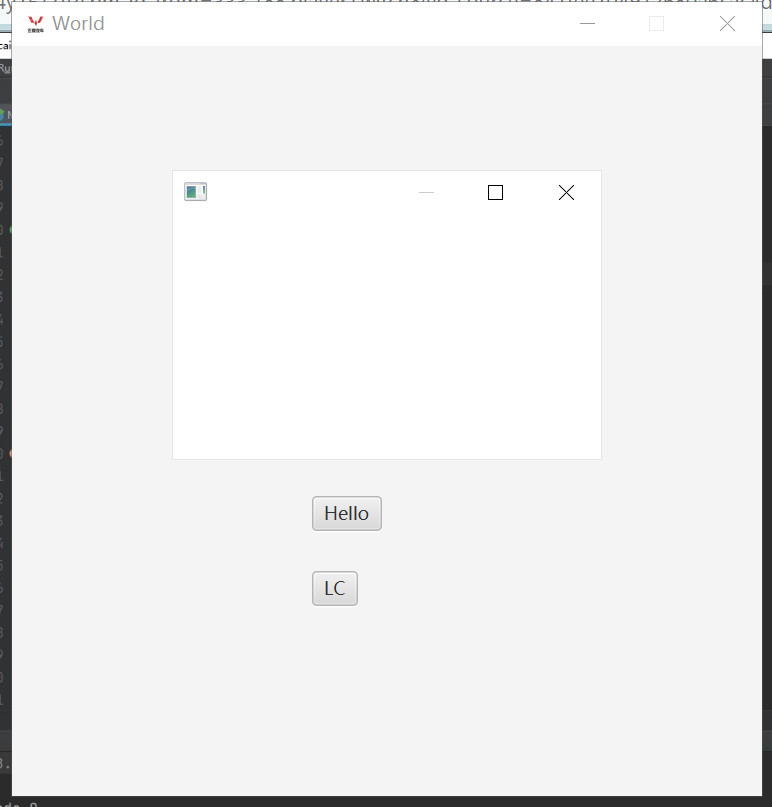
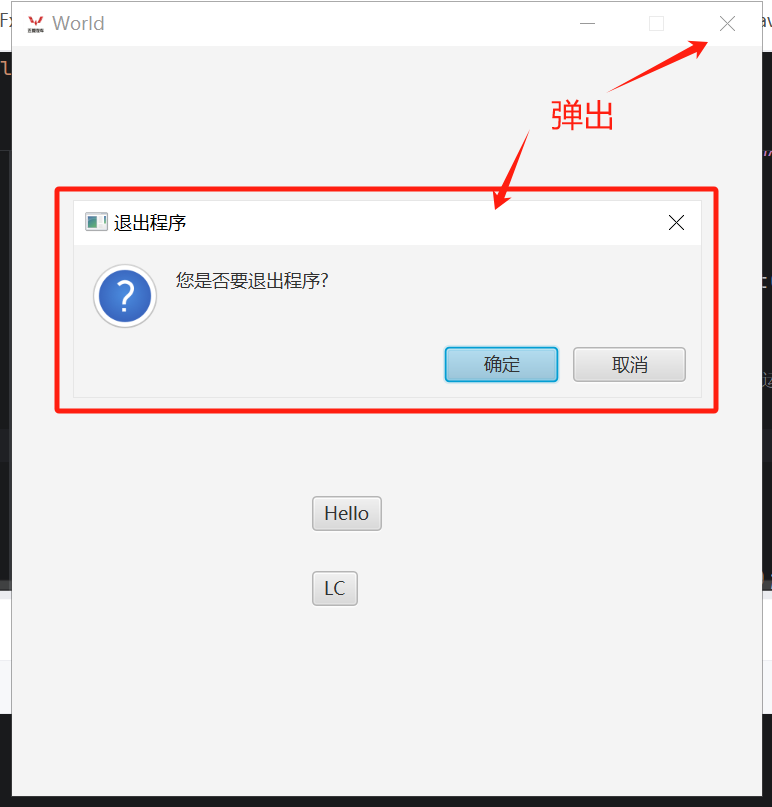
(运行效果)
四、链接学习
javaFX应用开发视频教程:蔡广

腾讯云面向开发者汇聚海量精品云计算使用和开发经验,营造开放的云计算技术生态圈。
更多推荐
 4
4 0
0- 0


 已为社区贡献9条内容

所有评论(0)