docker与既有的containerd共存
·
1 概述
服务器上已经通过yum安装了containerd供kubelet使用,现在想安装docker独立使用,docker必须完全不影响现有的containerd。因此docker必须使用独立的containerd进程。另外如果直接yum docker-ce,可能使得docker-ce依赖的containerd覆盖了既有的containerd的文件,因此选择使用二进制文件安装。
本次实验的环境概述如下:
docker专用的containerd进程的socket文件是:/run/containerd2/containerd.sock。
docker专用的containerd进程的数据目录是:/var/lib/containerd2。
既有containerd进程的socket文件是:/run/containerd/containerd.sock。
既有containerd进程的数据目录是:/var/lib/containerd。
2 部署步骤
2.1 下载docker二进制包
解压后的目录必须保留在原地,不能删除。
mkdir -p /opt
cd /opt
wget https://download.docker.com/linux/static/stable/x86_64/docker-26.1.3.tgz
tar xf docker-*.tgz

# docker开头的几个可执行二进制文件都复制到/usr/local/bin/目录下,不执行此步后续docker run运行容器会报错。
cp docker/docker* /usr/local/bin/
cp docker/containerd-shim-runc-v2 /usr/local/bin/

2.2 部署docker专用的containerd
2.2.1 创建containerd的配置文件
mkdir -p /etc/docker/containerd/
containerd的配置文件/etc/docker/containerd/config.toml如下(直接使用):
disabled_plugins = ["cri"]

root = "/var/lib/containerd2"
state = "/run/containerd2"

[grpc]
  address = "/run/containerd2/containerd.sock"
  uid = 0
  gid = 0

[plugins]
  [plugins."io.containerd.grpc.v1.cri".containerd.runtimes.runc.options]
    BinaryName = "/opt/docker/containerd-shim-runc-v2"
2.2.2 创建containerd的systemcd文件
vi /usr/lib/systemd/system/docker-containerd.service
docker-containerd.service文件的内容如下(直接使用):
[Unit]
Description=containerd container runtime
Documentation=https://containerd.io
After=network.target local-fs.target

[Service]
ExecStartPre=-/sbin/modprobe overlay
ExecStart=/opt/docker/containerd --config /etc/docker/containerd/config.toml --log-level debug

Type=notify
Delegate=yes
KillMode=process
Restart=always
RestartSec=5
# Having non-zero Limit*s causes performance problems due to accounting overhead
# in the kernel. We recommend using cgroups to do container-local accounting.
LimitNPROC=infinity
LimitCORE=infinity
LimitNOFILE=infinity
# Comment TasksMax if your systemd version does not supports it.
# Only systemd 226 and above support this version.
TasksMax=infinity
OOMScoreAdjust=-999

[Install]
WantedBy=multi-user.target
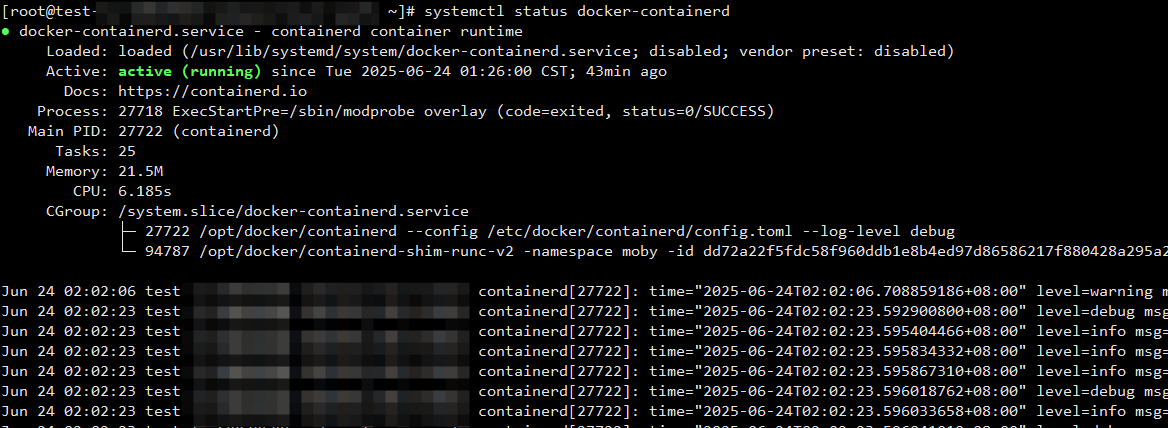
2.2.3 启动containerd
systemctl daemon-reload
systemctl restart docker-containerd
systemctl status docker-containerd

2.3 部署docker
2.3.1 创建docker的systemcd文件
vi /usr/lib/systemd/system/docker.service
[Unit]
Description=Docker Application Container Engine
Documentation=https://docs.docker.com
After=network-online.target firewalld.service
Wants=network-online.target

[Service]
Type=notify
# the default is not to use systemd for cgroups because the delegate issues still
# exists and systemd currently does not support the cgroup feature set required
# for containers run by docker
ExecStart=/opt/docker/dockerd --containerd /run/containerd2/containerd.sock
ExecReload=/bin/kill -s HUP $MAINPID
# Having non-zero Limit*s causes performance problems due to accounting overhead
# in the kernel. We recommend using cgroups to do container-local accounting.
LimitNOFILE=infinity
LimitNPROC=infinity
LimitCORE=infinity
# Uncomment TasksMax if your systemd version supports it.
# Only systemd 226 and above support this version.
#TasksMax=infinity
TimeoutStartSec=0
# set delegate yes so that systemd does not reset the cgroups of docker containers
Delegate=yes
# kill only the docker process, not all processes in the cgroup
KillMode=process
# restart the docker process if it exits prematurely
Restart=on-failure
StartLimitBurst=3
StartLimitInterval=60s

[Install]
WantedBy=multi-user.target
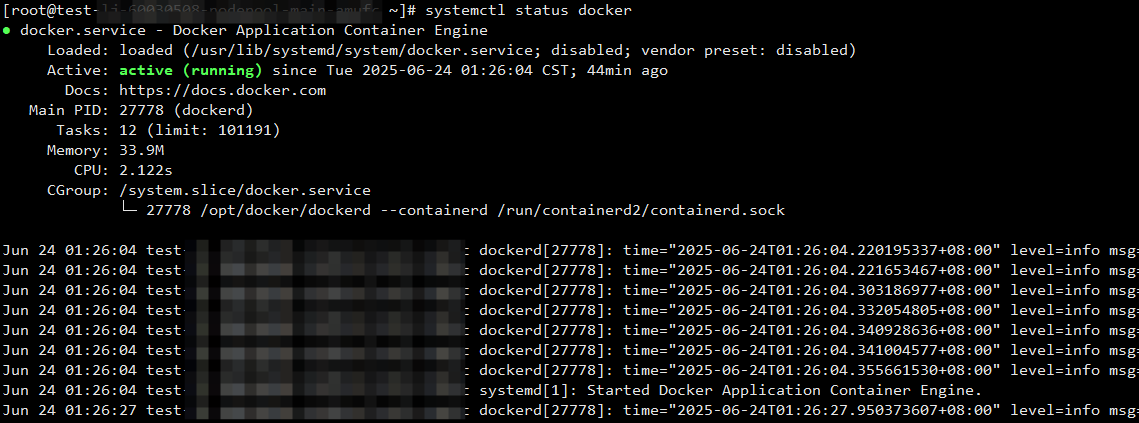
2.3.2 启动docker
systemctl daemon-reload
systemctl restart docker
systemctl status docker
3 测试
docker run启动一个容器,并且通过crt命令连接docker专用的containerd进程,发现符合预期:


腾讯云面向开发者汇聚海量精品云计算使用和开发经验,营造开放的云计算技术生态圈。
更多推荐
 5
5 0
0- 0


 已为社区贡献12条内容

所有评论(0)