grib1文件解析 python_基于Python的Grib数据可视化
利用Python语言实现Grib数据可视化主要依靠三个库——pygrib、numpy和matplotlib。pygrib是欧洲中期天气预报中心(ECMWF)的GRIG API C库的Python接口,通过这个库可以将Grib数据读取出来;numpy是Python的一种开源的数值计算扩展,这种工具可用来存储和处理大型矩阵;matplotlib是python著名的绘图库,它提供了一整套和matlab相
利用Python语言实现Grib数据可视化主要依靠三个库——pygrib、numpy和matplotlib。pygrib是欧洲中期天气预报中心(ECMWF)的GRIG API C库的Python接口,通过这个库可以将Grib数据读取出来;numpy是Python的一种开源的数值计算扩展,这种工具可用来存储和处理大型矩阵;matplotlib是python著名的绘图库,它提供了一整套和matlab相似的命令API,十分适合交互式地进行制图;在数据可视化过程中,我们常需要将数据在地图上画出来,所以还需要matplotlib的一个子包basemap,负责地图绘制。
一、库的安装
matplotlib依赖
安装过程
这里我都是通过源码包安装的,大家也可以再终端里通过pip install 命令来安装
1、安装nose
解压缩后,进入命令提示符 运行
1 python3 setup.py install
2、安装numpy
解压缩后,进入命令提示符 运行
1 python3 setup.py install
3、安装pyparsing
解压缩后,进入命令提示符 运行
1 python3 setup.py install
4、安装python-dateutil
解压缩后,进入命令提示符 运行
1 python3 setup.py install
5、安装cycler
解压缩后,进入命令提示符 运行
1 python3 setup.py install
6、安装pkg-config
1 ./configure --with-intermal-glib2 make && date
3 sudo make install && date
7、安装freetype
1 ./configure2 make && date
3 sudo make install && date
8、安装libpng
1 ./configure2 make && date
3 sudo make install && date
9、安装matplotlib-1.5.0
解压缩后,进入命令提示符 运行
1 python3 setup.py install
basemap依赖
安装过程
1、安装GEOS
1 ./configure2 make && date
3 sudo make install && date
2、安装pyproj
1 python3 setup.py install
3、安装basemap
1 python3 setup.py install
(三)pygrib安装
pygrib依赖
安装过程
由于之前已经安装了numpy和pyproj,这里只需安装Jasper和GRIB API即可安装pygrib
1、安装Jasper
1 ./configure2 make && date
3 sudo make install && date
2、安装GRIB API
1 ./configure --with-jasper='/usr/local/'
2 make && date
3 sudo make install && date
3、安装pygrib
安装pygrib之前首先要根据自己的实际情况修改文件目录下的setup.cfg文件,最主要的就是修改grib_api_dir和jasper_dir,这两个是刚刚安装的Jasper和GRIB API的路径,如果这两个地址不正确安装会报错


1 #Rename this file to setup.cfg to set pygrib's
2 #build options.
3 #Follow instructions below for editing.
4 [directories]5 #uncomment and set to grib_api install location.
6 #Include files should be located in grib_api_dir/include and
7 #the library should be located in grib_api_dir/lib.
8 #If the libraries and include files are installed in separate locations,
9 #use grib_api_libdir and grib_api_incdir to specify the locations
10 #separately.
11 grib_api_dir = /usr/local12 #if grib_api was built with jasper support for JPEG200,
13 #uncomment and set to jasper lib install location.
14 #If the libraries and include files are installed in separate locations,
15 #use jasper_libdir and jasper_incdir.
16 jasper_dir = /usr/local17 #if grib_api was built with openjpeg support for JPEG200,
18 #uncomment and set to openjpeg lib install location.
19 #If the libraries and include files are installed in separate locations,
20 #use openjpeg_libdir and openjpeg_incdir.
21 #openjpeg_dir = /opt/local
22 #if grib_api was built with png support,
23 #uncomment and set to png lib install location.
24 #If the libraries and include files are installed in separate locations,
25 #use png_libdir and png_incdir.
26 png_dir = /usr27 #if grib_api was built with png support,
28 #uncomment and set to zlib install location.
29 zlib_dir = /usr30 #install man pages for command line utilities here
31 #man_dir = /usr/local/man
View Code
修改好就可以正常安装了
1 python3 setup.py install
二、grib数据读取
虽然我做的东西和气象沾边,但是我本身并不是气象专业出身,所有这些东西都是我慢慢研究琢磨出来的,所以有些方面可能讲的比较外行,有不对的地方欢迎大家留言指正。
(一)导入pygrib模块
1 >>> import pygrib
(二)打开Grib文件
1 >>> grbs = pygrib.open('/Users/Kallan/Documents/data/echhae50.082')
(三)提取文件信息
1 >>>grbs.seek(0)2 >>> for grb ingrbs:3 grb4 1:Geopotential Height:gpm (instant):regular_ll:isobaricInhPa:level 500:fcst time 24 :from 201507081200
信息解读
1 :数据列表的行号,有的文件可能包括多个数据
GeopotentialHeight:数据的名称
gpm (instant):数据的单位
regular_ll:常规数据,其实这个字段我也不清楚
isobaricInhPa:这个字段表示的是数据属性,此处表示是以hPa为单位的等压面
level 500:这个字段表示的是高度层
fcst time 24:预报时效
from201507081200 :起报时间
综合上面的信息可以得出,这个文件是从2015年7月8日12时开始的24小时后500hPa等压面高度场数据
(四)导出文件数据
1 >>> grb = grbs.select(name='Geopotential Height')[0]2 >>> data =grb.values3 >>> print(data.shape,data.min(),data.max())4 (37, 37) 5368.6796875 5941.0390625
5 >>> lat,lon=grb.latlons()6 >>> print(lat,'\n',lon)7 [[ 0. 0. 0. ..., 0. 0. 0. ]8 [ 2.5 2.5 2.5 ..., 2.5 2.5 2.5]9 [ 5. 5. 5. ..., 5. 5. 5. ]10 ...,11 [ 85. 85. 85. ..., 85. 85. 85. ]12 [ 87.5 87.5 87.5 ..., 87.5 87.5 87.5]13 [ 90. 90. 90. ..., 90. 90. 90. ]]14 [[-90. -87.5 -85. ..., -5. -2.50. ]15 [-90. -87.5 -85. ..., -5. -2.50. ]16 [-90. -87.5 -85. ..., -5. -2.50. ]17 ...,18 [-90. -87.5 -85. ..., -5. -2.50. ]19 [-90. -87.5 -85. ..., -5. -2.50. ]20 [-90. -87.5 -85. ..., -5. -2.5 0. ]]
三、grib数据可视化
(一)导入需要的模块
1 >>> importmatplotlib.pyplot as plt2 >>> from mpl_toolkits.basemap importBasemap3 >>> import numpy as np
(二)创建一个figure
1 >>>plt.figure()2
(三)创建一个basemap实例
1 >>> m=Basemap(projection='mill',lat_ts=10,llcrnrlon=lon.min(), \2 urcrnrlon=lon.max(),llcrnrlat=lat.min(),urcrnrlat=lat.max(), \3 resolution='c')4 >>> m.drawcoastlines(linewidth=0.25)5
6 >>> m.drawcountries(linewidth=0.25)7
8 >>> m.fillcontinents(color='coral',lake_color='aqua')9 >>> m.drawmapboundary(fill_color='aqua')10
11 >>> m.drawmeridians(np.arange(0,360,30))12 >>> m.drawparallels(np.arange(-90,90,30))
(四)将lat,lon的数据格式转换成投影需要的格式存入x,y
1 >>> x, y = m(lon,lat)
(五)绘制等值线
1 >>> cs = m.contour(x,y,data,15,linewidths=1.5)
(六)命名并显示图像
1 >>> plt.title('Geopotential Height Contour from Grib')2
3 >>> plt.show()
(七)图像展示
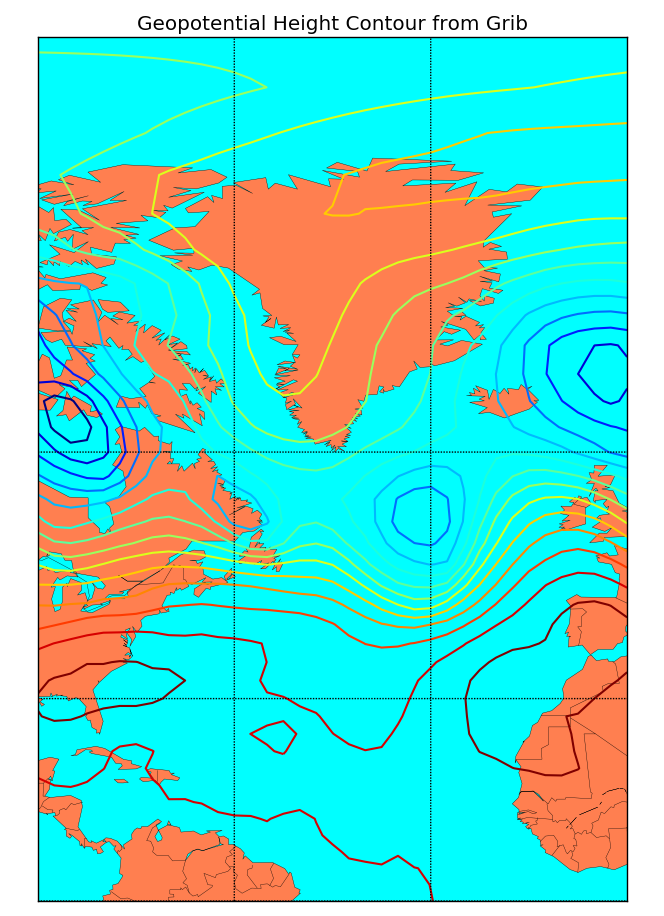
本文版权归作者和博客园共有,欢迎转载,但未经作者同意必须保留此段声明,且在文章页面明显位置给出原文连接,否则保留追究法律责任的权利。
想观看Matplotlib教学视频,了解更多Matplotlib实用技巧可关注
微信公众账号: MatplotlibClass

今日头条号:Matplotlib小讲堂


腾讯云面向开发者汇聚海量精品云计算使用和开发经验,营造开放的云计算技术生态圈。
更多推荐
 0
0 0
0- 0


 已为社区贡献1条内容

所有评论(0)