产业级多模态模型训练工具:PaddleFormers微调打造定制化视觉定位能力
未来,随着多模态模型能力的持续提升以及工具链生态的不断完善,我们期待PaddleFormers能够进一步降低多模态模型训练与应用的门槛,拓展更多帮助开发者们快速构建面向实际业务的能力,推动多模态模型在更多业务场景中的落地与发展。随着多模态大模型能力的不断提升,视觉语言模型正从“看懂图像”迈向“理解并定位世界”,多模态大模型在视觉理解与空间感知方面提供了强大的基础能力,而PaddleFormers通

最近几年,随着多模态大模型的快速发展,AI已从单纯“看懂图像”迈向“理解现实世界”的阶段。以ERNIE-4.5-VL、Qwen3-VL系列模型为代表的视觉语言模型,在视觉理解与空间感知方面展现出强大的基座能力,支持图像与视频等多模态任务,使视觉大模型逐步从“感知”走向“认知”,从“识别”迈向“推理与执行”。
当我们希望模型“看懂”一张图片,还希望它能够根据描述,在图中找到具体的位置。这类任务通常被称为视觉定位(Visual Grounding)。简单来说,视觉定位是给模型一张图片和一句话,让它在图片中找到这句话所描述的目标,并用标记框定位出来。例如,当我们输入一句话 “墙上白色的时钟” 时,模型需要在整张图片中找到时钟,并准确地把位置框出来,如下方示意图所示。这个过程包含两个步骤:一是理解语言描述中的关键信息(比如“白色”“时钟”“在墙上”),二是在图像中寻找符合这些特征的目标位置。
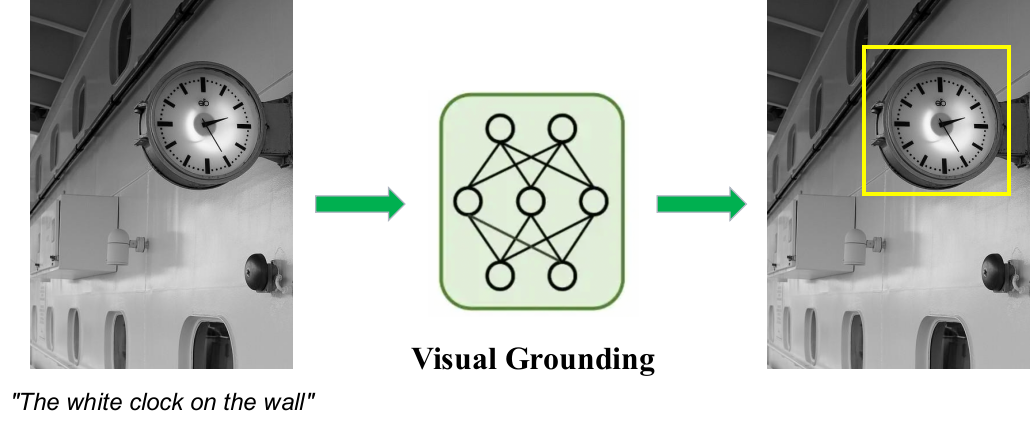
视觉定位任务示意
与传统的目标检测任务不同,视觉定位不会预先给定对象类别,而是通过自然语言来描述目标。因此,模型具备基本的视觉识别能力外,还需要理解语言中的属性、关系甚至动作信息,并把这些信息和图像中的内容进行匹配。例如,当描述变成“右下方的圆形闹铃” 或 “靠近电箱的白色路灯” 时,模型都需要根据不同的描述在图中找到对应的位置。用户用自然语言与模型进行交互,而不是手动指定目标类别。通过视觉定位,模型根据用户的描述快速理解图像中的目标,来支持场景理解、视觉问答以及智能交互等任务。
在下游应用场景中,仅依赖通用模型往往还难以达到理想效果,面对工业检测、医疗影像等任务,基于领域数据进行针对性微调仍是提升模型性能的关键步骤。通过结合领域数据对模型进行持续优化,不仅能够提升模型在特定任务中的准确性和适应性,也能够加速从实验验证到实际业务部署的落地过程,满足业界对高精度、定制化多模态模型的实际需求。在这一趋势下,如何高效、便捷地训练和微调多模态模型,成为了越来越多开发者关注的重要问题。
飞桨团队近期发布了面向大模型训练与微调的全流程开发套件PaddleFormers v1.0,为开发者提供高效便捷的大模型训练与能力扩展工具。PaddleFormers涵盖从数据处理、模型选择到训练微调的完整流程,并针对多模态任务提供完善的训练与调优能力,帮助开发者基于飞桨框架快速构建和优化模型。与此同时,PaddleFormers还集成了包括ERNIE-4.5-VL、Qwen3-VL、GLM4.5V在内的前沿多模态大模型,开发者可以借助其训练框架与工具链,一站式高效完成数据准备、模型微调和效果验证等关键步骤,快速微调面向业务场景的定制化多模态模型。

实战演练:微调视觉定位模型全流程
为了帮助用户更直观地掌握基于PaddleFormers进行多模态模型训练的流程,接下来我们将通过一个完整的实践案例,详细演示如何使用PaddleFormers对多模态模型进行Visual Grounding任务的微调。
PaddleFormers提供完整的模型训练与微调能力,集成Visual Grounding任务标准数据格式与自动化处理逻辑,开发者可以快速完成数据准备、模型训练以及效果验证等关键步骤,降低多模态模型训练与调优的门槛。在模型选择上,本示例采用Qwen3-VL多模态模型,其在视觉理解与图文跨模态对齐方面表现良好,适合处理文本驱动的视觉定位任务。
本示例将以经典视觉数据集COCO数据集为例,使用PaddleFormers快速微调Qwen3-VL-8B-Instruct模型,让其具备更强的文本驱动视觉定位能力。
COCO数据集链接:
https://huggingface.co/datasets/detection-datasets/coco
1. 环境安装
在正式开始之前,我们需要搭建好PaddleFormers v1.0的运行环境。依托飞桨生态的良好兼容性,整个安装过程非常简单,只需两步即可完成(以CUDA 12.6为例):
# 安装paddlepaddlepython -m pip install paddlepaddle-gpu==3.3.0 -i https://www.paddlepaddle.org.cn/packages/stable/cu126/
# 安装paddleformersgit clone -b release/v1.0 https://github.com/PaddlePaddle/PaddleFormers.gitcd PaddleFormerspython -m pip install -e '.[paddlefleet]' --extra-index-url https://www.paddlepaddle.org.cn/packages/nightly/cu126/
更多docker/pip安装方式参考官方文档:
https://github.com/PaddlePaddle/PaddleFormers/blob/release/v1.0/README.md
2. 数据准备
Visual Grounding任务需要特殊的指令格式,使模型能够学习输出目标坐标。PaddleFormers 支持标准的messages数据格式。在此任务中,模型输入需要使用:
-
<ref-object>表示目标对象 -
<bbox>表示对应的检测框
如果需要使用自定义数据,可以将数据整理成如下结构化指令格式:
{"messages": [{"role": "system", "content": "You are a helpful assistant."}, {"role": "user", "content": "<image>请找出图中的水果并描述它们的位置"}, {"role": "assistant", "content": "桌子上放着一个<ref-object><bbox>,旁边还有一串<ref-object><bbox>"}], "images": ["xxx.jpg"], "objects": {"ref": ["红苹果", "香蕉"], "bbox": [[245.0, 310.5, 380.0, 450.0], [400.5, 320.0, 650.0, 580.5]]}}{"messages": [{"role": "system", "content": "You are a helpful assistant."}, {"role": "user", "content": "<image>Please detect the object in this image."}, {"role": "assistant", "content": "<ref-object><bbox>, <ref-object><bbox></box>"}], "images": ["xxx.jpg"}, "objects": {"ref": ["person", "person"], "bbox": [[200, 300, 500, 600], [324, 557, 409, 683]]}}数据包含三个核心字段,分别为messages、images和objects。
-
字段
messages是由一系列对话内容构成的列表,列表中的每条对话内容均包含两个子字段,分别为role和content。在role字段中,填入system、user或assistant,分别表示“系统设定”、“用户输入”和“模型回复”,需特别说明的是,system这一角色标识仅能出现在对话的首轮。而content字段用于填入具体的对话内容,特别地,在user对应的内容中需包含<image>标识以引入图片;在assistant对应的内容中,需使用<ref-object>和<bbox>作为动态占位符,分别指代“目标物体名称”和“目标检测框”。 -
字段
images是由图片路径构成的列表,对应于对话中输入的图像文件/路径。 -
字段
objects是包含具体标注信息的字典,包含ref和bbox两个子字段。ref存储具体的物体名称文本,bbox存储对应的原始坐标数据(如[xmin, ymin, xmax, ymax])。这两个列表中的数据需严格按照顺序,与messages字段中出现的<ref-object>和<bbox>占位符一一对应,训练框架会自动将其解析并转换为模型所需的坐标格式。
为了方便大家快速上手,我们提供了一个自动化脚本,支持一键完成数据预处理。只需运行脚本,即可自动从huggingface或modelscope下载COCO数据集,并处理成Qwen3-VL特有的Grounding格式,生成可用于训练的train.jsonl和val.jsonl文件。
import osimport ioimport jsonimport globimport mathimport randomimport argparseimport pyarrow.parquet as pq
from PIL import Imagefrom tqdm import tqdmfrom collections import defaultdictfrom typing import List, Tuple, Dict, Optional
from paddleformers.utils.log import logger
COCO_CLASSES = [    'person', 'bicycle', 'car', 'motorcycle', 'airplane', 'bus', 'train', 'truck', 'boat', 'traffic light',    'fire hydrant', 'stop sign', 'parking meter', 'bench', 'bird', 'cat', 'dog', 'horse', 'sheep', 'cow',    'elephant', 'bear', 'zebra', 'giraffe', 'backpack', 'umbrella', 'handbag', 'tie', 'suitcase', 'frisbee', 'skis',    'snowboard', 'sports ball', 'kite', 'baseball bat', 'baseball glove', 'skateboard', 'surfboard',    'tennis racket', 'bottle', 'wine glass', 'cup', 'fork', 'knife', 'spoon', 'bowl', 'banana', 'apple', 'sandwich',    'orange', 'broccoli', 'carrot', 'hot dog', 'pizza', 'donut', 'cake', 'chair', 'couch', 'potted plant', 'bed',    'dining table', 'toilet', 'tv', 'laptop', 'mouse', 'remote', 'keyboard', 'cell phone', 'microwave', 'oven',    'toaster', 'sink', 'refrigerator', 'book', 'clock', 'vase', 'scissors', 'teddy bear', 'hair drier', 'toothbrush']
def parse_args():    parser = argparse.ArgumentParser(description="COCO Dataset Preparation for Qwen3-VL Grounding")    parser.add_argument("--dataset_repo", type=str, default="detection-datasets/coco", help="dataset repository ID")    parser.add_argument(        "--output_dir", type=str, default="./data/coco_grounding", help="Output directory for processed data"    )    parser.add_argument("--total_samples", type=int, default=15000, help="Total number of samples to process")    parser.add_argument("--val_ratio", type=float, default=0.01, help="Validation set ratio")    parser.add_argument("--seed", type=int, default=42, help="Random seed")    return parser.parse_args()
    # Convert bbox to Qwen3-VL format (0-1000 normalized coordinates)def convert_to_qwen3vl_format(    bbox: List[float],    orig_height: int,    orig_width: int,) -> List[int]:    """    Convert absolute bbox [x1,y1,x2,y2] to Qwen3-VL normalized format [0,1000].    """
    x1, y1, x2, y2 = bbox
    x1_new = round(x1 / orig_width * 1000)    y1_new = round(y1 / orig_height * 1000)    x2_new = round(x2 / orig_width * 1000)    y2_new = round(y2 / orig_height * 1000)        # clamp    x1_new = max(0, min(x1_new, 1000))    y1_new = max(0, min(y1_new, 1000))    x2_new = max(0, min(x2_new, 1000))    y2_new = max(0, min(y2_new, 1000))        return [x1_new, y1_new, x2_new, y2_new]

def get_data_path(dataset_repo: str) -> str:    download_hub = os.environ.get("DOWNLOAD_SOURCE", "huggingface")    try:        if download_hub == "huggingface":            logger.info(f"Checking dataset {dataset_repo} (HuggingFace)...")            from huggingface_hub import snapshot_download                        local_dir = snapshot_download(repo_id=dataset_repo, repo_type="dataset", allow_patterns="data/*.parquet")                elif download_hub == "modelscope":            from modelscope.msdatasets import MsDataset                        dataset_repo_ms = dataset_repo.replace("detection-datasets", "AI-ModelScope")            logger.info(f"Checking dataset {dataset_repo_ms} (ModelScope)...")            local_dir = MsDataset.load(dataset_repo_ms, subset_name="detection-datasets--coco", use_streaming=True)        else:            raise ValueError(f"Invalid download hub: {download_hub}")        except Exception as e:        if download_hub == "huggingface":            download_cmd = f"hf download {dataset_repo} --repo-type dataset"        elif download_hub == "modelscope":            repo_ms_name = dataset_repo.replace("detection-datasets", "AI-ModelScope")            download_cmd = f"modelscope download --dataset {repo_ms_name}"        else:            download_cmd = "N/A(Unexpected download hub)"        logger.error(f"DOWNLOAD FAILED. Please try downloading manually using these commands: {download_cmd}")                raise RuntimeError(f"Failed to download from {download_hub}") from e        data_path = os.path.join(local_dir, "data")    if not os.path.exists(data_path) and os.path.exists(local_dir):        return local_dir    return data_path

def scan_dataset_metadata(files: List[str], desc: str) -> List[dict]:    candidates = []    for f in tqdm(files, desc=desc):        try:            df = pq.read_table(f, columns=["objects"]).to_pandas()            for idx, row in df.iterrows():                cats = row["objects"].get("category", [])                if any(0 <= c < len(COCO_CLASSES) for c in cats):                    candidates.append({"file": f, "idx": idx})        except Exception as e:            logger.warning(f"Skipping corrupt file {f}: {e}")    return candidates

def process_row(row, img_save_dir: str) -> Optional[Dict]:    img_id = row["image_id"]    fname = f"{img_id:012d}.jpg"    save_path = os.path.join(img_save_dir, fname)        try:        if os.path.exists(save_path):            img = Image.open(save_path).convert("RGB")        else:            image_bytes = row["image"]["bytes"]            img = Image.open(io.BytesIO(image_bytes)).convert("RGB")            img.save(save_path)    except Exception as e:        logger.error(f"Error processing image {img_id}: {e}")        return None        objects = row["objects"]    refs, bboxes = [], []        category_list = objects.get("category", [])    bbox_list = objects.get("bbox", [])        if len(category_list) != len(bbox_list):        return None        for cat, bbox in zip(category_list, bbox_list):        if 0 <= cat < len(COCO_CLASSES):            refs.append(COCO_CLASSES[cat])            new_bbox = convert_to_qwen3vl_format(bbox, img.height, img.width)            bboxes.append(new_bbox)        if not refs:        return None        text_label = ", ".join(["<ref-object><bbox>"] * len(refs))        return {        "messages": [            {"role": "system", "content": "You are a helpful assistant."},            {"role": "user", "content": "<image>Task: Object Detection"},            {"role": "assistant", "content": text_label},        ],        "images": [os.path.join("images", fname)],        "objects": {"ref": refs, "bbox": bboxes},    }

def main():    args = parse_args()        img_dir = os.path.join(args.output_dir, "images")    os.makedirs(img_dir, exist_ok=True)        logger.info(f"Starting processing, Output Dir: {args.output_dir}")        data_path = get_data_path(args.dataset_repo)    all_files = glob.glob(os.path.join(data_path, "*.parquet"))        train_files = [f for f in all_files if "train" in os.path.basename(f)]    val_files = [f for f in all_files if "val" in os.path.basename(f)]        if not train_files:        logger.error(f"No parquet training files found in {data_path}")        return        logger.info("Scanning metadata (Phase 1)...")    train_pool = scan_dataset_metadata(train_files, "Scanning Train")    val_pool = scan_dataset_metadata(val_files, "Scanning Val")        n_val = int(args.total_samples * args.val_ratio)    n_train = args.total_samples - n_val        if len(train_pool) < n_train:        logger.warning(f"Requested {n_train} train samples, but only found {len(train_pool)}. Using all available.")        n_train = len(train_pool)        if len(val_pool) < n_val:        logger.warning(f"Requested {n_val} val samples, but only found {len(val_pool)}. Using all available.")        n_val = len(val_pool)        logger.info(f"Sampling Plan: Train={n_train}, Val={n_val} (Target Total={args.total_samples})")        random.seed(args.seed)    random.shuffle(train_pool)    random.shuffle(val_pool)        selected_train = train_pool[:n_train]    selected_val = val_pool[:n_val]        tasks = defaultdict(list)    for item in selected_train:        tasks[item["file"]].append((item["idx"], "train"))    for item in selected_val:        tasks[item["file"]].append((item["idx"], "val"))        logger.info(f"Processing images (Phase 2) - Reading from {len(tasks)} parquet files...")        train_path = os.path.join(args.output_dir, "train.jsonl")    val_path = os.path.join(args.output_dir, "val.jsonl")        with open(train_path, "w", encoding="utf-8") as train_f, open(val_path, "w", encoding="utf-8") as val_f:                for p_file, task_list in tqdm(tasks.items(), desc="Processing Parquet"):            try:                df = pq.read_table(p_file).to_pandas()                for row_idx, split in task_list:                    entry = process_row(df.iloc[row_idx], img_dir)                    if entry:                        line = json.dumps(entry, ensure_ascii=False) + "\n"                        if split == "train":                            train_f.write(line)                        else:                            val_f.write(line)            except Exception as e:                logger.error(f"Failed to process file {p_file}: {e}")                continue        logger.info(f"Output images and jsonl saved to: {args.output_dir}")

if __name__ == "__main__": main()需要注意的是,Qwen3-VL的bbox格式需要处理成归一化1000的相对坐标,当你使用自定义数据构建时,可以通过自动化脚本的convert_to_qwen3vl_format将bbox的绝对坐标转化成符合Qwen3-VL模型的相对坐标。
3. 训练前效果测试
在模型训练之前,可以从验证集val.jsonl中随机选择一条样本,对原始模型进行推理测试,以观察其初始表现。
{"messages": [{"role": "system", "content": "You are a helpful assistant."}, {"role": "user", "content": "<image>Task: Object Detection"}, {"role": "assistant", "content": "<ref-object><bbox>, <ref-object><bbox>, <ref-object><bbox>, <ref-object><bbox>"}], "images": ["images/000000299887.jpg"], "objects": {"ref": ["motorcycle", "person", "person", "truck"], "bbox": [[8, 271, 500, 990], [330, 221, 694, 997], [579, 254, 811, 1000], [0, 374, 74, 447]]}}-
推理脚本
from paddleformers.transformers import Qwen3VLForConditionalGenerationDecapitated, AutoProcessor, process_vision_info
model_name_or_path = "Qwen/Qwen3-VL-8B-Instruct"    # or local pathmodel = Qwen3VLForConditionalGenerationDecapitated.from_pretrained(model_name_or_path).eval()
# change the implementation of attention(default is "eager")model.language_model.config._attn_implementation = "flashmask"model.visual.config._attn_implementation = "flashmask"
processor = AutoProcessor.from_pretrained(model_name_or_path)messages = [    {        "role": "user",        "content": [            {                "type": "image",                "image": "./data/coco_grounding/images/000000299887.jpg",            },            {"type": "text", "text": "Task: Object Detection"},        ],    }]# Preparation for inferencetext = processor.apply_chat_template(    messages, tokenize=False, add_generation_prompt=True)image_inputs, video_inputs = process_vision_info(messages)inputs = processor(    text=[text],    images=image_inputs,    videos=video_inputs,    padding=True,    return_tensors="pd",)
outputs = model.generate(**inputs, max_new_tokens=512)output_ids = outputs[0].tolist()[0]
output_text = processor.decode( output_ids, skip_special_tokens=True, clean_up_tokenization_spaces=False)print(f"Model Output: \n{output_text}")-
模型回复
Model Output: Based on the image provided, here is an object detection analysis:
- **People:**  - A man with glasses, a mustache, wearing a blue shirt and red suspenders, sitting on a motorcycle.  - A woman with glasses, wearing a white long-sleeved shirt, blue jeans, and a red bandana around her neck, standing next to the man.
- **Motorcycle:**  - A red cruiser-style motorcycle with a large clear windscreen and chrome accents.  - Visible parts include the front headlight, handlebars, and the front fender.
- **Buildings & Structures:**  - A light-colored metal-sided building or shed on the right side of the image.  - A covered carport or gazebo in the background on the left.
- **Vehicles:**  - A white vehicle (possibly a truck or SUV) is partially visible under the carport in the background.
- **Nature:**  - A background of green grass and tall pine trees.  - A utility pole with wires is visible in the distance.
- **Other:**  - A wooden plank or step is visible on the ground near the building's base.
发现模型未能遵循目标定位的指令格式要求,仅输出了通用的图像描述,而未生成关键的目标类别和边界框坐标,无法满足对结构化Grounding任务的输出需求。
4. 一键启动训练
通过修改默认YAML配置文件,可以灵活调整微调策略。本次示例采用全量微调训练(SFT)策略,所使用到的实践训练配置如下:
### datatrain_dataset_type: messageseval_dataset_type: messagestrain_dataset_path: ./data/coco_grounding/train.jsonltrain_dataset_prob: "1.0"eval_dataset_path: ./data/coco_grounding/val.jsonleval_dataset_prob: "1.0"max_seq_len: 8192packing: truemix_strategy: concattemplate_backend: customtemplate: qwen3_vl
### modelmodel_name_or_path: Qwen/Qwen3-VL-8B-Instructattn_impl: flashmask### finetuning# basestage: VL-SFTfine_tuning: fullseed: 23do_train: truedo_eval: trueper_device_eval_batch_size: 1per_device_train_batch_size: 1num_train_epochs: 3max_steps: -1eval_steps: 100evaluation_strategy: stepssave_steps: 100save_strategy: stepslogging_steps: 1gradient_accumulation_steps: 4logging_dir: ./vdl_log_sft_full_coco_grounding_15k_gbs8output_dir: ./checkpoints/qwen3-vl-sft-full-coco-grounding-15k-gbs8disable_tqdm: trueeval_accumulation_steps: 16
# trainwarmup_ratio: 0.05learning_rate: 1.0e-4
# performancetensor_model_parallel_size: 4pipeline_model_parallel_size: 1sharding: stage1recompute_granularity: fullrecompute_method: uniformrecompute_num_layers: 1bf16: truefp16_opt_level: O2unified_checkpoint: falsesave_checkpoint_format: "flex_checkpoint"load_checkpoint_format: "flex_checkpoint"freeze_config: freeze_vision freeze_aligner配置好环境和路径后,模型训练启动只需要一行命令:
CUDA_VISIBLE_DEVICES=0,1,2,3,4,5,6,7 paddleformers-cli train qwen3vl_grounding_sft_full.yaml-
可视化收敛
# visualdl依赖安装: pip install visualdl# 指定端口和地址,以及日志目录(需要和配置yaml中的目录对应上)visualdl --logdir ./vdl_log_sft_full_coco_grounding_15k_gbs8/ --port 8080 --host 0.0.0.0本次全量微调训练策略的Loss收敛结果如下:
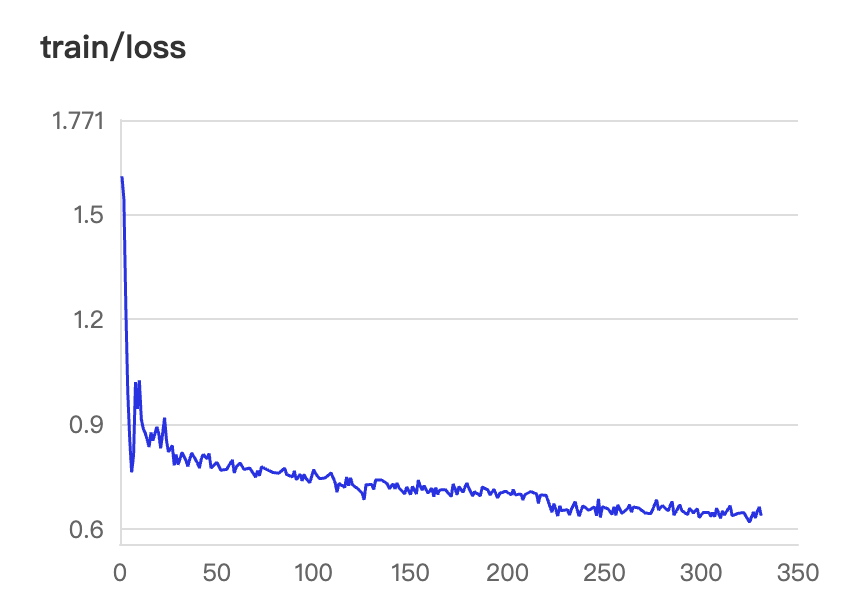
Grounding任务收敛曲线
在训练过程中,可以随时通过visual命令实时查看Loss收敛曲线。通常情况下,微调初期的Loss会快速下降,表明模型正在快速适应从“自然语言描述”到“坐标框输出”的指令范式切换,随着训练步数增加,曲线逐渐趋于平稳并基本收敛。
5. 训练后效果评估
训练完成后,再次对同一数据进行推理测试,得到如下结果:
motorcycle(0,274),(587,989), person(328,226),(684,989), person(570,244),(812,987), truck(0,380),(70,450)可以看到,经过微调后的Qwen3-VL-8B-Instruct模型已能够正确遵循Grounding任务的输出格式,生成结构化的目标检测框坐标。
结合可视化脚本,还可以将模型预测的边界框绘制在原始图像上,直观地对比Ground Truth与模型预测结果。
import jsonimport mathimport osimport re
from PIL import Image, ImageDraw, ImageFont

MODEL_RESULT = {    "image_path": "images/000000299887.jpg",    "ground_truth": {        "ref": [            "motorcycle",             "person",             "person",             "truck"        ],        "bbox": [            [8, 271, 500, 990],             [330, 221, 694, 997],             [579, 254, 811, 1000],             [0, 374, 74, 447]        ]    },    "prediction": "motorcycle(0,274),(587,989), person(328,226),(684,989), person(570,244),(812,987), truck(0,380),(70,450)"}ROOT_DIR = "data/coco_grounding"

def qwen3vl_bbox_to_pixel(bbox, img_w, img_h):    """    Convert Qwen3-VL bbox [0,1000] -> pixel coordinates    """    x1, y1, x2, y2 = bbox    return [        x1 / 1000 * img_w,        y1 / 1000 * img_h,        x2 / 1000 * img_w,        y2 / 1000 * img_h,    ]

def parse_prediction_string(pred_str):    if not pred_str:        return []    pattern = r"([a-zA-Z0-9_ ]+)\s*\(\s*([\d\.]+)\s*,\s*([\d\.]+)\s*\)\s*,\s*\(\s*([\d\.]+)\s*,\s*([\d\.]+)\s*\)"    matches = re.findall(pattern, pred_str)    results = []    for m in matches:        label = m[0].strip()        bbox = [float(x) for x in m[1:]]        results.append({"label": label, "bbox": bbox})    return results

def get_color_by_label(label):    palette = [        "#FF0000",        "#00AA00",        "#0000FF",        "#FF00FF",        "#800080",        "#008080",        "#FFA500",        "#8B4513",        "#DC143C",        "#2E8B57",        "#4B0082",        "#FF4500",        "#2F4F4F",        "#8B0000",        "#191970",    ]        color_index = hash(label) % len(palette)    return palette[color_index]

def visualize_sample(    json_data,    root_image_dir="",    output_path="output_vis.jpg",    show_gt=True,    show_pred=True,    use_random_color=True,):    if isinstance(json_data, str):        item = json.loads(json_data)    else:        item = json_data        rel_path = item.get("image_path", "")    gt_data = item.get("ground_truth", {})    pred_str = item.get("prediction", "")        full_image_path = os.path.join(root_image_dir, rel_path)        try:        img = Image.open(full_image_path).convert("RGB")    except FileNotFoundError:        print(f"Error: Image not found at: {full_image_path}")        img = Image.new("RGB", (640, 640), color=(200, 200, 200))        orig_w, orig_h = img.size        resized_img = img.copy()        draw = ImageDraw.Draw(resized_img)    try:        font = ImageFont.truetype("DejaVuSans-Bold.ttf", 16)    except:        try:            font = ImageFont.truetype("arialbd.ttf", 16)        except:            font = ImageFont.load_default()        def draw_single_box(bbox, label, color, line_style="solid", offset_y=0):        nx1, ny1, nx2, ny2 = qwen3vl_bbox_to_pixel(bbox, orig_w, orig_h)                draw.rectangle([nx1, ny1, nx2, ny2], outline=color, width=3)        display_text = label        text_bbox = draw.textbbox((0, 0), display_text, font=font)        text_w = text_bbox[2] - text_bbox[0]        text_h = text_bbox[3] - text_bbox[1]                text_bg_x1 = nx1        text_bg_y1 = ny1 - text_h - 4 + offset_y                if text_bg_y1 < 0:            text_bg_y1 = ny1 + 4                text_bg_x2 = text_bg_x1 + text_w + 8        text_bg_y2 = text_bg_y1 + text_h + 4                draw.rectangle([text_bg_x1, text_bg_y1, text_bg_x2, text_bg_y2], fill=color)        draw.text((text_bg_x1 + 4, text_bg_y1 + 2), display_text, font=font, fill=(255, 255, 255))        if show_gt and gt_data:        refs = gt_data.get("ref", [])        bboxes = gt_data.get("bbox", [])                for label, bbox in zip(refs, bboxes):            label_text = f"GT: {label}"            color = get_color_by_label(label) if use_random_color else "#00AA00"            draw_single_box(bbox, label_text, color=color, offset_y=0)        if show_pred and pred_str:        preds = parse_prediction_string(pred_str)        for p in preds:            label = p["label"]            label_text = f"Pred: {label}"            color = get_color_by_label(label) if use_random_color else "#FF0000"            offset = 25 if (show_gt and not use_random_color) else 0            draw_single_box(p["bbox"], label_text, color=color, offset_y=offset)        resized_img.save(output_path, quality=95)    print(f"Visualization saved to: {output_path}")

if __name__ == "__main__":    visualize_sample(        MODEL_RESULT,        root_image_dir=ROOT_DIR,        output_path="vis_gt.jpg",        show_gt=True,        show_pred=False,        use_random_color=True,    )    visualize_sample(        MODEL_RESULT,        root_image_dir=ROOT_DIR,        output_path="vis_pred.jpg",        show_gt=False,        show_pred=True,        use_random_color=True,    )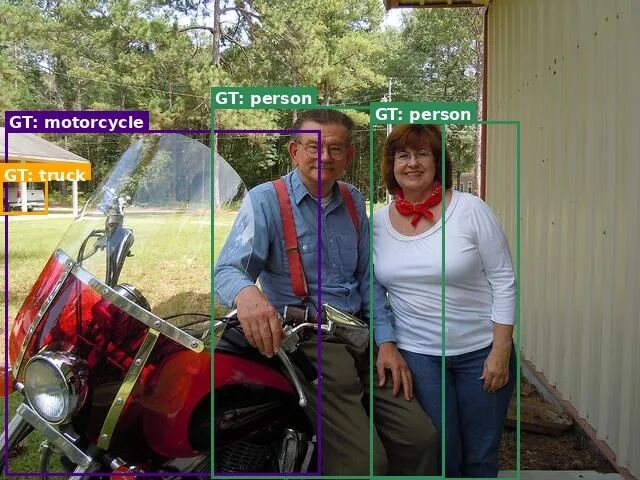
真实标签
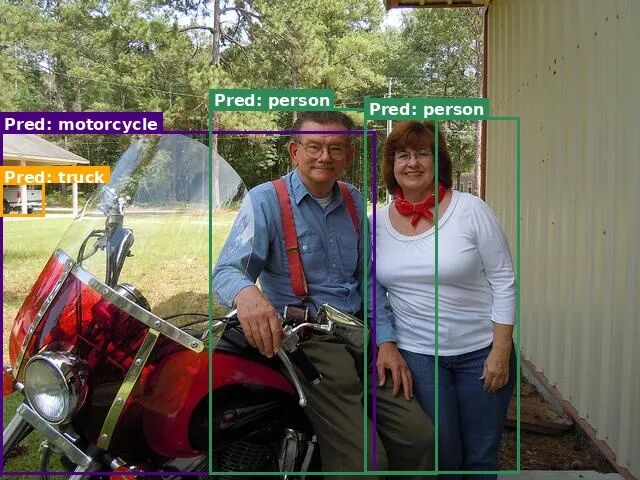
预测结果

结语
随着多模态大模型能力的不断提升,视觉语言模型正从“看懂图像”迈向“理解并定位世界”,多模态大模型在视觉理解与空间感知方面提供了强大的基础能力,而PaddleFormers通过高性能、工程化的一站式训练工具,让模型微调与能力扩展变得更加高效和便捷。借助二者的结合,开发者可以高效便捷地定制自己的多模态大模型,实现包括Visual Grounding在内的模型能力。
本次基于PaddleFormers的Visual Grounding实践,不仅展示了多模态大模型在视觉定位任务上的潜力,也积累了从数据构建、模型微调到效果验证的一整套实践经验,为视觉语言模型在行业场景中的应用提供了有价值的参考。未来,随着多模态模型能力的持续提升以及工具链生态的不断完善,我们期待PaddleFormers能够进一步降低多模态模型训练与应用的门槛,拓展更多帮助开发者们快速构建面向实际业务的能力,推动多模态模型在更多业务场景中的落地与发展。
为了助力您深入掌握基于PaddleFormers进行多模态模型训练的核心技能,百度工程师将于3月19日(周四)19:00开启线上直播,深度解析视觉定位模型微调实践,助您抢占AI技术前沿!
后续我们还将围绕企业级真实业务需求,推出PaddleFormers微调视觉定位模型实战营,强化基于PaddleFormers训练视觉定位模型的实战能力,为真实业务场景落地筑牢基础。
机会难得,立即扫描下方二维码预约直播,开启您的多模态大模型进阶之旅!

欢迎访问并Star我们的GitHub仓库,获取完整代码、训练脚本以及详细文档,快速开启你的多模态Grounding模型实践之旅。
🔗 立即体验:
https://github.com/PaddlePaddle/PaddleFormers


关注【飞桨PaddlePaddle】公众号
获取更多技术内容~

腾讯云面向开发者汇聚海量精品云计算使用和开发经验,营造开放的云计算技术生态圈。
更多推荐
 0
0 0
0- 0


 已为社区贡献9条内容

所有评论(0)