Failed at the node-sass@4.14.1 postinstall script(超简单解决)
·
Failed at the node-sass@4.14.1 postinstall script【超简单解决】
1、问题描述
npm install 安装依赖时,报错node-sass@4.14.1安装失败。
Failed at the node-sass@4.14.1 postinstall script

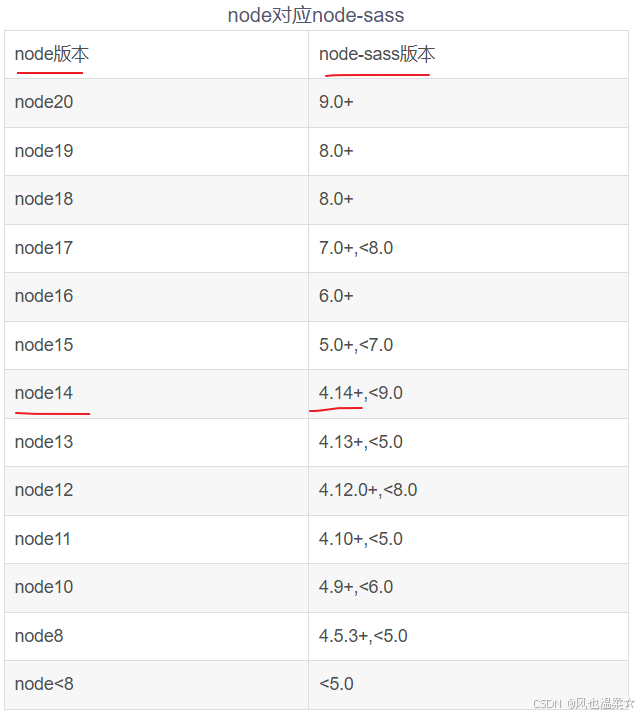
2、排查node和node-asaa版本是否匹配
如果不匹配,请卸载node换成匹配的版本。
嫌node卸载,安装 麻烦的话,强烈推荐使用 nvm 来管理node版本。
3、问题解决
3.1、卸载node-sass@4.14.1
npm uninstall node-sass
3.2、清除npm缓存
npm cache clean --force
3.3、安装node-sass@4.14.1
npm install node-sass@4.14.1 --save-dev --unsafe-perm --verbose --ignore-scripts
3.4、重新执行npm install
重新执行npm i 即可解决问题。

腾讯云面向开发者汇聚海量精品云计算使用和开发经验,营造开放的云计算技术生态圈。
更多推荐
 12
12 0
0- 0


 已为社区贡献8条内容

所有评论(0)