ubuntu下关联自己git账号配置方法
·
1、安装git
sudo apt-get install git
2、配置git账号
git config --global user.name "yourname"
git config --global user.email youremail
3、生成ssh key (生成过程中一路回车就行)
ssh-keygen -t rsa -C "GitHub邮箱地址"找到一下这两句话(xxxx是你的电脑用户名),其中id_rsa.pub文件包含了你的公钥,关联账号需要用到:
Your identification has been saved in /home/xxxx/.ssh/id_rsa.
Your public key has been saved in /home/xxxx/.ssh/id_rsa.pub.
4、关联github账号
cat /home/xxxx/.ssh/id_rsa.pub 
①、命令执行后会打印出SSH Key,全部复制。
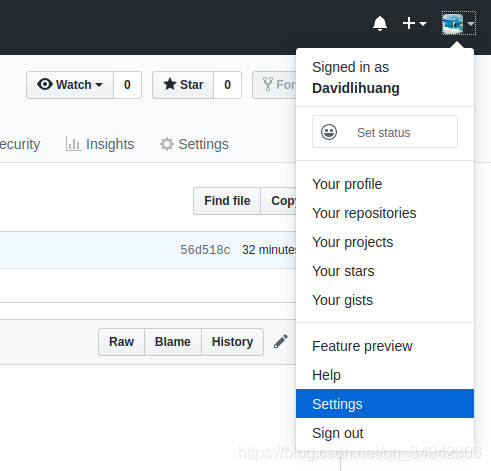
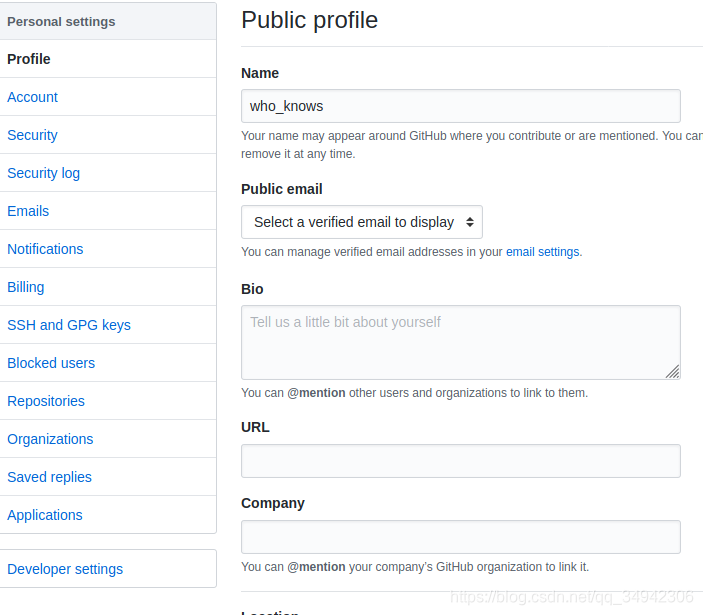
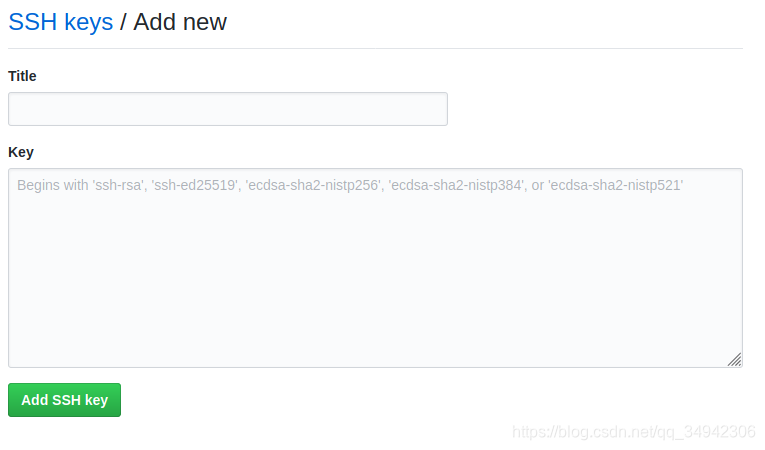
②、登录自己的github账号,添加公钥
setting --> SSH and GPGS Keys --> New SSH Key-->复制cat id_rsa.pub里的秘钥到指定位置-->Add SSH Key

5、验证是否成功链接
ssh -T git@github.com当出现一下提示代表已经成功关联账号

6、参考博文:https://blog.csdn.net/Chenftli/article/details/81141010

腾讯云面向开发者汇聚海量精品云计算使用和开发经验,营造开放的云计算技术生态圈。
更多推荐
 4
4 0
0- 0


 已为社区贡献1条内容

所有评论(0)