配置SSH访问github
·
综述
使用SSH协议,您可以连接到远程服务器和服务并进行身份验证。使用SSH密钥,您可以连接到GitHub,而无需在每次访问时都提供用户名或密码。
查看
ls -al ~/.ssh
如果显示 no such file or directory就是没有。

创建
ssh-keygen -t rsa -b 4096 -C "your_email@example.com"
your_email@example.com
你的github账号。
下面按enter即可。
面对
Enter passphrase (empty for no passphrase): [Type a passphrase]
Enter same passphrase again: [Type passphrase again]
然后记得设置你的管理密码即可。
运行
eval "$(ssh-agent -s)"
ssh-add ~/.ssh/id_rsa
此时可能需要密码。
添加到你的github账户。
sudo apt-get install xclip
# Downloads and installs xclip. If you don't have `apt-get`, you might need to use another installer (like `yum`)

xclip -sel clip < ~/.ssh/id_rsa.pub
# Copies the contents of the id_rsa.pub file to your clipboard
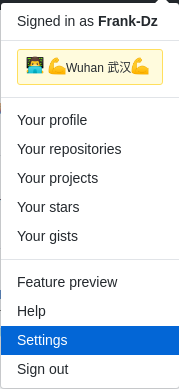
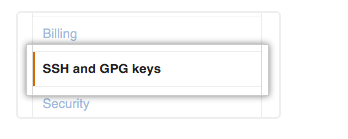
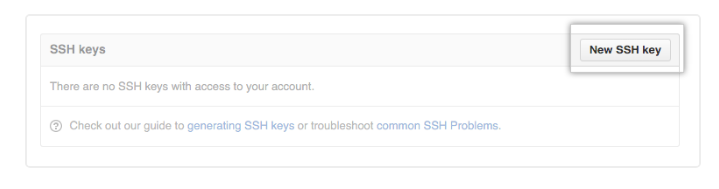
按照步骤添加即可。

腾讯云面向开发者汇聚海量精品云计算使用和开发经验,营造开放的云计算技术生态圈。
更多推荐
 0
0 0
0- 0


 已为社区贡献4条内容

所有评论(0)