Windows 10 启动 VirtualBox 报错 VT-x is not available
·
Windows 10 启动 VirtualBox 报错 VT-x is not available
Windows 10启动VirtualBox时,出现报错对话框
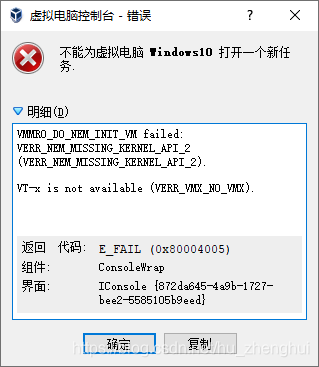
标题为:
不能为虚拟电脑Windows10打开一个新任务
明细为:
VMMRO_DO_NEM_INIT_VM failed:
VERR_NEM_MISSING_KERNEL_API_2
(VERR_NEM_MISSING_KERNEL_API_2).

VT-x is not available (VERR_VMX_NO_VMX).
返回代码为
| 返回代码: | E_FAIL (0x80004005) |
|---|---|
| 组件: | ConsoleWrap |
| 界面: | IConsole {872da645-4a9b-1727-bee2-5585105b9eed} |
处理方式为使用管理员打开cmd或者powershell
运行
bcdedit
查看hypervisorlaunchtype是否为auto,如果是则运行
bcdedit /set hypervisorlaunchtype off
重启即可。

腾讯云面向开发者汇聚海量精品云计算使用和开发经验,营造开放的云计算技术生态圈。
更多推荐
 2
2 0
0- 0


 已为社区贡献3条内容

所有评论(0)