通过配置hosts解决访问github访问慢的问题(或者是展示无法连接ERR_TUNNEL_CONNECTION_FAILED)
·
hosts文件位置
- windows系统的hosts文件的位置如下:
C:\Windows\System32\drivers\etc\hosts
如果是提示没有权限修改hosts文件的话
命令行修改权限参考这篇文章
图形化界面修改参考这篇文章 - mac/linux系统的hosts文件的位置如下:
/etc/hosts
查询github相关网址的ip
- 访问ipaddress地址:https://www.ipaddress.com/
- 逐个搜索网址对应ip
如github.com我这里搜索出来的ip是:140.82.114.3
需要搜索的如下(最重要的是前两个)13.229.188.59 github.com 31.13.81.1 github.global.ssl.fastly.net 185.199.108.153 assets-cdn.github.com 185.199.108.153 documentcloud.github.com 8.7.198.45 gist.github.com 185.199.108.154 help.github.com 13.250.162.133 nodeload.github.com 151.101.228.133 raw.github.com 52.205.36.92 status.github.com 140.82.114.18 training.github.com 140.82.113.3 www.github.com 151.101.88.133 avatars0.githubusercontent.com 151.101.228.133 avatars1.githubusercontent.com 185.199.108.154 github.githubassets.com - 然后将查询出来的存储到hosts文件中然后进行保存
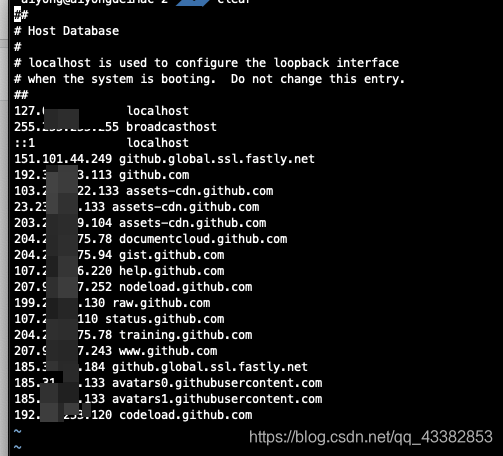
刷新DNS
-
mac电脑
mac电脑不同的版本刷新dns的命令不一样终端中刷新DNS的discovoryutil命令在macOS 10.10.4中被移除,在macOS 10.12之后刷新DNS缓存的命令为:
sudo dscacheutil -flushcache;sudo killall -HUP mDNSResponder;say flushed
听到mac读出flushed即表明DNS刷新成功。以前版本刷新命令
Mac OS X 10.7 – 10.8:sudo killall -HUP mDNSResponder
Mac OS X 10.5 – 10.6:dscacheutil -flushcache
Mac OS X 10.4:lookupd -flushcache -
windows电脑
ipconfig /flushdns
重置hosts文件
- 如果你的
hosts文件没有配置好,变得乱七八糟的话,那么初始化是一个不错的选择 - 直接上代码
# # Host Database # # localhost is used to configure the loopback interface # when the system is booting. Do not change this entry. ## 127.0.0.1 localhost 255.255.255.255 broadcasthost ::1 localhost fe80::10 localhost - 刷新DNS
小提示
如果github页面出现了这种情况:ERR_TUNNEL_CONNECTION_FAILED
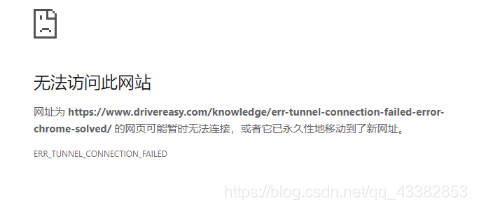
那么通过刷新dns的方式也是可行的哦

腾讯云面向开发者汇聚海量精品云计算使用和开发经验,营造开放的云计算技术生态圈。
更多推荐
 1
1 0
0- 0


 已为社区贡献10条内容

所有评论(0)