docker-compose配置nginx+php
·
最近用其他人的docker-compose.yml文件,发现docker-php中缺少常用的扩展,在原基础上面修改后,发现有的扩展莫名其妙的安装不成功。所以就自己配置了一个文件,供以后使用参考。
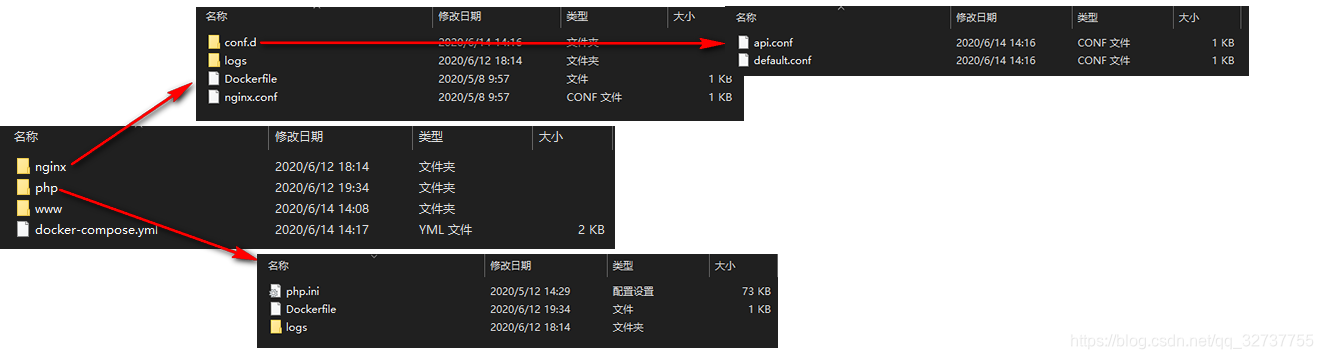
文件夹结构(我已打包上传:docker_test.rar-Docker文档类资源-CSDN下载)如下图示:
docker-compose.yml文件:
version: '3'
networks:
    service-net:
        driver: bridge
services:
    zsh-nginx:
        container_name: zsh-nginx
        build: ./nginx
        ports:
            - 88:88
            - 80:80
            - 443:443
        volumes:
            - ./www:/usr/share/nginx/html
            - ./nginx/nginx.conf:/etc/nginx/nginx.conf
            - ./nginx/conf.d:/etc/nginx/conf.d
            - ./nginx/logs:/var/log/nginx
        depends_on:
            - zsh-php
        restart: always
        networks:
            - service-net
    zsh-php:
        container_name: zsh-php
        build: ./php
        depends_on:
            - zsh-redis
        volumes:
            - ./www:/usr/share/nginx/html
            - ./php/php.ini:/usr/local/etc/php/php.ini
            - ./php/logs:/usr/local/var/log
        restart: always
        networks:
            - service-net
    zsh-redis:
        image: redis:6.0.1
        ports:
            - 6379:6379
        container_name: zsh-redis
        restart: always
        networks:
            - service-net
./nginx/Dockerfile文件:
FROM nginx:1.16.1
# set timezome
ENV TZ=Asia/Shanghai
RUN ln -snf /usr/share/zoneinfo/$TZ /etc/localtime && echo $TZ > /etc/timezone
./php/Dockerfile文件:
FROM php:7.2-fpm

# 设置时区
ENV TZ=Asia/Shanghai
RUN ln -snf /usr/share/zoneinfo/$TZ /etc/localtime && echo $TZ > /etc/timezone

# 更新安装依赖包和PHP核心拓展
RUN apt-get update && apt-get install -y \
        --no-install-recommends libfreetype6-dev libjpeg62-turbo-dev libpng-dev curl libzip-dev \
        && rm -r /var/lib/apt/lists/* \
        && docker-php-ext-configure gd \
        && docker-php-ext-install -j$(nproc) gd bcmath opcache pdo_mysql gettext sockets zip mysqli dba pcntl calendar shmop exif sysvmsg sysvsem sysvshm

# 安装 PECL 拓展,安装Redis,mongodb,amqp
RUN pecl install redis \
    && docker-php-ext-enable redis

RUN pecl install mongodb \
   && docker-php-ext-enable mongodb

# 若在此处安装amqp失败(因为linux系统版本问题查不到包会报错:E: Unable to locate package librabbitmq-dev),可先将下面注释。
# 等安装好后 进入容器执行:
# 1.执行:apt-get update
# 2.再搜索一下: apt-cache search librabbitmq-dev
# 3.如果能查询到再执行 apt-get install librabbitmq-dev -y
# 4.同理,pecl查询下版本:pecl search amqp
# 5.执行:pecl install amqp 1.11.0 -y
# 6.执行:docker-php-ext-enable amqp

RUN apt-get install librabbitmq-dev -y \
	&& pecl install amqp 1.11.0 -y \
	&& docker-php-ext-enable amqp

# 安装 Composer
ENV COMPOSER_HOME /root/composer
RUN curl -sS https://getcomposer.org/installer | php -- --install-dir=/usr/local/bin --filename=composer
ENV PATH $COMPOSER_HOME/vendor/bin:$PATH

WORKDIR /data
若想安装ldap,可以执行下面的命令,或者加到上面Dockerfile文件中即可。
apt-get install libldap2-dev -y && \
rm -rf /var/lib/apt/lists/* && \
docker-php-ext-configure ldap --with-libdir=lib/x86_64-linux-gnu/ && \
docker-php-ext-install ldap
./nginx/nginx.conf文件:
user  nginx;
worker_processes auto;

error_log  /var/log/nginx/error.log warn;
pid        /var/run/nginx.pid;


events {
    worker_connections  1024;
}


http {
    include       /etc/nginx/mime.types;
    default_type  application/octet-stream;

    log_format  main  '$remote_addr - $remote_user [$time_local] "$request" '
                      '$status $body_bytes_sent "$http_referer" '
                      '"$http_user_agent" "$http_x_forwarded_for"';

    access_log  /var/log/nginx/access.log  main;

    sendfile        on;
    #tcp_nopush     on;

    keepalive_timeout  65;

    #gzip  on;

    include /etc/nginx/conf.d/*.conf;
}
./nginx/conf.d/default.conf文件:
server {
        listen 80;
        server_name  "";

        index index.html index.htm index.php;
        root /usr/share/nginx/html/;

        error_page   500 502 503 504  /50x.html;
        location = /50x.html {
            root   /usr/share/nginx/html;
        }

		if (!-e $request_filename){
          rewrite ^/(.*) /index.php last;
		}

        location ~ \.php$ {
            fastcgi_pass   zsh-php:9000;  #容器名:端口
            fastcgi_index  index.php;
            fastcgi_param  SCRIPT_FILENAME  $document_root$fastcgi_script_name;
            include        fastcgi_params;
        }

        access_log  /var/log/nginx/default.log  main;
 }
./nginx/conf.d/api.conf文件:
server {
        listen 88;
        server_name  "";

        index index.html index.htm index.php;
        root /usr/share/nginx/html/api/;

        error_page   500 502 503 504  /50x.html;
        location = /50x.html {
            root   /usr/share/nginx/html;
        }

		if (!-e $request_filename){
          rewrite ^/(.*) /index.php last;
		}

        location ~ \.php$ {
            fastcgi_pass   zsh-php:9000;  #容器名:端口
            fastcgi_index  index.php;
            fastcgi_param  SCRIPT_FILENAME  $document_root$fastcgi_script_name;
            include        fastcgi_params;
        }

        access_log  /var/log/nginx/api.log  main;
 }
腾讯云面向开发者汇聚海量精品云计算使用和开发经验,营造开放的云计算技术生态圈。
更多推荐
 1
1 0
0- 0


 已为社区贡献3条内容

所有评论(0)