基于django的web_使用Django和GeoDjango制作基于位置的Web应用
基于django的web
Throughout this tutorial, you’ll learn how to use Django and GeoDjango to build a location-based web application from scratch. You’ll be building a simple nearby shops application that lists the shops closest to a user’s location.
在整个教程中,您将学习如何使用Django和GeoDjango从头开始构建基于位置的Web应用程序。 您将构建一个简单的附近商店应用程序,该应用程序列出距离用户位置最近的商店。
By the end of this tutorial, you’ll be able to:
在本教程结束时,您将能够:
-
Use Django to build a simple web application from scratch
-
Use the GeoDjango sub-framework to implement geolocation features in your Django application
-
Use a spatial database (PostgreSQL and PostGIS) to get benefits from the spatial features and easily implement location-aware web apps
-
使用Django从头构建一个简单的Web应用程序
-
使用GeoDjango子框架在Django应用程序中实现地理定位功能
-
使用空间数据库(PostgreSQL和PostGIS)从空间功能中受益,并轻松实现位置感知的Web应用程序
Free Bonus: Click here to get free access to additional Django tutorials and resources you can use to deepen your Python web development skills.
免费红利: 单击此处可免费访问其他Django教程和资源,您可以使用它们来加深Python Web开发技能。
您将使用的工具 (The Tools You Will Be Using)
You’ll be using the following tools to develop your nearby shops web application:
您将使用以下工具来开发附近的商店Web应用程序:
- The Python programming language
- The Django web framework
- The PostgreSQL database for persisting data
- The PostGIS extension for supporting spatial features in the PostgreSQL database
pipfor installing dependencies- The
venvmodule for managing a virtual environment - Docker for installing PostgreSQL and PostGIS
- Python程式设计语言
- Django Web框架
- PostgreSQL数据库用于持久存储数据
- PostGIS扩展,用于支持PostgreSQL数据库中的空间特征
- 用于安装依赖项的
pip venv模块,用于管理虚拟环境- 用于安装PostgreSQL和PostGIS的Docker

Before diving into practical steps, let’s first start by introducing the frameworks you’ll be using.
在进入实际步骤之前,让我们首先开始介绍您将要使用的框架。
Django is the most popular Python framework for building web apps. It makes it easy for developers to quickly build prototypes and meet their project deadlines by providing a plethora of built-in APIs and sub-frameworks such as GeoDjango.
Django是用于构建Web应用程序的最受欢迎的Python框架。 通过提供大量的内置API和子框架(例如GeoDjango),开发人员可以轻松地快速构建原型并按时完成项目。
GeoDjango is a built-in application that is included as a contrib module in Django. It’s actually a complete framework itself that can also be used separately from Django. It provides a toolbox of utilities for building GIS web applications.
GeoDjango是一个内置应用程序,包含在Django中作为contrib模块。 它实际上是一个完整的框架,也可以与Django分开使用。 它提供了用于构建GIS Web应用程序的实用工具箱。
GIS stands for Geographic Information System. It’s an information system (an organized system for the collection, organization, storage, and communication of information) designed for processing and manipulating data that have geographic or spatial characteristics.
GIS代表地理信息系统。 它是一个信息系统( 用于信息的收集,组织,存储和通信的有组织的系统 ),旨在处理和处理具有地理或空间特征的数据。
GeoDjango also provides Python bindings to popular spatial libraries such as GEOS, GDAL, and GeoIP, which can be used separately without Django in any Python application or interactively in the shell.
GeoDjango还提供了对流行的空间库(例如GEOS , GDAL和GeoIP)的 Python绑定,这些库可以在没有Django的情况下在任何Python应用程序中单独使用或在外壳中交互使用。
GeoDjango aims to provide a world-class geographic web framework. It has been refactored over the years with the goal of making it easier to work with geospatial data, in other words data that identifies the geographic location of natural or artificial features on Earth and is stored as coordinates and topologies.
GeoDjango旨在提供世界一流的地理网络框架。 多年来已对其进行了重构,其目标是使其更易于使用地理空间数据,换句话说,该数据可识别地球上自然或人工特征的地理位置并存储为坐标和拓扑。
GeoDjango integrates very well with the Django ORM and provides a set of geometry fields defined by the Open Geospatial Consortium (OGS) that can be used to map to different types of geometries in geospatial databases:
GeoDjango与Django ORM很好地集成在一起,并提供了由开放地理空间联盟(OGS)定义的一组几何字段,可用于映射到地理空间数据库中的不同类型的几何:
GeometryFieldis the base class for all geometric fields in GeoDjango.PointFieldis used for storing GEOS Point objects.PolygonFieldis used for storing GEOS Polygon objects and so on.
GeometryField是GeoDjango中所有几何字段的基类。PointField用于存储GEOS Point对象。PolygonField用于存储GEOS 多边形对象等。
GeoDjango is a very powerful framework for storing and working with geographic data using the Django ORM. It provides an easy-to-use API to find the distances between two points on a map, areas of polygons, the points within a polygon, and so on.
GeoDjango是一个非常强大的框架,用于使用Django ORM存储和处理地理数据。 它提供了易于使用的API,可查找地图上两个点之间的距离,多边形的区域,多边形内的点等。
To be able to work with GeoDjango, you’ll need to have two things: a spatial database and geospatial libraries. A spatial database is a database that is optimized for storing and querying data that represents objects defined in a geometric space.
为了能够与GeoDjango一起使用,您需要具备两件东西:空间数据库和地理空间库。 空间数据库是为存储和查询表示几何空间中定义的对象的数据而优化的数据库。
To fully use all features of GeoDjango, you’ll need to install the following open-source geospatial libraries:
要完全使用GeoDjango的所有功能,您需要安装以下开源地理空间库:
-
GEOS stands for Geometry Engine Open Source. It’s a C++ port of the JTS (Java Topology Suite) that implements the OCG Simple Feature for SQL specification.
-
GDAL stands for Geospatial Data Abstraction Library. It’s an open-source library for working with raster and vector geospatial data formats.
-
PROJ.4 is for Cartographic Projections library. It’s an open-source GIS library for easily working with spatial reference systems and projections.
-
GeoIP is a library that helps users find geographical information based on an IP address.
-
GDAL代表地理空间数据抽象库。 这是一个用于处理栅格和矢量地理空间数据格式的开源库。
-
PROJ.4用于制图投影库。 这是一个开源GIS库,可轻松使用空间参考系统和投影。
-
GeoIP是一个库,可帮助用户根据IP地址查找地理信息。
This tutorial makes use of an Ubuntu 18.04 system for installing prerequisites and a Unix bash for running the commands, but this shouldn’t be a problem for you if you’re using any other system, particularly Unix-based systems like macOS.
本教程利用Ubuntu 18.04系统安装必备软件,并使用Unix bash运行命令,但是如果您使用任何其他系统,尤其是基于macOS的基于Unix的系统,这对您来说应该不是问题。
For most installation instructions, you’ll be using the aptitude package manager, so you should simply replace that with the equivalent package manager for your system.
对于大多数安装说明,将使用aptitude软件包管理器,因此您只需将其替换为系统的等效软件包管理器即可。
先决条件 (Prerequisites)
In this section, you’ll be installing the prerequisites needed before you can bootstrap your project, such as Python 3 and GeoDjango dependencies (GEOS, GDAL, and PROJ.4). You’ll also use Docker to set up a PostgreSQL and PostGIS database for your project.
在本节中,您将安装所需的先决条件,然后才能引导您的项目,例如Python 3和GeoDjango依赖项(GEOS,GDAL和PROJ.4)。 您还将使用Docker为您的项目设置PostgreSQL和PostGIS数据库。
安装Python 3 (Installing Python 3)
There is a big chance that you already have Python 3 installed on your system. If you don’t, you can simply head to the official website and download the binaries for your operating system.
您很有可能已经在系统上安装了Python 3。 如果没有,您可以直接访问官方网站并下载适用于您的操作系统的二进制文件。
Depending on your system, you may also be able to install Python 3 or upgrade it to the latest version if it’s already installed by using the official package manager.
根据您的系统,您可能还可以安装Python 3或将其升级到最新版本(如果已经使用官方软件包管理器安装了该版本)。
If you have a problem installing Python 3 or want more information, you can check the Python 3 Installation & Setup Guide, which provides different ways to install Python 3 on your system.
如果您在安装Python 3时遇到问题或需要更多信息,可以查看《 Python 3安装和设置指南》 ,该指南提供了在系统上安装Python 3的不同方法。
Finally, you can check if you have Python 3 installed by running the following command:
最后,您可以通过运行以下命令来检查是否已安装Python 3:
 $ python3 --version
$ python3 --version
Python 3.6.5
Python 3.6.5
安装GeoDjango依赖关系(GEOS,GDAL和PROJ.4) (Installing GeoDjango Dependencies (GEOS, GDAL, and PROJ.4))
GeoDjango requires a spatial database and a set of open-source geospatial libraries:
GeoDjango需要一个空间数据库和一组开源地理空间库:
-
GEOS is an open-source geometry engine and a C++ port of the JTS (Java Topology Suite). It’s required by GeoDjango for performing geometric operations.
-
PROJ.4 is an open-source GIS library for easily working with spatial reference systems and projections. You need it because you’ll be using PostGIS as the spatial database.
-
GDAL is an open-source geospatial data abstraction library for working with raster and vector data formats. It’s needed for many utilities used by GeoDjango.
-
GEOS是一个开放源代码几何引擎,并且是JTS(Java拓扑套件)的C ++端口。 GeoDjango必须执行几何操作。
-
PROJ.4是一个开源GIS库,可轻松使用空间参考系统和投影。 之所以需要它,是因为您将使用PostGIS作为空间数据库。
-
GDAL是用于处理栅格和矢量数据格式的开源地理空间数据抽象库。 GeoDjango使用的许多实用程序都需要它。
You can refer to the docs for more information about spatial databases and the required libraries.
您可以参考文档以获取有关空间数据库和所需库的更多信息。
GDAL 2.2 is included in Ubuntu 18.04 so you can simply run the following command to install it:
GDAL 2.2包含在Ubuntu 18.04中,因此您只需运行以下命令即可安装它:
Note: python3-gdal is the Python 3 binding for GDAL.
注意: python3-gdal是GDAL的Python 3绑定。
Next, you can install the other libraries using the following:
接下来,可以使用以下命令安装其他库:
 $ sudo aptitude install binutils libproj-dev
$ sudo aptitude install binutils libproj-dev
Note: Since you’re using a binary package for GEOS, you also need to install binutils.
注意:由于您正在为GEOS使用二进制软件包,因此还需要安装binutils 。
Refer to the docs for detailed instructions about how to install these dependencies on macOS and Windows.
有关如何在macOS和Windows上安装这些依赖项的详细说明,请参考文档。
For more information about PROJ.4, you can refer to its official docs.
有关PROJ.4的更多信息,您可以参考其官方文档 。
使用PostgreSQL和PostGIS建立空间数据库 (Setting up a Spatial Database With PostgreSQL and PostGIS)
You’ll use PostgreSQL, the most commonly used database with Django. It’s not a spatial database, but thanks to PostGIS you can power up your database with powerful geospatial features.
您将使用PostgreSQL,这是Django最常用的数据库。 它不是空间数据库,但是借助PostGIS,您可以使用强大的地理空间功能来增强数据库功能。
PostGIS is a spatial database extension that needs to be installed on a PostgreSQL database, which gives it the capability to store and work with spatial data and perform spatial operations. It adds support for geographic objects allowing location queries to be run in SQL.
PostGIS是空间数据库扩展,需要安装在PostgreSQL数据库上,这使它能够存储和处理空间数据并执行空间操作。 它增加了对地理对象的支持,允许在SQL中运行位置查询。
You can either install PostgreSQL on your system, create a database, and then add the PostGIS extension, or better yet use Docker to quickly create a database using the kartoza postgis image, which provides a container with PostgreSQL and PostGIS already installed:
您可以在系统上安装PostgreSQL,创建数据库,然后添加PostGIS扩展,或者更好地使用Docker通过kartoza postgis映像快速创建数据库,该映像提供了一个已安装PostgreSQL和PostGIS的容器:
After running the command, you’ll have a PostgreSQL server listening on the 5432 port with a database called gis. The database uses the user001 username and the 123456789 password.
运行该命令后,您将拥有一个PostgreSQL服务器,该服务器在5432端口上监听名为gis的数据库。 数据库使用user001用户名和123456789密码。
Note: You need to have Docker installed on your system. For instructions, you can simply refer to the official docs.
注意:您需要在系统上安装Docker。 有关说明,您只需参考官方文档 。
设置项目 (Setting up Your Project)
Now that you have a spatial database set up and ready, you can go ahead and setup your Django project. In this section, you’ll use venv to create an isolated virtual environment for your project and install all the required packages such as Django.
现在您已经建立了空间数据库并准备就绪,您可以继续设置Django项目。 在本节中,您将使用venv为您的项目创建一个隔离的虚拟环境,并安装所有必需的软件包,例如Django。
创建虚拟环境 (Creating a Virtual Environment)
A virtual environment allows you to create an isolated environment for the dependencies of your current project. This will allow you to avoid conflicts between the same packages that have different versions.
虚拟环境允许您为当前项目的依赖关系创建隔离的环境。 这将使您避免具有不同版本的相同软件包之间的冲突。
In Python 3, you can create virtual environments using virtualenv or the venv module.
在Python 3中,您可以使用virtualenv或venv模块创建虚拟环境。
For more information about Python virtual environments, check out Python Virtual Environments: A Primer.
有关Python虚拟环境的更多信息,请查看Python虚拟环境:入门指南 。
Now, head over to your terminal and run the following command to create a virtual environment based on Python 3:
现在,转到终端并运行以下命令以基于Python 3创建虚拟环境:
 $ python3 -m venv env
$ python3 -m venv env
(env) $
(env) $
Next, you need to activate the following command:
接下来,您需要激活以下命令:
That’s it. You now have your virtual environment activated, and you can install the packages for your project.
而已。 现在,您已经激活了虚拟环境,并且可以为项目安装软件包。
安装Django (Installing Django)
The first step after creating and activating a virtual environment is to install Django. The Django package is available from the Python Package Index (PyPI) so you can simply use pip to install it by running the following command in your terminal:
创建和激活虚拟环境后的第一步是安装Django。 Django软件包可从Python软件包索引 (PyPI)获得,因此您只需在终端中运行以下命令即可使用pip进行安装:
 $ pip install django
$ pip install django
创建一个Django项目 (Creating a Django Project)
The project you’ll be creating is a web application that lists shops sorted by distance so your users will be able to discover the shops that are close to their location.
您将创建的项目是一个Web应用程序,其中列出了按距离排序的商店,因此您的用户将能够发现靠近其位置的商店。
The web application makes use of GeoDjango for easily implementing location requirements like calculating the distances of shops from the user’s location and ordering the shops by distance.
该Web应用程序利用GeoDjango轻松实现位置要求,例如计算商店到用户位置的距离以及按距离对商店进行排序。
Using GeoDjango, you can get and display the nearest shops that are stored in a PostgreSQL database configured with the PostGIS extension to enable spatial operations.
使用GeoDjango,您可以获取并显示存储在配置有PostGIS扩展名的PostgreSQL数据库中的最近的商店,以启用空间操作。
Now, you’re ready to create a Django project using the django-admin.py script. Simply run the following command:
现在,您准备使用django-admin.py脚本创建Django项目。 只需运行以下命令:
This will create a project named nearbyshops.
这将创建一个名为nearbyshops的项目。
配置PostgreSQL数据库 (Configuring the PostgreSQL Database)
Now that you’ve created a project, let’s continue by configuring the connection to the PostgreSQL and PostGIS spatial database. Open the settings.py file and add django.contrib.gis.db.backends.postgis as the engine with the credentials for the PostGIS database you configured earlier:
现在,您已经创建了一个项目,让我们继续配置与PostgreSQL和PostGIS空间数据库的连接。 打开settings.py文件,并使用先前配置的PostGIS数据库的凭据将django.contrib.gis.db.backends.postgis添加为引擎:
 DATABASES DATABASES = = {
    {
    'default''default' : : {
        {
        'ENGINE''ENGINE' : : 'django.contrib.gis.db.backends.postgis''django.contrib.gis.db.backends.postgis' ,
        ,
        'NAME''NAME' : : 'gis''gis' ,
        ,
        'USER''USER' : : 'user001''user001' ,
        ,
        'PASSWORD''PASSWORD' : : '123456789''123456789' ,
        ,
        'HOST''HOST' : : 'localhost''localhost' ,
        ,
        'PORT''PORT' : : '5432'
    '5432'
    }
}
}
}
Note: You need to change the database credentials accordingly if you didn’t specify the same credentials when running the Docker container.
注意:如果在运行Docker容器时未指定相同的凭据,则需要相应地更改数据库凭据。
If you try to run your Django server at this point, you’ll get the ImportError: No module named 'psycopg2' error related to psycopg2, which is the most popular PostgreSQL adapter for Python. To solve the error, you simply need to install the psycopg2-binary in your virtual environment using the following:
如果此时尝试运行Django服务器,则会收到ImportError: No module named 'psycopg2'与psycopg2有关的ImportError: No module named 'psycopg2'错误, psycopg2是最流行的Python PostgreSQL适配器。 要解决该错误,只需使用以下方法在虚拟环境中安装psycopg2-binary :
添加GeoDjango (Adding GeoDjango)
GeoDjango is a framework that makes it as easy as possible to build GIS and location aware web applications. You can add it by simply including the gis contrib module in the list of installed apps.
GeoDjango是一个框架,可让您尽可能轻松地构建GIS和位置感知型Web应用程序。 您可以通过在已安装应用程序列表中简单地包含gis contrib模块来添加它。
Open the settings.py file and locate the INSTALLED_APPS array. Then add the 'django.contrib.gis' module:
打开settings.py文件,然后找到INSTALLED_APPS数组。 然后添加'django.contrib.gis'模块:
 INSTALLED_APPS INSTALLED_APPS = = [
    [
    # [...]
    # [...]
    'django.contrib.gis'
'django.contrib.gis'
]
]
创建Django应用程序 (Creating a Django Application)
A Django project is made up of applications. By default, it contains several core or built-in apps like django.contrib.admin, but you will usually add at least one app that contains your custom project’s code.
Django项目由应用程序组成。 默认情况下,它包含几个核心或内置应用程序,例如django.contrib.admin ,但是通常您至少会添加一个包含自定义项目代码的应用程序。
Note: For simple projects, you may only need one app, but once your project becomes bigger and has different requirements, you can organize your code in multiple separate apps.
注意:对于简单的项目,您可能只需要一个应用程序,但是一旦您的项目变大并且有不同的要求,您就可以在多个单独的应用程序中组织代码。
Now that you have created a Django project, configured the connection with the spatial database, and added GeoDjango to the project, you need to create a Django application that you may call shops.
现在,你已经创建了一个Django项目,配置与空间数据库的连接,并添加GeoDjango内置到项目中,你需要创建一个Django应用程序,你可以叫shops 。
The shops application will contain the code for creating and displaying the shops closest to a user’s location. In the next steps, you are going to perform the following tasks:
shops应用程序将包含用于创建和显示距离用户位置最近的商店的代码。 在接下来的步骤中,您将执行以下任务:
- Create the app
- Add a
Shopmodel - Add a data migration for loading initial demo data (shops)
- Add a view function
- Add a template
- 创建应用
- 添加
Shop模型 - 添加数据迁移以加载初始演示数据(商店)
- 添加视图功能
- 添加模板
First run the following command to create the app:
首先运行以下命令来创建应用程序:
Next, you need to add it to the list of installed apps in the settings.py file, which will make Django recognize it as a part of your project:
接下来,您需要将其添加到settings.py文件中已安装应用程序的列表中,这将使Django将其识别为项目的一部分:
 INSTALLED_APPS INSTALLED_APPS = = [
    [
    # [...]
    # [...]
    'shops'
'shops'
]
]
创建Django模型 (Creating a Django Model)
After creating the shops application, which will contain the actual code of your project, you need to add models in your app. Django uses an ORM (Object Relational Mapper), which is an abstraction layer between Django and the database that transforms Python objects (or models) into database tables.
在创建shops应用程序(其中将包含项目的实际代码)之后,您需要在应用程序中添加模型。 Django使用ORM(对象关系映射器),这是Django与数据库之间的抽象层,可将Python对象(或模型)转换为数据库表。
In this case, you need one model that represents a shop in the database. You’ll create a Shop model that has the following fields:
在这种情况下,您需要一个模型来代表数据库中的商店。 您将创建一个具有以下字段的Shop模型:
name: the name of the shoplocation: the location of the shop in latitude and longitude coordinatesaddress: the address of the shopcity: the city the shop is in
name:商店名称location:商店的经纬度位置address:商店的地址city:商店所在的城市
Open the shops/models.py file and add the following code:
打开shops/models.py文件并添加以下代码:
For the location, you are using the PointField, a GeoDjango-specific geometric field for storing a GEOS Point object that represents a pair of longitude and latitude coordinates.
对于位置,您使用PointField ,这是GeoDjango特定的几何字段,用于存储GEOS Point对象,该对象表示一对经度和纬度坐标。
The other fields are normal Django fields of type CharField that can be used to store strings of small and large size.
其他字段是CharField类型的普通Django字段,可用于存储大小字符串。
Note: Please note that the models module is imported from django.contrib.gis.db and not the usual django.db module.
注意:请注意, models模块是从django.contrib.gis.db导入的,而不是通常的django.db模块。
创建数据库表 (Creating the Database Tables)
With Django, you don’t need to use SQL to create the database tables thanks to its ORM. Let’s create the database tables by using the makemigrations and migrate commands. Head back to your terminal and run the following:
使用Django,由于其ORM,您无需使用SQL创建数据库表。 让我们通过创建数据库表makemigrations和migrate命令。 回到您的终端并运行以下命令:
 $ python manage.py makemigrations
$ python manage.py makemigrations
$ python manage.py migrate
$ python manage.py migrate
For more information about these commands, check out Django Migrations – A Primer.
有关这些命令的更多信息,请查看Django Migrations – A Primer 。
添加超级用户 (Adding a Super User)
You need to create a super user so you can access the admin interface. This can be done using the following command:
您需要创建一个超级用户,以便可以访问管理界面。 可以使用以下命令完成此操作:
The prompt will ask you for the username, email, and password you want to use for accessing the user account. Enter them and hit Enter.
提示将询问您要用于访问用户帐户的用户名,电子邮件和密码。 输入它们,然后按Enter 。
在管理界面中注册模型 (Registering the Model in the Admin Interface)
Django’s admin application provides a complete CRUD interface for managing data.
Django的管理应用程序提供了用于管理数据的完整CRUD接口。
GeoDjango extends the admin application to add support for working with geometry fields.
GeoDjango扩展了管理应用程序,以添加对使用几何字段的支持。
Before you can access your models from Django admin, you need to register them.
您需要先注册它们,然后才能从Django admin访问模型。
Open the shops/admin.py file and add the following code:
打开shops/admin.py文件并添加以下代码:
 from from django.contrib.gis.admin django.contrib.gis.admin import import OSMGeoAdmin
OSMGeoAdmin
from from .models .models import import Shop

Shop

@admin@admin .. registerregister (( ShopShop )
)
class class ShopAdminShopAdmin (( OSMGeoAdminOSMGeoAdmin ):
    ):
    list_display list_display = = (( 'name''name' , , 'location''location' )
)
You are using the @admin.register decorator to register the Shop model in the admin application. The decorated class is a representation of the Shop model in the admin interface and allows you to customize different aspects such as the Shop fields that you want to display. (In your case, it’s the name and location.) For more information about decorators, you can read Primer on Python Decorators.
您正在使用@admin.register装饰器在admin应用程序中注册Shop模型。 装饰类是管理界面中Shop模型的代表,它允许您自定义不同的方面,例如要显示的Shop字段。 (在您的情况下,这是名称和位置。)有关装饰器的更多信息,您可以阅读Python Decorators上的Primer 。
Since the Shop model includes a GeoDjango field, you need to use the special OSMGeoAdmin class that’s available from the django.contrib.gis.admin package .
由于Shop模型包含一个GeoDjango字段,因此您需要使用django.contrib.gis.admin包中可用的特殊OSMGeoAdmin类。
You can either use GeoModelAdmin or OSMGeoAdmin, which is a subclass of GeoModelAdmin that uses an Open Street Map layer in the admin to display geometric fields. This provides more information like street and thoroughfare details than would be available with the GeoModelAdmin class, which uses Vector Map Level 0.
您可以使用GeoModelAdmin或OSMGeoAdmin ,它是GeoModelAdmin的子类,它使用admin中的Open Street Map图层显示几何字段。 与使用Vector Map Level 0的GeoModelAdmin类相比,这提供了更多信息,例如街道和通行GeoModelAdmin详细信息。
You can now run the Django server:
您现在可以运行Django服务器:
You application will be running from localhost:8000, and you can access the admin interface from localhost:8000/admin.
您的应用程序将从localhost:8000运行,您可以从localhost:8000/admin访问管理界面。

This is a screenshot from the Add shop interface:
这是“添加商店”界面中的屏幕截图:
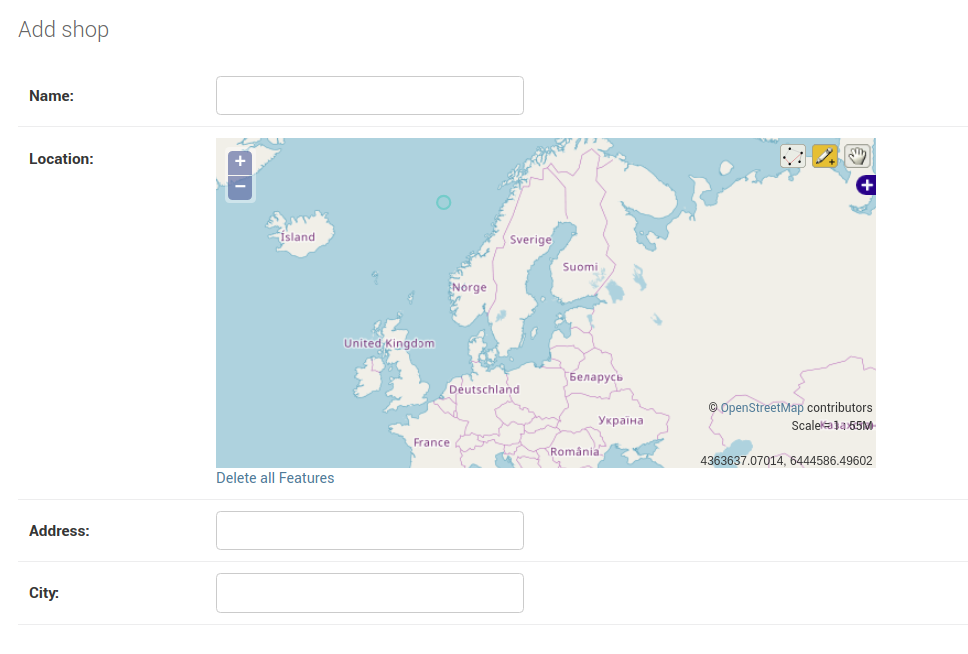
You can see that the Location geometric field is displayed as an interactive map. You can zoom the map in and out, and you can choose different selectors at the top right corner of the map to select a location, which is marked by the green circle.
您可以看到“ Location几何字段显示为交互式地图。 您可以放大和缩小地图,还可以在地图的右上角选择其他选择器以选择一个位置,该位置由绿色圆圈标记。
添加初始数据 (Adding Initial Data)
You need some initial demo data for your application, but instead of manually adding data, you can use a data migration.
您需要为应用程序提供一些初始演示数据,但是可以使用数据迁移来代替手动添加数据。
Data migrations can be used for multiple scenarios, including adding initial data in your database. For more information, check out Data Migrations.
数据迁移可用于多种情况,包括在数据库中添加初始数据。 有关更多信息,请参阅数据迁移 。
Before creating a migration, let’s first get some real-world data from OpenStreetMap using overpass turbo, a web-based data filtering tool for OpenStreetMap. You can run Overpass API queries and analyze the resulting data interactively on the map.
在创建迁移之前,让我们首先使用Overpass turbo (来自OpenStreetMap的基于Web的数据过滤工具)从OpenStreetMap中获取一些实际数据。 您可以运行Overpass API查询并在地图上以交互方式分析结果数据。
You can also use the integrated Wizard, which makes it easy to create queries.
您还可以使用集成的向导 ,使创建查询变得容易。
In your case, you want to get all the shops in a city. Simply click on the Wizard button. A small window will pop up. In the text field, write a query like “shop in Miami” and click on build and run query.
就您而言,您想在城市中获得所有商店。 只需单击向导按钮。 将会弹出一个小窗口。 在文本字段中,编写“迈阿密商店”之类的查询,然后单击“构建并运行”查询。

Next, click on the export button and click on download/copy as raw OSM data to download a JSON file that contains the raw OSM data. Save the file as data.json in your project’s root folder:
接下来,单击导出按钮,然后单击下载/复制为原始OSM数据,以下载包含原始OSM数据的JSON文件。 将文件另存为data.json在项目的根文件夹中:

This is a screenshot of example data from the file:
这是文件中示例数据的屏幕截图:

You need to get the objects in the elements array. Specifically the lat, lon, and tags (name) fields for each shop.
您需要在elements数组中获取对象。 特别是每个商店的lat , lon和tags ( name )字段。
You can find more details on how you can write Overpass queries from this wiki.
您可以找到有关如何从此Wiki编写“超越”查询的更多详细信息。
Now, let’s create an empty migration for importing the content of the data.json file in the database, using the following command:
现在,让我们使用以下命令创建一个空的迁移,以将data.json文件的内容导入数据库中:
 $ python manage.py makemigrations shops --empty
$ python manage.py makemigrations shops --empty
Open the migration file. It has the following code:
打开迁移文件。 它具有以下代码:
You next need to create load_data() to be executed by RunPython(). First, in the import area, add the following imports:
接下来,您需要创建load_data()以便由RunPython()执行。 首先,在导入区域中,添加以下导入:
 from from django.db django.db import import migrations
migrations
import import json
json
from from django.contrib.gis.geos django.contrib.gis.geos import import fromstr
fromstr
from from pathlib pathlib import import Path
Path
You are importing the Path class from the pathlib package for accessing low-level system functions, the json package for working with JSON, the Django built-in migrations API, and fromstr(), part of the geos package.
您正在导入的Path从类pathlib包用于访问低级别的系统功能,将json包用于JSON的,Django的内置迁移API和fromstr()该部分geos包。
Next, add load_data():
接下来,添加load_data() :
Let’s explain the code you’ve just added. You first construct the absolute path using the Path class of the pathlib library and open the data.json file. Next, you parse the JSON file into a Python object.
让我们解释一下您刚刚添加的代码。 首先,使用pathlib库的Path类构造绝对路径,然后打开data.json文件。 接下来,您将JSON文件解析为Python对象。
You loop through the elements object containing the locations and tags of shops. Inside the loop, you extract the name and the longitude and latitude coordinates. Then you use formstr() to return a valid GEOSGeometry object corresponding to the spatial data in the string that can be assigned to the location field of the Shop model. Finally, you create and save the instance of the Shop model corresponding to the extracted data.
您遍历包含商店位置和标签的elements对象。 在循环内部,提取名称以及经度和纬度坐标。 然后,使用formstr()返回与字符串中可分配给Shop模型的位置字段的空间数据相对应的有效GEOSGeometry对象。 最后,您创建并保存与提取的数据相对应的Shop模型的实例。
You are using the with statement, so you don’t have to explicitly close the file, and an f-string for formatting the argument of fromstr().
您正在使用with语句 ,因此不必显式关闭文件,也无需使用f字符串来格式化fromstr()的参数。
fromstr() takes a srid as the second parameter. srid stands for Spatial Reference System Identifier. It’s a unique value to identify spatial reference systems (projection systems used for interpreting the data in the spatial database).
fromstr()将srid作为第二个参数。 srid代表空间参考系统标识符。 标识空间参考系统(用于解释空间数据库中数据的投影系统)是一个独特的价值。
The 4326 srid is the most popular system used with PostGIS. It’s also known as WGS84, where units are specified in degrees of longitude and latitude. You can refer to spatialreference.org for a Django-powered database of spatial reference systems.
4326 srid是与PostGIS一起使用的最受欢迎的系统。 也称为WGS84 ,其中单位以经度和纬度指定。 您可以访问spatialreference.org ,以获取由Django支持的空间参考系统数据库。
Next, add the migration class to execute the above function when you run the migrate command:
接下来,添加迁移类在运行执行上述功能migrate命令:
 class class MigrationMigration (( migrationsmigrations .. MigrationMigration ):

    ):

    dependencies dependencies = = [
        [
        (( 'shops''shops' , , '0005_auto_20181018_2050''0005_auto_20181018_2050' ),
    ),
    ]

    ]

    operations operations = = [
        [
        migrationsmigrations .. RunPythonRunPython (( load_dataload_data )
    )
    ]
]
That’s it. You can now return to your terminal and run the following:
而已。 现在,您可以返回到终端并运行以下命令:
The data from the data.json file will be loaded on your database. Run your Django server and head to your admin interface. You should see your data in the table. In my case, this is a screenshot of a portion of the table:
data.json文件中的数据将被加载到您的数据库中。 运行您的Django服务器并转到您的管理界面。 您应该在表中看到数据。 就我而言,这是表的一部分的屏幕截图:

显示附近的商店 (Displaying Nearby Shops)
At this point of the tutorial, you have created:
在本教程的这一点上,您已经创建:
-
The
shopsapplication, which encapsulates the code for creating and getting nearby shops in your project -
The
Shopmodel and the corresponding tables in the database -
The initial admin user for accessing the admin interface
-
The initial demo data for loading real-world shops in the database that you can play with without manually entering a lot of fake data
-
shops应用程序,其中封装了用于在项目中创建和获取附近商店的代码 -
Shop模型和数据库中的相应表 -
用于访问管理界面的初始管理员用户
-
用于在数据库中加载现实世界商店的初始演示数据,您可以在不手动输入大量假数据的情况下进行操作
You also registered the Shop model in the admin application so you can create, update, delete, and list shops from the admin interface.
您还已在管理应用程序中注册了Shop模型,因此您可以从管理界面创建,更新,删除和列出商店。
Next, you’ll add a view function using the generic ListView class that you can use to display a list of nearby shops. You also create an HTML template that will be used by the view function to render the shops and add the URL that will be used to display the shops.
接下来,您将使用通用ListView类添加一个视图函数,可用于显示附近商店的列表。 您还创建了一个HTML模板,其视图功能将使用它来渲染商店,并添加将用于显示商店的URL。
Let’s start by adding a template and a view function that will be used to display the nearby shops from a user’s location.
让我们首先添加一个模板和一个视图功能,该功能将用于从用户位置显示附近的商店。
Open the shops/views.py file and start by importing the necessary APIs:
打开shops/views.py文件,然后从导入必要的API开始:
 from from django.views django.views import import generic
generic
from from django.contrib.gis.geos django.contrib.gis.geos import import fromstr
fromstr
from from django.contrib.gis.db.models.functions django.contrib.gis.db.models.functions import import Distance
Distance
from from .models .models import import Shop
Shop
Next add a user_location variable where you can hard code a user location:
接下来添加一个user_location变量,您可以在其中对用户位置进行硬编码:
In this part, you’ll simply hard code the user’s location (the coordinates of Miami in the USA), but this ideally should be specified by the user or retrieved automatically from the user’s browser with their permission using JavaScript and the HTML5 GeoLocation API. You can scroll down to the middle of that page to see a live example of implementing the Geolocation API.
在这一部分中,您将简单地对用户的位置(美国迈阿密的坐标)进行硬编码,但是理想情况下,这应该由用户指定,或者在使用JavaScript和HTML5 GeoLocation API的许可下从用户的浏览器中自动检索。 您可以向下滚动到该页面的中间,以查看实现Geolocation API的实时示例。
Finally, add the following view class:
最后,添加以下视图类:
 class class HomeHome (( genericgeneric .. ListViewListView ):
    ):
    model model = = Shop
    Shop
    context_object_name context_object_name = = 'shops'
    'shops'
    queryset queryset = = ShopShop .. objectsobjects .. annotateannotate (( distancedistance == DistanceDistance (( 'location''location' ,
    ,
    user_locationuser_location )
    )
    )) .. order_byorder_by (( 'distance''distance' )[)[ 00 :: 66 ]
    ]
    template_name template_name = = 'shops/index.html'
'shops/index.html'
You are using the generic class-based ListView to create a view.
您正在使用基于通用类的ListView创建视图。
Class-based views are an alternative way to implement views as Python classes instead of functions. They are used to handle common use cases in web development without re-inventing the wheel. In this example, you’ve just sub-classed the ListView generic view and overridden the model, context_object_name, queryset, and template_name attributes to create a list view that handles HTTP requests without any extra code.
基于类的视图是将视图实现为Python类而非函数的一种替代方法。 它们用于处理Web开发中的常见用例,而无需重新发明轮子。 在此示例中,您只是对ListView通用视图进行了子分类,并覆盖了model , context_object_name , queryset和template_name属性,以创建一个无需任何额外代码即可处理HTTP请求的列表视图。
Now let’s focus on the queryset attribute. To get the nearby shops, you simply use .annotate() to annotate each object on the returned queryset with a distance annotation that’s calculated using Distance(), available from GeoDjango, between the location of each shop and the user’s location. You also order the returned queryset by the distance annotation and take only the nearest six shops.
现在,让我们集中讨论queryset属性。 要获得附近的商店,您只需使用.annotate()在返回的查询集中的每个对象上标注距离注释,该距离注释是使用GeoDjango提供的Distance()计算得出的,该距离注释在每个商店的位置和用户位置之间。 您还可以通过距离注释对返回的查询集进行排序,并且仅采用最近的六家商店。
You can learn more about class-based views from the official docs.
您可以从官方文档了解有关基于类的视图的更多信息。
Next let’s add the shops/index.html template with the following content:
接下来,我们添加具有以下内容的shops/index.html模板:
The nearest shops are available from the shops context object that you specified as the context_object_name in the class-based view. You loop through the shops object and you display the name and distance from the user’s location for each shop.
最近的商店可从您在基于类的视图中指定为context_object_name的shops上下文对象中获得。 您遍历shops对象,并显示每个商店的名称和距用户位置的距离。
Finally, let’s add a URL to our urls.py file:
最后,让我们向我们的urls.py文件添加一个URL:
 from from django.urls django.urls import import path
path
from from shops shops import import views

views

urlpatterns urlpatterns = = [
    [
    # [...]
    # [...]
    pathpath (( '''' , , viewsviews .. ShopListShopList .. as_viewas_view ())
())
]
]
You use .as_view() to return a callable view that takes a request and returns a response, which can be passed as the second parameter for path() that maps paths to views.
您可以使用.as_view()返回可调用视图,该视图接受request并返回response ,可以将其作为path()的第二个参数传递,该参数将path()映射到视图。
Now you can run your Django server. The home page will display a simple un-styled list with the nearest shops from the hard-coded user’s location. This is an example screenshot:
现在,您可以运行Django服务器。 主页将显示一个简单的无样式列表,其中包含硬编码用户位置附近的商店。 这是一个示例屏幕截图:

In the screenshot, each item in the list displays the name of the shop (before the colon) and the distance in meters from the user’s location (after the colon). The letter m refers to meters.
在屏幕快照中,列表中的每个项目均显示商店名称(冒号之前)和距用户位置(冒号之后)的距离(以米为单位)。 字母m代表米。
Note: The view function you used to display the results in the screenshot is just for testing the queryset annotated by Distance().
注意:用于在屏幕快照中显示结果的视图功能仅用于测试由Distance()注释的查询集。
In the next part of the series, you’ll use a RESTful endpoint to return the nearest shops. Instead of a Django template, you’ll use Vue.js with some CSS styling for a better look, so stay tuned!
在本系列的下一部分中,您将使用RESTful端点返回最近的商店。 您将使用带有某些CSS样式的Vue.js而不是Django模板,以获得更好的外观,请继续关注!
结语 (Wrap-Up)
Congratulations on creating your location based web application using GeoDjango, which aims to become a world-class geographic framework for implementing GIS apps. You now have the basic skills that you can use to either add simple geolocation stuff to your applications or create GIS apps. You can read the GeoDjango docs for a complete resource of the available APIs and what you can do with them.
祝贺您使用GeoDjango创建了基于位置的Web应用程序,该应用程序旨在成为实现GIS应用程序的世界一流的地理框架。 您现在掌握了基本技能,可以用来向应用程序中添加简单的地理位置信息或创建GIS应用程序。 您可以阅读GeoDjango文档 ,以获取可用API的完整资源以及如何使用它们。
You also learned to use Docker to quickly pull and launch a PostgreSQL and PostGIS server. Docker can be used for more than that. It’s a containerization tool for spinning up isolated, reproducible application environments. You can read Django Development with Docker Compose and Machine if you want to learn how to containerize your Django project.
您还学习了如何使用Docker快速拉出并启动PostgreSQL和PostGIS服务器。 Docker可以用于更多用途。 它是一个容器化工具,用于分离隔离的,可重现的应用程序环境。 如果您想学习如何容器化Django项目,可以阅读《 使用Docker Compose和Machine进行Django开发》。
Nowadays, location aware apps (apps that know your location and help you discover nearby objects and services by offering you results based on your location) are all the rage. Using the knowledge you gained in this tutorial, you’ll be able to incorporate this modern feature in your apps developed with Django.
如今,位置感知型应用程序(了解您的位置并通过根据位置提供结果来帮助您发现附近物体和服务的应用程序)风行一时。 使用您在本教程中获得的知识,您将能够在使用Django开发的应用程序中纳入这一现代功能。
The only requirement, besides the dependencies of GeoDjango, is to use a spatial database (a database that’s capable of storing and manipulating spatial data). For PostgreSQL, one of the most popular database management systems used with Django, you can simply install the PostGIS extension with your database to turn it into a spatial database. Other popular databases like Oracle and MySQL have built-in support for spatial data.
除了GeoDjango的依赖关系外,唯一的要求是使用空间数据库(能够存储和处理空间数据的数据库)。 对于PostgreSQL(与Django一起使用的最流行的数据库管理系统之一),您只需将PostGIS扩展与数据库一起安装即可将其转换为空间数据库。 其他流行的数据库(如Oracle和MySQL)都内置了对空间数据的支持。
结论 (Conclusion)
Throughout this tutorial, you used PostgreSQL, PostGIS, Django, and GeoDjango to build a simple nearby shops web application.
在整个教程中,您使用PostgreSQL,PostGIS,Django和GeoDjango构建了一个简单的附近商店Web应用程序。
In the next tutorial, you’ll continue building the application with Django REST framework to expose a RESTful API, and you’ll use the JavaScript Vue.js library with the Axios HTTP client to consume the API and render the data.
在下一个教程中,您将继续使用Django REST框架构建应用程序以公开RESTful API,并且将JavaScript Vue.js库与Axios HTTP客户端一起使用以使用API并呈现数据。
You’ll also use the HTML5 Geolocation API to automatically get the user’s location from the user’s browser instead of hard-coding it like you did in this tutorial, so stay tuned!
您还将使用HTML5 Geolocation API从用户的浏览器自动获取用户的位置,而不是像本教程中那样对它进行硬编码,敬请关注!
翻译自: https://www.pybloggers.com/2018/12/make-a-location-based-web-app-with-django-and-geodjango/
基于django的web

腾讯云面向开发者汇聚海量精品云计算使用和开发经验,营造开放的云计算技术生态圈。
更多推荐
 1
1 0
0- 0


 已为社区贡献2条内容

所有评论(0)