

Spark has added a lot of notable features with Spark SQL. Some will have a huge impact on checks like data quality and data validations. Though there is a lot of upgraded features, I’m listing out a few of those as these would be used in most common cases.
Spark在Spark SQL中添加了许多显着的功能。 有些将对检查产生巨大影响,例如数据质量和数据验证。 尽管有很多升级的功能,但我列出了其中的一些功能,因为这些功能将在最常见的情况下使用。
ANSI SQL投诉功能 (ANSI SQL Complaint Features)
For Spark developers, who are at the initial stage of learning SQL commands, query identifier validation might be helpful. They might use keywords as identifiers that are not meant to be used. Even it will work completely fine with spark, This will confuse others who work with the code in the future.
对于处于学习SQL命令初期阶段的Spark开发人员,查询标识符验证可能会有所帮助。 他们可能使用关键字作为不打算使用的标识符。 即使使用spark也会完全正常工作,这会使将来使用该代码的其他人感到困惑。
Spark will allow certain unusual cases like using some reserved keywords as identifiers. Something like this:
Spark将允许某些特殊情况,例如使用一些保留的关键字作为标识符。 像这样:
select * from table_1 create where create.column_1= 1This query will run without any issues in spark. create is the most common reserved keyword, used for creating tables with SQL, but it can be used as an identifier in spark without any issues.
此查询将运行,不会在spark中出现任何问题。 create是最常用的保留关键字,用于通过SQL创建表,但可以用作spark中的标识符,不会出现任何问题。
To overcome this, and involve query validation in runtime, Spark is now compliant with ANSI SQL standard. Validation has been added to the catalyst parser level. To enable ANSI mode query validation, switch property spark.sql.ansi.enabled to true. For the same query shown above, Spark will now throw the exception.
为了克服这个问题,并在运行时进行查询验证,Spark现在符合ANSI SQL标准。 验证已添加到催化剂解析器级别。 要启用ANSI模式查询验证,请将属性spark.sql.ansi.enabled切换为true。 对于上面显示的相同查询,Spark现在将引发异常。
Error in SQL statement: ParseException:  no viable alternative at input 'create'(line 1, pos 38)== SQL ==
select * from table_1 create  where create.column_1= 1
----------------------^^^com.databricks.backend.common.rpc.DatabricksExceptions$SQLExecutionException: org.apache.spark.sql.catalyst.parser.ParseException:
Following are the keywords standardized in Spark 3.0:
以下是Spark 3.0中标准化的关键字:
To disable the ANSI standard validation, Falsify spark.sql.ansi.enabled.
要禁用ANSI标准验证,请伪造spark.sql.ansi.enabled。
商店分配政策 (Store Assignment policy)
This feature is introduced for stern data quality checks during migration from SQL kind of environment. Below Insert table statement(Ingesting string into an integer column) would execute without any runtime exception in Spark 2.4 and below.
引入此功能是为了在从SQL类环境迁移期间进行严厉的数据质量检查。 在Spark 2.4及更低版本中,Insert table语句(将字符串吸收到整数列中)将在没有任何运行时异常的情况下执行。



This will work fine in Spark 3.0 as well. But by setting up the property “spark.sql.storeAssignmentPolicy” as ‘ANSI’, casting exception is thrown.
在Spark 3.0中也可以正常工作。 但是通过将属性“ spark.sql.storeAssignmentPolicy”设置为“ ANSI”,可以强制转换 抛出异常。

This definitely improves data quality checks during the migration.
无疑,这可以改善迁移期间的数据质量检查。
“ from_json”中的可选模式(FAIL_FAST / PERMISSIVE) (Optional mode in “from_json” (FAIL_FAST/PERMISSIVE))
from_json method is used in parsing JSON type value within a column. In Spark 3.0, it supports PERMISSIVE/FAIL_FAST mode similar to spark.read.json. So, if the JSON value cannot be parsed or malformed, it will throw an exception as follows:
from_json方法用于解析列中的JSON类型值。 在Spark 3.0中,它支持类似于spark.read.json的PERMISSIVE / FAIL_FAST模式。 因此,如果无法解析或格式错误的JSON值,它将引发如下异常:

指数符号 (Exponential notation)
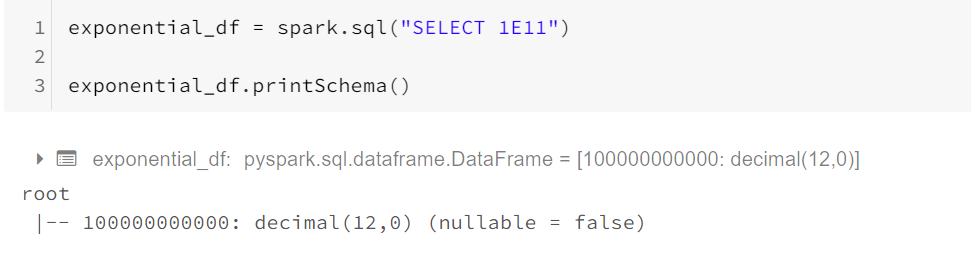
In Spark 3.0, numbers written in scientific notation(for example, 1E11) would be parsed as Double. In Spark version 2.4 and below, they’re parsed as Decimal. To restore the behavior before Spark 3.0, you can set spark.sql.legacy.exponentLiteralAsDecimal.enabled to false.
在Spark 3.0中,以科学计数法表示的数字( 例如1E11 )将被解析为Double。 在Spark 2.4及更低版本中,它们被解析为Decimal。 要恢复Spark 3.0之前的行为,可以将spark.sql.legacy.exponentLiteralAsDecimal.enabled设置为false 。
In Spark 2.4,
在Spark 2.4中,
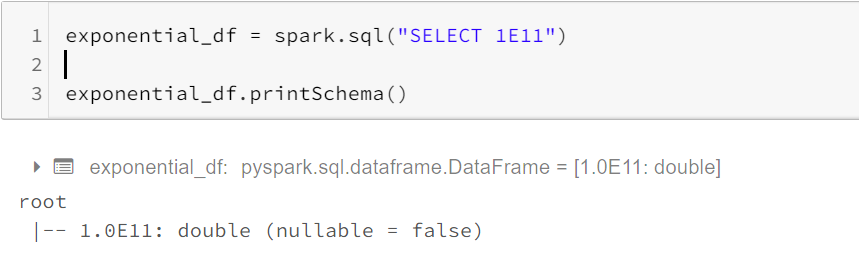
In Spark 3.0, and setting ‘spark.sql.legacy.exponentLiteralAsDecimal.enabled’ as true.
在Spark 3.0中,将'spark.sql.legacy.exponentLiteralAsDecimal.enabled'设置为true 。
负十进制零 (Negative Decimal zeroes)
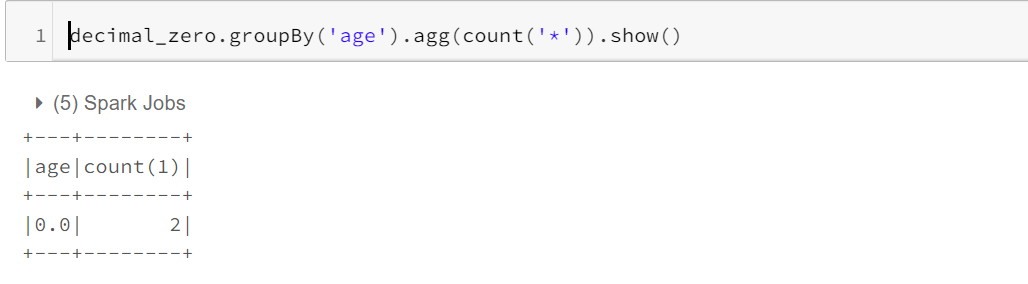
In Spark version 2.4 and below, float/double -0.0 is semantically equal to 0.0, but -0.0 and 0.0 are considered as different values when used in aggregate grouping keys, window partition keys, and join keys. It’s a Bug and it is fixed in Spark 3.0. Now, Distinct of (-0.0,0.0) will give (0.0).
在Spark 2.4及更低版本中,float / double -0.0在语义上等于0.0,但在聚合分组键,窗口分区键和联接键中使用时,-0.0和0.0被视为不同的值。 这是一个Bug,已在Spark 3.0中修复。 现在,(-0.0,0.0)的Distinct将给出(0.0)。
Sample Dataset
样本数据集
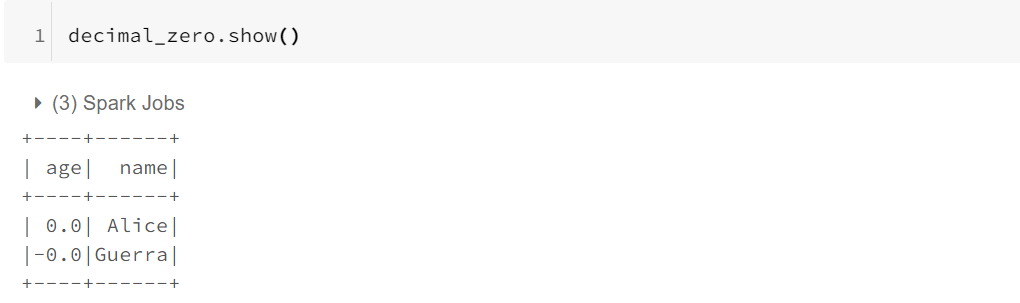
With Spark 2.4, you will get as follows,
使用Spark 2.4,您将获得以下信息,
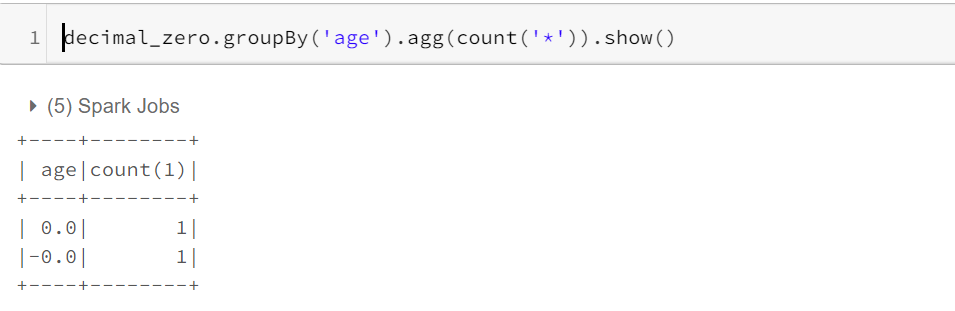
Whereas with Spark 3.0, with no additional property set, consideration will be the same irrespective of negative or positive.
而对于Spark 3.0,没有设置其他属性,则考虑的因素将是相同的,而不管其正面还是负面。
“日期”和“时间戳记”的关键字字符串 (Keyword Strings to ‘Date’ and ’Timestamp’)
In Spark 3.0, Certain keywords are supported for converting a string to date.
在Spark 3.0中,支持某些关键字将字符串转换为日期。
To Generate a ‘date’ from a string, Following are the keywords.
要从字符串生成“日期”,以下是关键字。
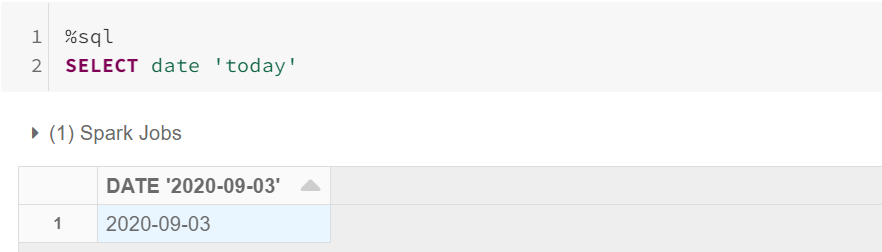
Possible keywords:
可能的关键字:
select date 'x''x' can have following values:> epoch -> 1970-01-01 (minimum date)> today the current date in the time zone specified by spark.sql.session.timeZone> yesterday -> the current date - 1> tomorrow -> the current date + 1> now -> the date of running the current query. It has the same notion as todaySimilarly, We have an option for getting timestamp from string.
同样,我们有一个从字符串获取时间戳的选项。
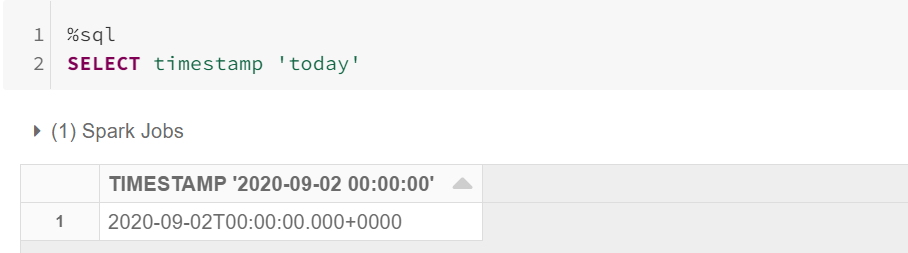
Possible keywords:
可能的关键字:
select timestamp 'x''x' can have following values> epoch -> 1970-01-01 00:00:00+00 (Unix system time zero)> today -> midnight today> yesterday midnight yesterday> tomorrow -> midnight tomorrow> now -> current query start timeIn 3.0, Some of the SQL functions also have been updated/added, which has benefits in data aggregation and getting insights out of it in a simpler way. Find some of them below.
在3.0中,一些SQL函数也已更新/添加,这在数据聚合和以更简单的方式获得见解方面具有优势。 在下面找到其中一些。
以下部分使用的数据集 (Dataset used for following section)
Max_By(),Min_By() (Max_By(), Min_By())
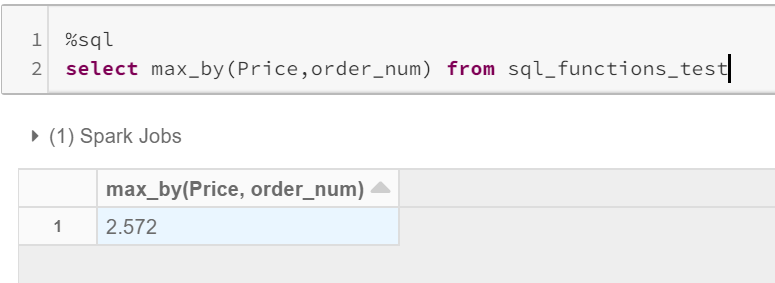
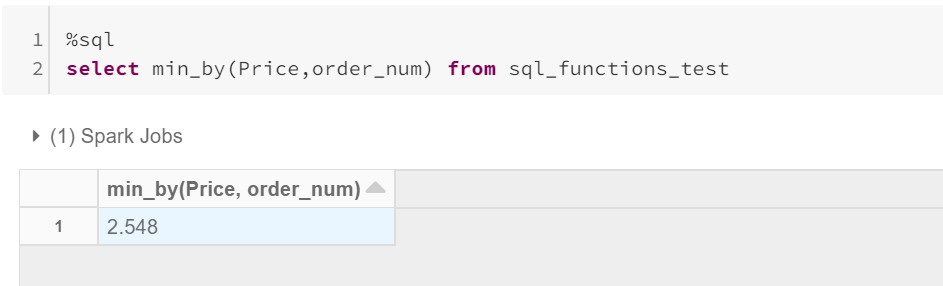
These functions are one of the significant features that I have noted. These will get you the value of a column, with respect to maximum/minimum some other column.
这些功能是我注意到的重要功能之一。 相对于其他最大值/最小值,这些将为您提供一列的值。
Usage: max_by(x,y) / min_by(x,y)
用法: max_by(x,y) / min_by(x,y)
→ x = column from which value to be fetched.
→x =要从中获取值的列。
→ y = column to get the aggregated maximum/minimum.
→y =列以获取合计的最大值/最小值。
From the above data, the Overall Maximum Price is 2.598 and the Overall Minimum price is 2.514.
根据以上数据,最高总价为2.598,最低总价为2.514。
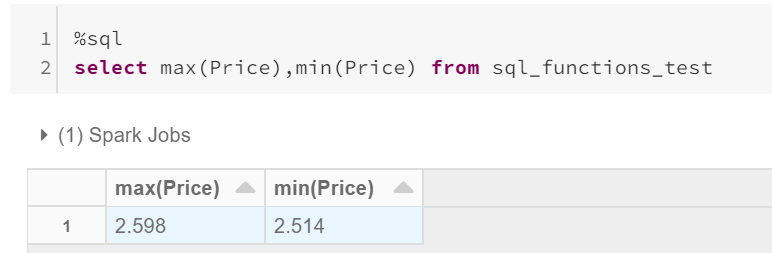
But with Max_by/Min_by, Maximum = 2.572, which is for the maximum order number 6 and Minimum = 2.548, which is for the minimum order number 1.
但是对于Max_by / Min_by,Maximum = 2.572(用于最大订单号6),Minimum = 2.548(用于最小订单号1)。
子查询中的WITH子句 (WITH clause inside subqueries)
CTE using with clause can now be used within subqueries. This will improve query readability and would be significant in using multiple CTE’s.Something like this:
CTE using with子句现在可以在子查询中使用。 这样可以提高查询的可读性,并且在使用多个CTE时将非常重要。
select * from
(with inner_cte as (select * from sql_functions_test where order_num = 5)
select order_num from inner_cte);
过滤器(在…处) (Filter (Where…))
This feature would be helpful in aggregation only for a set of rows, filtered based on a condition.
此功能仅对基于条件过滤的一组行聚合很有帮助。

覆盖() (Overlay())
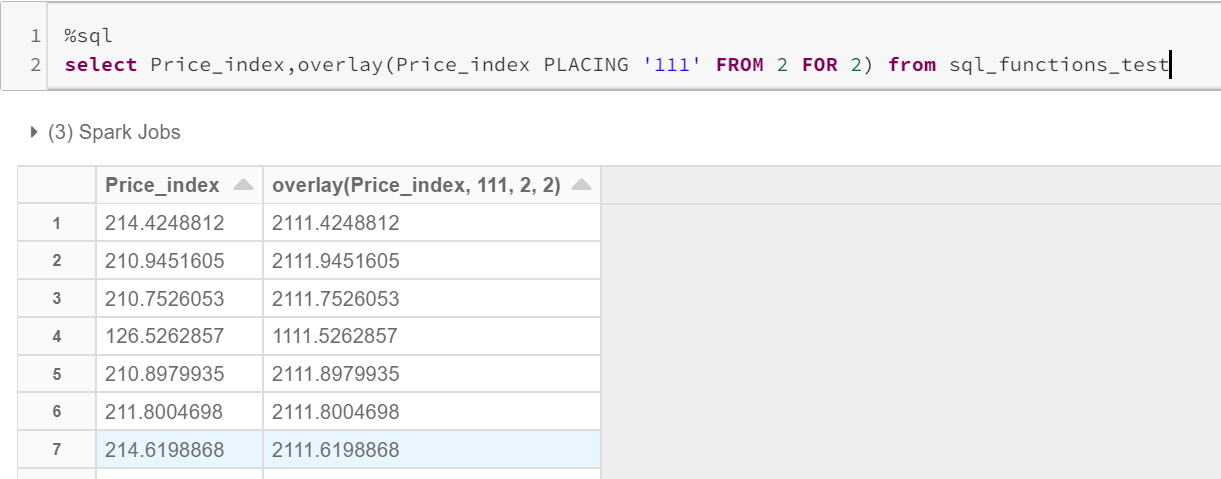
This is an alternative to ‘replace’ function. But, It does have some advantages over replace.
这是“替换”功能的替代方法。 但是,它确实比替换具有一些优势。
Usage : overlay(input_string placing replace_string from start_position for number_of_positions_to_be_replaced)
用法: overlay( input_string从number_of_positions_to_be_replaced的 start_position放置replace_string )
Note: The input column should be a string.
注意:输入列应为字符串。
任意()-Every()-Some() (Any ()— Every() — Some())
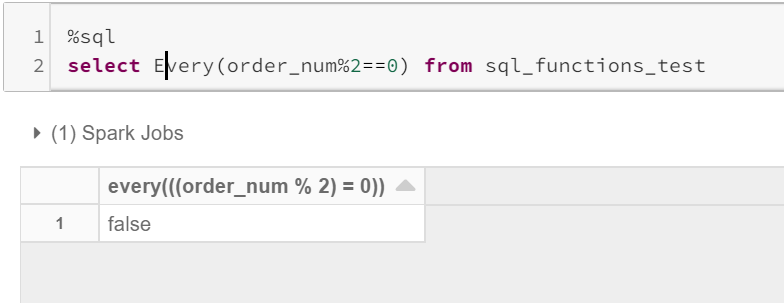
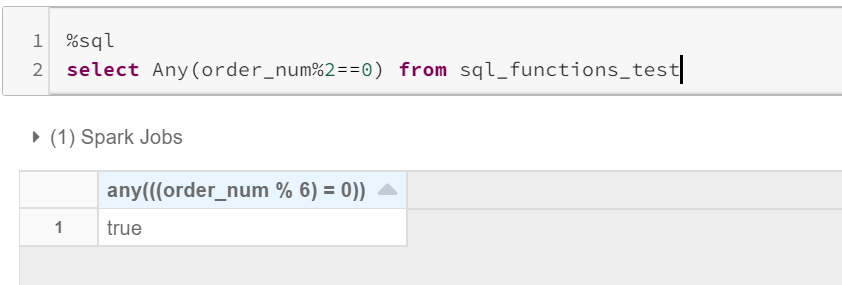
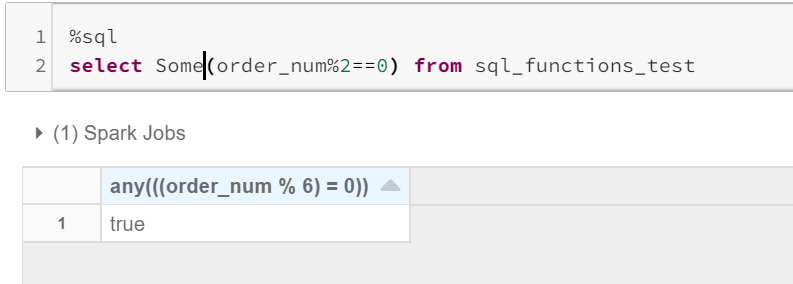
This is to validate a column based on the condition expression provided.
这是基于提供的条件表达式来验证列。
Usage: Any(expr) , Every(expr), Some(expr)
用法: Any(expr),Every(expr),Some(expr)
EVERY: will return true, only if all column values return true.
EVERY:仅当所有列值都返回true时,才会返回true。
ANY/SOME: will return true, even if one value returns true.
ANY / SOME:即使一个值返回true,也将返回true。
Count_if() (Count_if())
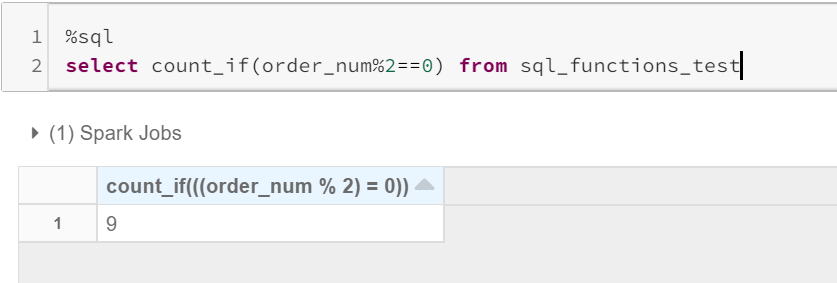
This is similar to filter(where..), which will give you the non-distinct count of column records, that satisfy the condition provided.
这类似于filter(where ..),它将为您提供满足所提供条件的列记录的非明显计数。
Usage: count_if(expr)
用法: count_if(expr)
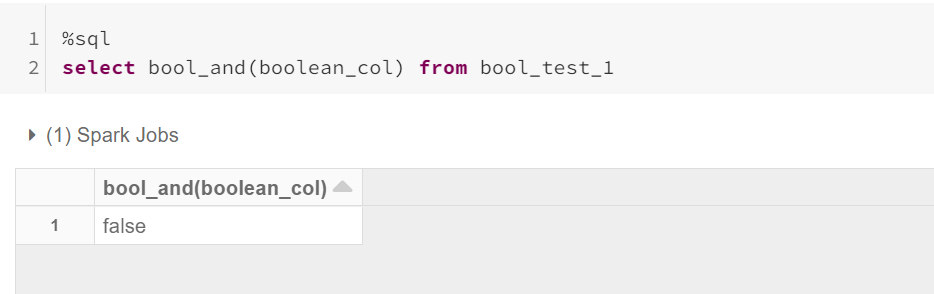
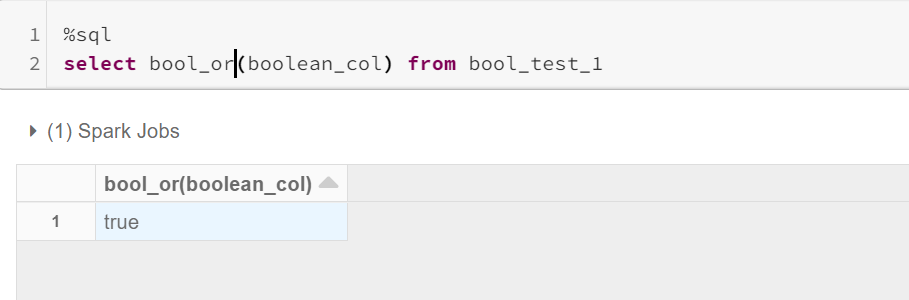
Bool_and()— Bool_or() (Bool_and() — Bool_or())
This is to validate boolean columns, mimicking AND /OR operation.
这是为了验证布尔列,模仿AND / OR操作。
Usage: bool_and(column_value) , bool_or(column_value)
用法: bool_and( column_value ),bool_or( column_value )
Considering the sample table, having a boolean column.
考虑到示例表,具有布尔列。
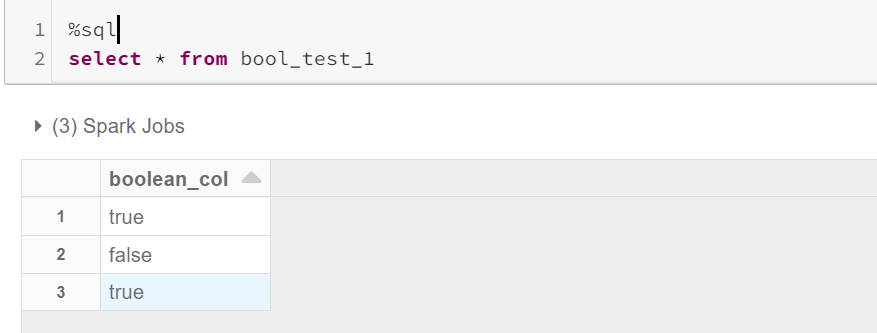
Applying BOOL_AND: returns true only if all the values are true.
应用BOOL_AND:仅当所有值均为true时,才返回true。
Applying BOOL_OR: returns true even if one value is true.
应用BOOL_OR:即使一个值是true,也将返回true。
结语 (Wrapping up)
Spark has not only added new features but fixed a few bugs with the earlier versions. Validation and quality checks have been easier than before. Functions like count with filter, max_by and min_by will reduce the complexity of executing multiple sub-queries.
Spark不仅添加了新功能,还修复了早期版本中的一些错误。 验证和质量检查比以前更加容易。 带有filter的count,max_by和min_by之类的功能将降低执行多个子查询的复杂性。


 已为社区贡献1条内容


所有评论(0)