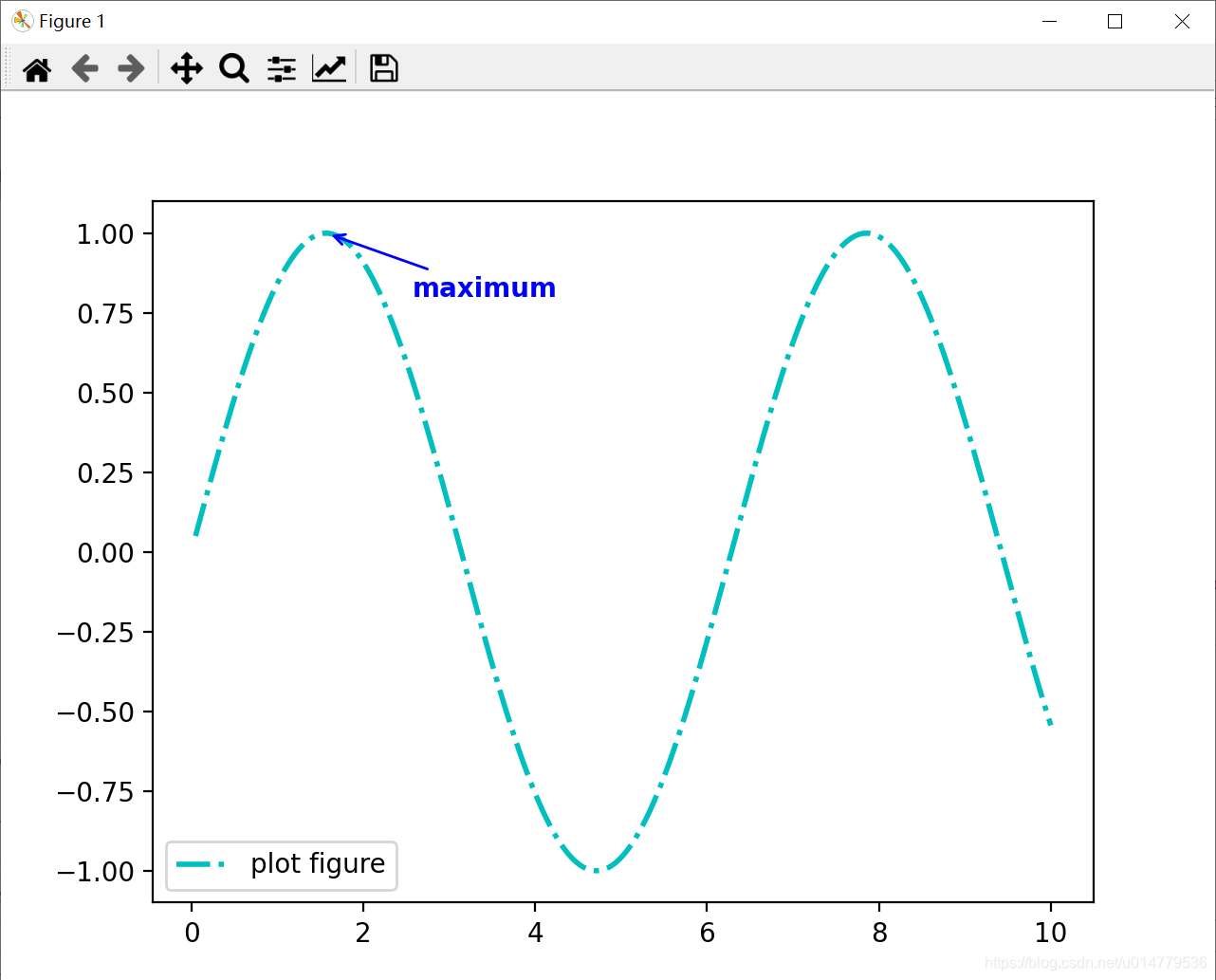
数据可视化之matplotlib实战:plt.annotate()函数 添加图形内容细节的指向型注释文本
import matplotlib.pyplot as pltimport numpy as npx = np.linspace(0.05,10,1000)y = np.sin(x)plt.plot(x,y,ls="-.",lw=2,c="c",label="plot figure")plt.legend()plt.annotate("maximum",xy=(np.pi/2,1.0),xytex
·
import matplotlib.pyplot as plt
import numpy as np

x = np.linspace(0.05,10,1000)
y = np.sin(x)

plt.plot(x,y,ls="-.",lw=2,c="c",label="plot figure")

plt.legend()

plt.annotate("maximum",
             xy=(np.pi/2,1.0),
             xytext=((np.pi/2)+1.0,.8),
             weight = "bold",
             color = "b",
             arrowprops=dict(arrowstyle="->",connectionstyle="arc3",color="b"))

plt.show()

腾讯云面向开发者汇聚海量精品云计算使用和开发经验,营造开放的云计算技术生态圈。
更多推荐
 1
1 0
0- 0


 已为社区贡献10条内容

所有评论(0)