spring boot使用aop实现一个简易版日志功能
·
今天我们来使用aop来实现简易版的日志记录,话不多说,直接来上手
-
创建日志表log
-
创建用户实体类,日志实体类
-
创建日志类接口
-
创建扫描注解
-
创建切面
-
测试接口
1.创建日志表log
CREATE TABLE `log`  (
  `id` int(10) NOT NULL AUTO_INCREMENT COMMENT '主键Id',
  `Executor` varchar(64) CHARACTER SET gbk COLLATE gbk_chinese_ci NULL DEFAULT NULL COMMENT '执行人',
  `operation` varchar(64) CHARACTER SET gbk COLLATE gbk_chinese_ci NULL DEFAULT NULL COMMENT '操作描述',
  `method` varchar(2048) CHARACTER SET gbk COLLATE gbk_chinese_ci NULL DEFAULT '' COMMENT '执行方法路径',
  `execution_duration` int(11) NULL DEFAULT NULL COMMENT '执行时间',
  `ip` varchar(64) CHARACTER SET gbk COLLATE gbk_chinese_ci NULL DEFAULT NULL COMMENT 'ip地址',
  `createtime` datetime(0) NULL DEFAULT NULL COMMENT '创建时间',
  PRIMARY KEY (`id`) USING BTREE
) ENGINE = InnoDB AUTO_INCREMENT = 249 CHARACTER SET = gbk COLLATE = gbk_chinese_ci ROW_FORMAT = Dynamic;
2.创建用户实体和日志实体
- 用户实体类
/**用户测试实体*/
@Accessors(chain = true)
@Data
public class User {
    private Integer id;
    private String username;
    private String password;
}
- 日志实体类
/**日志实体*/
@Accessors(chain = true)
@Data
public class Log {
    /**主键*/
	private Integer id;
    /**执行人*/
	private String executor;
	/**方法描述*/
	private String operation;
	/**执行方法*/
	private String method;
	/**执行时长*/
    private Long executionDuration;
    /**ip*/
	private String ip;
	/**创建时间*/
	private Date createtime;
}
3.创建日志类接口
@Mapper
public interface LogMapper {
    @Insert("insert into log(id,Executor,operation,method,execution_duration,ip,createtime) " +
            "values(null,#{executor},#{operation},#{method},#{executionDuration},#{ip},#{createtime})")
    int insert(Log log);
}
4.创建扫描注解
@Retention(RetentionPolicy.RUNTIME)
@Target(ElementType.METHOD)
public @interface RequiredLog {
    String value();
}
5.创建切面
@Aspect//定义切面
@Component
@Order(1)//第一层切面
@Slf4j
public class LogAspect {

    @Resource
    private LogMapper logMapper;

    //扫描RequiredLog注解
    @Pointcut("@annotation(com.sise.annotation.RequiredLog)")
    public void doPointCut() {
    }

    @Around("doPointCut()")
    public Object around(ProceedingJoinPoint jp) throws Throwable {
        try {
            //记录方法执行前的时间
            long t1 = System.currentTimeMillis();
            //执行方法
            Object result = jp.proceed();
            //记录方法执行后的时间
            long t2 = System.currentTimeMillis();
            //保存用户行为日志
            log(jp, (t2 - t1));
            return result;
        } catch (Throwable e) {
            log.error(e.getMessage());
            throw e;
        }
    }

    private void log(ProceedingJoinPoint jp, long time) throws Exception {
        //获取目标对象
        Class<?> targetCls = jp.getTarget().getClass();
        //获取目标方法签名信息(包含方法名,参数列表等信息)
        MethodSignature ms = (MethodSignature) jp.getSignature();
        //获取方法对象
        Method interfaceMethod = ms.getMethod();
        //获取方法名
        String methodName = interfaceMethod.getName();
        //拼接包名+类名+方法
        String clsMethodName = targetCls.getName() + "." + methodName;
        //获取注解RequiredLog
        Method targetMethod =
                targetCls.getMethod(methodName, ms.getParameterTypes());
        RequiredLog requiredLog =
                targetMethod.getAnnotation(RequiredLog.class);
        //获取方法描述(注解值)
        String operation = requiredLog.value();

        //获取已登录的用户信息
        ServletRequestAttributes attr = (ServletRequestAttributes) RequestContextHolder.currentRequestAttributes();
        HttpSession session = attr.getRequest().getSession(true);
        User user = (User) session.getAttribute("user");

        //如果是登录操作则获取登录时的用户名作为执行人
        if(user==null&&operation.equals("登录")){
            Object[] args = jp.getArgs();
            for (Object object : args) {
                if (object instanceof User) {
                    user = (User) object;
                }
            }
        }

        //初始化日志实体
        Log entity = new Log()
                .setExecutor(user == null ? "" : user.getUsername())//登录使用的用户名
                .setOperation(operation)
                .setMethod(clsMethodName)//method=类全名+方法名
                .setIp(IPUtils.getIpAddr())
                .setExecutionDuration(time)
                .setCreatetime(new Date());
        //插入日志
        logMapper.insert(entity);
    }
}
6.测试
-
创建测试接口
@RequestMapping("/test7") @RequiredLog("登录") public CallResult test7(@RequestBody User user,HttpSession session){ session.setAttribute("user",user); return CallResult.success(user); } @RequestMapping("/getUser") @RequiredLog("获取用户信息") public CallResult getUser(HttpSession session){ return CallResult.success(session.getAttribute("user")); } -
模拟登录测试
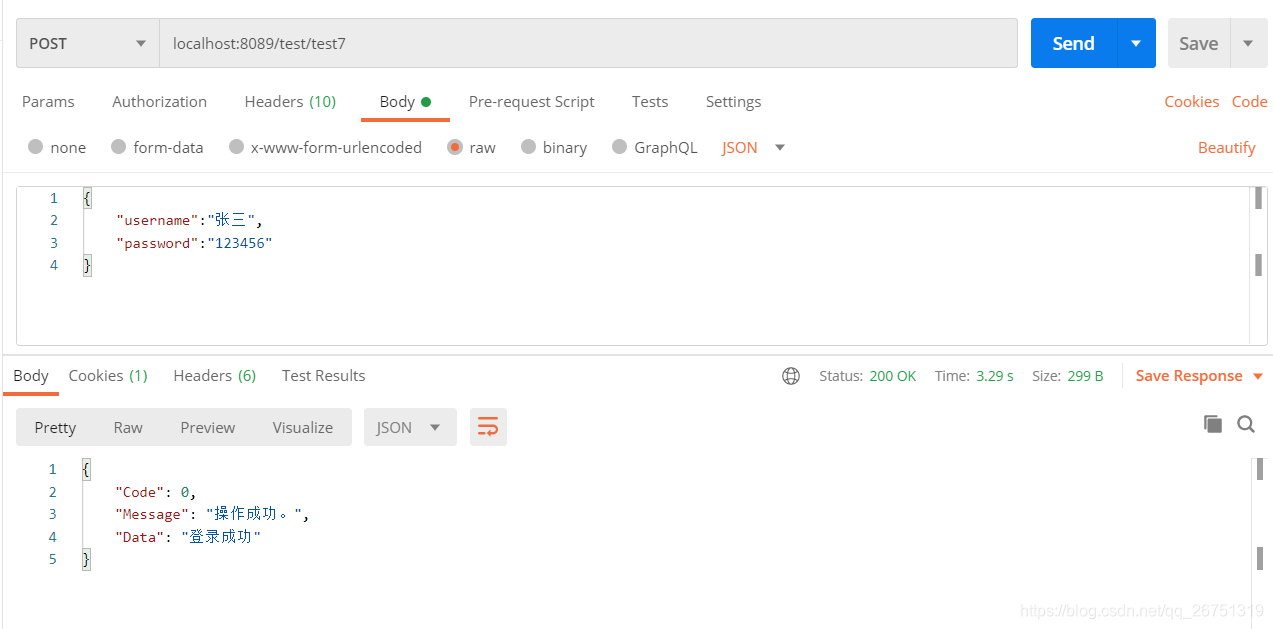
登录测试日志信息插入成功

-
模拟操作测试
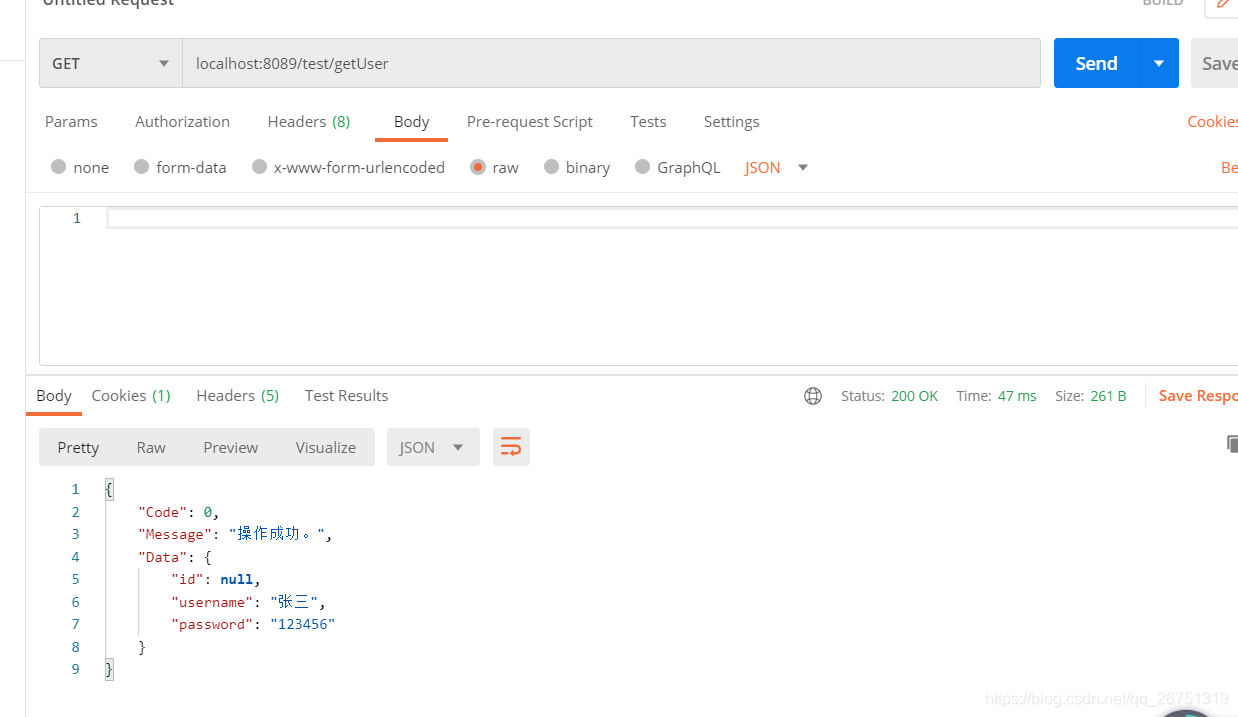
模拟操作日志插入成功

IP工具类:
public class IpUtils {
    public static String getIpAddr(HttpServletRequest request) {
        if (request == null) {
            return null;
        }

        String ip = null;

        // X-Forwarded-For:Squid 服务代理
        String ipAddresses = request.getHeader("X-Forwarded-For");
        if (ipAddresses == null || ipAddresses.length() == 0 || "unknown".equalsIgnoreCase(ipAddresses)) {
            // Proxy-Client-IP:apache 服务代理
            ipAddresses = request.getHeader("Proxy-Client-IP");
        }
        if (ipAddresses == null || ipAddresses.length() == 0 || "unknown".equalsIgnoreCase(ipAddresses)) {
            // WL-Proxy-Client-IP:weblogic 服务代理
            ipAddresses = request.getHeader("WL-Proxy-Client-IP");
        }
        if (ipAddresses == null || ipAddresses.length() == 0 || "unknown".equalsIgnoreCase(ipAddresses)) {
            // HTTP_CLIENT_IP:有些代理服务器
            ipAddresses = request.getHeader("HTTP_CLIENT_IP");
        }
        if (ipAddresses == null || ipAddresses.length() == 0 || "unknown".equalsIgnoreCase(ipAddresses)) {
            // X-Real-IP:nginx服务代理
            ipAddresses = request.getHeader("X-Real-IP");
        }

        // 有些网络通过多层代理,那么获取到的ip就会有多个,一般都是通过逗号(,)分割开来,并且第一个ip为客户端的真实IP
        if (ipAddresses != null && ipAddresses.length() != 0) {
            ip = ipAddresses.split(",")[0];
        }

        // 还是不能获取到,最后再通过request.getRemoteAddr();获取
        if (ip == null || ip.length() == 0 || "unknown".equalsIgnoreCase(ipAddresses)) {
            ip = request.getRemoteAddr();
        }
        return ip.equals("0:0:0:0:0:0:0:1") ? "127.0.0.1" : ip;
    }

    public static boolean internalIp(String ip) {
        byte[] addr = textToNumericFormatV4(ip);
        return internalIp(addr) || "127.0.0.1".equals(ip);
    }

    private static boolean internalIp(byte[] addr) {
        if (StringUtils.isNull(addr) || addr.length < 2) {
            return true;
        }
        final byte b0 = addr[0];
        final byte b1 = addr[1];
        // 10.x.x.x/8
        final byte SECTION_1 = 0x0A;
        // 172.16.x.x/12
        final byte SECTION_2 = (byte) 0xAC;
        final byte SECTION_3 = (byte) 0x10;
        final byte SECTION_4 = (byte) 0x1F;
        // 192.168.x.x/16
        final byte SECTION_5 = (byte) 0xC0;
        final byte SECTION_6 = (byte) 0xA8;
        switch (b0) {
            case SECTION_1:
                return true;
            case SECTION_2:
                if (b1 >= SECTION_3 && b1 <= SECTION_4) {
                    return true;
                }
            case SECTION_5:
                switch (b1) {
                    case SECTION_6:
                        return true;
                }
            default:
                return false;
        }
    }

    /**
     * 将IPv4地址转换成字节
     *
     * @param text IPv4地址
     * @return byte 字节
     */
    public static byte[] textToNumericFormatV4(String text) {
        if (text.length() == 0) {
            return null;
        }

        byte[] bytes = new byte[4];
        String[] elements = text.split("\\.", -1);
        try {
            long l;
            int i;
            switch (elements.length) {
                case 1:
                    l = Long.parseLong(elements[0]);
                    if ((l < 0L) || (l > 4294967295L)) {
                        return null;
                    }
                    bytes[0] = (byte) (int) (l >> 24 & 0xFF);
                    bytes[1] = (byte) (int) ((l & 0xFFFFFF) >> 16 & 0xFF);
                    bytes[2] = (byte) (int) ((l & 0xFFFF) >> 8 & 0xFF);
                    bytes[3] = (byte) (int) (l & 0xFF);
                    break;
                case 2:
                    l = Integer.parseInt(elements[0]);
                    if ((l < 0L) || (l > 255L)) {
                        return null;
                    }
                    bytes[0] = (byte) (int) (l & 0xFF);
                    l = Integer.parseInt(elements[1]);
                    if ((l < 0L) || (l > 16777215L)) {
                        return null;
                    }
                    bytes[1] = (byte) (int) (l >> 16 & 0xFF);
                    bytes[2] = (byte) (int) ((l & 0xFFFF) >> 8 & 0xFF);
                    bytes[3] = (byte) (int) (l & 0xFF);
                    break;
                case 3:
                    for (i = 0; i < 2; ++i) {
                        l = Integer.parseInt(elements[i]);
                        if ((l < 0L) || (l > 255L)) {
                            return null;
                        }
                        bytes[i] = (byte) (int) (l & 0xFF);
                    }
                    l = Integer.parseInt(elements[2]);
                    if ((l < 0L) || (l > 65535L)) {
                        return null;
                    }
                    bytes[2] = (byte) (int) (l >> 8 & 0xFF);
                    bytes[3] = (byte) (int) (l & 0xFF);
                    break;
                case 4:
                    for (i = 0; i < 4; ++i) {
                        l = Integer.parseInt(elements[i]);
                        if ((l < 0L) || (l > 255L)) {
                            return null;
                        }
                        bytes[i] = (byte) (int) (l & 0xFF);
                    }
                    break;
                default:
                    return null;
            }
        } catch (NumberFormatException e) {
            return null;
        }
        return bytes;
    }

    public static String getHostIp() {
        try {
            return InetAddress.getLocalHost().getHostAddress();
        } catch (UnknownHostException e) {
        }
        return "127.0.0.1";
    }

    public static String getHostName() {
        try {
            return InetAddress.getLocalHost().getHostName();
        } catch (UnknownHostException e) {
        }
        return "未知";
    }
}

腾讯云面向开发者汇聚海量精品云计算使用和开发经验,营造开放的云计算技术生态圈。
更多推荐
 2
2 0
0- 0


 已为社区贡献4条内容

所有评论(0)