python中turtle库函数_python中的画图神器——turtle模块
·
turtle库的基础命令介绍
(1)画布
画布cancas是绘图区域,可以设置它的大小和初始位置
turtle.screensize(1000,600,'red')    大小的设置
turtle.setup(width=0.5,height=0.75)  初始位置
(2)画笔
(1)画笔运动的命令
turtle.forward(a)   向当前画笔方向移动a像素长度
turtle.backward(a)  向当前画笔相反方向移动a像素长度
turtle.right(a)     顺时针移动
aturtle.left(a)     逆时针移动
aturtle.pendown()   移动时绘制图形
turtle.goto(x,y)    将画笔移动到坐标为x,y的位置
turtle.penup()      移动时不绘制图形,提起笔
turtle.speed(a)     画笔绘制的速度范围
turtle.circle()     画图,半径为正,表示圆心在画笔的左边画圈
(2)画笔控制命令
turtle.pensize(width)   绘制图形的宽度
turtle.pencolor()       画笔的颜色
turtle.fillcolor(a)     绘制图形的填充颜色
turtle.color(a1,a2)     同时设置pencolor=a1,fillcolor=a2
turtle.filling()        返回当前是否在填充状态
turtle.begin_fill()     准备开始填充图形
turtle.end_fill()       填充完成
turtle.hideturtle()     隐藏箭头显示
turtle.showturtle()     显示箭头
(3)全局控制命令
turtle.clear()   清空turtle窗口,但是turtle的位置和状态不会改变
turtle.reset()   清空窗口,重置turtle状态为起始位置
turtle.undo()    撤销上一个turtle动作
turtle绘制实战
(1)樱花树1的绘制
import turtle as T
import random
import time

# 绘制樱花
def Tree(branch,t):
    time.sleep(0.01)
 if branch>3:
 if 8<=branch<=12:
 if random.randint(0,2)==0:
 # 上色
 t.color('snow')
 else:
 # 上色
 t.color('lightcoral')
            t.pensize(branch/3)
 elif branch<8:
 if random.randint(0,1)==0:
                t.color('snow')
 else:
                t.color('lightcoral')
            t.pensize(branch/2)
 else:
            t.color('sienna')
            t.pensize(branch/2)
        t.forward(branch)
        a=1.5*random.random()
        t.right(20*a)
        b=1.5*random.random()
        Tree(branch-10*b,t)
        t.left(40*a)
        Tree(branch-10*b,t)
        t.right(20*a)
        t.up()
        t.backward(branch)
        t.down()


# 绘制花瓣
def Petal(m,t):
 for i in range(m):
        a=200-400*random.random()
        b=10-20*random.random()
        t.up()
        t.forward(b)
        t.left(90)
        t.forward(a)
        t.down()
        t.color('lightcoral')
        t.circle(1)
        t.up()
        t.backward(a)
        t.right(90)
        t.backward(b)


t=T.Turtle()
w=T.Screen()
t.hideturtle()  # 隐藏turtle
t.getscreen().tracer(5,0)
w.screensize(bg='wheat')
t.left(90)
t.up()
t.backward(150)
t.down()
t.color('sienna')

Tree(60,t)
Petal(200,t)
w.exitonclick()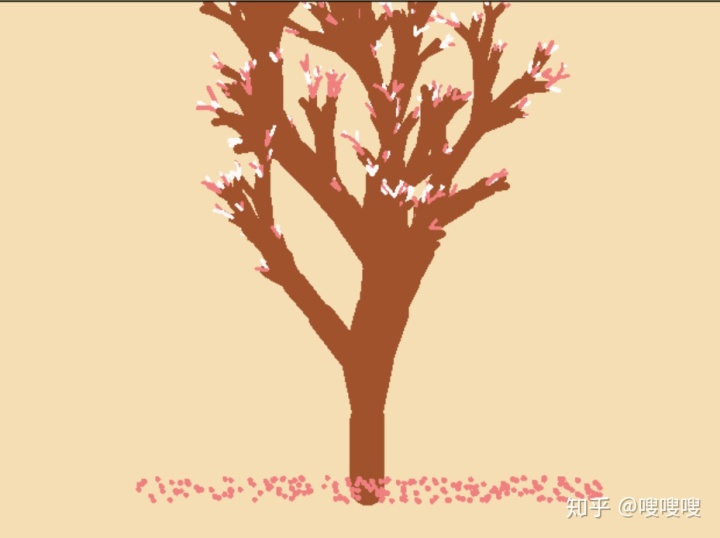
(2)樱花树2的绘制
from turtle import *
from random import *
from math import *

def tree(n, l):
    pd() # 下笔
 # 阴影效果
 t = cos(radians(heading() + 45)) / 8 + 0.25
 pencolor(t, t, t)
    pensize(n / 3)
    forward(l) # 画树枝
 if n > 0:
        b = random() * 15 + 10 # 右分支偏转角度
 c = random() * 15 + 10 # 左分支偏转角度
 d = l * (random() * 0.25 + 0.7) # 下一个分支的长度
 # 右转一定角度,画右分支
 right(b)
        tree(n - 1, d)
 # 左转一定角度,画左分支
 left(b + c)
        tree(n - 1, d)

 # 转回来
 right(c)
 else:
 # 画叶子
 right(90)
        n = cos(radians(heading() - 45)) / 4 + 0.5
 pencolor(n, n*0.8, n*0.8)
        circle(3)
        left(90)

 # 添加0.3倍的飘落叶子
 if(random() > 0.7):
            pu()
 # 飘落
 t = heading()
            an = -40 + random()*40
 setheading(an)
            dis = int(800*random()*0.5 + 400*random()*0.3 + 200*random()*0.2)
            forward(dis)
            setheading(t)


 # 画叶子
 pd()
            right(90)
            n = cos(radians(heading() - 45)) / 4 + 0.5
 pencolor(n*0.5+0.5, 0.4+n*0.4, 0.4+n*0.4)
            circle(2)
            left(90)
            pu()

 #返回
 t = heading()
            setheading(an)
            backward(dis)
            setheading(t)

    pu()
    backward(l)# 退回
bgcolor(0.5, 0.5, 0.5) # 背景色
ht() # 隐藏turtle
speed(0) # 速度,1-10渐进,0最快
tracer(0, 0)
pu() # 抬笔
backward(100)
left(90) # 左转90度
pu() # 抬笔
backward(300) # 后退300
tree(12, 100) # 递归7层
done()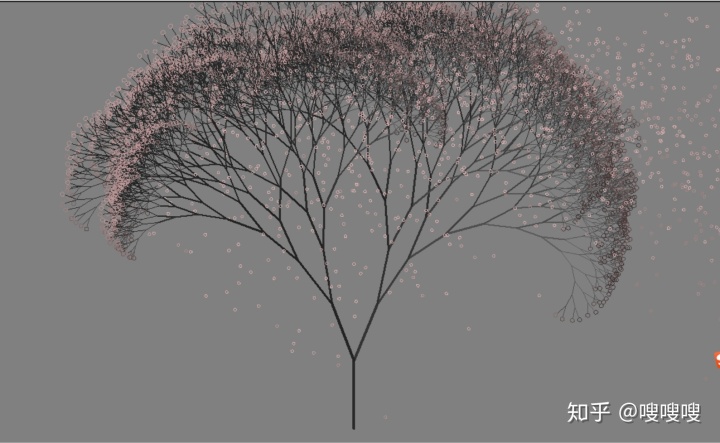
(3)樱花树3的绘制
from turtle import *
from random import *
from math import *

def tree(n,l):
    pd()
    t=cos(radians(heading()+45))/8+0.25
 pencolor(t,t,t)
    pensize(n/4)
    forward(l)
 if n>0:
        b=random()*15+10
 c=random()*15+10
 d=l*(random()*0.35+0.6)
        right(b)
        tree(n-1,d)
        left(b+c)
        tree(n-1,d)
        right(c)
 else:
        right(90)
        n=cos(radians(heading()-45))/4+0.5
 pencolor(n,n,n)
        circle(2)
        left(90)
    pu()
    backward(l)
bgcolor(0.5,0.5,0.5)
ht()
speed(0)
tracer(0,0)
left(90)
pu()
backward(300)
tree(13,100)
done()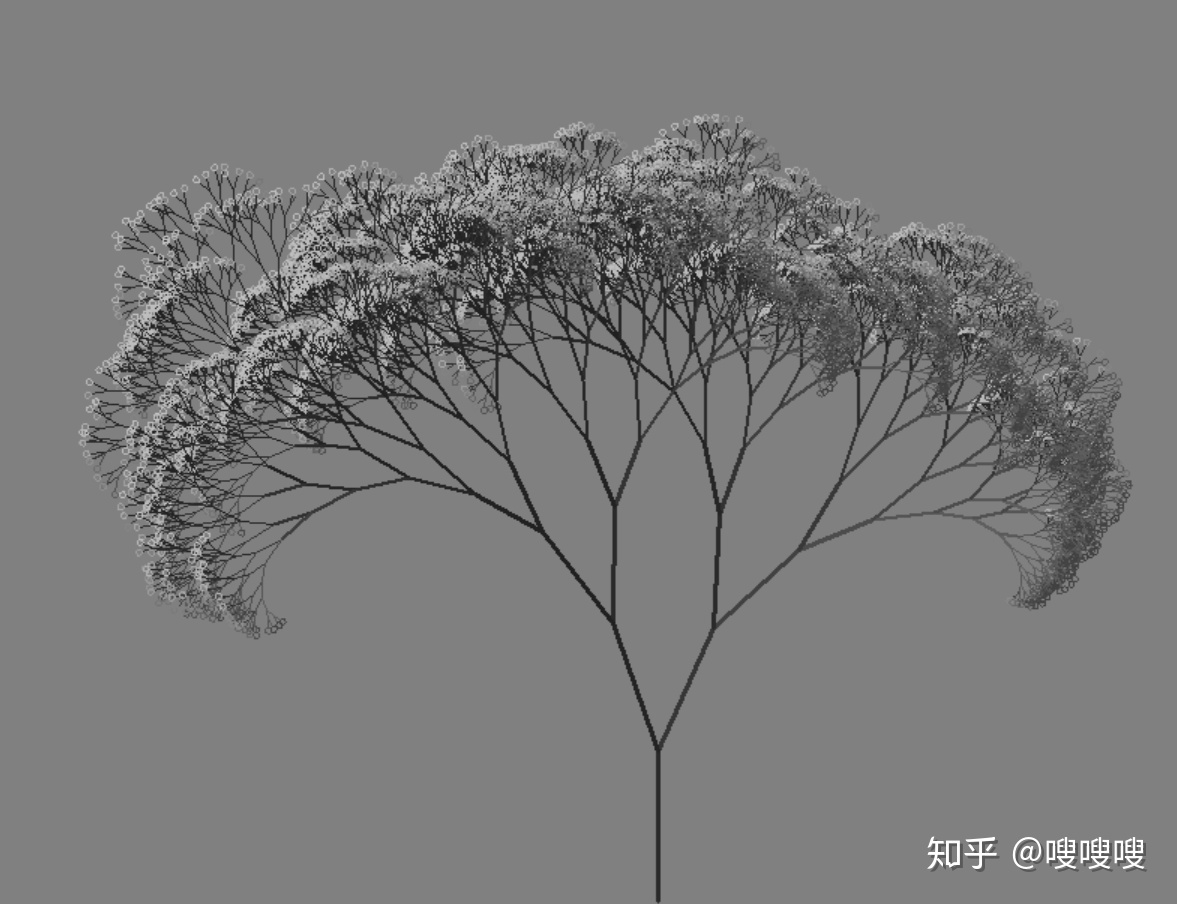
4、爱心的绘制
from turtle import *

color('red', 'pink')  # 画笔色red,背景色pink
begin_fill()
left(135)  # 左转135°
fd(100)  # 前进100像素
right(180)  # 画笔掉头

circle(30, -180)

backward(35)  # 由于此时画笔方向约为绝对方向的135°,需倒退画线
right(90)
forward(35)
circle(-30, 180)
fd(100)
end_fill()
hideturtle()
done()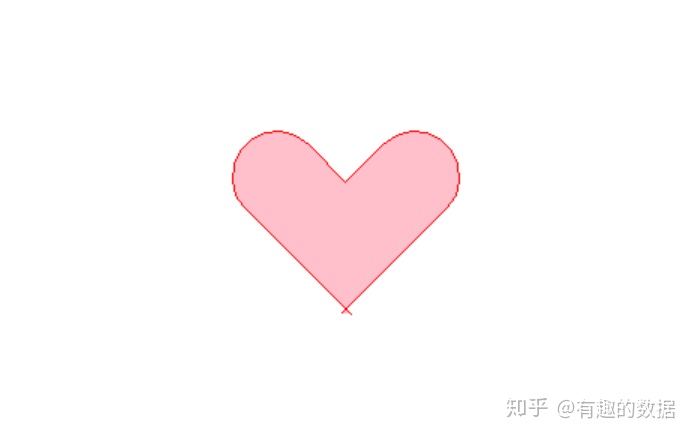
(5)玫瑰花的绘制
from turtle import *
import time

setup(800,600,0,0)
speed(0)
penup()
seth(90)
fd(340)
seth(0)
pendown()

speed(5)
begin_fill()
fillcolor('red')
circle(50,30)

for i in range(10):
    fd(1)
    left(10)

circle(40,40)

for i in range(6):
    fd(1)
    left(3)

circle(80,40)

for i in range(20):
    fd(0.5)
    left(5)

circle(80,45)

for i in range(10):
    fd(2)
    left(1)

circle(80,25)

for i in range(20):
    fd(1)
    left(4)

circle(50,50)

time.sleep(0.1)

circle(120,55)

speed(0)

seth(-90)
fd(70)

right(150)
fd(20)

left(140)
circle(140,90)

left(30)
circle(160,100)

left(130)
fd(25)

penup()
right(150)
circle(40,80)
pendown()

left(115)
fd(60)

penup()
left(180)
fd(60)
pendown()

end_fill()

right(120)
circle(-50,50)
circle(-20,90)

speed(1)
fd(75)

speed(0)
circle(90,110)

penup()
left(162)
fd(185)
left(170)
pendown()
circle(200,10)
circle(100,40)
circle(-52,115)
left(20)
circle(100,20)
circle(300,20)
speed(1)
fd(250)

penup()
speed(0)
left(180)
fd(250)
circle(-300,7)
right(80)
circle(200,5)
pendown()

left(60)
begin_fill()
fillcolor('green')
circle(-80,100)
right(90)
fd(10)
left(20)
circle(-63,127)
end_fill()

penup()
left(50)
fd(20)
left(180)

pendown()
circle(200,25)

penup()
right(150)

fd(180)

right(40)
pendown()
begin_fill()
fillcolor('green')
circle(-100,80)
right(150)
fd(10)
left(60)
circle(-80,98)
end_fill()

penup()
left(60)
fd(13)
left(180)

pendown()
speed(1)
circle(-200,23)


exitonclick()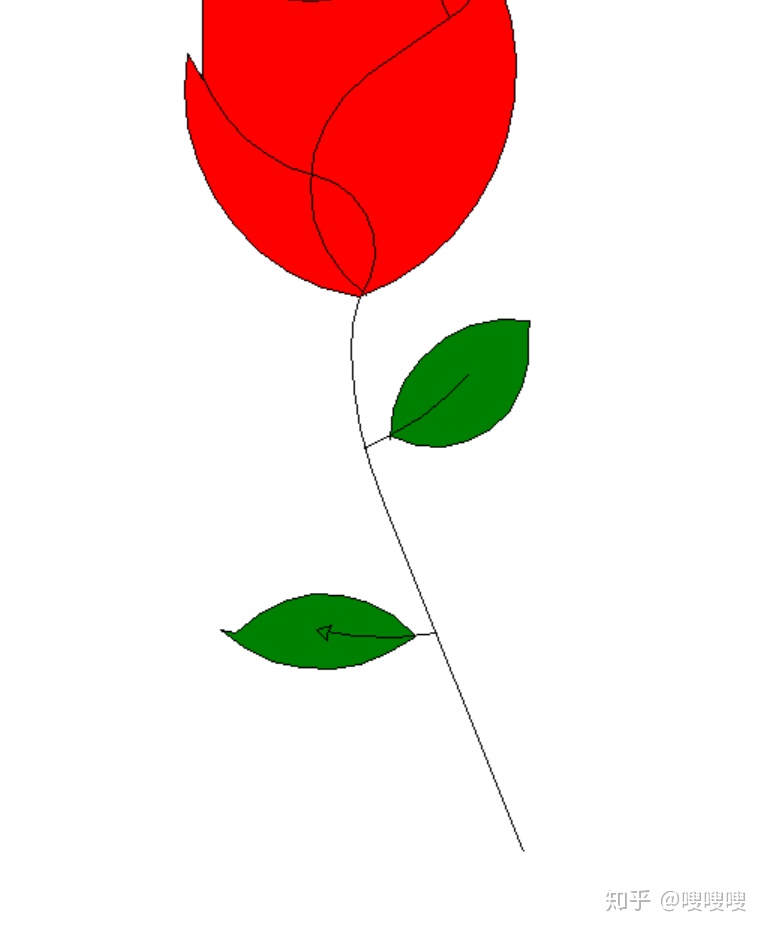
(6)皮卡丘绘制
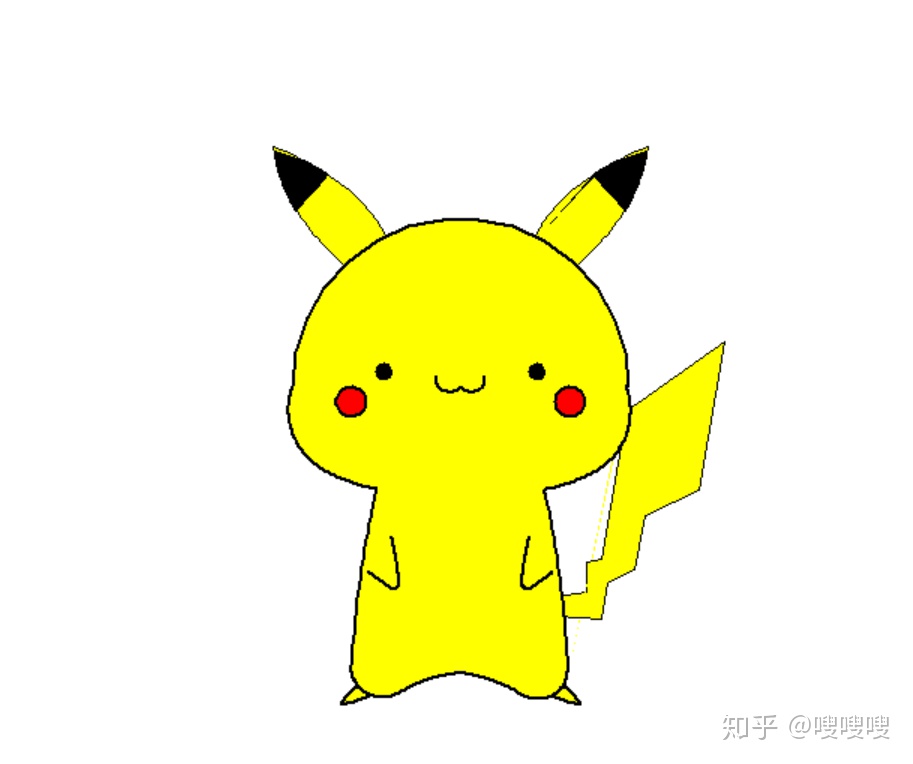
# coding:utf-8
import turtle as t
import time
# 皮卡丘
# 基础设置
t.screensize(800, 600)
t.pensize(2)  # 设置画笔的大小
t.speed(10)  # 设置画笔速度为10
# 画左偏曲线函数
def radian_left(ang, dis, step, n):
    for i in range(n):
        dis += step  # dis增大step
        t.lt(ang)  # 向左转ang度
        t.fd(dis)  # 向前走dis的步长
def radian_right(ang, dis, step, n):
    for i in range(n):
        dis += step
        t.rt(ang)  # 向左转ang度
        t.fd(dis)  # 向前走dis的步长
# 画耳朵
def InitEars():
    t.color("black", "yellow")
    # 左耳朵曲线
    t.pu()  # 提笔
    t.goto(-50, 100)  # 笔头初始位置
    t.pd()  # 下笔
    t.setheading(110)  # 画笔角度
    t.begin_fill()
    radian_left(1.2, 0.4, 0.1, 40)
    t.setheading(270)  # 画笔角度
    radian_left(1.2, 0.4, 0.1, 40)
    t.setheading(44)  # 画笔角度
    t.forward(32)
    t.end_fill()
    # 右耳朵曲线
    t.pu()  # 提笔
    t.goto(50, 100)  # 笔头初始位置
    t.pd()  # 下笔
    t.setheading(70)  # 画笔角度
    t.begin_fill()
    radian_right(1.2, 0.4, 0.1, 40)
    t.setheading(270)  # 画笔角度
    radian_right(1.2, 0.4, 0.1, 40)
    t.setheading(136)  # 画笔角度
    t.forward(32)
    t.end_fill()
    # 耳朵黑
    t.begin_fill()
    t.fillcolor("black")
    t.pu()  # 提笔
    t.goto(88, 141)  # 笔头初始位置
    t.pd()  # 下笔
    t.setheading(35)  # 画笔角度
    radian_right(1.2, 1.6, 0.1, 16)
    t.setheading(270)  # 画笔角度
    radian_right(1.2, 0.4, 0.1, 25)
    t.setheading(132)  # 画笔角度
    t.forward(31)
    t.end_fill()
    t.begin_fill()
    t.fillcolor("black")
    t.pu()  # 提笔
    t.goto(-88, 141)  # 笔头初始位置
    t.pd()  # 下笔
    t.setheading(145)  # 画笔角度
    radian_left(1.2, 1.6, 0.1, 16)
    t.setheading(270)  # 画笔角度
    radian_left(1.2, 0.4, 0.1, 25)
    t.setheading(48)  # 画笔角度
    t.forward(31)
    t.end_fill()
# 画尾巴
def InitTail():
    # 尾巴
    t.begin_fill()
    t.fillcolor("yellow")
    t.pu()  # 提笔
    t.goto(64, -140)  # 笔头初始位置
    t.pd()  # 下笔
    t.setheading(10)  # 画笔角度
    t.forward(20)
    t.setheading(90)  # 画笔角度
    t.forward(20)
    t.setheading(10)  # 画笔角度
    t.forward(10)
    t.setheading(80)  # 画笔角度
    t.forward(100)
    t.setheading(35)  # 画笔角度
    t.forward(80)
    t.setheading(260)  # 画笔角度
    t.forward(100)
    t.setheading(205)  # 画笔角度
    t.forward(40)
    t.setheading(260)  # 画笔角度
    t.forward(37)
    t.setheading(205)  # 画笔角度
    t.forward(20)
    t.setheading(260)  # 画笔角度
    t.forward(25)
    t.setheading(175)  # 画笔角度
    t.forward(30)
    t.setheading(100)  # 画笔角度
    t.forward(13)
    t.end_fill()
# 画脚
def InitFoots():
    # 脚
    t.begin_fill()
    t.fillcolor("yellow")
    t.pensize(2)
    t.pu()  # 提笔
    t.goto(-70, -200)  # 笔头初始位置
    t.pd()  # 下笔
    t.setheading(225)  # 画笔角度
    radian_left(0.5, 1.2, 0, 12)
    radian_left(35, 0.6, 0, 4)
    radian_left(1, 1.2, 0, 18)
    t.setheading(160)  # 画笔角度
    t.forward(13)
    t.end_fill()
    t.begin_fill()
    t.fillcolor("yellow")
    t.pensize(2)
    t.pu()  # 提笔
    t.goto(70, -200)  # 笔头初始位置
    t.pd()  # 下笔
    t.setheading(315)  # 画笔角度
    radian_right(0.5, 1.2, 0, 12)
    radian_right(35, 0.6, 0, 4)
    radian_right(1, 1.2, 0, 18)
    t.setheading(20)  # 画笔角度
    t.forward(13)
    t.end_fill()
# 画身体
def InitBody():
    # 外形轮廓
    t.begin_fill()
    t.pu()  # 提笔
    t.goto(112, 0)  # 笔头初始位置
    t.pd()  # 下笔
    t.setheading(90)  # 画笔角度
    t.circle(112, 180)
    t.setheading(250)  # 画笔角度
    radian_left(1.6, 1.3, 0, 50)
    radian_left(0.8, 1.5, 0, 25)
    t.setheading(255)  # 画笔角度
    radian_left(0.4, 1.6, 0.2, 27)
    radian_left(2.8, 1, 0, 45)
    radian_right(0.9, 1.4, 0, 31)
    t.setheading(355)  # 画笔角度
    radian_right(0.9, 1.4, 0, 31)
    radian_left(2.8, 1, 0, 45)
    radian_left(0.4, 7.2, -0.2, 27)
    t.setheading(10)  # 画笔角度
    radian_left(0.8, 1.5, 0, 25)
    radian_left(1.6, 1.3, 0, 50)
    t.end_fill()
def InitEyes():
    # 左眼睛
    t.begin_fill()
    t.fillcolor("black")
    t.pu()  # 提笔
    t.goto(-46, 10)  # 笔头初始位置
    t.pd()  # 下笔
    t.setheading(90)  # 画笔角度
    t.circle(5, 360)
    t.end_fill()
    # 右眼睛
    t.begin_fill()
    t.fillcolor("black")
    t.pu()  # 提笔
    t.goto(46, 10)  # 笔头初始位置
    t.pd()  # 下笔
    t.setheading(-90)  # 画笔角度
    t.circle(5, 360)
    t.end_fill()
# 画脸
def InitFace():
    # 脸蛋
    t.begin_fill()
    t.fillcolor("red")
    t.pu()  # 提笔
    t.goto(-63, -10)  # 笔头初始位置
    t.pd()  # 下笔
    t.setheading(90)  # 画笔角度
    t.circle(10, 360)
    t.end_fill()
    t.begin_fill()
    t.fillcolor("red")
    t.pu()  # 提笔
    t.goto(63, -10)  # 笔头初始位置
    t.pd()  # 下笔
    t.setheading(-90)  # 画笔角度
    t.circle(10, 360)
    t.end_fill()
    # 嘴巴
    t.pensize(2.2)
    t.pu()  # 提笔
    t.goto(0, 0)  # 笔头初始位置
    t.pd()  # 下笔
    t.setheading(235)  # 画笔角度
    radian_right(5, 0.8, 0, 30)
    t.pu()  # 提笔
    t.goto(0, 0)  # 笔头初始位置
    t.pd()  # 下笔
    t.setheading(305)  # 画笔角度
    radian_left(5, 0.8, 0, 30)
# 画手
def InitHands():
    # 左手
    t.pensize(2)
    t.pu()  # 提笔
    t.goto(-46, -100)  # 笔头初始位置
    t.pd()  # 下笔
    t.setheading(285)  # 画笔角度
    radian_right(0.4, 1.2, 0, 26)
    radian_right(5, 0.35, 0, 26)
    radian_right(0.3, 1.2, 0, 15)
    # 右手
    t.pu()  # 提笔
    t.goto(46, -100)  # 笔头初始位置
    t.pd()  # 下笔
    t.setheading(255)  # 画笔角度
    radian_left(0.4, 1.2, 0, 26)
    radian_left(5, 0.35, 0, 26)
    radian_left(0.3, 1.2, 0, 15)
def CloseEyes():
    # 左眼睛
    t.pu()  # 提笔
    t.goto(-46, 12)  # 笔头初始位置
    t.pd()  # 下笔
    t.setheading(180)  # 画笔角度
    t.forward(10)
    # 右眼睛
    t.pu()  # 提笔
    t.goto(46, 12)  # 笔头初始位置
    t.pd()  # 下笔
    t.setheading(0)  # 画笔角度
    t.forward(10)
# 初始化
def Init():
    InitEars()
    InitTail()
    InitFoots()
    InitBody()
    InitFace()
    InitHands()
    InitEyes()
# 眨眼睛
def Upgarde():
    InitEars()
    InitTail()
    InitFoots()
    InitBody()
    InitFace()
    InitHands()
    CloseEyes()
def Upgarde_Init():
    InitEars()
    InitTail()
    InitFoots()
    InitBody()
    InitFace()
    InitHands()
    InitEyes()
def main():
    Init()
    t.tracer(False)
    # 眨眼睛动画
    for i in range(30):
        if i % 2 == 0:
            t.reset()
            t.hideturtle()
            Upgarde()
            t.update()
            time.sleep(0.3)
        else:
            t.reset()
            t.hideturtle()
            Upgarde_Init()
            t.update()
            time.sleep(1)
main()
# 结束画笔
t.done()
7、星空图(动图)
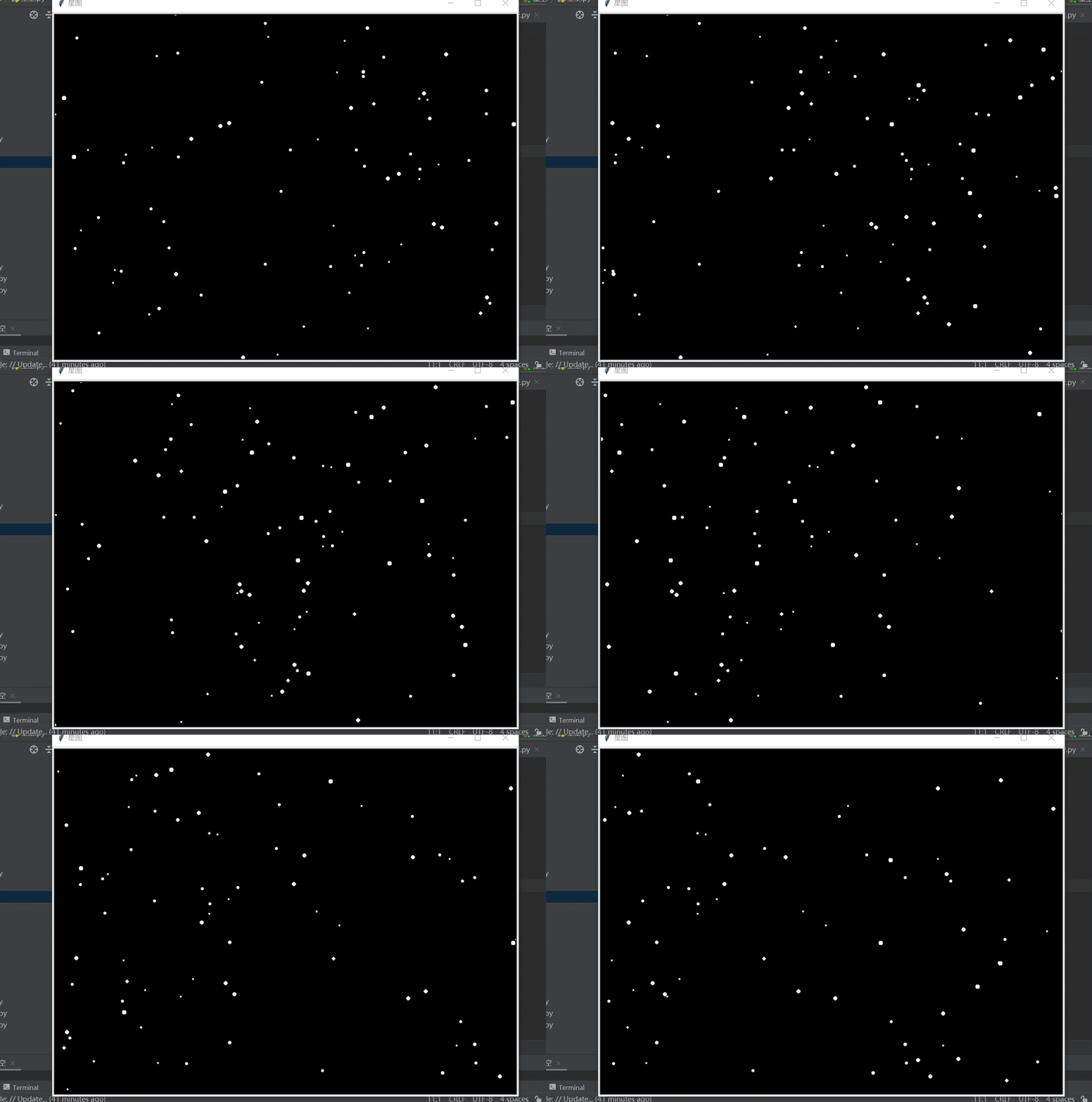
from turtle import *
from random import random,randint

screen = Screen()
width ,height = 800,600
screen.setup(width,height)
screen.title("星图")
screen.bgcolor("black")
screen.mode("logo")
screen.delay(0)


t = Turtle(visible = False,shape='circle')
t.pencolor("white")
t.fillcolor("white")
t.penup()
t.setheading(-90)
t.goto(width/2,randint(-height/2,height/2))

stars = []
for i in range(200):
    star = t.clone()
    s =random() /3
    star.shapesize(s,s)
    star.speed(int(s*10))
    star.setx(width/2 + randint(1,width))
    star.sety( randint(-height/2,height/2))
    star.showturtle()
    stars.append(star)

while True:
    for star in stars:
        star.setx(star.xcor() - 3 * star.speed())
        if star.xcor()<-width/2:
            star.hideturtle()
            star.setx(width/2 + randint(1,width))
            star.sety( randint(-height/2,height/2))
            star.showturtle()
8、单身狗的绘制
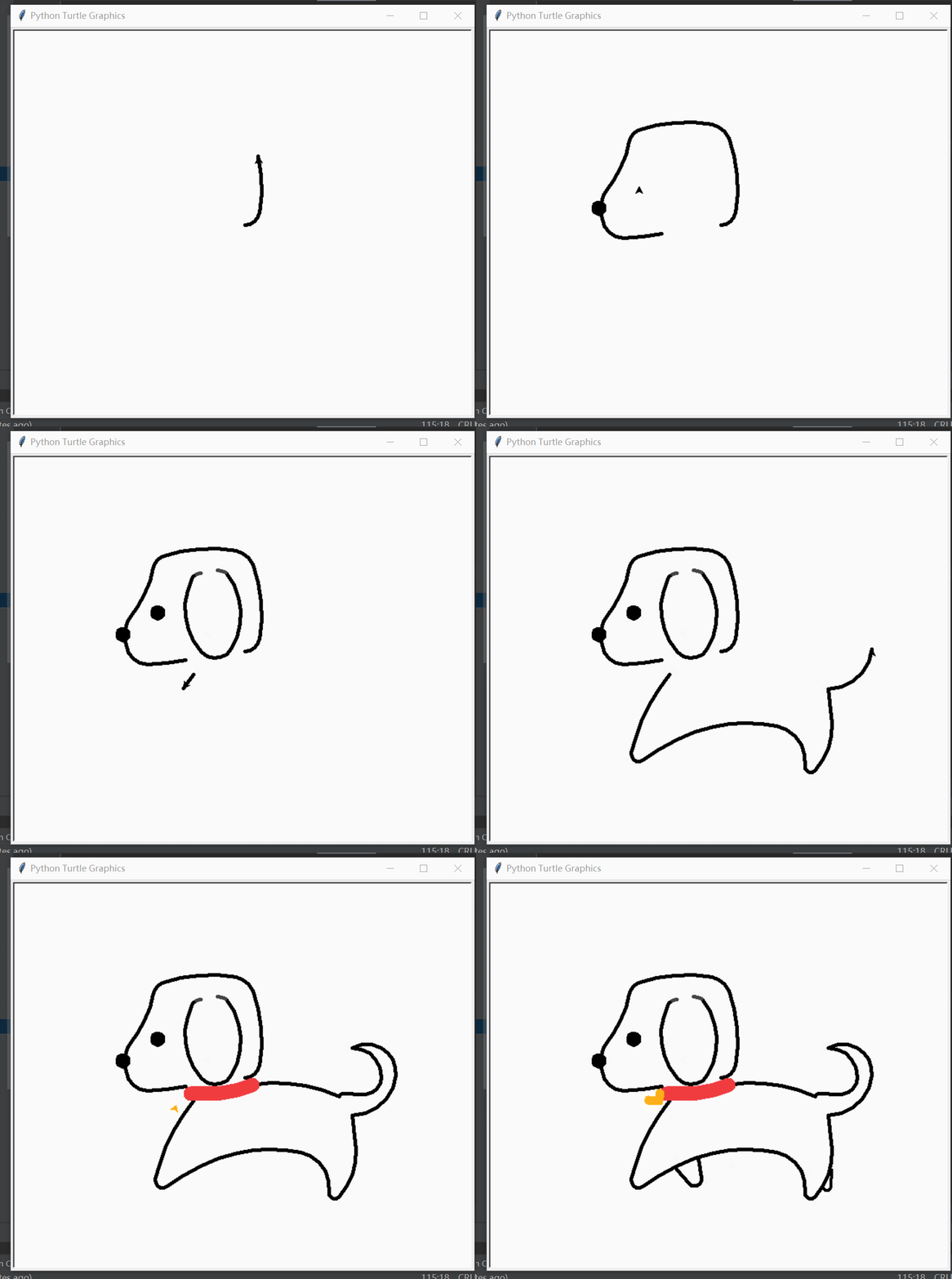
import turtle as t
t.screensize(500, 500)
# 【头部轮廓】
t.pensize(5)
t.home()
t.seth(0)
t.pd()  #pendown
t.color('black')
t.circle(20, 80)  # 0
t.circle(200, 30)  # 1
t.circle(30, 60)  # 2
t.circle(200, 29.5)  # 3
t.color('black')
t.circle(20, 60)  # 4
t.circle(-150, 22)  # 5
t.circle(-50, 10)  # 6
t.circle(50, 70)  # 7
# 确定鼻头大概位置 t.xcor和t.ycor乌龟一开始的位置
x_nose = t.xcor()
y_nose = t.ycor()
t.circle(30, 62)  # 8
t.circle(200, 15)  # 9
# 【鼻子】
t.pu() #penup
t.goto(x_nose, y_nose + 25)
t.seth(90)
t.pd()
t.begin_fill()
t.circle(8)
t.end_fill()
# 【眼睛】
t.pu()
t.goto(x_nose + 48, y_nose + 55)
t.seth(90)
t.pd()
t.begin_fill()
t.circle(8)
t.end_fill()
# 【耳朵】
t.pu()
t.color('#444444')
t.goto(x_nose + 100, y_nose + 110)
t.seth(182)
t.pd()
t.circle(15, 45)
t.color('black')
t.circle(10, 15)
t.circle(90, 70)
t.circle(25, 110)
t.rt(4)
t.circle(90, 70)
t.circle(10, 15)
t.color('#444444')
t.circle(15, 45)
# 【身体】
t.pu()
t.color('black')
t.goto(x_nose + 90, y_nose - 30)
t.seth(-130)
t.pd()
t.circle(250, 28)
t.circle(10, 140)
t.circle(-250, 25)
t.circle(-200, 25)
t.circle(-50, 85)
t.circle(8, 145)
t.circle(90, 45)
t.circle(550, 5)
# 【尾巴】
t.seth(0)
t.circle(60, 85)
t.circle(40, 65)
t.circle(40, 60)
t.lt(150)  #left
t.circle(-40, 90)
t.circle(-25, 100)
t.lt(5)
t.fd(20)
t.circle(10, 60)
# 【背部】
t.rt(80)  #right
t.circle(200, 35)
# 【项圈】
t.pensize(20)
t.color('#F03C3F')
t.lt(10)
t.circle(-200, 25)
# 【爱心铃铛】
t.pu()
t.fd(18)
t.lt(90)
t.fd(18)
t.pensize(6)
t.seth(35)  #setheading
t.color('#FDAF17')
t.begin_fill()
t.lt(135)
t.fd(6)
t.right(180)  # 画笔掉头
t.circle(6, -180)
t.backward(8)
t.right(90)
t.forward(6)
t.circle(-6, 180)
t.fd(15)
t.end_fill()
# 【前小腿】
t.pensize(5)
t.pu()
t.color('black')
t.goto(x_nose + 100, y_nose - 125)
t.pd()
t.seth(-50)
t.fd(25)
t.circle(10, 150)
t.fd(25)
# 【后小腿】
t.pensize(4)
t.pu()
t.goto(x_nose + 314, y_nose - 125)
t.pd()
t.seth(-95)
t.fd(25)
t.circle(-5, 150)
t.fd(2)
t.hideturtle()
t.done()
9、小黄人
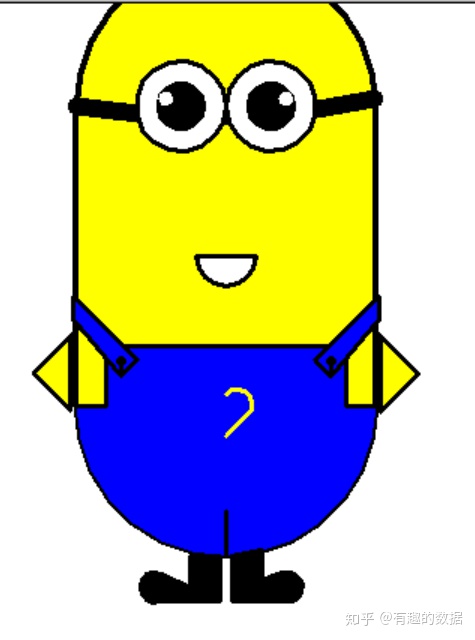
import turtle

t = turtle.Turtle()
wn = turtle.Screen()
turtle.colormode(255)
t.hideturtle()
t.speed(0)
t.penup()
t.pensize(4)
t.goto(100, 0)
t.pendown()
t.left(90)
t.color((0, 0, 0), (255, 255, 0))
# 身体绘制上色
t.begin_fill()
t.forward(200)
t.circle(100, 180)
t.forward(200)
t.circle(100, 180)
t.end_fill()
# 右眼睛绘制上色
t.pensize(12)
t.penup()
t.goto(-100, 200)
t.pendown()
t.right(100)
t.circle(500, 23)

t.pensize(3)
t.penup()
t.goto(0, 200)
t.pendown()
t.seth(270)
t.color("black", "white")
t.begin_fill()
t.circle(30)
t.end_fill()

t.penup()
t.goto(15, 200)
t.pendown()
t.color("black", "black")
t.begin_fill()
t.circle(15)
t.end_fill()

t.penup()
t.goto(35, 205)
t.color("black", "white")
t.begin_fill()
t.circle(5)
t.end_fill()
# 左眼睛绘制上色
t.pensize(3)
t.penup()
t.goto(0, 200)
t.pendown()
t.seth(90)
t.color("black", "white")
t.begin_fill()
t.circle(30)
t.end_fill()

t.penup()
t.goto(-15, 200)
t.pendown()
t.color("black", "black")
t.begin_fill()
t.circle(15)
t.end_fill()

t.penup()
t.goto(-35, 205)
t.color("black", "white")
t.begin_fill()
t.circle(5)
t.end_fill()

# 嘴绘制上色
t.penup()
t.goto(-20, 100)
t.pendown()
t.seth(270)
t.color("black", "white")
t.begin_fill()
t.circle(20, 180)
t.left(90)
t.forward(40)
t.end_fill()

# 裤子绘制上色
t.penup()
t.goto(-100, 0)
t.pendown()
t.seth(0)
t.color("black", "blue")
t.begin_fill()
t.forward(20)
t.left(90)
t.forward(40)
t.right(90)
t.forward(160)
t.right(90)
t.forward(40)
t.left(90)
t.forward(20)
t.seth(270)
t.penup()
t.goto(-100, 0)
t.circle(100, 180)
t.end_fill()

# 左裤子腰带
t.penup()
t.goto(-70, 20)
t.pendown()
t.color("black", "blue")
t.begin_fill()
t.seth(45)
t.forward(15)
t.left(90)
t.forward(60)
t.seth(270)
t.forward(15)
t.left(40)
t.forward(50)
t.end_fill()
t.left(180)
t.goto(-70, 30)
t.dot()

# 右裤腰带
t.penup()
t.goto(70, 20)
t.pendown()
t.color("black", "blue")
t.begin_fill()
t.seth(135)
t.forward(15)
t.right(90)
t.forward(60)
t.seth(270)
t.forward(15)
t.right(40)
t.forward(50)
t.end_fill()

t.left(180)
t.goto(70, 30)

t.dot()

# 脚

t.penup()
t.goto(4, -100)
t.pendown()
t.seth(270)
t.color("black", "black")
t.begin_fill()
t.forward(30)
t.left(90)
t.forward(40)
t.seth(20)
t.circle(10, 180)
t.circle(400, 2)
t.seth(90)
t.forward(20)
t.goto(4, -100)
t.end_fill()

t.penup()
t.goto(-4, -100)
t.pendown()
t.seth(270)
t.color("black", "black")
t.begin_fill()
t.forward(30)
t.right(90)
t.forward(40)
t.seth(20)
t.circle(10, -225)
t.circle(400, -3)
t.seth(90)
t.forward(21)
t.goto(-4, -100)
t.end_fill()

# 左手
t.penup()
t.goto(-100, 50)
t.pendown()
t.seth(225)
t.color("black", "yellow")
t.begin_fill()
t.forward(40)
t.left(90)
t.forward(35)
t.seth(90)
t.forward(50)
t.end_fill()
# 右手
t.penup()
t.goto(100, 50)
t.pendown()
t.seth(315)
t.color("black", "yellow")
t.begin_fill()
t.forward(40)
t.right(90)
t.forward(36)
t.seth(90)
t.forward(50)
t.end_fill()

#
t.penup()
t.goto(0, -100)
t.pendown()
t.forward(30)

#
t.penup()
t.goto(0, -20)
t.pendown()
t.color("yellow")
t.begin_fill()
t.seth(45)
t.forward(20)
t.circle(10, 180)
t.right(90)
t.circle(10, 180)
t.forward(20)
t.end_fill()

#
t.penup()
t.color("black")
t.goto(-100, -20)
t.pendown()
t.circle(30, 90)

t.penup()
t.goto(100, -20)
t.pendown()
t.circle(30, -90)
# 头顶
t.penup()
t.goto(2, 300)
t.pendown()
t.begin_fill()
t.seth(135)
t.circle(100, 40)
t.end_fill()

t.penup()
t.goto(2, 300)
t.pendown()
t.begin_fill()
t.seth(45)
t.circle(100, 40)
t.end_fill()
更多精彩内容
Python 海龟绘图 100 题——第 113 题 - 玩转Python海龟绘图www.pythonturtle.cc

腾讯云面向开发者汇聚海量精品云计算使用和开发经验,营造开放的云计算技术生态圈。
更多推荐
 2
2 0
0- 0


 已为社区贡献1条内容

所有评论(0)