hadoop使用mapreduce统计词频_MapReduce编程实战(1)--实现wordcount词频统计
摘要:
一个WordCount单词统计程序为实例,详细演示了如何编写MapReduce程序代码以及如何打包运行程序。
参考资料:
1.创建maven项目
创建maven项目,项目名hdfs ##这里我用的文章“java操作hdfs”的项目hdfs
pom.xml文件: //与文章“java操作hdfs”的项目一样。
2.编写WordCount类
在该项目包com.scitc.hdfs中新建WordCount.java类,代码如下:
package com.scitc.hdfs;
import java.io.IOException;
import org.apache.hadoop.conf.Configuration;
import org.apache.hadoop.fs.Path;
import org.apache.hadoop.io.IntWritable;
import org.apache.hadoop.io.LongWritable;
import org.apache.hadoop.io.Text;
import org.apache.hadoop.mapreduce.Job;
import org.apache.hadoop.mapreduce.Mapper;
import org.apache.hadoop.mapreduce.Reducer;
import org.apache.hadoop.mapreduce.lib.input.FileInputFormat;
import org.apache.hadoop.mapreduce.lib.output.FileOutputFormat;
public class WordCount {
/**
* @author he
*参数LongWritable:读取行的偏移量,知道下一行从哪儿开始读取
*Text:正在读取的行的内容
*后两个参数构成输出类型 例如*/
static class Maps extends Mapper{
private final static IntWritable one = new IntWritable(1); //等价于java中 int one = 1;
@Override
protected void map(LongWritable key, Text value, Context context) throws IOException, InterruptedException {
// 将读入的每行数据按空格切分
String[] dataArr = value.toString().split(" ");
if(dataArr.length>0){
// 将每个单词作为map的key的value设置为1
for (String word : dataArr) {
context.write(new Text(word), one); //context是mapreduce的上下文
}
}
}
}
/**
* @author he *前两个参数构成,正式map的输出,例如,,...
*/
static class Reduces extends Reducer {
/**
* 参数key:例如词频统计,单词hadoop
* 参数values:是一个迭代器,例如>,*/
@Override
public void reduce(Text key, Iterablevalues, Context context)
throws IOException, InterruptedException {
int sum = 0;
for (IntWritable value : values) {
sum += value.get(); //获取IntWritable的值,这里实际都是1
}
IntWritable result = new IntWritable();
result.set(sum);
context.write(key, result);
}
}
public static void main(String[] args) throws ClassNotFoundException, IOException, InterruptedException {
// 1:实例化Configuration类、新建一个任务
Configuration conf = new Configuration();
Job job = Job.getInstance(conf, "word-count"); //名字可以自己取
//2:设置jar加载的路径,这个测试正确
job.setJarByClass(WordCount.class);
//3:设置Map类和reduce类
job.setMapperClass(Maps.class);
job.setReducerClass(Reduces.class);
//4:设置Map输出
job.setMapOutputKeyClass(Text.class);
job.setMapOutputValueClass(IntWritable.class);
//5:设置最终输出kv类型
job.setOutputKeyClass(Text.class);
job.setOutputValueClass(IntWritable.class);
//6:设置输入和输出路径
//方法1:直接提供输入、输出默认参数
//输入文件地址,可以是本地,或者hdfs地址;
//输出文件地址可以本地文件夹或hdfs文件夹,wordcount不能提前在hdfs中创建
String inputPath = "hdfs://master:9000/he/input/wordcount.txt";
String outPath = "hdfs://master:9000/he/output/wordcount/";
// 如果有传入文件地址,接收参数为输入文件地址
if(args != null && args.length > 0){
inputPath = args[0];
}
FileInputFormat.addInputPath(job, new Path(inputPath));
FileOutputFormat.setOutputPath(job, new Path(outPath));
// 方法2:执行jar时,外部提供输入、输出参数
//FileInputFormat.addInputPath(job, new Path(args[0]));
//FileOutputFormat.setOutputPath(job, new Path(args[1]));
//7:提交任务
boolean result = job.waitForCompletion(true);
System.exit(result?0:1);
}
}
3:HDFS准备工作
1.启动hadoop集群
2.在hdfs中新建/he/input/ 目录,从本地导入wordcount.txt文件到该目录下
新建/he/output/ 目录
##说明:代码中输出路径/he/output/wordcount/中wordcount文件夹不能提前创建,代码执行的时候自己会创建。
4:maven项目打包和运行
1.打包
项目名hdfs上右键>>Run As>>Maven install
2.上传
项目根目录下的target文件夹中找到hdfs-0.0.1-SNAPSHOT.jar,改文件名为hdfs.jar,上传到master的/opt/data/目录中
3.用hadoop jar 命令运行hd.jar包
cd /opt/data
hadoop jar hdfs.jar com.scitc.hdfs.WordCount ##命令语法:hadoop jar jar包 类的全名称
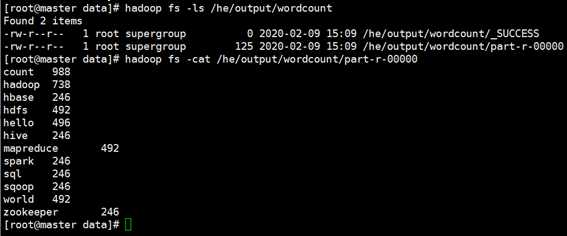
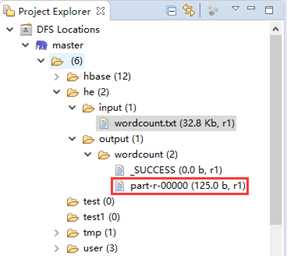
5:查看结果
方法1:通过hdfs shell 查看结果
方法2:eclipse中查看
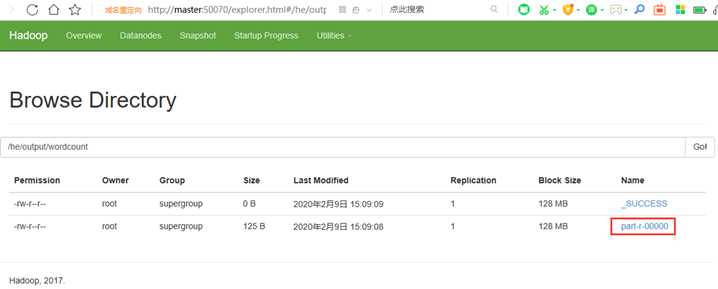
原文:https://www.cnblogs.com/hemomo/p/12288516.html

腾讯云面向开发者汇聚海量精品云计算使用和开发经验,营造开放的云计算技术生态圈。
更多推荐
 0
0 0
0- 0


 已为社区贡献2条内容

所有评论(0)