owncloud mysql_Nginx+ownCloud+PHP+MySQL搭建私有云
ownCloud是一个免费开源的软件,用于为分享文件,日历,联系人,书签和个人音频/视频,它拥有全客户端,方便使用,同时也非常容易安装和管理。

配置mysql
这里就不详细讲mysql的安装了,直接配置mysql。# 创建数据库
CREATE DATABASE IF NOT EXISTS owncloud DEFAULT CHARACTER SET UTF8 COLLATE utf8_general_ci;
# 创建用户
GRANT ALL PRIVILEGES ON owncloud.* to 'owncloud'@'127.0.0.1' identified by 'owncloud';
# 刷新数据库
FLUSH PRIVILEGES;
获取ownCloud# 获取最新的版本
wget https://download.owncloud.org/community/owncloud-10.0.2.zip
# 解压缩
unzip -oq owncloud-10.0.2.zip
# 放到合适的位置
mv owncloud/ /data/domains/cloud
# 如果使用的centos,关闭selinux
setenforce 0
配置nginx
由于我们是初次配置,可以不采用https
配置文件如下,注意修改相关路径upstream php-handler {
server 127.0.0.1:9000;
#server unix:/var/run/php5-fpm.sock;
}
server {
listen 80;
server_name ***;# 这里自定义好
# Add headers to serve security related headers
# Before enabling Strict-Transport-Security headers please read into this topic first.
#add_header Strict-Transport-Security "max-age=15552000; includeSubDomains";
add_header X-Content-Type-Options nosniff;
add_header X-Frame-Options "SAMEORIGIN";
add_header X-XSS-Protection "1; mode=block";
add_header X-Robots-Tag none;
add_header X-Download-Options noopen;
add_header X-Permitted-Cross-Domain-Policies none;
# Path to the root of your installation
root /data/domains/cloud;##这里需要修改
location = /robots.txt {
allow all;
log_not_found off;
access_log off;
}
# The following 2 rules are only needed for the user_webfinger app.
# Uncomment it if you're planning to use this app.
#rewrite ^/.well-known/host-meta /public.php?service=host-meta last;
#rewrite ^/.well-known/host-meta.json /public.php?service=host-meta-json last;
location = /.well-known/carddav {
return 301 $scheme://$host/remote.php/dav;
}
location = /.well-known/caldav {
return 301 $scheme://$host/remote.php/dav;
}
location ^~ /.well-known/acme-challenge { }
# set max upload size
client_max_body_size 512M;
fastcgi_buffers 64 4K;
# Disable gzip to avoid the removal of the ETag header
gzip off;
# Uncomment if your server is build with the ngx_pagespeed module
# This module is currently not supported.
#pagespeed off;
error_page 403 /core/templates/403.php;
error_page 404 /core/templates/404.php;
location / {
rewrite ^ /index.php$uri;
}
location ~ ^/(?:build|tests|config|lib|3rdparty|templates|data)/ {
return 404;
}
location ~ ^/(?:\.|autotest|occ|issue|indie|db_|console) {
return 404;
}
location ~ ^/(?:index|remote|public|cron|core/ajax/update|status|ocs/v[12]|updater/.+|ocs-provider/.+|core/templates/40[34])\.php(?:$|/) {
fastcgi_split_path_info ^(.+\.php)(/.*)$;
include fastcgi_params;
fastcgi_param SCRIPT_FILENAME $document_root$fastcgi_script_name;
fastcgi_param PATH_INFO $fastcgi_path_info;
#fastcgi_param HTTPS on;
fastcgi_param modHeadersAvailable true; #Avoid sending the security headers twice
fastcgi_param front_controller_active true;
fastcgi_pass php-handler;
fastcgi_intercept_errors on;
fastcgi_request_buffering off; #Available since NGINX 1.7.11
}
location ~ ^/(?:updater|ocs-provider)(?:$|/) {
try_files $uri $uri/ =404;
index index.php;
}
# Adding the cache control header for js and css files
# Make sure it is BELOW the PHP block
location ~* \.(?:css|js)$ {
try_files $uri /index.php$uri$is_args$args;
add_header Cache-Control "max-age=15778463";
# Add headers to serve security related headers (It is intended to have those duplicated to the ones above)
# Before enabling Strict-Transport-Security headers please read into this topic first.
#add_header Strict-Transport-Security "max-age=15552000; includeSubDomains";
add_header X-Content-Type-Options nosniff;
add_header X-Frame-Options "SAMEORIGIN";
add_header X-XSS-Protection "1; mode=block";
add_header X-Robots-Tag none;
add_header X-Download-Options noopen;
add_header X-Permitted-Cross-Domain-Policies none;
# Optional: Don't log access to assets
access_log off;
}
location ~* \.(?:svg|gif|png|html|ttf|woff|ico|jpg|jpeg)$ {
try_files $uri /index.php$uri$is_args$args;
# Optional: Don't log access to other assets
access_log off;
}
}
检查一下你的nginx和php-fpm是以什么用户身份跑的,一般debian系列都是www-data,centos系列是nginx。
然后修改目录权限chown -R www-data:www-data cloud/
重启nginxservice nginx restart
OR
systemctl restart nginx
安装ownCloud
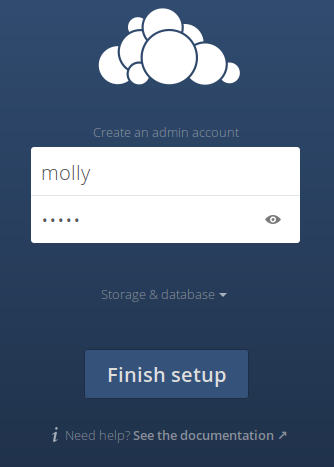
登陆之前nginx上配置的域名,自己的云的主页将出现。你将被要求创建一个新的管理员账户。输入管理员账户信息。
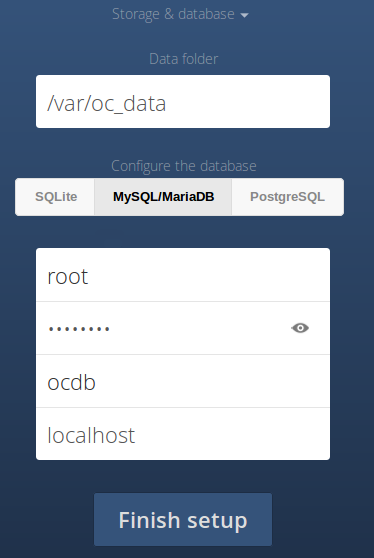
然后点击 Advanced 下拉按钮,选择mysql并输入mysql数据库名,数据库用户和密码。最后点击 Finish setup 来完成安装。
就是这样。我们的云服务已经准备好了。现在,你可以从你任何网络的客户端来上传/下载你的图片,文件,音频,视频以及访问它们。
常见问题没有权限读写配置文件,关闭selinux # setenforce 0
获取不到环境变量,修改/etc/php-fpm.d/www.conf# 开启这里
env[PATH] = /usr/local/bin:/usr/bin:/bin
# 重启php-fpm
service restart php-fpm

腾讯云面向开发者汇聚海量精品云计算使用和开发经验,营造开放的云计算技术生态圈。
更多推荐
 0
0 0
0- 0


 已为社区贡献2条内容

所有评论(0)