nginx防mysql注入_nginx的安全之通过nginx+lua的waf防火墙防sql注入和cc攻击
2.测试页面准备:登陆页面html[root@node1 code]#cat /opt/app/code/login.htmljeson sql注入演示用户名:密码验证页面validate.php[root@node1 code]#cat /opt/app/code/validate.php
2.测试页面准备:
登陆页面html
[root@node1 code]#cat /opt/app/code/login.html
jeson sql注入演示| 用户名: | |
| 密码 | |
验证页面validate.php
[root@node1 code]#cat /opt/app/code/validate.php<?php
$conn= mysql_connect("localhost", "root", '');
mysql_select_db("info", $conn) or die('the database you selected is not exists');
$name= $_POST['username'];
$pwd = $_POST['password'];
$sql= "select * from users where username = '$name' and password=md5('$pwd')";echo $sql."
";
$query=mysql_query($sql);
$arr=mysql_fetch_array($query);if($arr) {echo "login success!\n";echo $arr[1];echo $arr[3]."
";
}else{echo "login failed!";
}?>
3.测试登陆和注入:
普通的登陆
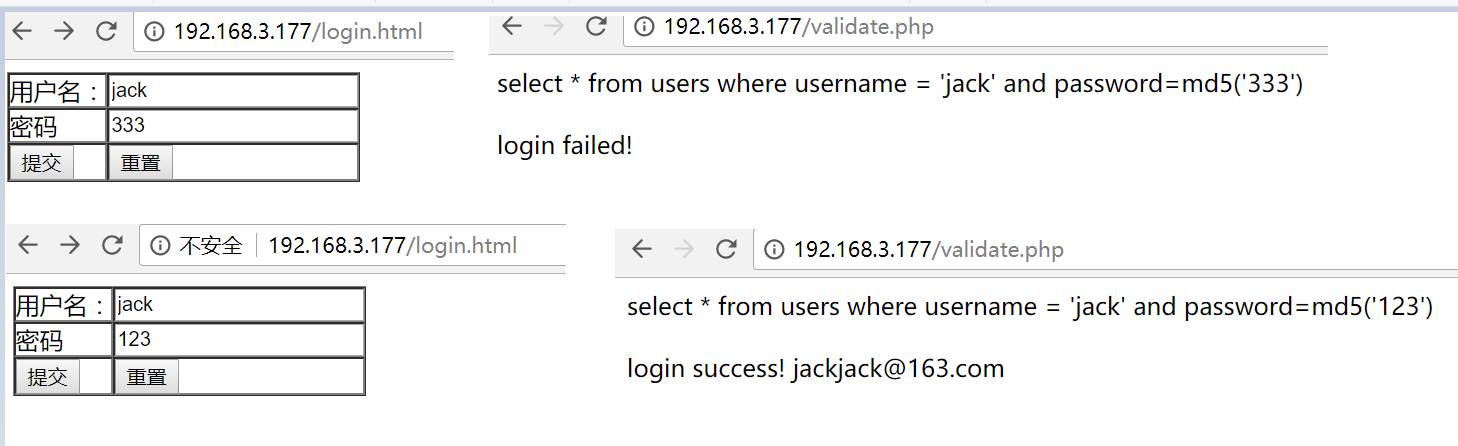
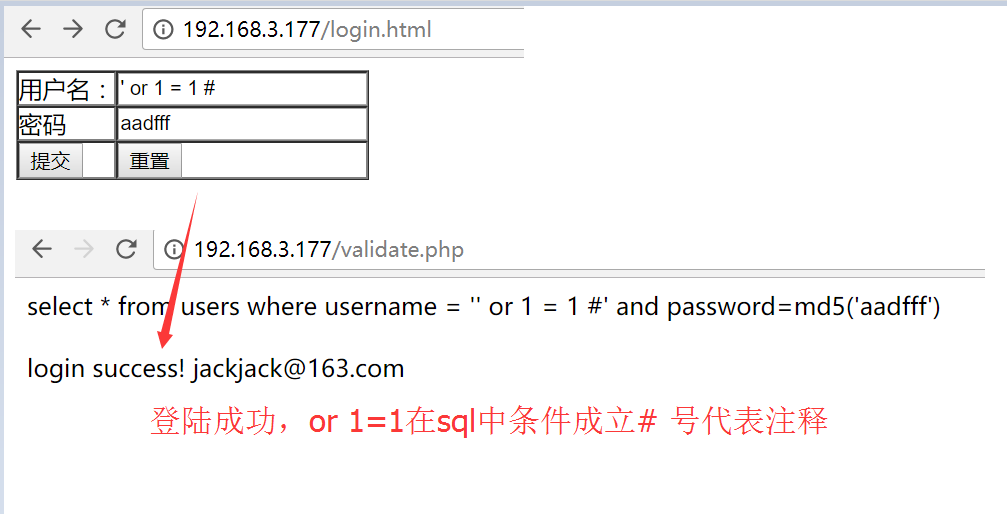
登陆成功,or1=1在sql中条件成立# 号代表注释
 4.nginx+lua防火墙
下载ngx_lua_waf插件并且移动到指定目录:
[root@node1 code]#mkdir /etc/nginx/wafyum install -y git
git clone https://github.com/loveshell/ngx_lua_waf.git
[root@node1 data]# mv ngx_lua_waf /etc/nginx/waf/配置nginx.conf
[root@node1 waf]#cat /etc/nginx/nginx.conf
user nginx;
worker_processes4;
worker_cpu_affinity auto;
error_log/var/log/nginx/error.log warn;
pid/var/run/nginx.pid;
worker_rlimit_nofile35535;
events {
worker_connections10240;
}
http {
include/etc/nginx/mime.types;
default_type application/octet-stream;
log_format main'$remote_addr - $remote_user [$time_local] "$request"'
'$status $body_bytes_sent "$http_referer"'
'"$http_user_agent" "$http_x_forwarded_for" "$request_uri"';
lua_package_path"/etc/nginx/waf/ngx_lua_waf/?.lua";
lua_shared_dict limit 10m;
init_by_lua_file/etc/nginx/waf/ngx_lua_waf/init.lua;
access_by_lua_file/etc/nginx/waf/ngx_lua_waf/waf.lua;
access_log off;
sendfile on;
#tcp_nopush on;
#tcp_nodeny on;
keepalive_timeout65;gzipon;
gzip_disable"MSIE [1-6]\.";
gzip_http_version1.1;
include/etc/nginx/conf.d/*.conf;
}
修改waf的路径
[root@node1 waf]# vim /etc/nginx/waf/ngx_lua_waf/config.lua
RulePath = "/etc/nginx/waf/ngx_lua_waf/wafconf/"
重启nginx
[root@node1 waf]# /usr/sbin/nginx -s reload
测试登陆功能是否正常,此时可以看到,我们输入' or 1 = 1 #还是能够正常登陆
原因是没有指定的规则匹配,所以waf不拦截
编辑post规则
[root@node1 waf]# vim /etc/nginx/waf/ngx_lua_waf/wafconf/post
\sor\s+ # 添加对or的拦截规则,如果是空格+or+空格或者其他字符则拦截
select.+(from|limit)
(?:(union(.*?)select))
having|rongjitest
sleep\((\s*)(\d*)(\s*)\)
benchmark\((.*)\,(.*)\)
base64_decode\(
(?:from\W+information_schema\W)
(?:(?:current_)user|database|schema|connection_id)\s*\(
(?:etc\/\W*passwd)
into(\s+)+(?:dump|out)file\s*
group\s+by.+\(
xwork.MethodAccessor
(?:define|eval|file_get_contents|include|require|require_once|shell_exec|phpinfo|system|passthru|preg_\w+|execute|echo|print|print_r|var_dump|(fp)open|alert|showmodaldialog)\(
xwork\.MethodAccessor
(gopher|doc|php|glob|file|phar|zlib|ftp|ldap|dict|ogg|data)\:\/
java\.lang
\$_(GET|post|cookie|files|session|env|phplib|GLOBALS|SERVER)\[
\
(onmouseover|onerror|onload)\=
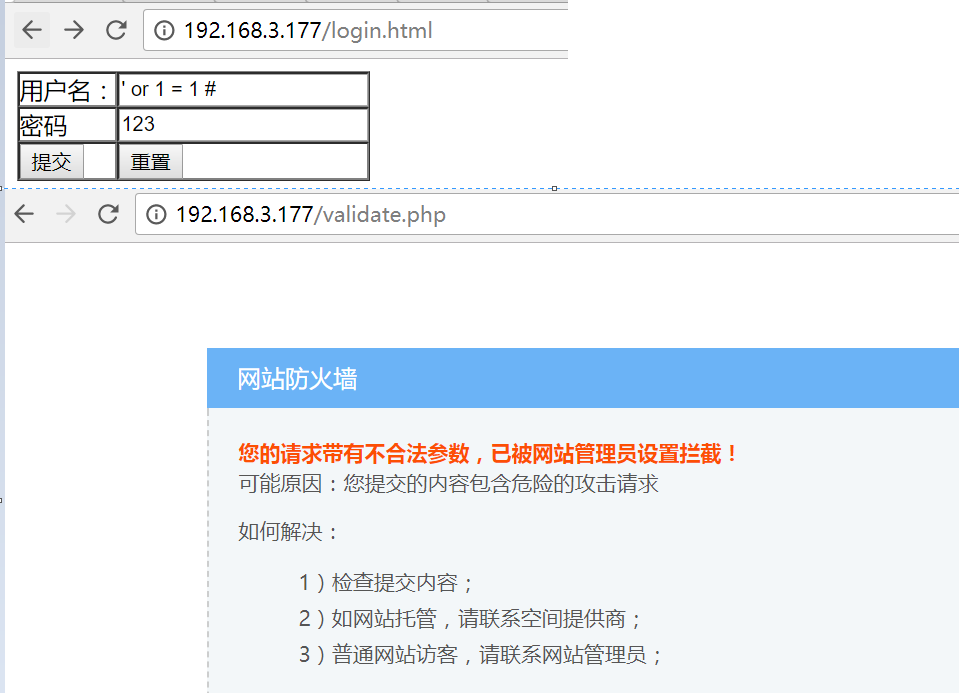
重启nginx,再次尝试' or 1 = 1 # 用户名登陆可以看到已经拦截下来了
5.测试ccdeny的功能
cc攻击是指对某个接口进行超载访问从而达到拒绝服务攻击的效果
①不添加waf规则的时候,对网站进行ab压力测试,再次访问是没有问题的
[root@node1 waf]# ab -n 2000 -c 2http://192.168.3.177/login.htmlThis is ApacheBench, Version 2.3
Copyright 1996 Adam Twiss, Zeus Technology Ltd,http://www.zeustech.net/Licensed to The Apache Software Foundation,http://www.apache.org/Benchmarking 192.168.3.177 (be patient)
Completed 200 requests
Completed 400 requests
Completed 600 requests
Completed 800 requests
Completed 1000 requests
Completed 1200 requests
Completed 1400 requests
Completed 1600 requests
Completed 1800 requests
Completed 2000 requests
Finished 2000 requests
Server Software: nginx/1.12.1
Server Hostname: 192.168.3.177
Server Port: 80
Document Path: /login.html
Document Length: 2078 bytes
Concurrency Level: 2
Time taken for tests: 0.227 seconds
Complete requests: 2000
Failed requests: 0
Write errors: 0
Non-2xx responses: 2000
Total transferred: 4458000 bytes
HTML transferred: 4156000 bytes
Requests per second: 8793.91 [#/sec] (mean)
Time per request: 0.227 [ms] (mean)
Time per request: 0.114 [ms] (mean, across all concurrent requests)
Transfer rate: 19142.22 [Kbytes/sec] received
Connection Times (ms)
min mean[+/-sd] median max
Connect: 0 0 0.0 0 0
Processing: 0 0 0.1 0 2
Waiting: 0 0 0.1 0 2
Total: 0 0 0.1 0 2
Percentage of the requests served within a certain time (ms)
50% 0
66% 0
75% 0
80% 0
90% 0
95% 0
98% 1
99% 1
100% 2 (longest request)
[root@node1 waf]# curl -Ihttp://192.168.3.177/login.htmlHTTP/1.1 200 OK
Server: nginx/1.12.1
Date: Thu, 18 Jan 2018 12:06:00 GMT
Content-Type: text/html
Content-Length: 545
Last-Modified: Thu, 18 Jan 2018 11:22:02 GMT
Connection: keep-alive
ETag: "5a60835a-221"
Accept-Ranges: bytes
②添加waf对ccdeny的规则
# 编辑config.lua把
[root@node1 waf]# vim /etc/nginx/waf/ngx_lua_waf/config.lua
RulePath = "/etc/nginx/waf/ngx_lua_waf/wafconf/"
attacklog = "on"
logdir = "/usr/local/nginx/logs/hack/"
UrlDeny="on"
Redirect="on"
CookieMatch="on"
postMatch="on"
whiteModule="on"
black_fileExt={"php","jsp"}
ipWhitelist={"127.0.0.1"}
ipBlocklist={"1.0.0.1"}
CCDeny="on" # 开启ccdeny的功能
CCrate="100/60" # 限制每分钟100次访问
重新加载nginx,正常访问接口没有问题
[root@node1 waf]# /usr/sbin/nginx -s reload
[root@node1 waf]# curl -Ihttp://192.168.3.177/login.htmlHTTP/1.1 200 OK
Server: nginx/1.12.1
Date: Thu, 18 Jan 2018 12:08:56 GMT
Content-Type: text/html
Content-Length: 545
Last-Modified: Thu, 18 Jan 2018 11:22:02 GMT
Connection: keep-alive
ETag: "5a60835a-221"
Accept-Ranges: bytes
通过ab工具对网站进行压力测试,再次访问就变成503了
[root@node1 waf]# ab -n 2000 -c 2http://192.168.3.177/login.htmlThis is ApacheBench, Version 2.3
Copyright 1996 Adam Twiss, Zeus Technology Ltd,http://www.zeustech.net/Licensed to The Apache Software Foundation,http://www.apache.org/Benchmarking 192.168.3.177 (be patient)
Completed 200 requests
Completed 400 requests
Completed 600 requests
Completed 800 requests
Completed 1000 requests
Completed 1200 requests
Completed 1400 requests
Completed 1600 requests
Completed 1800 requests
Completed 2000 requests
Finished 2000 requests
Server Software: nginx/1.12.1
Server Hostname: 192.168.3.177
Server Port: 80
Document Path: /login.html
Document Length: 2078 bytes
Concurrency Level: 2
Time taken for tests: 0.254 seconds
Complete requests: 2000
Failed requests: 1799 # 可以看到大部分的请求都被拦截了
(Connect: 0, Receive: 0, Length: 1799, Exceptions: 0)
Write errors: 0
Non-2xx responses: 2000
Total transferred: 1140644 bytes
HTML transferred: 800865 bytes
Requests per second: 7866.49 [#/sec] (mean)
Time per request: 0.254 [ms] (mean)
Time per request: 0.127 [ms] (mean, across all concurrent requests)
Transfer rate: 4381.28 [Kbytes/sec] received
Connection Times (ms)
min mean[+/-sd] median max
Connect: 0 0 0.0 0 0
Processing: 0 0 0.2 0 3
Waiting: 0 0 0.1 0 3
Total: 0 0 0.2 0 3
Percentage of the requests served within a certain time (ms)
50% 0
66% 0
75% 0
80% 0
90% 0
95% 0
98% 1
99% 1
100% 3 (longest request)
[root@node1 waf]# curl -Ihttp://192.168.3.177/login.htmlHTTP/1.1 503 Service Temporarily Unavailable
Server: nginx/1.12.1
Date: Thu, 18 Jan 2018 12:09:27 GMT
Content-Type: text/html
Content-Length: 213
Connection: keep-alive

腾讯云面向开发者汇聚海量精品云计算使用和开发经验,营造开放的云计算技术生态圈。
更多推荐
 0
0 0
0- 0


 已为社区贡献1条内容

所有评论(0)