使用react实现select_react select案例
效果图:select 里的回填的值 和外面盒子的 数据保持同步更新。运用到的知识点:1、表单回填,双向绑定。2、redux3、@修饰器4、表单的onValuesChange5、select 的onDeselect (就是select里的删除回调)页面代码:import React, { Component } from 'react'import { connect } from 'react..
效果图:
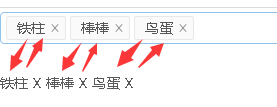
select 里的回填的值 和外面盒子的 数据保持同步更新。
运用到的知识点:
1、表单回填,双向绑定。
2、redux
3、@修饰器
4、表单的 onValuesChange
5、select 的 onDeselect (就是select里的删除回调)
页面代码:
import React, { Component } from 'react'
import { connect } from 'react-redux'
import { Form, Select } from 'antd';
import { addTagList, onDeselect, onDeleteTagList } from '@/actions/select'
const { Option } = Select;
export default @connect( state => {
return{
optionList: state.select.optionList, //redux里存入数据(假装是接收后台的数据)
tagList: state.select.tagList
}
},{
addTagList, //option进行添加
onDeselect, //select 回填里的删除
onDeleteTagList //外面盒子 标签里 X 删除
})
@Form.create({
mapPropsToFields( {tagList} ) {
return {
select: Form.createFormField({
value: tagList.map( v => v.id), //双向绑定,把taglist的数据给到select里
})
}
},
onValuesChange(props, { select }){
const { optionList } = props
if ( !select.length ) return //如果 select.length == true 就不进行添加的步骤了。
const obj = optionList.find( v => v.id == select.slice(-1)[0] )
props.addTagList(obj)
},
})
class Selects extends Component {
onDeleteTagList = option => {
this.props.onDeleteTagList(option)
}
// select回填里删除数据
onDeselect = option => {
this.props.onDeselect(option)
}
render() {
const { getFieldDecorator } = this.props.form
const { optionList = [], tagList = [] } = this.props
return (
{getFieldDecorator('select', {
rules: [{ required: true, message: 'Please select your select!' }],
})(
{
optionList.map( item => {item.name})
}
,
)}
{
tagList.map( item => {
return(
this.onDeleteTagList(item)}>
{item.name}
X
)
})
}
)
}
}
action 代码:
const addTagList = option => {
return {
type: "SELECT_ADD_TAGLIST",
payload: option
}
}
const onDeselect = option => {
return {
type: "SELECT_ON_DESELECT",
payload: option
}
}
const onDeleteTagList = option => {
return {
type: "SELECT_ON_DELETE_TAGLIST",
payload: option
}
}
export {
addTagList,
onDeselect,
onDeleteTagList,
}
reducer 代码
const defaultState = {
// 假装optionList 是后台给的数据
optionList: [
{id: 'tiezhu', name: '铁柱'},
{id: 'bangbang', name: '棒棒'},
{id: 'niaodan', name: '鸟蛋'},
],
// 用来存放 下面盒子的数据
tagList: []
}
export default function home (state = defaultState, action) {
//这里解构时候一定要注意,不能用const
let { tagList } = state
switch (action.type) {
// 添加
case 'SELECT_ADD_TAGLIST':
let index = tagList.findIndex( v => v.id == action.payload.id )
if( index == -1) tagList.push(action.payload)
return { ...state, tagList }
// select 回填数据删除
case 'SELECT_ON_DESELECT':
tagList = tagList.filter(v => v.id !== action.payload)
return { ...state, tagList}
// tagList 数据删除
case 'SELECT_ON_DELETE_TAGLIST':
tagList = tagList.filter(v => v.id !== action.payload.id)
return { ...state, tagList }
default:
return state
}
}

腾讯云面向开发者汇聚海量精品云计算使用和开发经验,营造开放的云计算技术生态圈。
更多推荐
 0
0 0
0- 0


 已为社区贡献1条内容

所有评论(0)