vscode无法连接扩展市场问题
·
在使用vscode打开扩展市场安装插件的时候,发现下面的问题。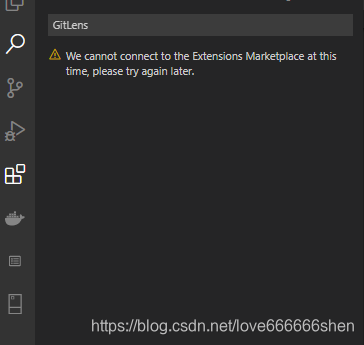
令人好奇的是之前还是好好的,怎么突然又不能使用了呢?
打开vscode的 File -> Perferences -> Settings,在User -> Features -> Extensions,在Application -> Proxy中发现,http_proxy代理设置的是https://goproxy.cn,direct,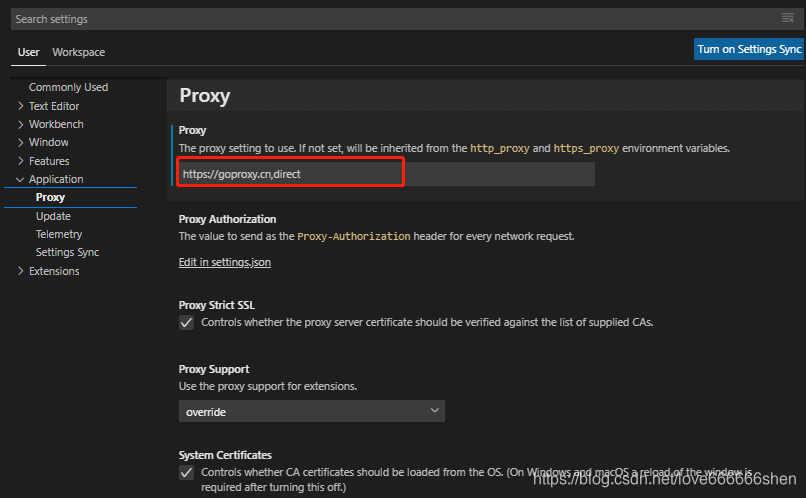
这时候想起来:由于之前配置go环境时,国外的一些包总是安装不上,就将代理配置成这个https://goproxy.cn,direct以方便安装一些国外的包。
编辑设置文件settings.json,其配置如下:
{
    "window.zoomLevel": -1, //改变左侧界面字体
    "go.gopath": "D:\\Go\\goproject",
    "go.goroot": "D:\\Go",
    "editor.formatOnSave": true,
    "go.buildOnSave": "workspace",
    "go.lintOnSave": "package",
    "go.vetOnSave": "package",
    "go.buildTags": "",
    "go.buildFlags": [],
    "go.lintFlags": [],
    "go.vetFlags": [],
    "go.coverOnSave": false,
    "go.formatOnSave": true,
    "go.formatTool": "goimports",
    "go.gocodeAutoBuild": false,
    // 文件头部注释
    "fileheader.customMade": {
        "Descripttion": "",
        "version": "",
        "Author": "sym",
        "Date": "Do not edit",
        "LastEditors": "sym",
        "LastEditTime": "Do not Edit"
    },
    //函数注释
    "fileheader.cursorMode": {
        "name": "",
        "test": "test ",
        "msg": "",
        "param": "",
        "return": ""
    },
    "editor.fontSize": 18,
    "go.inferGopath": true, // 内部包代码提示
    "go.autocompleteUnimportedPackages": true, // 自动完成未导入的包
    "go.useCodeSnippetsOnFunctionSuggest": true,
    "go.lintTool": "golangci-lint",
    "go.docsTool": "guru",
    "editor.tabSize": 4,
    "editor.minimap.scale": 2,
    "editor.minimap.size": "fill",
    "extensions.ignoreRecommendations": true,
    "go.gocodePackageLookupMode": "go",
    "go.gotoSymbol.includeImports": true,
    "go.useCodeSnippetsOnFunctionSuggestWithoutType": true,
    "git.ignoreWindowsGit27Warning": true,
    "editor.codeActionsOnSave": {},
    "terminal.integrated.shell.windows": "D:\\Git\\bin\\bash.exe",
    "http.proxy": "https://goproxy.cn,direct",
    "http.proxyAuthorization": null
}
发现最后http.proxy配置了代理,将其删除或将上图红框中Proxy的内容清空,保存配置即可。
进行上面的修改后,重新打开扩展商店,搜索git结果如下: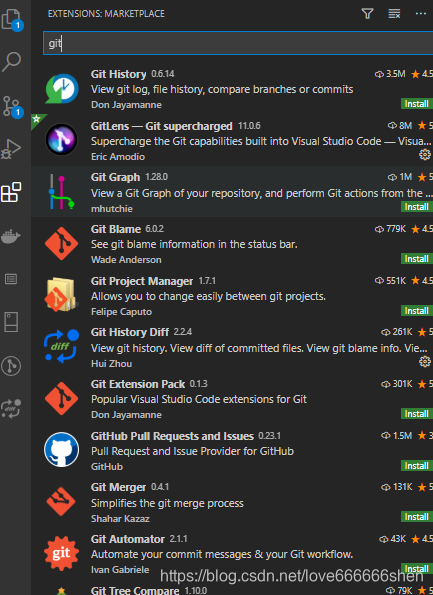
然后,就可以搜索安装需要的插件,愉快地进行开发工作了。
参考
vs code中配置go语言开发环境
vscode连接不到扩展商店解决方法
VS Code 中的代码自动补全和自动导入包
VS Code 查看git 提交历史记录和代码作者插件
这就是我想要的 VSCode 插件!

腾讯云面向开发者汇聚海量精品云计算使用和开发经验,营造开放的云计算技术生态圈。
更多推荐
 2
2 0
0- 0


 已为社区贡献6条内容

所有评论(0)