java multivaluemap_spring boot中使用@RequestBody MultiValueMap 总是报400,415错误
spring boot中使用@RequestBody MultiValueMap 总是报400,415错误
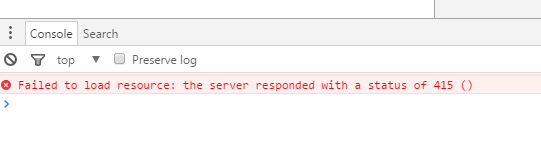
Content-Type为application/json时,报415错误
如下图所示
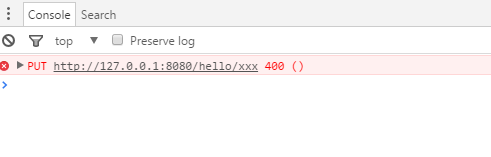
Content-Type为application/x-www-form-urlencoded时,报400错误
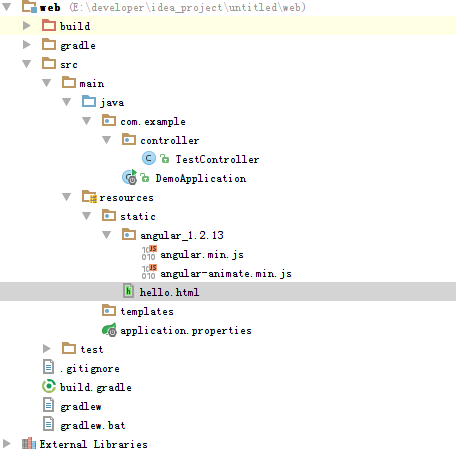
代码结构如下图:
代码如下:
build.gradle
buildscript {
ext {
springBootVersion = '1.4.1.RELEASE'
}
repositories {
mavenCentral()
}
dependencies {
classpath("org.springframework.boot:spring-boot-gradle-plugin:${springBootVersion}")
}
}
apply plugin: 'java'
apply plugin: 'eclipse'
apply plugin: 'spring-boot'
jar {
baseName = 'demo'
version = '0.0.1-SNAPSHOT'
}
sourceCompatibility = 1.8
targetCompatibility = 1.8
repositories {
mavenCentral()
}
dependencies {
compile('org.springframework.boot:spring-boot-starter-web')
compile('org.springframework.boot:spring-boot-starter-web-services')
testCompile('org.springframework.boot:spring-boot-starter-test')
}
main类
DemoApplication.java
package com.example;
import org.springframework.boot.SpringApplication;
import org.springframework.boot.autoconfigure.SpringBootApplication;
@SpringBootApplication
public class DemoApplication {
public static void main(String[] args) {
SpringApplication.run(DemoApplication.class, args);
}
}
controller类
package com.example.controller;
import org.springframework.http.HttpStatus;
import org.springframework.util.MultiValueMap;
import org.springframework.web.bind.annotation.PathVariable;
import org.springframework.web.bind.annotation.RequestBody;
import org.springframework.web.bind.annotation.RequestMapping;
import org.springframework.web.bind.annotation.RequestMethod;
import org.springframework.web.bind.annotation.ResponseStatus;
import org.springframework.web.bind.annotation.RestController;
@RestController
public class TestController {
@RequestMapping(value = "/hello/{modelId}",method = RequestMethod.PUT)
@ResponseStatus(value = HttpStatus.OK)
public void saveModel(@PathVariable String modelId, @RequestBody MultiValueMap values) {
System.out.println("hello:" + modelId);
}
}
前端页面
<!DOCTYPE html>
<html lang="en" ng-app="hello">
<head>
<meta charset="UTF-8">
<title>hello</title>
</head>
<body ng-controller="HelloCtrl">
<button ng-click="save()">http</button>
<script src="angular_1.2.13/angular.min.js"></script>
<script>
var helloApp = angular.module("hello", []);
helloApp.controller("HelloCtrl", function ($scope, $http) {
$scope.save = function () {
$http({
method: 'PUT',
data: {'name':'kaka'},
ignoreErrors: true,
headers: {
'Accept': 'application/json',
// 改为application/json时,会报415错误
'Content-Type': 'application/x-www-form-urlencoded; charset=UTF-8'
},
url: 'hello/xxx'
}).success(function (data, status, headers, config) {
alert('ok');
});
};
})
</script>
</body>
</html>

腾讯云面向开发者汇聚海量精品云计算使用和开发经验,营造开放的云计算技术生态圈。
更多推荐
 0
0 0
0- 0


 已为社区贡献1条内容

所有评论(0)