(2021年3月)Datawhale数据挖掘挑战赛TASK2 数据分析
·
import warnings
warnings.filterwarnings('ignore')
import missingno as msno
import pandas as pd
from pandas import DataFrame
import matplotlib.pyplot as plt
import seaborn as sns
import numpy as np

import pandas as pd
from pandas import DataFrame, Series
import matplotlib.pyplot as plt
path = '../data/tianchi/'
# .read_csv返回DataFrame形式的数据
train = pd.read_csv(path+'train.csv')
test = pd.read_csv(path+'testA.csv')
# 1首先要看下数据集的分布情况
train.head().append(train.tail())
| id | heartbeat_signals | label | |
|---|---|---|---|
| 0 | 0 | 0.9912297987616655,0.9435330436439665,0.764677... | 0.0 |
| 1 | 1 | 0.9714822034884503,0.9289687459588268,0.572932... | 0.0 |
| 2 | 2 | 1.0,0.9591487564065292,0.7013782792997189,0.23... | 2.0 |
| 3 | 3 | 0.9757952826275774,0.9340884687738161,0.659636... | 0.0 |
| 4 | 4 | 0.0,0.055816398940721094,0.26129357194994196,0... | 2.0 |
| 99995 | 99995 | 1.0,0.677705342021188,0.22239242747868546,0.25... | 0.0 |
| 99996 | 99996 | 0.9268571578157265,0.9063471198026871,0.636993... | 2.0 |
| 99997 | 99997 | 0.9258351628306013,0.5873839035878395,0.633226... | 3.0 |
| 99998 | 99998 | 1.0,0.9947621698382489,0.8297017704865509,0.45... | 2.0 |
| 99999 | 99999 | 0.9259994004527861,0.916476635326053,0.4042900... | 0.0 |
test.head().append(test.tail())
| id | heartbeat_signals | |
|---|---|---|
| 0 | 100000 | 0.9915713654170097,1.0,0.6318163407681274,0.13... |
| 1 | 100001 | 0.6075533139615096,0.5417083883163654,0.340694... |
| 2 | 100002 | 0.9752726292239277,0.6710965234906665,0.686758... |
| 3 | 100003 | 0.9956348033996116,0.9170249621481004,0.521096... |
| 4 | 100004 | 1.0,0.8879490481178918,0.745564725322326,0.531... |
| 19995 | 119995 | 1.0,0.8330283177934747,0.6340472606311671,0.63... |
| 19996 | 119996 | 1.0,0.8259705825857048,0.4521053488322387,0.08... |
| 19997 | 119997 | 0.951744840752379,0.9162611283848351,0.6675251... |
| 19998 | 119998 | 0.9276692903808186,0.6771898159607004,0.242906... |
| 19999 | 119999 | 0.6653212231837624,0.527064114047737,0.5166625... |
# 2,利用describel()和info()总揽数据分布和数据类型
# 个数count、平均值mean、方差std、最小值min、中位数25% 50% 75% 、以及最大值
train.describe()
| id | label | |
|---|---|---|
| count | 100000.000000 | 100000.000000 |
| mean | 49999.500000 | 0.856960 |
| std | 28867.657797 | 1.217084 |
| min | 0.000000 | 0.000000 |
| 25% | 24999.750000 | 0.000000 |
| 50% | 49999.500000 | 0.000000 |
| 75% | 74999.250000 | 2.000000 |
| max | 99999.000000 | 3.000000 |
test.describe()
| id | |
|---|---|
| count | 20000.000000 |
| mean | 109999.500000 |
| std | 5773.647028 |
| min | 100000.000000 |
| 25% | 104999.750000 |
| 50% | 109999.500000 |
| 75% | 114999.250000 |
| max | 119999.000000 |
train.info()
<class 'pandas.core.frame.DataFrame'>
RangeIndex: 100000 entries, 0 to 99999
Data columns (total 3 columns):
 #   Column             Non-Null Count   Dtype
---  ------             --------------   -----
 0   id                 100000 non-null  int64
 1   heartbeat_signals  100000 non-null  object
 2   label              100000 non-null  float64
dtypes: float64(1), int64(1), object(1)
memory usage: 2.3+ MB
test.info()
<class 'pandas.core.frame.DataFrame'>
RangeIndex: 20000 entries, 0 to 19999
Data columns (total 2 columns):
 #   Column             Non-Null Count  Dtype
---  ------             --------------  -----
 0   id                 20000 non-null  int64
 1   heartbeat_signals  20000 non-null  object
dtypes: int64(1), object(1)
memory usage: 312.6+ KB
# 3,缺失值判断
train.isnull().sum()
id                   0
heartbeat_signals    0
label                0
dtype: int64
test.isnull().sum()
id                   0
heartbeat_signals    0
dtype: int64
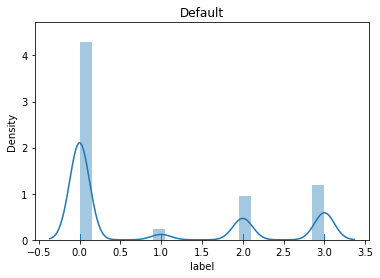
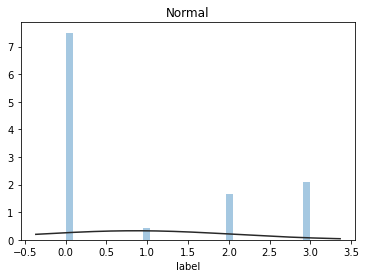
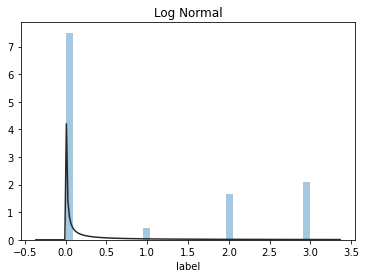
# 4,查看分布情况
## 1) 总体分布概况(无界约翰逊分布等)
import scipy.stats as st
y = train['label']
plt.figure(1); plt.title('Default')
sns.distplot(y, rug=True, bins=20)
plt.figure(2); plt.title('Normal')
sns.distplot(y, kde=False, fit=st.norm)
plt.figure(3); plt.title('Log Normal')
sns.distplot(y, kde=False, fit=st.lognorm)
<matplotlib.axes._subplots.AxesSubplot at 0x199f1cf9948>
# 2)查看skewness and kurtosis
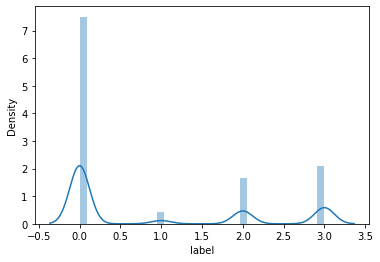
sns.distplot(train['label']);
print("Skewness: %f" % train['label'].skew())
print("Kurtosis: %f" % train['label'].kurt())
Skewness: 0.871005
Kurtosis: -1.009573
train.skew(), train.kurt()
(id       0.000000
 label    0.871005
 dtype: float64,
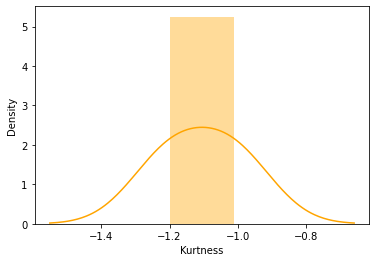
 id      -1.200000
 label   -1.009573
 dtype: float64)
sns.distplot(train.kurt(),color='orange',axlabel ='Kurtness')
<matplotlib.axes._subplots.AxesSubplot at 0x199f1f40688>
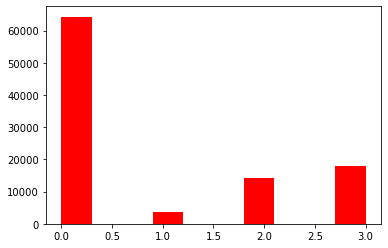
## 3) 查看预测值的具体频数
plt.hist(train['label'], orientation = 'vertical',histtype = 'bar', color ='red')
plt.show()

腾讯云面向开发者汇聚海量精品云计算使用和开发经验,营造开放的云计算技术生态圈。
更多推荐
 0
0 0
0- 0


 已为社区贡献1条内容

所有评论(0)