vue.js+键盘+php,vue-touch-keyboard一个VueJS虚拟键盘组件
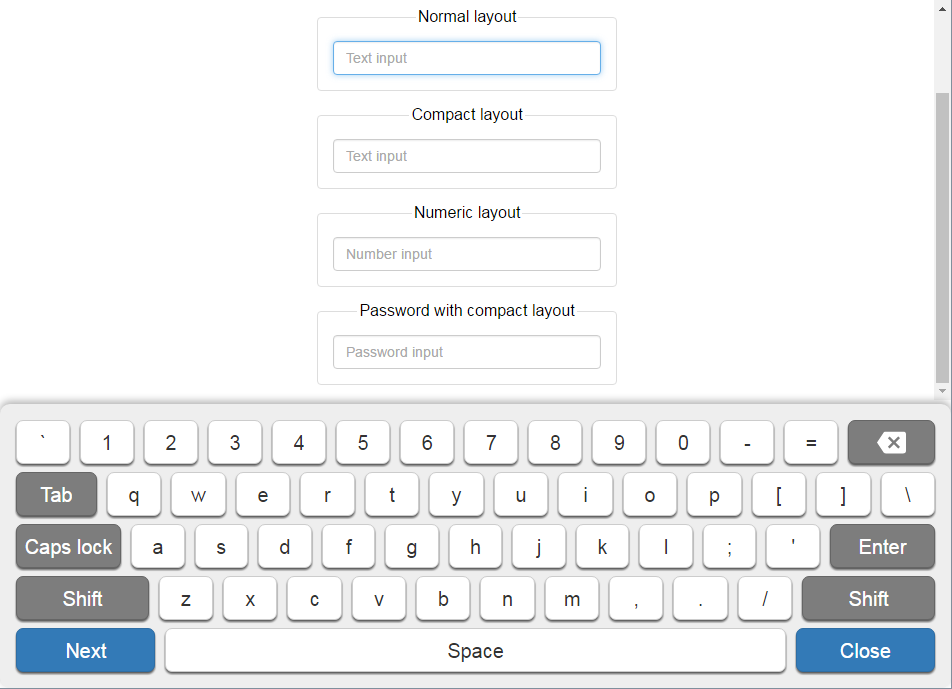
vue-touch-keyboardVirtual keyboard component for Vue.js v2.x. Designed to Raspberry Pi Touch DisplayIf you like my work, please donate. Thank you!Demo Features3 built-in layouts, but you can...
vue-touch-keyboard
Virtual keyboard component for Vue.js v2.x. Designed to Raspberry Pi Touch Display
If you like my work, please donate. Thank you!
Demo
Features
3 built-in layouts, but you can create custom layouts
no external dependencies
full responsive
customizable styles
...etc
Installation
NPM
You can install it via NPM.
$ npm install vue-touch-keyboard
Manual
Download zip package and unpack and add the vue-touch-keyboard.css and vue-touch-keyboard.js file to your project from dist folder.
https://github.com/icebob/vue-touch-keyboard/archive/master.zip
Usage
import VueTouchKeyboard from "vue-touch-keyboard";
import style from "vue-touch-keyboard/dist/vue-touch-keyboard.css"; // load default style
Vue.use(VueTouchKeyboard);
export default {
data: {
visible: false,
layout: "normal",
input: null,
options: {
useKbEvents: false,
preventClickEvent: false
}
},
methods: {
accept(text) {
alert("Input text: " + text);
this.hide();
},
show(e) {
this.input = e.target;
this.layout = e.target.dataset.layout;
if (!this.visible)
this.visible = true
},
hide() {
this.visible = false;
}
}
}
Properties
Property
Default
Accepted values
Description
input
required
HTMLInputElement
The target input HTML element
layout
required
String or Object
Layout of keys. If you are using the built-in layouts, you can set as the name of the layout. If you want to use custom layout, you need to set a layout Object.
accept
null
Function
Event handler. Fired when the "Accept/Close" button pressed.
cancel
null
Function
Event handler. Fired when the "Cancel" button pressed.
change
null
Function
Event handler. Fired when the input value changed.
next
null
Function
Event handler. Fired when the "Next" button pressed or the length of the value of the input reached the maxLength of the input
options
{}
Object
Functional options.
defaultKeySet
default
String
Default key set. You can choose a desired key set of your layout to be used when a keyboard is initialized.
Options
Option
Default
Accepted values
Description
useKbEvents
false
boolean
If true, the component will generate a keydown event and trigger it. If it returns with false, it won't insert the new character.
preventClickEvent
false
boolean
If true, the component will preventDefault the click event.
Built-in layouts
normal - Normal full layout. Similar as real keyboard layouts
numeric - Only for numbers
compact - Compact layout. Similar as mobile phone keyboard layouts
Development
This command will start a webpack-dev-server with content of dev folder.
npm run dev
Build
This command will build a distributable version in the dist directory.
npm run build
Test
npm test
Contribution
Please send pull requests improving the usage and fixing bugs, improving documentation and providing better examples, or providing some testing, because these things are important.
License
vue-touch-keyboard is available under the MIT license.
Contact
Copyright (C) 2016 Icebob

腾讯云面向开发者汇聚海量精品云计算使用和开发经验,营造开放的云计算技术生态圈。
更多推荐
 0
0 0
0- 0


 已为社区贡献2条内容

所有评论(0)