Docker和docker-compose安装脚本
一、脚本适用Shell编写具体脚本代码如下#!/bin/bashdocker -v &>/dev/nullif[ $? == 0 ];thenecho -e "[*] docker-ce 已经存在..."docker-compose -v &>/dev/nullif [ $? == 0 ];thenecho -e "[*] docker-compose 也已经存在...
·
一、Shell编写
具体脚本代码如下
#!/bin/bash
docker -v &>/dev/null
if  [ $? == 0 ];then
	echo -e "[*] docker-ce 已经存在..."
	docker-compose -v &>/dev/null
	if [ $? == 0 ];then
		echo -e "[*] docker-compose 也已经存在..."
		echo -e "[*] 退出安装程序.....exit...."
		exit
	fi
fi
echo -e "[*] 开始更新源...."
apt-get update -y
#apt-get upgrade -y
if [ $? != 0 ];then
	echo -e "[*] sudo ./docker-install.sh"
	exit
fi

echo -e "[*] 开始安装 docker-ce..."
apt-get install docker-ce -y
if [ $? != 0 ];then
	apt-get install -y apt-transport-https ca-certificates curl software-properties-common
	curl -fsSL https://download.docker.com/linux/ubuntu/gpg |  apt-key add -
	add-apt-repository "deb [arch=amd64] https://download.docker.com/linux/ubuntu xenial stable"
	apt-get update
	cache=`apt-cache search docker-ce`
	if [ ! -n "$cache" ];then
		echo -e "[*] 添加ali源....."
		curl -fsSL http://mirrors.aliyun.com/docker-ce/linux/ubuntu/gpg |  apt-key add -
		add-apt-repository "deb [arch=amd64] http://mirrors.aliyun.com/docker-ce/linux/ubuntu $(lsb_release -cs) stable"
		apt-get update
	fi
	apt-get install docker-ce -y
	if [ $? != 0 ];then
		printf "Y\ny\n" | apt-get install docker-ce
	fi
fi

docker -v
if [ $? != 0 ];then
	echo -e "[-] docker-ce 安装失败....."
	exit
else
	echo -e "[+] docker-ce 安装成功....."
fi

echo -e "[*] 开始安装 docker-compose....."
apt install docker-compose -y
if [ $? != 0 ];then
	curl -L https://github.com/docker/compose/releases/download/1.18.0/docker-compose-`uname -s`-`uname -m` -o /usr/local/bin/docker-compose
	chmod +x /usr/local/bin/docker-compose
fi
docker-compose --version

if [ $? == 0 ];then
	echo -e "[+] docker-compose 安装成功....."
fi
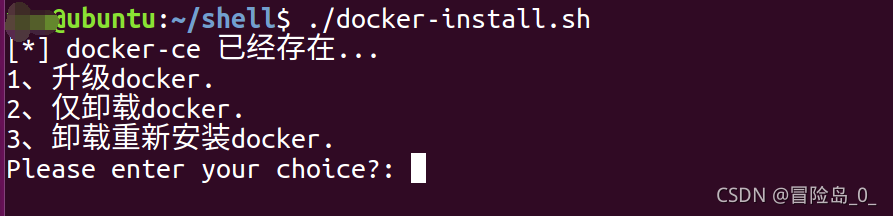
运行结果:

腾讯云面向开发者汇聚海量精品云计算使用和开发经验,营造开放的云计算技术生态圈。
更多推荐
 0
0 0
0- 0


 已为社区贡献3条内容

所有评论(0)