使用docker 安装label me并使用
·
环境:Mac OS
准备工作:Docker安装, git
1 下载项目代码
git clone https://github.com/CSAILVision/LabelMeAnnotationTool.git
历史记录:
localhost:git xubo$ git clone https://github.com/CSAILVision/LabelMeAnnotationTool.git
Cloning into 'LabelMeAnnotationTool'...
remote: Enumerating objects: 3578, done.
remote: Counting objects: 100% (32/32), done.
remote: Compressing objects: 100% (26/26), done.
remote: Total 3578 (delta 18), reused 13 (delta 6), pack-reused 3546
Receiving objects: 100% (3578/3578), 12.54 MiB | 7.41 MiB/s, done.
Resolving deltas: 100% (2160/2160), done.
2. 构建image镜像
命令:
sudo sh ./build_labelme_image.sh
历史记录:
localhost:git xubo$ cd LabelMeAnnotationTool/DockerFiles/ubuntu_16.04/
localhost:ubuntu_16.04 xubo$ ll
total 56
-rw-r--r--  1 xubo  staff   182B May 14 11:18 start_labelme_container.sh
-rw-r--r--  1 xubo  staff    39B May 14 11:18 build_labelme_image.sh
-rw-r--r--  1 xubo  staff   7.1K May 14 11:18 apache2.conf
-rw-r--r--  1 xubo  staff   745B May 14 11:18 README.md
-rw-r--r--  1 xubo  staff   1.0K May 14 11:18 Dockerfile
-rw-r--r--  1 xubo  staff   1.6K May 14 11:18 000-default.conf
localhost:ubuntu_16.04 xubo$ ./build_labelme_image.sh
-bash: ./build_labelme_image.sh: Permission denied
localhost:ubuntu_16.04 xubo$ sudo ./build_labelme_image.sh
Password:
sudo: ./build_labelme_image.sh: command not found
localhost:ubuntu_16.04 xubo$ sudo sh ./build_labelme_image.sh
[+] Building 82.5s (19/19) FINISHED
 => [internal] load build definition from Dockerfile                                                                                                                                                   0.0s
 => => transferring dockerfile: 1.09kB                                                                                                                                                                 0.0s
 => [internal] load .dockerignore                                                                                                                                                                      0.0s
 => => transferring context: 2B                                                                                                                                                                        0.0s
 => [internal] load metadata for docker.io/library/ubuntu:16.04                                                                                                                                        4.4s
 => [auth] library/ubuntu:pull token for registry-1.docker.io                                                                                                                                          0.0s
 => [internal] load build context                                                                                                                                                                      0.0s
 => => transferring context: 9.03kB                                                                                                                                                                    0.0s
 => [ 1/13] FROM docker.io/library/ubuntu:16.04@sha256:eed7e1076bbc1f342c4474c718e5438af4784f59a4e88ad687dbb98483b59ee4                                                                               12.5s
 => => resolve docker.io/library/ubuntu:16.04@sha256:eed7e1076bbc1f342c4474c718e5438af4784f59a4e88ad687dbb98483b59ee4                                                                                  0.0s
 => => sha256:eed7e1076bbc1f342c4474c718e5438af4784f59a4e88ad687dbb98483b59ee4 1.42kB / 1.42kB                                                                                                         0.0s
 => => sha256:89fd38d069a9a369525ade2bfb6922e62422db58813fccac0ecc1e59dfab0a59 1.15kB / 1.15kB                                                                                                         0.0s
 => => sha256:aefd7f02ae24739b95f77c488de70465c54653f394097b9859acede976c80e03 3.36kB / 3.36kB                                                                                                         0.0s
 => => sha256:92473f7ef45574f608989888a6cfc8187d3a1425e3a63f974434acab03fed068 46.25MB / 46.25MB                                                                                                       9.6s
 => => sha256:fb52bde70123ac7f3a1b88fee95e74f4bdcdbd81917a91a35b56a52ec7671947 851B / 851B                                                                                                             1.3s
 => => sha256:64788f86be3fd71809b5de602deff9445f3de18d2f44a49d0a053dfc9a2008ae 527B / 527B                                                                                                             1.5s
 => => sha256:33f6d5f2e001ababe3ddac4731d9c33121e1148ef32a87a83a5b470cb401abef 169B / 169B                                                                                                             1.7s
 => => extracting sha256:92473f7ef45574f608989888a6cfc8187d3a1425e3a63f974434acab03fed068                                                                                                              2.3s
 => => extracting sha256:fb52bde70123ac7f3a1b88fee95e74f4bdcdbd81917a91a35b56a52ec7671947                                                                                                              0.0s
 => => extracting sha256:64788f86be3fd71809b5de602deff9445f3de18d2f44a49d0a053dfc9a2008ae                                                                                                              0.0s
 => => extracting sha256:33f6d5f2e001ababe3ddac4731d9c33121e1148ef32a87a83a5b470cb401abef                                                                                                              0.0s
 => [ 2/13] RUN apt-get update -y                                                                                                                                                                      7.9s
 => [ 3/13] RUN DEBIAN_FRONTEND=noninteractive apt-get -y -o Dpkg::Options::="--force-confdef" -o Dpkg::Options::="--force-confold" upgrade                                                            8.3s
 => [ 4/13] RUN apt-get install -y      apache2      git      libapache2-mod-perl2      libcgi-session-perl      libapache2-mod-php      make      php                                                37.2s
 => [ 5/13] RUN a2enmod include                                                                                                                                                                        0.3s
 => [ 6/13] RUN a2enmod rewrite                                                                                                                                                                        0.5s
 => [ 7/13] RUN a2enmod cgi                                                                                                                                                                            0.5s
 => [ 8/13] COPY 000-default.conf /etc/apache2/sites-available/000-default.conf                                                                                                                        0.0s
 => [ 9/13] COPY apache2.conf /etc/apache2/apache2.conf                                                                                                                                                0.0s
 => [10/13] RUN git clone https://github.com/CSAILVision/LabelMeAnnotationTool.git                                                                                                                     5.8s
 => [11/13] RUN mv ./LabelMeAnnotationTool/ /var/www/html/LabelMeAnnotationTool/                                                                                                                       1.0s
 => [12/13] RUN cd /var/www/html/LabelMeAnnotationTool/ && make                                                                                                                                        0.5s
 => [13/13] RUN chown -R www-data:www-data /var/www/html                                                                                                                                               1.1s
 => exporting to image                                                                                                                                                                                 2.2s
 => => exporting layers                                                                                                                                                                                2.1s
 => => writing image sha256:581abd5f042c5cf7bb8994e4f84b9a6934ab43dcd80582e1b0fd266f61cde997                                                                                                           0.0s
 => => naming to docker.io/library/labelme
3. 启动服务
命令:
sudo sh ./start_labelme_container.sh
历史:
localhost:ubuntu_16.04 xubo$ sudo sh ./start_labelme_container.sh
c834087d9c2f7e5a3fb3ad4bfc09799e5aced47ce4a0642992b3fc71d9a22afb
 * Restarting Apache httpd web server apache2
[Fri May 14 03:22:40.957254 2021] [alias:warn] [pid 38] AH00671: The ScriptAlias directive in /etc/apache2/apache2.conf at line 223 will probably never match because it overlaps an earlier ScriptAlias.
AH00558: apache2: Could not reliably determine the server's fully qualified domain name, using 172.17.0.2. Set the 'ServerName' directive globally to suppress this message
done.
查看命令:
localhost:ubuntu_16.04 xubo$ vi start_labelme_container.sh

#!/bin/bash

docker run \
--name labelme \
-p 8080:80 \
-d \
--entrypoint "/bin/bash" \
-t labelme

# restart apache inside the container
docker exec labelme service apache2 restart
4.访问。
Point your favourite browser to http://localhost:8080/LabelMeAnnotationTool/tool.html. Let the Labeling Begin!
5.使用
支持bndbox,polygon,支持自动图像分割等功能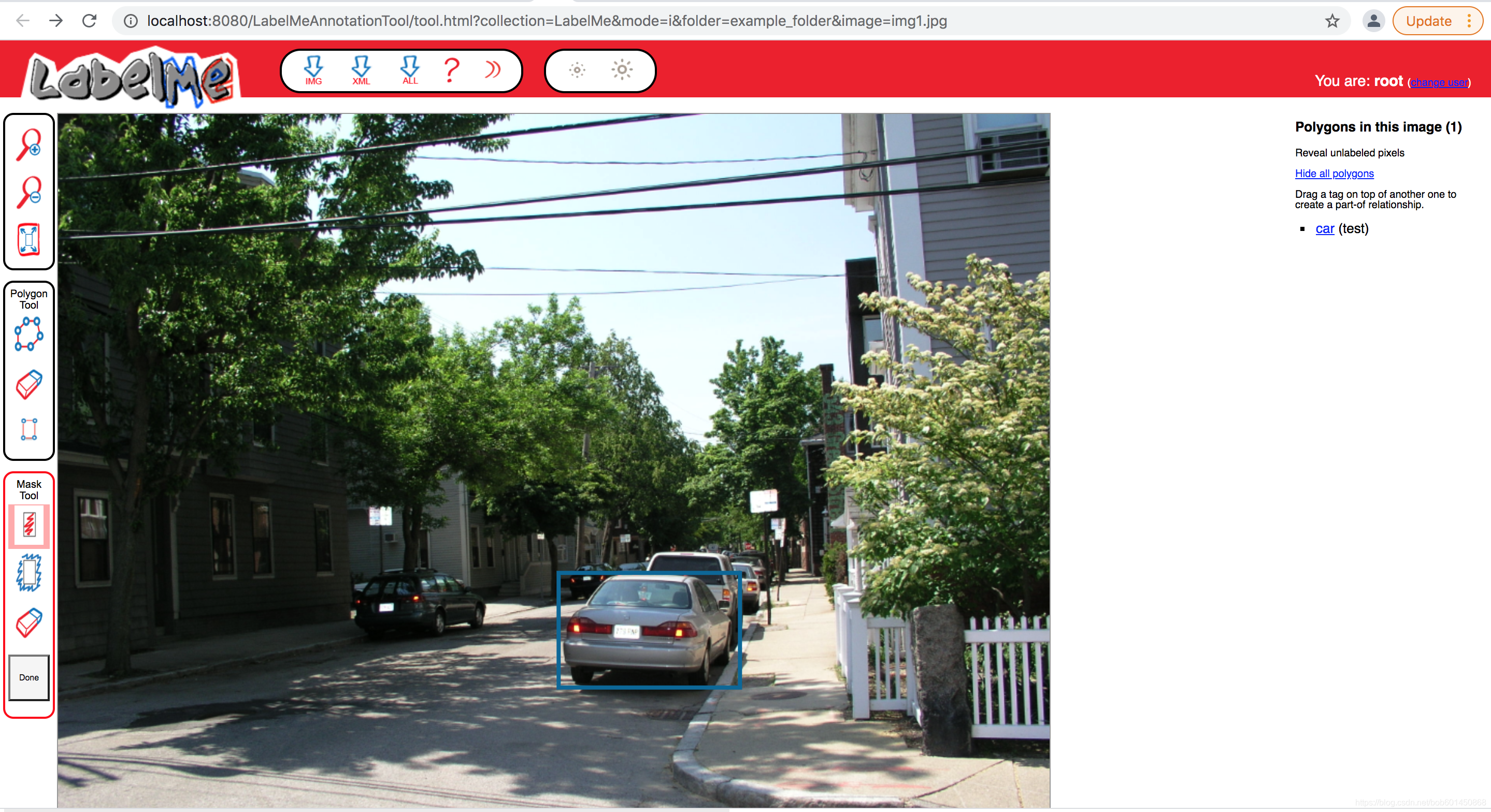
参考:
1.https://github.com/CSAILVision/LabelMeAnnotationTool/blob/master/DockerFiles/ubuntu_16.04/Dockerfile

腾讯云面向开发者汇聚海量精品云计算使用和开发经验,营造开放的云计算技术生态圈。
更多推荐
 0
0 0
0- 0


 已为社区贡献8条内容

所有评论(0)