最简单的c++日志输出
·
最简单的日志
mylog.h
#pragma once

#include <windows.h>
#include <ctime>
#include <iostream>
#include <fstream>
#include <direct.h>

using namespace std;

static std::mutex _mtx;

class Log
{
public:
	Log();
	~Log();

	static void info(std::string log)
	{
		string type = "INFO";
		write(log, type);
	}

	static void debug(std::string log)
	{
		string type = "DEBUG";
		write(log, type);
	}

	static void warning(std::string log)
	{
		string type = "WARNING";
		write(log, type);
	}

	static void error(std::string log)
	{
		string type = "ERROR";
		write(log, type);
	}

	static void critical(std::string log)
	{
		string type = "CRITICAL";
		write(log, type);
	}

	static std::string getTimestamp()
	{
		time_t timep;
		time(&timep);
		char tmp[64];
		struct tm nowTime;
		localtime_s(&nowTime, &timep);
		strftime(tmp, sizeof(tmp), "%Y-%m-%d-%H:%M:%S", &nowTime);
		return std::string(tmp);
	}

	static void string_replace(string& s1, const string& s2, const string& s3)
	{
		string::size_type pos = 0;
		string::size_type a = s2.size();
		string::size_type b = s3.size();

		while ((pos = s1.find(s2, pos)) != string::npos)
		{
			s1.replace(pos, a, s3);
			pos += b;
		}
	}


	static void write(std::string log, std::string type)
	{
		string filePath = "D:/test.log";				//存日志文件的路径
		std::ofstream ofs;

		_mtx.lock();

		ofs.open(filePath, std::ofstream::app);

		ofs << getTimestamp().c_str() << "-";
		ofs << "[" << type.c_str() << "]-";

		ofs.write(log.c_str(), log.size());
		ofs << std::endl;
		ofs.close();

		_mtx.unlock();
	}
};
使用方法
在要使用的地方包含头文件 mylog.h 即可
#include<iostream>
#include "mylog.h"

int main() {

	Log::write("测试3","info");
	Log::info("info 测试");
	Log::debug("debug 测试");
	Log::warning("warning 测试");
	Log::error("error 测试");
	Log::critical("critical 测试");
	return 0;
}
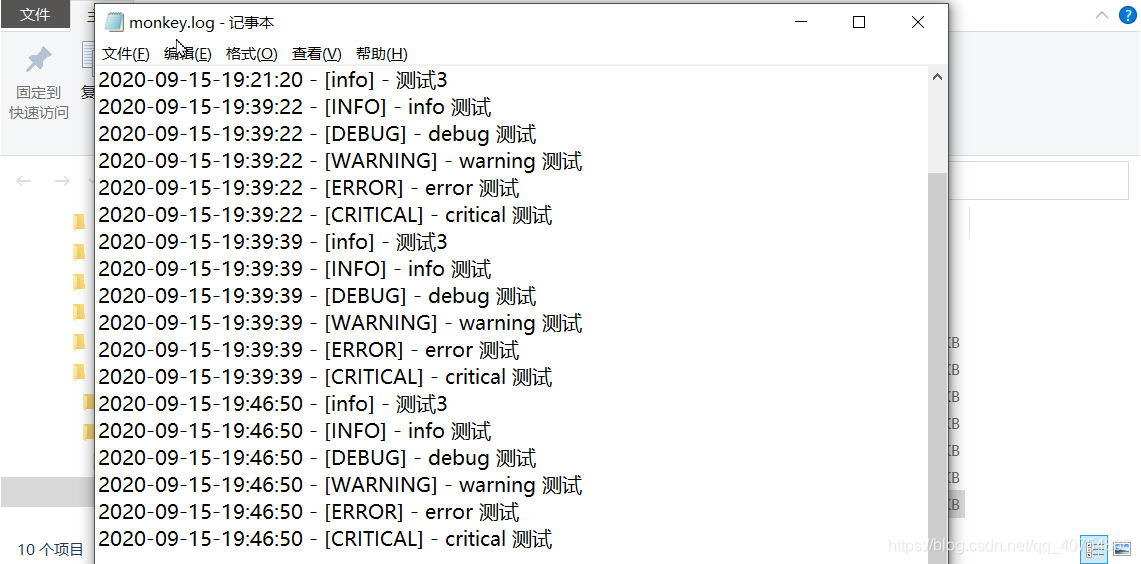
结果
参考

腾讯云面向开发者汇聚海量精品云计算使用和开发经验,营造开放的云计算技术生态圈。
更多推荐
 3
3 0
0- 0


 已为社区贡献3条内容

所有评论(0)