Python上传文件到百度网盘(一)
·
前言
最近由于突发奇想要下载某网站电影,当然资源也是爬来的,然后是一堆M3u8格式的URL,为了保证防止资源后续失效的情况,打算先下载下来,然后加密压缩(~。~你懂的),然后上传百度网盘,哈哈。下面就开始我们的冒险之旅吧~~
第一步:研究百度网盘开放平台api
https://pan.baidu.com/union/document/entrance
第二部:建立应用获取对应的appkey巴拉巴拉。。。目的就是为了获取百度api的token
这里,我们使用最简单获取token的方法:
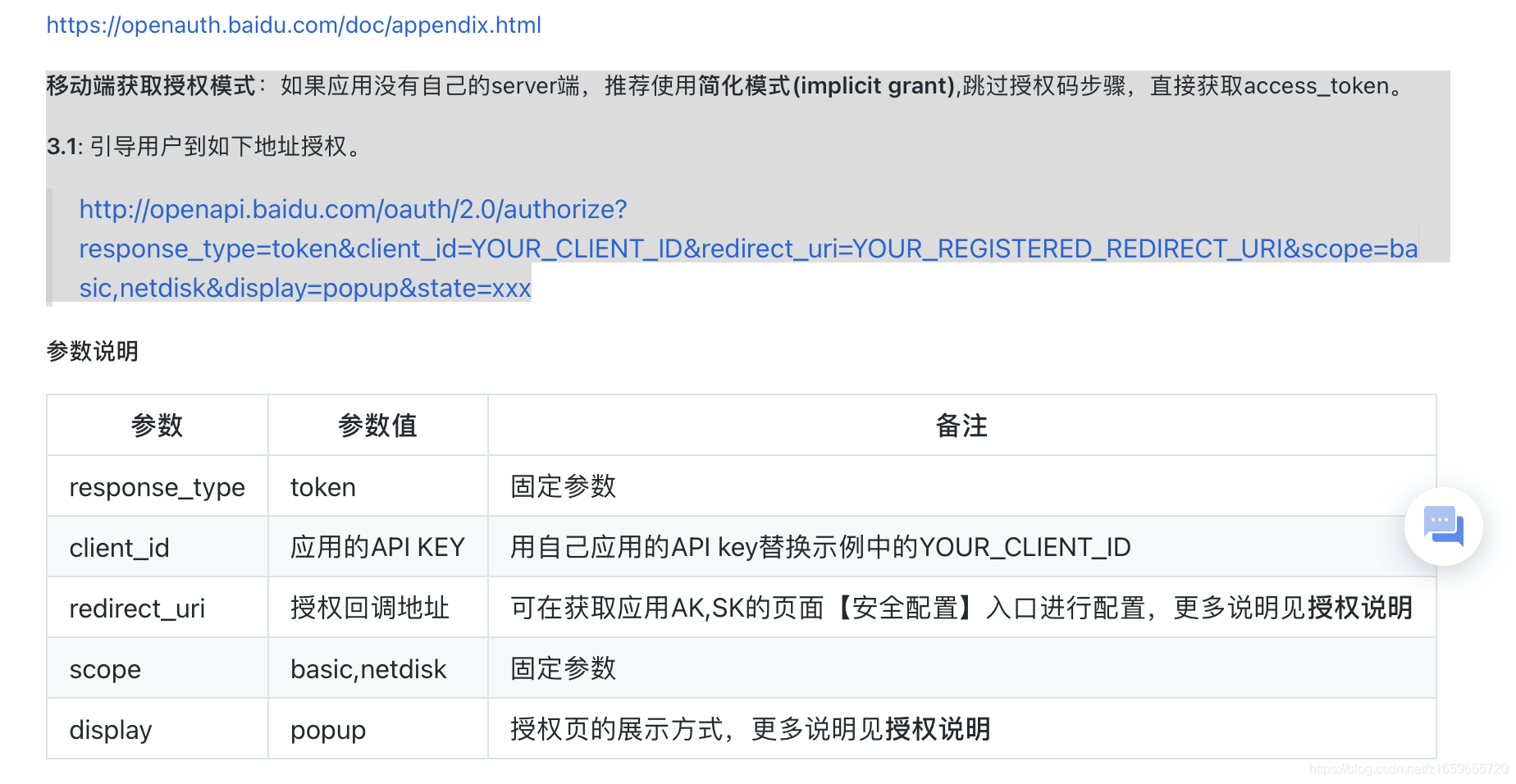
再贴一张图:

这里操作完呢,我们的token就到手了,一个月过期哈,够我们自己折腾了,如果要上云的话,就参考server的获取token的方式,可以直接吧token丢到你的接口里面,想存哪存哪,还可以二次刷新,这里不拓展了。
第三部:撸代码
这里我就使用到了上传文件的接口,如需其他接口也是一样的哈,不多说了上代码:
# -*- coding: UTF-8 -*-
import os.path

import demjson
import requests


def pre_create_file(access_token, remote_path, local_path, block_list, content_md5, slice_md5):
    url = "http://pan.baidu.com/rest/2.0/xpan/file?method=precreate&access_token=" + access_token
    file_size = os.path.getsize(local_path)
    payload = {'path': remote_path,
               'size': file_size,
               'rtype': '3',
               'isdir': '0',
               'autoinit': '1',
               'block_list': block_list,
               'content-md5': content_md5,
               'slice-md5': slice_md5
               }
    files = [

    ]
    headers = {
        'Cookie': 'BAIDUID=56BE0870011A115CFA43E19EA4CE92C2:FG=1; BIDUPSID=56BE0870011A115CFA43E19EA4CE92C2; PSTM=1535714267'
    }
    response = requests.request(method="POST", url=url, headers=headers, data=payload, files=files)
    print("pre_create_file resp is ", response.text.encode('utf8'))
    return demjson.decode(response.text.encode('utf8'))


def part_upload(access_token, remote_path, upload_id, seq, local_path):
    url = "https://d.pcs.baidu.com/rest/2.0/pcs/superfile2?method=upload&access_token=" + access_token + \
          "&path=" + remote_path + \
          "&type=tmpfile&uploadid=" + upload_id + \
          "&partseq=" + str(seq)
    payload = {}
    files = [
        ('util', open(local_path, 'rb'))
    ]
    headers = {
        'Cookie': 'BAIDUID=56BE0870011A115CFA43E19EA4CE92C2:FG=1; BIDUPSID=56BE0870011A115CFA43E19EA4CE92C2; PSTM=1535714267'
    }

    response = requests.request("POST", url, headers=headers, data=payload, files=files)

    print(response.text.encode('utf8'))


def create_remote_file(access_token, remote_path, upload_id, size, block_list):
    url = "https://pan.baidu.com/rest/2.0/xpan/file?method=create&access_token=" + access_token

    payload = {'path': remote_path,
               'size': size,
               'rtype': '1',
               'isdir': '0',
               'uploadid': upload_id,
               'block_list': block_list}
    files = [

    ]
    headers = {
        'Cookie': 'BAIDUID=56BE0870011A115CFA43E19EA4CE92C2:FG=1; BIDUPSID=56BE0870011A115CFA43E19EA4CE92C2; PSTM=1535714267'
    }
    response = requests.request("POST", url, headers=headers, data=payload, files=files)
    print(response.text.encode('utf8'))
这个文件呢,就是我们可爱的上传文件的百度网盘的接口了。
总结:
好啦好啦,小渃先和你讲到这,下班了下班了,要回家看电视了,后续再更。
续

腾讯云面向开发者汇聚海量精品云计算使用和开发经验,营造开放的云计算技术生态圈。
更多推荐
 3
3 0
0- 0


 已为社区贡献2条内容

所有评论(0)