spring boot读取resources目录下的python脚本执行
·
最近项目有点忙,有段时间没有更新了,今天趁放假在家,水一篇文章。
一、问题描述
如何在spring boot工程中,通过java代码调用执行存放在resources目录下的python脚本?
二、分析
1、要执行python脚本,服务器上一定要配置对应的python执行环境。
2、spring boot工程中resources目录下的python文件只能通过流读取出来,然后保存为临时文件,才能调用python脚本执行命令。
三、代码实战
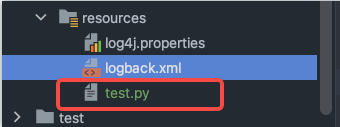
test.py的内容:
#!/usr/bin/python3

import sys

print ('参数个数为:', len(sys.argv), '个参数。')
print ('参数列表:', str(sys.argv))
print ('脚本名:', str(sys.argv[0]))

print("Hello, World!")
/**
 * @Description python执行工具类
 */
@Slf4j
public class PythonUtil {
    /**
     * 执行脚本
     */
    public  static void exec(String path, List<String> params) throws Exception {
        //InputStream inputStream = Thread.currentThread().getContextClassLoader().getResourceAsStream(path);
        InputStream inputStream = PythonUtil.class.getClassLoader().getResourceAsStream(path);
        File somethingFile = File.createTempFile("test", ".py");
        String filePath = null;
        String commond = null;
        try {
            FileUtils.copyInputStreamToFile(inputStream, somethingFile);
            filePath = somethingFile.getAbsolutePath();
            log.info("文件路径:{}",filePath);

            Runtime runTime = Runtime.getRuntime();
            commond = "python3 " + filePath;
            if(params!=null && params.size()>0){
                commond += " " + params.stream().collect(Collectors.joining(" "));
            }
            log.info("执行脚本[{}]",commond);

            Process proc =  runTime.exec(commond);
            BufferedReader bfr = new BufferedReader(new InputStreamReader(proc.getInputStream()));
            String line = "";
            while ((line = bfr.readLine()) != null) {
                log.info(line);
            }
            proc.waitFor();

        } catch (Exception e) {
            log.error("脚本[{}]执行失败",commond);
            e.printStackTrace();
        }finally {
            IOUtils.closeQuietly(inputStream);
            //删除临时文件
            somethingFile.deleteOnExit();
        }
    }

    /**
     * 无参方法
     */
    public  static void exec(String path) throws Exception {
        exec(path,null);
    }

    public static void main(String[] args) throws Exception {
        List<String> params = new ArrayList<>();
        params.add("参数1");
        params.add("参数2");
        params.add("参数3");
        PythonUtil.exec("test.py",params);
    }
}
执行结果:
四、其他方式
Jython在执行普通py脚本时速度很慢,而且在含有第三方库(requests, jieba…)时bug很多,不易处理。 原因在于,python执行时的sys.path和Jython的sys.path路径不一致,以及Jython的处理不是很好。
<!--Maven依赖,jar包自行前往仓库下载-->
<dependency>
    <groupId>org.python</groupId>
    <artifactId>jython-standalone</artifactId>
    <version>2.7.0</version>
</dependency>
1. 直接执行Python脚本代码
1 PythonInterpreter interpreter = new PythonInterpreter();
2 interpreter.exec("days=('mod','Tue','Wed','Thu','Fri','Sat','Sun'); ");
2. 执行python .py文件
 PythonInterpreter interpreter = new PythonInterpreter();
 InputStream filepy = new FileInputStream("D:\\demo.py");
 interpreter.execfile(filepy);  ///执行python py文件
 filepy.close();
3. 使用Runtime.getRuntime()执行脚本文件
这种方式和.net下面调用cmd执行命令的方式类似。如果执行的python脚本有引用第三方包的,建议使用此种方式。使用上面两种方式会报错java ImportError: No module named arcpy。
Process proc = Runtime.getRuntime().exec("python  D:\\demo.py");
proc.waitFor();
其中,方式一和方式二都依赖Jython,对有第三方依赖的脚本执行不友好,且实现效率较慢,所以更推荐方案三用cmd执行命令的方式。

腾讯云面向开发者汇聚海量精品云计算使用和开发经验,营造开放的云计算技术生态圈。
更多推荐
 1
1 0
0- 0


 已为社区贡献4条内容

所有评论(0)