【Github】git clone final connect fail xxx.xxx.xxx github.com 无法连上github问题
Git连接失败可能是端口或代理问题导致。当出现"Failed to connect to 127.0.0.1 port 2340"错误时,说明本地代理端口被某些软件修改。可以通过GitGUI工具检查端口设置,并使用以下命令修改或清除代理配置:设置代理端口为git config命令,清除代理用--unset参数。查看当前全局配置用git config --global -l。若改
·

将https://github.com/... 改为 git://github.com/... ,也就是百度能搜到的https改成git
第二种情况依然会导致你无法connect成功,就是端口号问题
可以使用

自带的Git GUI Here 工具,检查端口问题
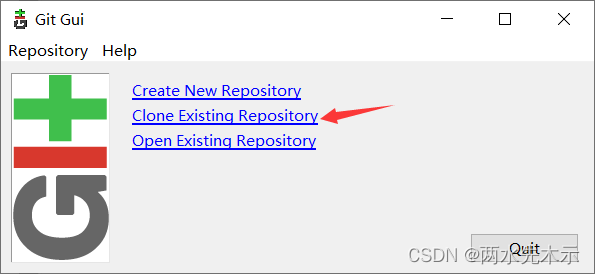
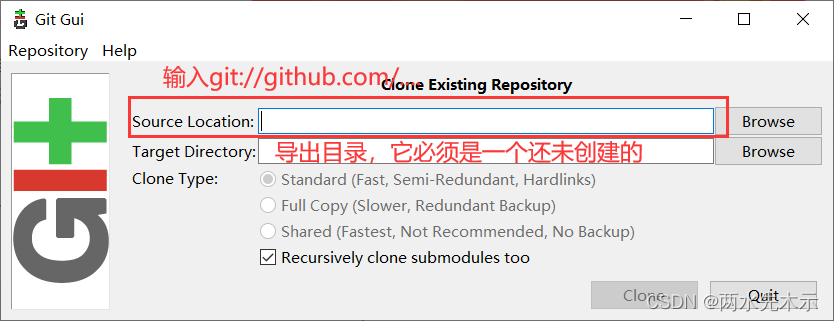

fatal: unable to access 'https://github.com/AMikeW/UnityResourceStaticAnalyzeTool.git/': Failed to connect to 127.0.0.1 port 2340 after 2074 ms: Connection refused
现在这个2340就是我们接收数据的端口,并不是我们连不上github,而是尼玛的我们接不到数据,因为127.0.0.1的接收数据端口被一些软件改了。
https://blog.csdn.net/weixin_43900888/article/details/113026784
如上则是被设置成了2340,设置代码如下:
git config --global http.https://github.com.proxy https://127.0.0.1:XXXX
git config --global https.https://github.com.proxy https://127.0.0.1:XXXX
清除:
git config --global --unset http.proxy
git config --global --unset https.proxy
git config --global --unset http.https://github.com.proxy
git config --global --unset https.https://github.com.proxy
查看全局配置
git config --global -l

腾讯云面向开发者汇聚海量精品云计算使用和开发经验,营造开放的云计算技术生态圈。
更多推荐
 10
10 0
0- 0


 已为社区贡献6条内容

所有评论(0)