【Github】克隆库时报错无法连接github(HTTP_PROXY代理)
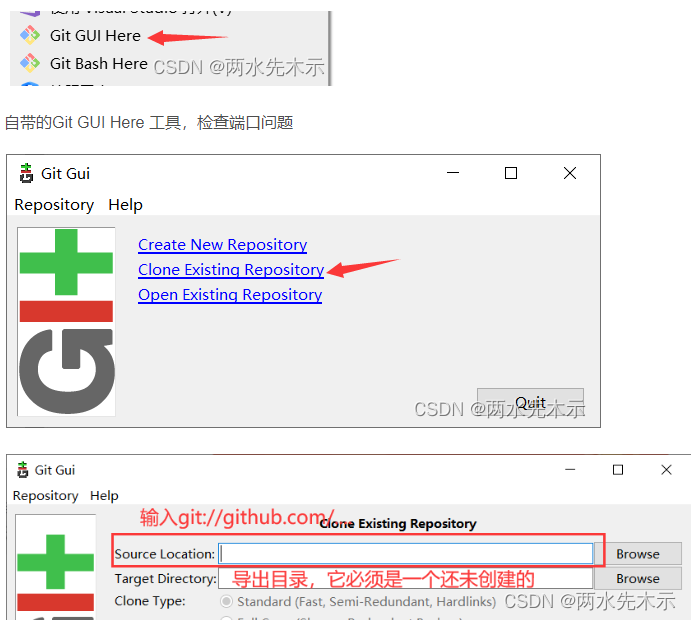
你可以使用Git GUI Here工具 用 git://xxxx/xxxx的链接导出,检查当前github所使用的端口号。1、将https://github.com/... 改为 git://github.com/...2、改全局配置 :设置github.com.proxy端口号保持与你的端口号一致。3、改全局配置 :完全清除端口号。修改完毕后检查,查看全局配置。...
·
知识点:针对HTTP_PROXY、HTTPS_PROXY GitHub 代理地址设置和清除
1、将https://github.com/... 改为 git://github.com/...
2、改全局配置 :设置github.com.proxy端口号保持与你的端口号一致
git config --global http.https://github.com.proxy https://127.0.0.1:XXXX
git config --global https.https://github.com.proxy https://127.0.0.1:XXXX
3、改全局配置 :完全清除端口号
git config --global --unset http.proxy
git config --global --unset https.proxy
git config --global --unset http.https://github.com.proxy
git config --global --unset https.https://github.com.proxy
修改完毕后检查,查看全局配置
git config --global -l
你可以使用Git GUI Here工具 用 git://xxxx/xxxx的链接导出,检查当前github所使用的端口号。

腾讯云面向开发者汇聚海量精品云计算使用和开发经验,营造开放的云计算技术生态圈。
更多推荐
 0
0 0
0- 0


 已为社区贡献6条内容

所有评论(0)